Imageglass: "Insert a disk into device D:" error on update
System information:
- Windows OS version: 10, Windows to Go
- ImageGlass version: 7.5.1.1, x64
To Reproduce
I could not isolate the issue, but here are the steps that I took:
- Have ImageGlass 7.0.7.26 installed
- Update to version 7.5.1.1 using the installer
- Start ImageGlass
Actual behavior:
Instead of starting normally, an "Error" popup window appears. Unfortunately, I have Russian locale installed, so the text might not match exactly since I've translated it manually. The title is "ImageGlass.exe - Disk missing", the text is "Device does not contain a disk. Insert a disk into device D:." Three buttons exist: "Cancel", "Repeat" and "Continue"; however, pressing any button or closing the popup just brings it up again.
Expected behavior:
The application should start normally.
Screenshots:
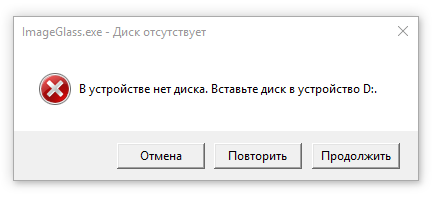
Additional context:
A disk drive with designated letter D: exists in my system but has not been used in a while. My OS is installed on an external hard disk.
This issue has been reported by me previously on the ImageGlass Community Google Group: https://groups.google.com/d/msg/imageglass/IU4nqL3k_5U/vlrRkTQsAQAJ. The issue has appeared again. Unlike my previous case, the title now mentions ImageGlass.exe, not igcmd.exe, however.
A similar issue is #360, but I have not accessed my disk drive since last several successful launches of ImageGlass.
 OLEGSHA
All 5 comments
Drat. I've been banging my head on this one periodically. I had hoped it was under control. I will look again. My apologies for the hassle.
When my system gets into this state, the only thing I've found that will work around it is to insert something so drive D: is active again. Possibly "fixable" by dismounting drive D:.
 fire-eggs
on 7 Jan 2020
fire-eggs
on 7 Jan 2020
I still need to identify and fix the root cause, but the following solves the problem for me:
- Run regedit
- Goto HKEY_LOCAL_MACHINE\SYSTEM\CurrentControlSet\Control\Windows
- On the right side, change the value of "ErrorMode" to 2.
- Exit regedit
(from here)
fire-eggs
on 7 Jan 2020
Phap - I have something for you to investigate, related to this issue.
When I scan the 7.5.1.1 release imageglass.exe for strings, the following string appears:
D:\DEV\ImageGlass\Source\ImageGlass\obj\x64\Release\ImageGlass.pdb
When I build from Github (release or debug), said string does not appear. I also find that
string in the last Moon release.
It looks like a debug file reference; I don't know what the "D:" drive is on your system.
Could you check your "publish" build environment for some sort of setting which might
introduce this reference into the EXE?
[To find strings in binaries, I use [strings](https://docs.microsoft.com/en-us/sysinternals/downloads/strings)]
fire-eggs
on 7 Jan 2020
Release builds have "debug info" set to "pdbonly". Should be "none".
fire-eggs
on 3 Apr 2020
Should be fixed in v7.6
 d2phap
on 30 Apr 2020
d2phap
on 30 Apr 2020
Related issues
 Stealth3
·
5Comments
Stealth3
·
5Comments
 retrue
·
5Comments
retrue
·
5Comments
 Matix-Media
·
5Comments
Matix-Media
·
5Comments
 MoneyAllDay
·
5Comments
MoneyAllDay
·
5Comments
 Unknow0059
·
4Comments
Unknow0059
·
4Comments