Image-sequencer: Correct default view for brightness module
We are preparing to participate in Google Code-in, and have reserved this issue for participants in GCI - but we'd love to have your help with another one! Please check out https://code.publiclab.org to see more.
Problem
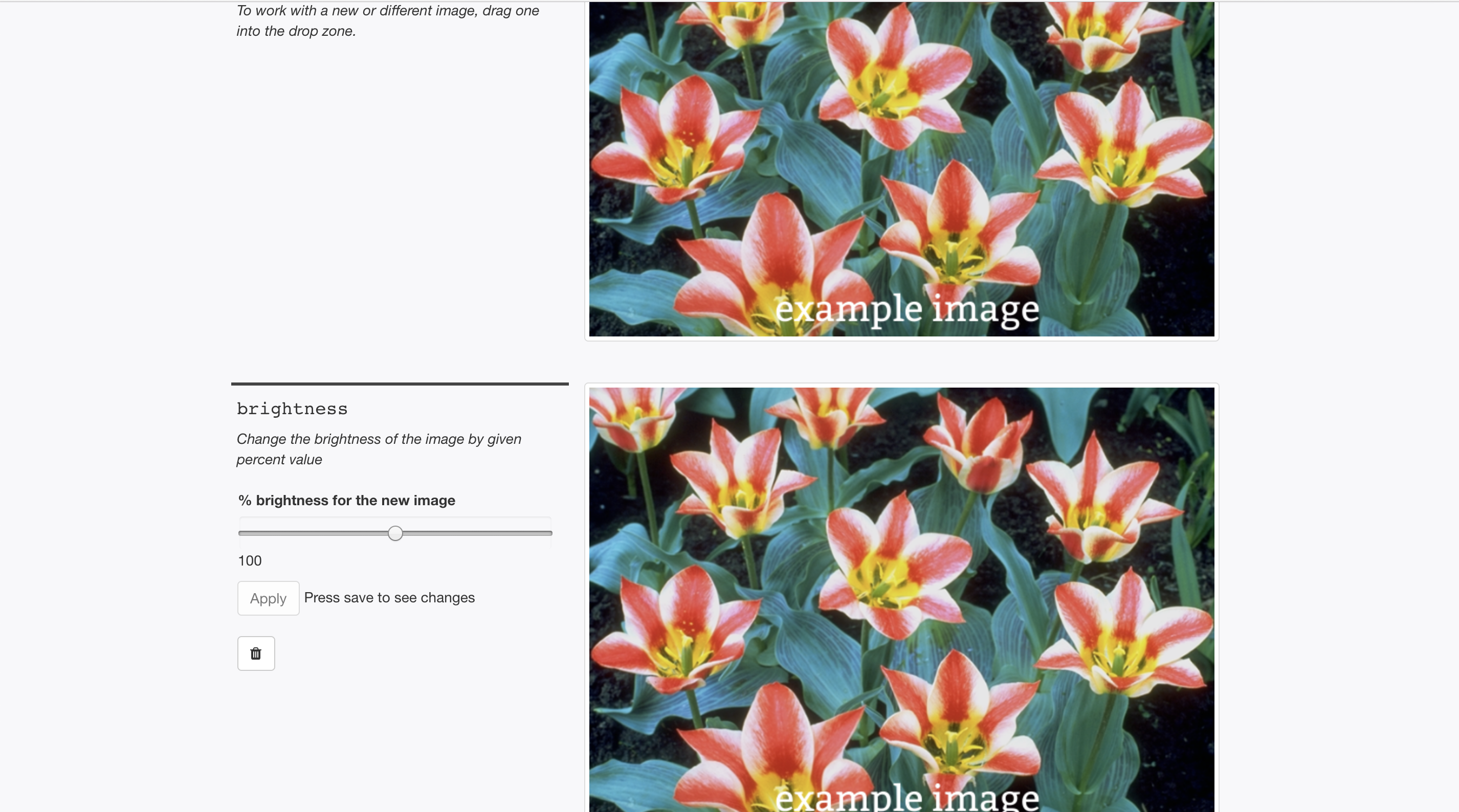
The brightness module when selected displays a white screen in the image area instead of the image from the previous step or the selected image.
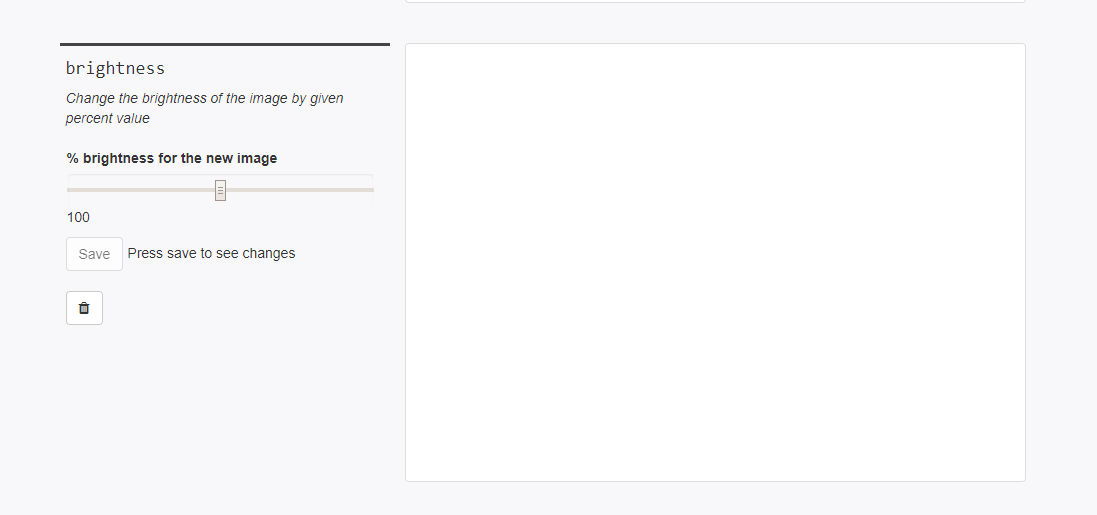
However the default view should be something like this
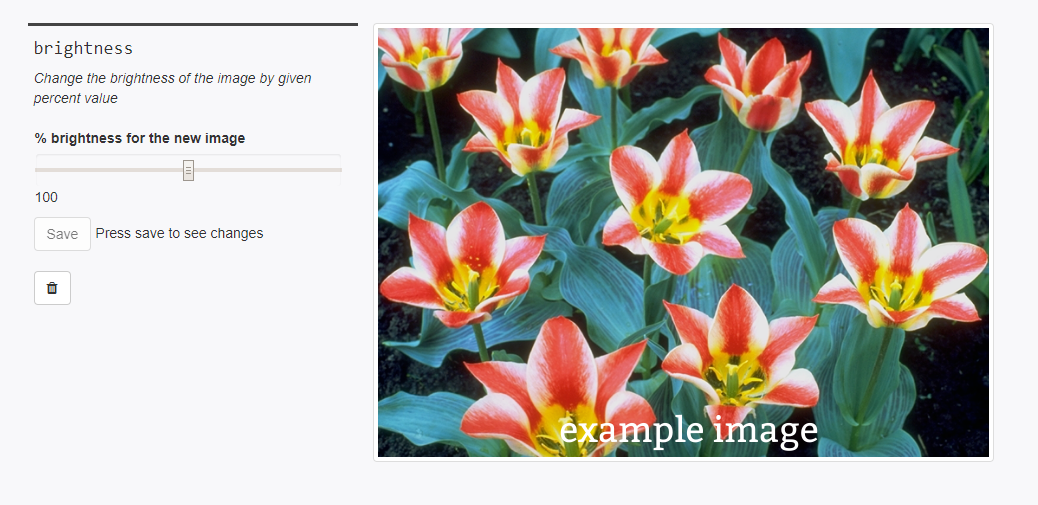
Instance Count = 1
Thank you!
Your help makes Public Lab better! We deeply appreciate your helping refine and improve this site.
To learn how to write really great issues, which increases the chances they'll be resolved, see:
https://publiclab.org/wiki/developers#Contributing+for+non-coders
 aashna27
All 66 comments
GitMate.io thinks the contributors most likely able to help are @jywarren, and @SidharthBansal.
Possibly related issues are https://github.com/publiclab/image-sequencer/issues/113 (Add a Brightness module), https://github.com/publiclab/image-sequencer/issues/472 (refactor/speed up Brightness module (and other PixelManipulation modules)), https://github.com/publiclab/image-sequencer/issues/434 (Rotate module), https://github.com/publiclab/image-sequencer/issues/108 (Math Module), and https://github.com/publiclab/image-sequencer/issues/112 (Scale module).
![gitmate[bot] picture](https://avatars.githubusercontent.com/in/9010?v=4&s=40) gitmate[bot]
on 22 Nov 2018
gitmate[bot]
on 22 Nov 2018
GitMate.io thinks the contributors most likely able to help are @jywarren, and @SidharthBansal.
Possibly related issues are https://github.com/publiclab/image-sequencer/issues/113 (Add a Brightness module), https://github.com/publiclab/image-sequencer/issues/472 (refactor/speed up Brightness module (and other PixelManipulation modules)), https://github.com/publiclab/image-sequencer/issues/434 (Rotate module), https://github.com/publiclab/image-sequencer/issues/108 (Math Module), and https://github.com/publiclab/image-sequencer/issues/112 (Scale module).
gitmate[bot]
on 22 Nov 2018
I'd like to work on this.. Can I please get help regarding the code links for the main image sequencer page and the brightness module .. Thanks
 oorjitchowdhary
on 25 Nov 2018
oorjitchowdhary
on 25 Nov 2018
Our task here is to show the image in the brightness box right?
oorjitchowdhary
on 25 Nov 2018
http://sequencer.publiclab.org/examples/#steps=
http://sequencer.publiclab.org/examples/#steps=brightness{brightness:100}
Go ahead!! 😄
aashna27
on 25 Nov 2018
yes basically the image coming from the previous step should be visible when brightness module is added.
aashna27
on 25 Nov 2018
yes basically the image coming from the previous step should be visible when brightness module is added.
Ok
oorjitchowdhary
on 25 Nov 2018
http://sequencer.publiclab.org/examples/#steps=
http://sequencer.publiclab.org/examples/#steps=brightness{brightness:100}
Go ahead!!
Sorry if I wasn't clear.. I meant to ask for the code files which would be required here... I'm not so familiar with this repo...
oorjitchowdhary
on 25 Nov 2018
http://sequencer.publiclab.org/examples/#steps=
http://sequencer.publiclab.org/examples/#steps=brightness{brightness:100}
Go ahead!!Sorry if I wasn't clear.. I meant to ask for the code files which would be required here... I'm not so familiar with this repo...
https://github.com/publiclab/image-sequencer/tree/main/src/modules/Brightness
I hope this works for you. This is basically the folder of this module.
aashna27
on 25 Nov 2018
@aashna27 Yes, Thanks
oorjitchowdhary
on 25 Nov 2018
One more thing, I can see two instances of this issue on the GCI dash... Pls remove one as it leads to a lot of confusion..
@jywarren @sidharthbansal
oorjitchowdhary
on 25 Nov 2018
Yes, @oorjitchowdhary , there are two instances of this on GCI. Should be removed asap to avoid confusion.
 CodeSarthak
on 25 Nov 2018
CodeSarthak
on 25 Nov 2018
Yep there are still the two tasks available on the dashboard. @oorjitchowdhary are you still working on it?
 JonathanXu1
on 25 Nov 2018
JonathanXu1
on 25 Nov 2018
@jonathanxu1 yes I'm working on it
oorjitchowdhary
on 26 Nov 2018
@oorjitchowdhary you also seem to be working on issue #487 . Keep in mind that according to GCI, you can only work on one issue at a time
JonathanXu1
on 27 Nov 2018
@JonathanXu1 Yeah I know.. my #487 got approved so I'll do this now...
oorjitchowdhary
on 27 Nov 2018
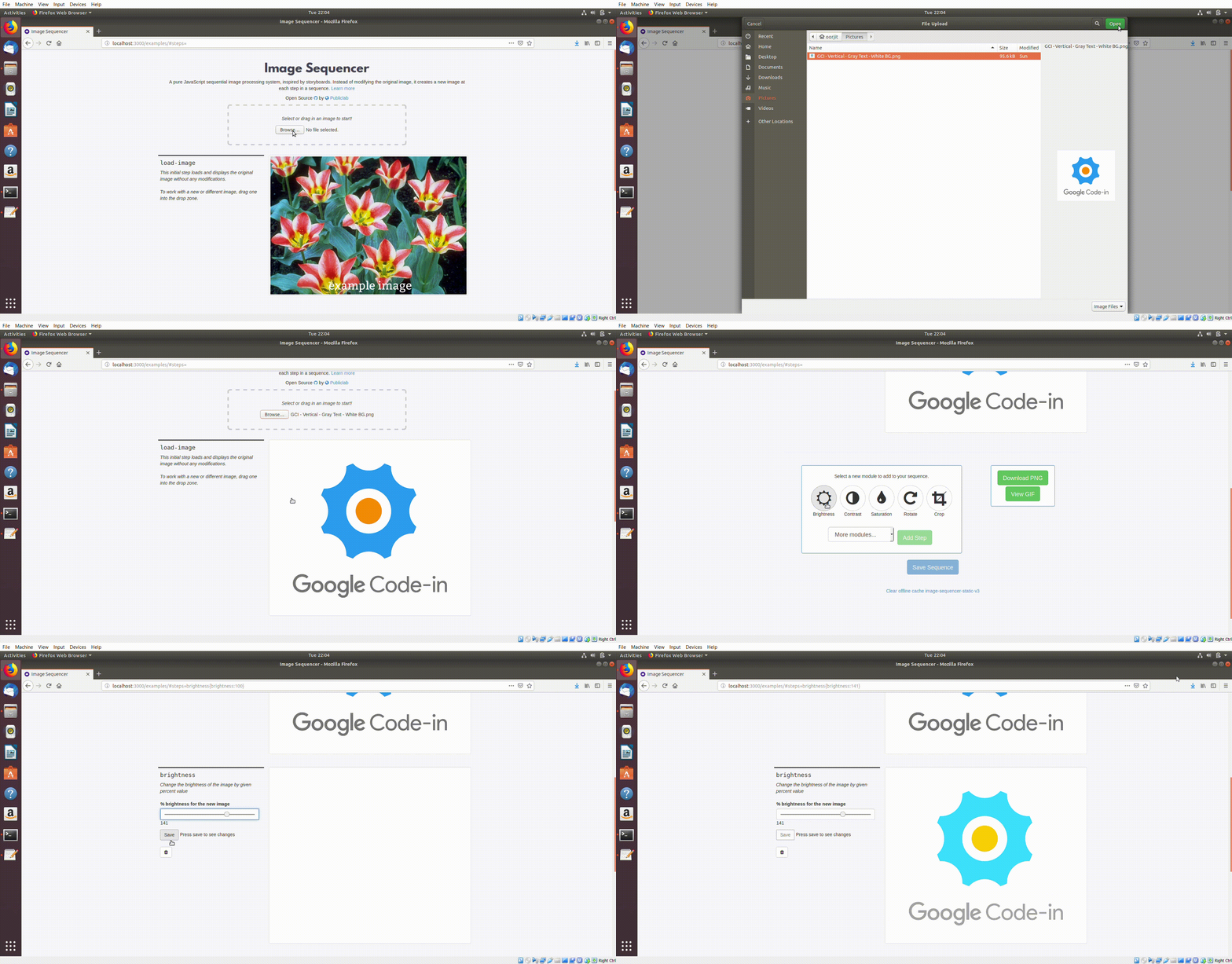
@aashna27 I'm stuck here.. Through my changes in the code, it takes the load-image as the image in brightness but somehow doesn't show the file uphead... It is only visible after a change in the brightness .. Check out the gif which explains this..
oorjitchowdhary
on 27 Nov 2018
@aashna27 I'm stuck here.. Through my changes in the code, it takes theload-imageas the image in brightness but somehow doesn't show the file uphead... It is only visible after a change in thebrightness.. Check out the gif which explains this..
I am busy with a submission today so if anyone from @publiclab/mentors could have a look till then.
aashna27
on 27 Nov 2018
Okay sure
oorjitchowdhary
on 27 Nov 2018
@aashna27 Could you help me..
oorjitchowdhary
on 28 Nov 2018
@aashna27 Could you help me..
Yeah sure. I ll look for the bug.
aashna27
on 28 Nov 2018
https://github.com/publiclab/image-sequencer/blob/main/src/modules/Convolution/Module.js
https://github.com/publiclab/image-sequencer/blob/main/src/modules/Brightness/Module.js
There is no difference between the modules of brightness and convolution apart from the different functions.. But still we can see the picture by using convolution whereas it doesn't show up in brightness
oorjitchowdhary
on 28 Nov 2018
I'm unable to understand this..
oorjitchowdhary
on 28 Nov 2018
@aashna27 @Paarmita
oorjitchowdhary
on 28 Nov 2018
Anyone pls help.. I have my deadline today
oorjitchowdhary
on 29 Nov 2018
What’s the problem, can you please elaborate? 😄
 tech4GT
on 29 Nov 2018
tech4GT
on 29 Nov 2018
@tech4GT with no changes in the respective code modules.. The brightness module doesn't show the picture whereas the contrast, convolution.. All show the picture from the previous step...
oorjitchowdhary
on 29 Nov 2018
I guess that’s because the default value is set to 0 no?
tech4GT
on 29 Nov 2018
Maybe make it 50?
tech4GT
on 29 Nov 2018
@tech4GT I'm unable to change it through the brightness module
oorjitchowdhary
on 29 Nov 2018
The default .. where do I change it?
oorjitchowdhary
on 29 Nov 2018
It should be in the info.json file inside /src/modules/Brightness/, I
believe!
On Thu, Nov 29, 2018 at 11:19 AM Oorjit Chowdhary notifications@github.com
wrote:
The default .. where do I change it?
—
You are receiving this because you were mentioned.
Reply to this email directly, view it on GitHub
https://github.com/publiclab/image-sequencer/issues/491#issuecomment-442894895,
or mute the thread
https://github.com/notifications/unsubscribe-auth/AABfJ0oMOQcHuiT4Hj5lMA3JZxliqitvks5u0AjogaJpZM4Yv36a
.
 jywarren
on 29 Nov 2018
jywarren
on 29 Nov 2018
It should be in the info.json file inside /src/modules/Brightness/, I believe!
If I edit it there, nothing happens.. It still shows brightness=100 in the default
oorjitchowdhary
on 29 Nov 2018
Did you run grunt build after making the change? That will compile
everything in /src/ into the final /dist/ directory.
On Thu, Nov 29, 2018 at 11:35 AM Oorjit Chowdhary notifications@github.com
wrote:
It should be in the info.json file inside /src/modules/Brightness/, I
believe!If I edit it there, nothing happens.. It still shows brightness=100 in the
default—
You are receiving this because you were mentioned.
Reply to this email directly, view it on GitHub
https://github.com/publiclab/image-sequencer/issues/491#issuecomment-442901612,
or mute the thread
https://github.com/notifications/unsubscribe-auth/AABfJx_4PEMyHYrszoHIarqpeX8zkemGks5u0AyfgaJpZM4Yv36a
.
jywarren
on 29 Nov 2018
Oh.. lemme check that out
oorjitchowdhary
on 29 Nov 2018
ah, have you installed all modules with npm install? It looks like it's
missing a dependency. Great work sticking with this, you'll get it soon,
i'm sure!
On Thu, Nov 29, 2018 at 11:52 AM Oorjit Chowdhary notifications@github.com
wrote:
[image: screenshot 39]
https://user-images.githubusercontent.com/39333058/49237825-164e5600-f425-11e8-9fd4-e9cc7c47ffc9.png
Pls help me with this...—
You are receiving this because you were mentioned.
Reply to this email directly, view it on GitHub
https://github.com/publiclab/image-sequencer/issues/491#issuecomment-442908247,
or mute the thread
https://github.com/notifications/unsubscribe-auth/AABfJ9CrLh-mFiJSU47CJ99dSSdaQAAbks5u0BCRgaJpZM4Yv36a
.
jywarren
on 29 Nov 2018
You’ll have to change it in Module.js file of the brightness module
tech4GT
on 29 Nov 2018
https://github.com/publiclab/image-sequencer/blob/ddf4bd0dae5bb40e8144b2a10979e59dc12752ed/src/modules/Channel/Module.js#L6
This is how you can add that default value.
Something like
Options.brightness = options.brightness || 0
This is how you can add that default value.
Something likeOptions.brightness = options.brightness || 0
Yes I figured that out.. That doesn't work out too..
oorjitchowdhary
on 30 Nov 2018
@tech4GT @jywarren @aashna27 As I see it, when the brightness module is added it doesn't take the input from the previous output until you change the brightness and click the save button... If you add the brightness module and then click on the image it simply downloads the blank white screen as the image.. But after you change the brightness, it takes the previous output as the input and then you could download the image showing the edited output..
I may not sound very clear.. I'll make a gif to demonstrate
oorjitchowdhary
on 30 Nov 2018
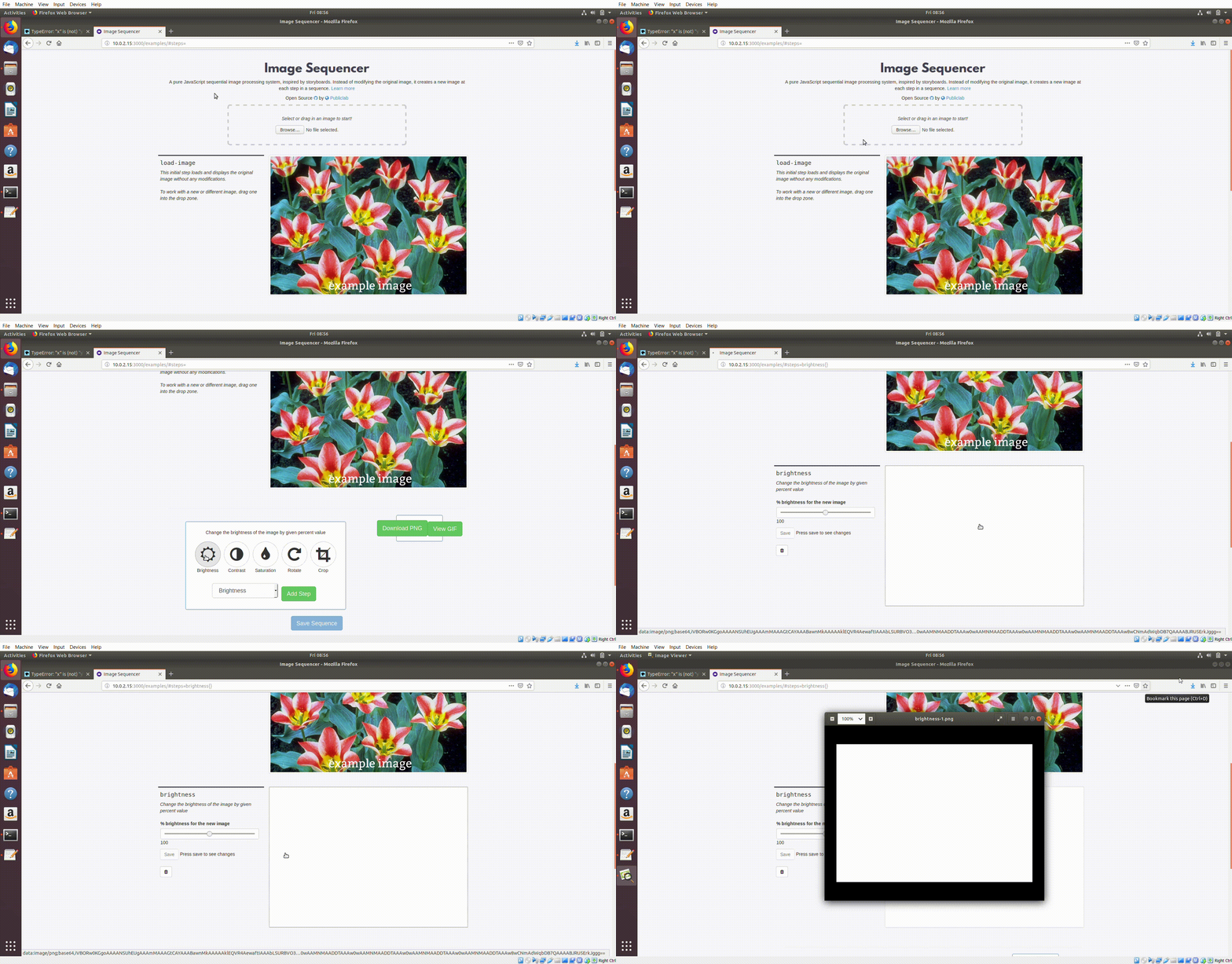
Brightness module takes input as blank white screen on default...
oorjitchowdhary
on 30 Nov 2018
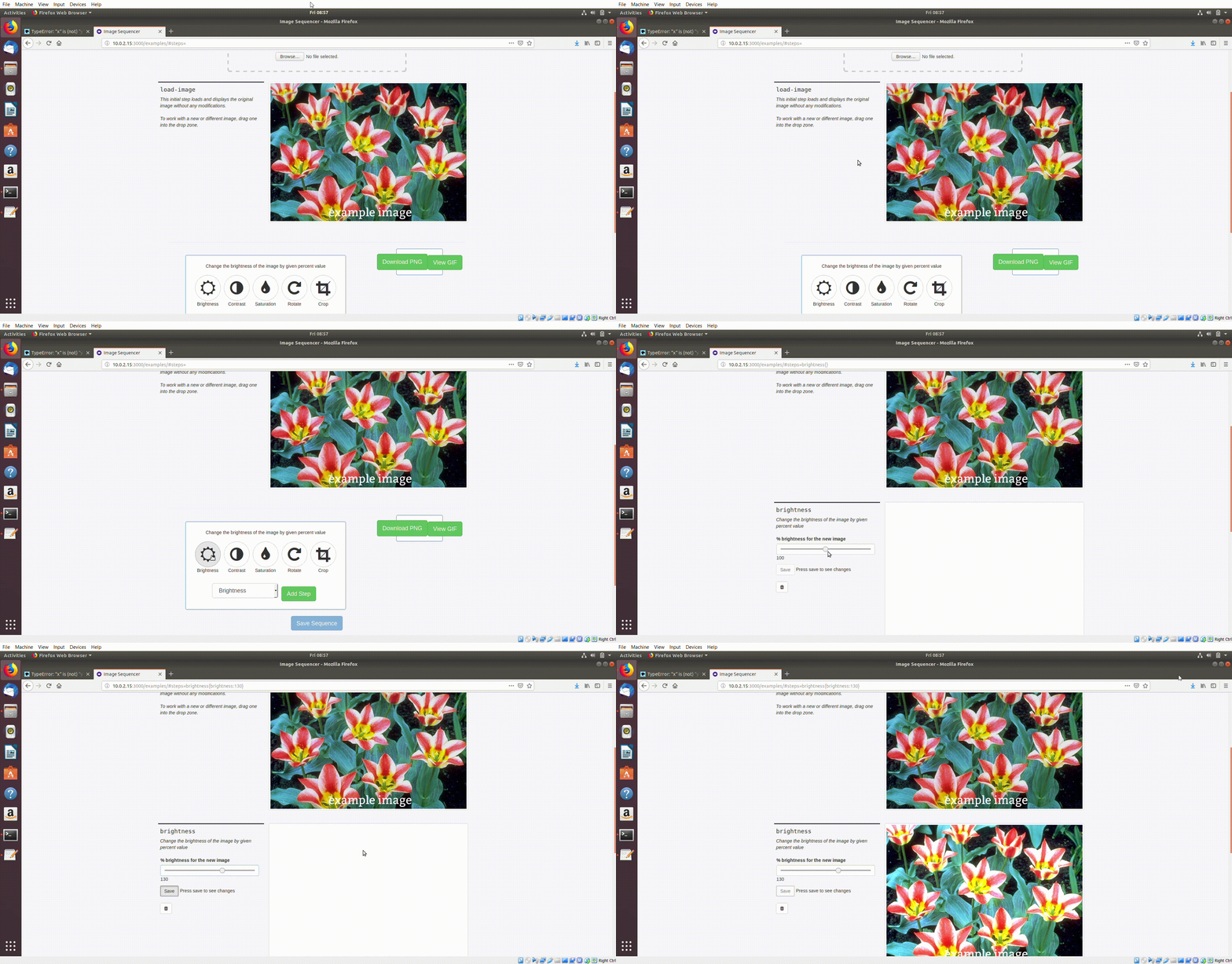
The output of previous step is only taken as input when you change the brightness through the bar..
oorjitchowdhary
on 30 Nov 2018
The output of previous step is only taken asinputwhen you change the brightness through the bar..
So when you download this one, it downloads the edited picture
oorjitchowdhary
on 30 Nov 2018
Hmm I would have too look through this in code then, I’ll see this as soon as I get some time. 🙂
tech4GT
on 30 Nov 2018
So what should I do for my gci task. I have 12 hrs left..
oorjitchowdhary
on 30 Nov 2018
Oh, sorry I did not know that, I’ll look through this in an hour or two then. Don’t worry we’ll get this done. :)
tech4GT
on 30 Nov 2018
Okay
oorjitchowdhary
on 30 Nov 2018
@oorjitchowdhary This looks like a browser issue to me, this works fine in my browser!
tech4GT
on 30 Nov 2018
@tech4GT so the issue is solved in your browser? That is umm.. Surprising 🤔
oorjitchowdhary
on 30 Nov 2018
Confirmed this issue with chrome, safari.
 bhavayAnand9
on 30 Nov 2018
bhavayAnand9
on 30 Nov 2018
@tech4GT @jywarren @aashna27 If it is a browser issue, then the code is working fine and any changes to it aren't required... Right?
So, I believe, I should submit my task for review 🤔
oorjitchowdhary
on 30 Nov 2018
This isn't a browser issue. I figured out what is going wrong
Try console.log the value of val by adding this code console.log(val) after var val = (options.brightness)/100.0 this line in Brightness module.js, you'll find the val variable is NaN and that's why there's a blank image is displaying.
So if you hardcode the value of val like give it 1.5 it'll work just as expected.
bhavayAnand9
on 30 Nov 2018
I wonder why it works on my computer though?
tech4GT
on 30 Nov 2018
If you do a fresh build & run and then add the first step as brightness then only this issue will occur.
bhavayAnand9
on 30 Nov 2018
@bhavayAnand9 So i have to the rgb values to 1.5? and add that console.log?
oorjitchowdhary
on 30 Nov 2018
@oorjitchowdhary No, not rgb values but val variable which is declared in line 23 in module.js. and this isn't a fix, instead just a way to help you figure out what is going wrong and where.
bhavayAnand9
on 30 Nov 2018
Uhh
oorjitchowdhary
on 30 Nov 2018
So i remove (options.brightness)/100.0 and put it as 1.5
oorjitchowdhary
on 30 Nov 2018
So i remove
(options.brightness)/100.0and put it as 1.5
Not working
oorjitchowdhary
on 30 Nov 2018
I think this'll fix it.
Explanation:
val value is dependent on option.brightness which is a parameter to Brightness function. If you console log options.brightness you'll find it undefined, which I don't know why that is.
so adding this line options.brightness = options.brightness || 100; will set the option.brightness value to 100 only if it's undefined.
@oorjitchowdhary Here's what you need to do. Just add these two lines of code in starting of 'changePixel' function.
//If options.brightness is undefined, set it to 100 by default
options.brightness = options.brightness || 100;
GIve it a try and let me know If it worked.
bhavayAnand9
on 30 Nov 2018
@bhavayAnand9 Thanks a ton... Cheers 😄
oorjitchowdhary
on 30 Nov 2018
This is how you can add that default value.
Something likeOptions.brightness = options.brightness || 0Yes I figured that out.. That doesn't work out too..
Wow.. I had tried that long ago.. but placed it in above the function changePixels 😕 😆
oorjitchowdhary
on 30 Nov 2018
oh wow, so were you all able to figure this out? That's awesome!
On Fri, Nov 30, 2018 at 10:55 AM Oorjit Chowdhary notifications@github.com
wrote:
This is how you can add that default value.
Something likeOptions.brightness = options.brightness || 0
Yes I figured that out.. That doesn't work out too..
Wow.. I had tried that long ago.. but placed it in above the function
changePixels 😕 😆—
You are receiving this because you were mentioned.
Reply to this email directly, view it on GitHub
https://github.com/publiclab/image-sequencer/issues/491#issuecomment-443247110,
or mute the thread
https://github.com/notifications/unsubscribe-auth/AABfJyFBWl_Bu6tvfRH8amPvBHctVb8Kks5u0VTmgaJpZM4Yv36a
.
jywarren
on 30 Nov 2018
@jywarren yes.. TEAMWORK = OPEN SOURCE = 💯🔥
oorjitchowdhary
on 30 Nov 2018
Another thing.. There is duplicate of this same task.. It should be removed asap
oorjitchowdhary
on 30 Nov 2018
Great! did this. 🙌 👍 💯
jywarren
on 30 Nov 2018
Related issues
jywarren
·
5Comments
 vaibhavmatta
·
4Comments
vaibhavmatta
·
4Comments
 harshkhandeparkar
·
5Comments
jywarren
·
3Comments
harshkhandeparkar
·
5Comments
jywarren
·
3Comments
 keshav234156
·
4Comments
keshav234156
·
4Comments
Most helpful comment
@jywarren yes.. TEAMWORK = OPEN SOURCE = 💯🔥