Iina: Add option to disable auto-playing subtitles
System and IINA version:
- macOS 10.13.2
- IINA 0.0.15
IINA's "Subtitle > General > Auto load > Disabled" option doesn't prevent embedded subtitles (e.g., in an MKV file) from playing, only (I think?) stops external subtitle files from loading.
I very rarely want to watch something with subtitles, even "forced" subtitle tracks, apart from on the rare occasions I watch anime. Could we get a more basic preference like VLC's "Subtitles / OSD > Enable subtitles" checkbox, that stops subtitles auto-loading at all?
(I'd also love to be able to disable the OSD messages, but I see that's already been posted a couple of times. :))
 meejle
All 3 comments
For reference, this has been a feature request for over a year with no action: https://github.com/lhc70000/iina/issues/501
 vampjaz
on 12 Apr 2018
vampjaz
on 12 Apr 2018
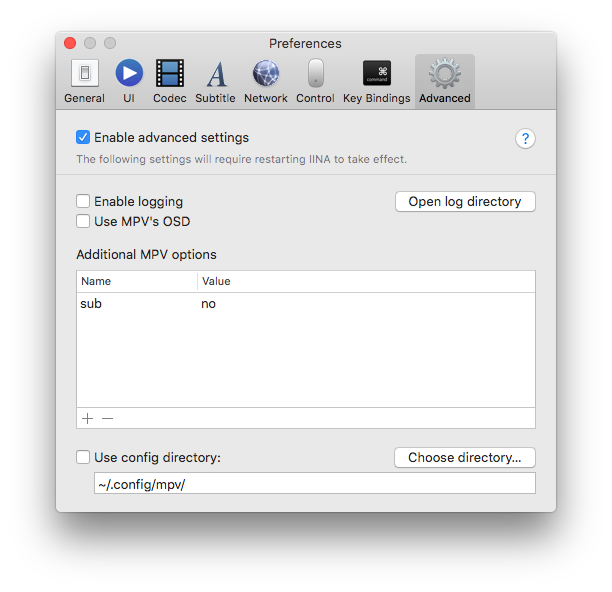
There is a workaround I found, using the lower level MPV settings:
vampjaz
on 15 Apr 2018
Thank you thank you @red-green for that tip. Saved me from going back to my previous favorite player Movist which does not preload subtitles. Truly bizarre how this is the default and has not been addressed in over a year. Either way very excited about this app having just discovered it recently. Almost a perfect app. Now if there was a little hack for having the audio controls take over system volume like Movist does then it would truly be a replacement for me. It's a small pain to have to control two volume settings on my Mac mini TV set up. Movist has an option to have volume changes update system volume. Still very excited to have found the ability to turn off subtitles!!
 michalpfeil
on 27 Jun 2018
michalpfeil
on 27 Jun 2018
Related issues
 JayBrown
·
3Comments
JayBrown
·
3Comments
 orchick
·
3Comments
orchick
·
3Comments
 yyzclyang
·
3Comments
yyzclyang
·
3Comments
 stefan1983
·
3Comments
stefan1983
·
3Comments
 AlexeiGitH
·
3Comments
AlexeiGitH
·
3Comments
Most helpful comment
There is a workaround I found, using the lower level MPV settings:
