Hydrogen: Scrolling output in dock no longer works
Prerequisites
- [x] Have you checked the solutions in our troubleshooting guide for common problems ?
- [x] Have you checked that your issue isn't already filed ?
Related issues: #785, #2026
Description
Since I work with code that frequently results in large outputs I configured the hydrogen output to be displayed in the dock by default.
Outputs that are longer than the screen height used to be viewable by simply scrolling down, however, this is no longer the
Steps to Reproduce
- In hydrogen settings activate
View output in the dock by default - Execute command with long output, e.g:
python for i in range(100): print(i) - Note that the visible output reaches 40 and the remainder is off-screen
- Scrolling down to see the remaining output does not work
- The only way I found is to mark any line and use shift + ↓ to expand the selection downwards, as the visible output section is moved with the selection.
- This 'downward selection method' however results in the output slider to disappear (see screenshots) and switching to previous or later outputs is not possible until the output view has been returned to the top (again selecting an arbitrary line and pressing shift + ↑)
Versions
OS version:
macOS Catalina 10.15.7
atom --version
Atom    : 1.54.0
Electron: 6.1.12
Chrome  : 76.0.3809.146
Node    : 12.4.0
apm --version
apm  2.5.2
npm  6.14.8
node 12.4.0 x64
atom 1.54.0
python 3.8.6
git 2.27.0
Hydrogen version:
2.14.6
Plugins
Have you installed and activated any of the Hydrogen plugins below ?
- [x] hydrogen-python
- [x] Hydrogen Launcher
- [ ] Data Explorer
Logs
[Please post any error logs and the output of the developer tools as described in our [Debugging Guide](https://nteract.gitbooks.io/hydrogen/docs/Troubleshooting.html).]
Expected behavior
Being able to scroll output
Screenshots


 mlangiu
All 8 comments
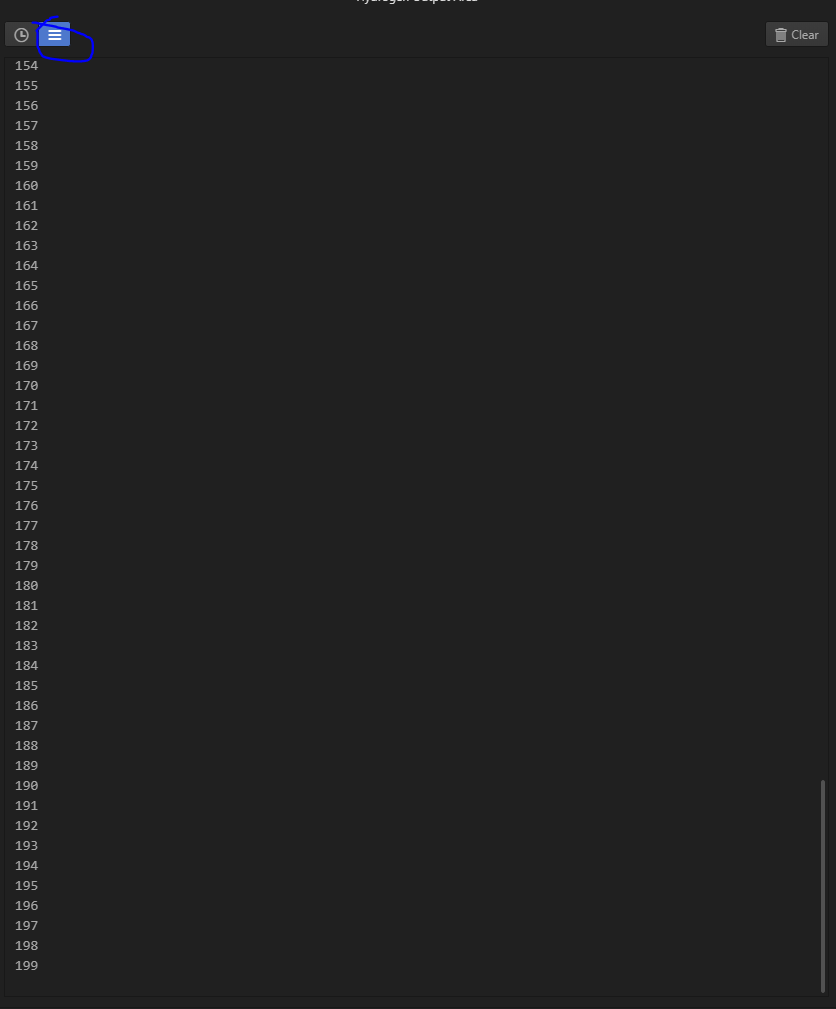
I can see the output if I click on the three lines button on the top left corner
but I also have a related issue which is that I would have expected the output dock to automatically scroll down when there is overflow. Currently it does not.
 2sls
on 30 Jan 2021
2sls
on 30 Jan 2021
@mlangiu and @2sls, thank you for raising the issue and providing the details.
This should be fixed with this PR #2049
 ramantehlan
on 1 Feb 2021
ramantehlan
on 1 Feb 2021
@ramantehlan - I implemented the fix you created. Maybe I am missing something, but just wondering if there is any way for the output dock to automatically scroll to bottom when there is overflow? This would match the behavior for the inline output. Thanks!
2sls
on 1 Feb 2021
@2sls I think it used to be like that before this bug, so hopefully it is possible. Helps a lot with logs..
Edit: I tested. It seems that Enable Autoscroll option works as expected on inline output, but not on the output pane.
 juliuscrn
on 1 Feb 2021
juliuscrn
on 1 Feb 2021
I think we should be able to make it auto-scroll again if that was the behavioral earlier. Will take a look into it.
ramantehlan
on 2 Feb 2021
thanks a lot, @ramantehlan ! just to mention that the second tab in output pane does scroll down, but not the first one.
juliuscrn
on 3 Feb 2021
@juliuscrn just to clarify the behavior I am observing:
The second tab autoscrolls down if you switch from the first tab. The first tab doesn't scroll at all.
BUT it does not scroll down automatically if you are already on the second tab when there is new output.
As an aside, I don't actually know the intended difference between the first and second tab.
2sls
on 3 Feb 2021
The first tab only returns outputs from a single function call, the second one accumulates them. Both are useful. With auto scroll option enabled I would say both should scroll all the way down.
juliuscrn
on 3 Feb 2021
Related issues
 lgeiger
·
3Comments
lgeiger
·
3Comments
 HaoranXue
·
4Comments
HaoranXue
·
4Comments
 xmen1412
·
3Comments
xmen1412
·
3Comments
 neurotronix
·
4Comments
neurotronix
·
4Comments
 gepcel
·
3Comments
gepcel
·
3Comments
Most helpful comment
I think we should be able to make it auto-scroll again if that was the behavioral earlier. Will take a look into it.