Heidisql: MYSQL table primary key to be automatic UNIQUE INDEX
Firts: Sorry for some type errors, English is not my main language.
does not accept my edit and again to be UNIQUE INDEX,All primary keys in my database were UNIQUE INDEX, This happened after the last 3 updates
Version : 10.3.0.5828
 oguzsaka
All 30 comments
Ok, then please post
- the result of
SHOW CREATE TABLE mytable - and your MySQL server version
 ansgarbecker
on 17 Jan 2020
ansgarbecker
on 17 Jan 2020
CREATE TABLE region (
regid int(11) NOT NULL AUTO_INCREMENT,
Sütun 4 char(50) DEFAULT '-',
PRIMARY KEY (regid)
) ENGINE=InnoDB AUTO_INCREMENT=0 DEFAULT CHARSET=latin1

oguzsaka
on 17 Jan 2020
MYSQL VERSİON 5.7
oguzsaka
on 17 Jan 2020
MYSQL VERSİON 5.7
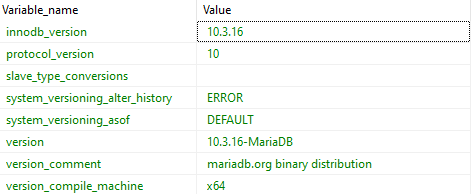
Your screenshot says you are on MariaDB 10.3.16 ? What's the correct version?
I created your table here two times. The first one was the code from you above, showing me a primary key in the table designer:

The second table got a unique key via "create table", and then the table designer displays a unique key. So, I see no problem here:

But probably we're really on MySQL 5.7?
ansgarbecker
on 17 Jan 2020
previously used as the primary key in the table designer
HEİDİSQL TAB Create Code click
CREATE TABLE `region` (
    `regid` INT(11) NOT NULL AUTO_INCREMENT,
    Sütun 4` CHAR(50) NULL DEFAULT '-' COLLATE 'latin1_swedish_ci',
    **UNIQUE INDEX `PRIMARY` (`regid`) USING BTREE**
)
COLLATE='latin1_swedish_ci'
;
they are the same thing but , Why does UNIQUE INDEX not show as PRIMARY KEY instead of PRIMARY
oguzsaka
on 17 Jan 2020
Ok, you just _named_ a unique key "PRIMARY". That is still a unique key, not a primary key, which is a different thing.
I'm confused about the bug here. Was that now a misunderstanding or..? Where exactly do you see a bug, and which server version is it - MySQL 5.7 or MariaDB 10.3?
ansgarbecker
on 17 Jan 2020
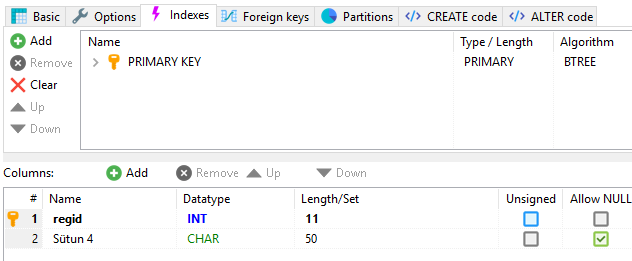
MariaDB 10.3
should always be displayed as above. requesting indexs should be able to change the tab type now it cannot be changed as UNIQUE INDEX even if I update it as the primary key heidisql
I'm using mariaDB but when I use heidisql when connecting to heidisql he sees it as mariadb heidisql was fast but some different events developed after the last updates you did not used to
oguzsaka
on 17 Jan 2020
navicat mysql is not the primary key I am not having such a problem but heidisql is changing its auto UNIQUE INDEX
oguzsaka
on 17 Jan 2020

I want this
oguzsaka
on 17 Jan 2020
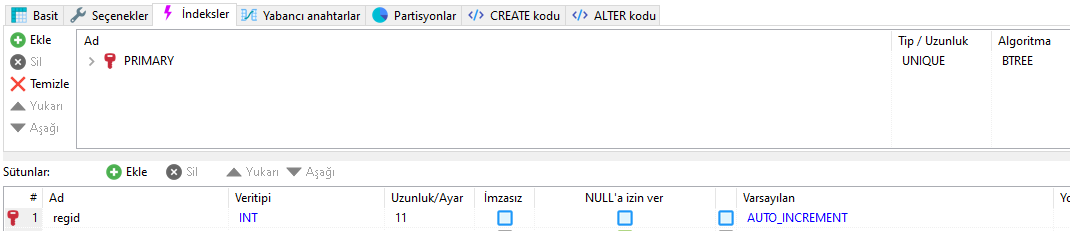
not this
oguzsaka
on 17 Jan 2020
I understand your primary keys are wrongly detected as unique keys in HeidiSQL.
I just cannot reproduce that here, neither on MariaDB 10.3 nor on MySQL 5.7 - both just tested:

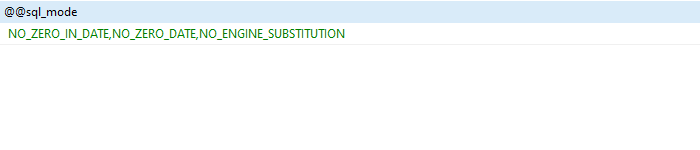
Probably there is some more stuff to examine, for example the SQL modes you have set. You could post the result of SELECT @@sql_mode here.
ansgarbecker
on 18 Jan 2020
Could someone else please also try to reproduce that?
ansgarbecker
on 18 Jan 2020
oguzsaka
on 18 Jan 2020
Same report here: https://www.heidisql.com/forum.php?t=35431
I am still unable to reproduce this.
ansgarbecker
on 20 Jan 2020
Please post the result of the following query:
SHOW INDEXES FROM `region`;

oguzsaka
on 20 Jan 2020
I think there is a problem with the Heidisql indexs detection engine
oguzsaka
on 20 Jan 2020
Yes, that is what I am thinking too, but the logic is so simple, and it works for me. So this turned out more complex than it seems:
      NewKey.Name := KeyQuery.Col('Key_name');
      NewKey.OldName := NewKey.Name;
      if NewKey.Name.ToLower = 'primary' then
        NewKey.IndexType := 'PRIMARY'
      else if KeyQuery.Col('Non_unique') = '0' then
        NewKey.IndexType := 'UNIQUE'
      else
        NewKey.IndexType := 'KEY';
Are you on the latest build? If not please update.
ansgarbecker
on 21 Jan 2020
I'm in the latest version. actual . Version 9 does not have such a problem
NewKey.Name := KeyQuery.Col('Key_name');
can you show the incoming values by testing. because it might perceive the incoming value differently
if NewKey.Name.ToLower = 'primary' then
        NewKey.IndexType := 'PRIMARY'
may return a different value
oguzsaka
on 21 Jan 2020
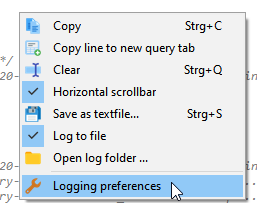
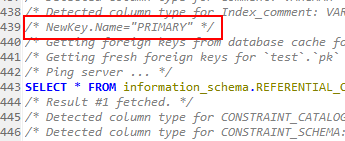
Good idea. Next build will have a debug output in the lower log panel, saying NewKey.Name="PRIMARY". As this is a debug message, you need to activate these in preferences:
- rightclick log panel, and click "Logging preferences":
- activate debug messages:

- apply options, and watch out for such a line in the log panel (you may need to scroll up a bit after clicking a table):
ansgarbecker
on 21 Jan 2020
oguzsaka
on 21 Jan 2020
Even in your log I see now _NewKey.Name="PRIMARY"_, and I'm sure in lowercase that's "primary". I'm lost here.
ansgarbecker
on 25 Jan 2020
ALTER TABLE region
DROP INDEX PRIMARY,
ADD PRIMARY KEY (regid) USING BTREE;


oguzsaka
on 28 Jan 2020

I think it gives the value in the last condition because it satisfies two conditions
the problem is here
else if KeyQuery.Col('Non_unique') = '0' then
`
you have to change it this way
  NewKey.OldName := NewKey.Name;
  if NewKey.Name.ToLower = 'primary' then
    NewKey.IndexType := 'PRIMARY'
  else if KeyQuery.Col('Non_unique') = '0' and NewKey.Name.ToLower != 'primary' then
    NewKey.IndexType := 'UNIQUE'
  else
    NewKey.IndexType := 'KEY';`
`
oguzsaka
on 28 Jan 2020
No, the if ... else ... construct prefers the first one if that already matches. It cannot prefer both.
ansgarbecker
on 28 Jan 2020
Can you print NewKey.IndexType as log?
oguzsaka
on 29 Jan 2020
Next build should show some more details, like this:
/* NewKey.Name="PRIMARY", NewKey.Name.ToLower="primary", NewKey.IndexType="PRIMARY" */
/* NewKey.Name="PRIMARY", NewKey.Name.ToLower="prımary", NewKey.IndexType="UNIQUE" */

oguzsaka
on 29 Jan 2020
Ok, your "prımary" has an "i" without dot on it, which is I guess a localization issue in the ToLower method. Will try to change that without locale.
ansgarbecker
on 30 Jan 2020
Got it, hopefully. Preferring ToLowerInvariant now, as described on https://stackoverflow.com/questions/6225808/string-tolower-and-string-tolowerinvariant - that thread talks about exactly the same character differences, in the Turkish "i".
Please check in the next build.
ansgarbecker
on 30 Jan 2020
Related issues
 andreybatalof
·
4Comments
andreybatalof
·
4Comments
 catamphetamine
·
3Comments
catamphetamine
·
3Comments
 Ivan-Perez
·
3Comments
Ivan-Perez
·
3Comments
 chrysler5798
·
5Comments
chrysler5798
·
5Comments
 BraveOtter
·
4Comments
BraveOtter
·
4Comments