Steps to reproduce this issue
- put two separate queries to query tab and run
Current behavior
see pic.
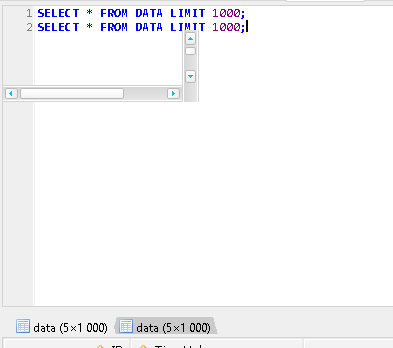
Expected behavior
no artefacts
Environment
- HeidiSQL version:
Revision 5340 (yours: 5340)
Compiled: 2018-11-25 (yours: 2018-11-26)
 mftun
mftun
All 30 comments
I can confirm the issue.
When I'm executing long query (even a single one), scroll bars are flashing for a moment:
SELECT * FROM TableWithManyRecords LIMIT 10000;
When query is not slow, I still see one-pixel-width flashing rectangles at about the same place where the scroll bars are.
P.S. I should not read this as now I will not be able to 'unseen' it.
 fifonik
on 26 Nov 2018
fifonik
on 26 Nov 2018
Artifacts flash on the local host. With remote access (RDP) these artifacts remain on the screen. They do not respond to clicks. When a window is moved or resized, they behave like a control tied to a tab bar.
Perhaps this is an RDP bug. However, versions prior to r5305 are not affected.
It looks like a stub to display a dataset. They must be hidden. With remote access, they disappear if you click on the inactive header of the data set.
mftun
on 27 Nov 2018
I ran 10 requests and found out that this is a TVirtualStringTree. The coordinates of the upper left corner of all 10 coincide with TTabSheet.
If you click on each result of the query, the coordinates change.
mftun
on 27 Nov 2018
Any particular reason for closing the issue?
fifonik
on 28 Nov 2018
missclick
mftun
on 29 Nov 2018
Perhaps this is an RDP bug. However, versions prior to r5305 are not affected.
r5305 added themes to HeidiSQL. Also, the screenshot in the first post here shows a themed scrollbar. Another user on the forum reported similar stuff. So I suppose the issue is related to the new themes in Heidi.
For testing purposes, you should apply the default "Windows" theme to HeidiSQL, and see if the artifacts still show up.
 ansgarbecker
on 29 Nov 2018
ansgarbecker
on 29 Nov 2018
Ah, and you should definitely update HeidiSQL to the latest build. I worked a lot on theming during the recent weeks, so one or another glitch may already be fixed, magically.
ansgarbecker
on 29 Nov 2018
In 9.5.0.5355 is still present with remote connection (RDP). Windows theme without artifacts.
mftun
on 29 Nov 2018
I'm on build 9.5.0.5355 and use Windows theme.
I see these scroll bars flashing when I press F9 (for executing query) multiple times.
fifonik
on 29 Nov 2018
Ok, I have no clue what's exactly causing the flashing of scrollbars, or the artefacts mftun mentioned.
ansgarbecker
on 30 Nov 2018
I experienced some artefacts after selecting a theme, in the same HeidiSQL session where I did that. So the next build will show an information dialog the user should restart Heidi after changing critical settings.
I suppose you already restarted HeidiSQL to get rid of these artefacts?
ansgarbecker
on 4 Dec 2018
I never changed the theme (well, I did once long time ago just to check what is this) so restart was not needed.
Also, I downloaded build 5304 (with no themes support) and the thing is still flashing on query execution.
fifonik
on 4 Dec 2018
@mftun and @fifonik , could you please retest with the latest build whether the artefacts are gone now?
I disabled DirectWrite in the underlying SynEdit component, which fixed other major problems as well, e.g. #445. So this might also be magically fixed.
ansgarbecker
on 24 Dec 2018
Updated to build 5422 and still see the same glitches on my home PC (100% scale, Windows 10 1809):
Screen capture with demo (re-encoded, can supply sources, but they are bigger): https://www.dropbox.com/s/z91qfqo75dncham/Heidi.mp4?dl=1
fifonik
on 25 Dec 2018
Hm, you video just shows some temorary artefacts. Nothing permanent. Is that what you mean?
ansgarbecker
on 25 Dec 2018
Hm, yes. This is what I said from the beginning: "scroll bars are flashing for a moment"
fifonik
on 25 Dec 2018
Oh, in that case I misunderstood, sorry. Though it's a really minor issue then, and probably not fixable.
ansgarbecker
on 25 Dec 2018
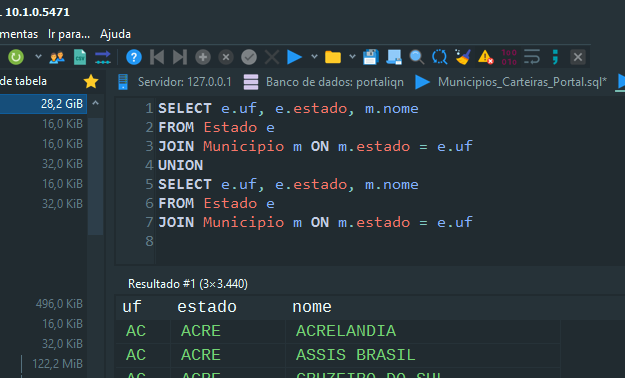
In my case, the artifacts are persistent (and highly annoying) with two or more queries on the same tab, separated by semicolon.
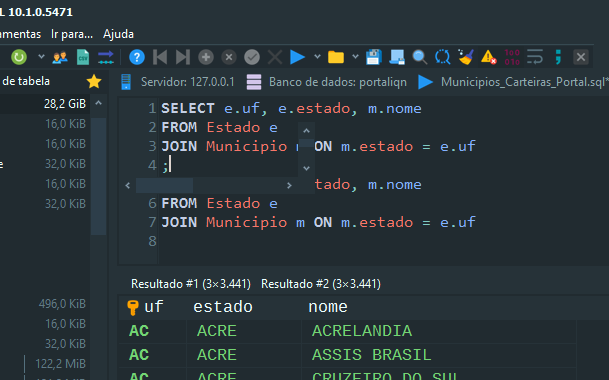
The same two queries united by UNION clause, only generate flickering artifacts.
 vr0ck
on 5 Feb 2019
vr0ck
on 5 Feb 2019
I'm also getting persisting scroll bar artifacts as per @vr0ck latest post here. Only occurring when running 2 or more queries in sequence. If multiple are present but only one is selected and run via Ctrl+F9 then the artifacts do not occur.
EDIT: I've just noticed that after I run 2 queries in sequence, if I click any of the 2nd-nth results tabs, the artifacts disappear from the query editor.
 ieuanmeredith
on 7 Mar 2019
ieuanmeredith
on 7 Mar 2019
I suppose this and most of the other theme related issues here cannot be solved by code in HeidiSQL. The implementation of themes is just buggy. Even it does not work out of the box, for which reason I added a lot of code from https://github.com/RRUZ/vcl-styles-utils . But still quite a few issues are left, and I have no clue how to fix these. I can just recommend to use the default Windows theme instead.
ansgarbecker
on 7 Mar 2019
I get the artifact nearly everytime I move Heidi from one monitor to another, but it's particularly frequent when moving from monitor to monitor when they have differing DPI or scaling settings (4K -> 1080p)
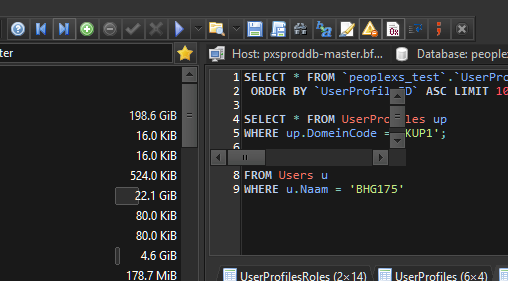
Once it show up, there's not an obvious way to get rid of it with restarting Heidi.
 JamieAzure
on 15 Mar 2019
JamieAzure
on 15 Mar 2019
Here's a video of the rendering working but you can clearly see what the default theme is 'erasing' that all the other themes leave as artifacts.
JamieAzure
on 15 Mar 2019
I have this bug. Nothing to do with RDP, just regular windows and the dark theme.
 adipose
on 8 Apr 2019
adipose
on 8 Apr 2019
I have some more info on this bug. It presents itself when running multiple queries, as noted by others. However, it appears to resolve itself when switching to the second resultset (and back). This may be a clue. Perhaps the form is trying to erase those extra scrollbars, but only does so on the last resultset, then the first resultset is shown and still has the artifact. When switching resultsets manually it appears to trigger a refresh and fix the issue. No restart required!
adipose
on 8 Apr 2019
I also have this bug since the themes thing. I'm using dark theme too and I have confirmed what @adipose just said, and would like to extend it: if you have 'n' queries: you have to navigate by the 'n' resultsets to get rid of it (at least there is a way). In the meantime, maybe you (we) could automate this by making a macro on the execute query command to trigger also the all tabs navigation hassle.
 MrBitsHub
on 8 Apr 2019
MrBitsHub
on 8 Apr 2019
that's a nice hint @JamieAzure and @adipose , guess sir @ansgarbecker has something to start with now. more power!
i can really use what @adipose had tipped.
 kapitannwel
on 6 May 2019
kapitannwel
on 6 May 2019
The artefact is the result grid, which is created with a default alignment, before this gets fixed:

I will check what happens when clicking the result tabs, which may indeed by a good hint.
ansgarbecker
on 7 May 2019
I found that the just created grid is made invisible before it gets aligned correctly. This may explain the old position of the artefacts. So I am now hiding the grid _after_ the alignment has finished, and suddenly I have no artefacts any more.
Please also test with the upcoming nightly build, and give feedback. Thanks!
ansgarbecker
on 7 May 2019
installed the latest update (10.1.0.5559) and i confirmed that the artefacts is hiding after the queries had finished. thank you very much! (im using 'Charcoal Dark Slate' theme)
kapitannwel
on 8 May 2019
Dark theme confirmed as fixed here (10.1.0.5559) !! Big thank you!
MrBitsHub
on 8 May 2019
Related issues
 hkaraoglu
·
3Comments
hkaraoglu
·
3Comments
 andreybatalof
·
4Comments
andreybatalof
·
4Comments
 rkmaier
·
5Comments
rkmaier
·
5Comments
 rentalhost
·
5Comments
rentalhost
·
5Comments
 Ivan-Perez
·
3Comments
Ivan-Perez
·
3Comments