Heidisql: Can't close/clear first query tab
Steps to reproduce this issue
- Into the first query tab, open a query file or type some query text.
- Double-click tab.
Contents of query tab are not cleared. Associated file name is not cleared. The "close" action on this tab is disabled.
Previously, double-clicking on the first query tab cleared it and disassociated the filename if a file was opened in it (without warning about changed contents).
Enable the close action for the first tab to clear the tab and disassociate any open file if there are no unsaved changes.
- HeidiSQL version:
9.5.0.5280 (64 Bit)
- Database system and version:
MySql 5.6.17
- Operating system:
Windows 10
 psilent
All 11 comments
@ansgarbecker while it is a dup from #238, I don't think that Ctrl + W is obvious like just double-click like works in another additional tabs. Do you think that you could reconsider "ask for save" and just clear (instead of close) the last available tab? If you have two+ tabs, the second+ will support double-click to close, the first one will not have.
 rentalhost
on 27 Jul 2018
rentalhost
on 27 Jul 2018
Due to quite a few complaints here I'll go and revert my change for #231, so a double click will also clear the unclosable last tab. Instead, I should probably add a ask-for-save-prompt on that double click.
 ansgarbecker
on 28 Jul 2018
ansgarbecker
on 28 Jul 2018
Just changed the behaviour like stated above: a double click on the very first tab asks for confirmation to clear the contents and then clears it.
This is a bit inconsistent now, as the friend menu item "Clear editor" does the same _without_ asking the user. I was on the way to add a prompt there too, but then I thought this is not what anybody wants. Please shout if you have suggesstions here.
ansgarbecker
on 4 Aug 2018
If "Clear editor" is just clearing out the contents of the tab but leaves the file association in place, this is fine not prompting for save as long as the clear is part of the undo history I think. Any action that is going to disassociate an open and modified file should prompt for save since undo will not be available.
psilent
on 5 Aug 2018
I think you can go return testing Heidisql 9.3.0.4999, because it do best work for this tab function.
 Dolass
on 5 Aug 2018
Dolass
on 5 Aug 2018
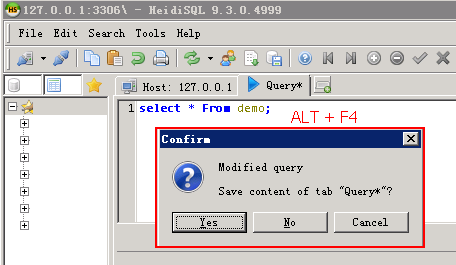


Dolass
on 5 Aug 2018
@Dolass: that prompt was part of the discussion in #231 .
ansgarbecker
on 5 Aug 2018
I just found this - double-click works for me. But why not also enable the context menu for "Close query tab"? Currently it's disabled for the first tab. That would be much more intuitive, and the only way I knew to try until I came a-googling. Why would anyone ever think that double-click would close something??? Glad it exists, but nobody would make that connection.
 HerrimanCoder
on 20 Oct 2019
HerrimanCoder
on 20 Oct 2019
@HerrimanCoder, "... Why would anyone ever think that double-click would close something???.. "
 bekeleh
on 22 Oct 2019
bekeleh
on 22 Oct 2019
It took me hours to find the double-click on the tab to close it, and I've been a Windows user since 3.1. As others have already said, what a dodgy UI design (on Windows),
Why not just place the x-close indicator like in every other tab, and prompt if there are changes, or don't prompt if it has already been saved; Currently the prompt still appears even If I have just saved the tab. Whether it is the first tab or second or third is irrelevant.
In any case, still a great product - thanks to the author and contributors !
 joe-oli
on 25 Jan 2020
joe-oli
on 25 Jan 2020
It's nice that you can middle-click it to clear it, because middle-click closes other tabs.
 mbomb007
on 21 Jul 2020
mbomb007
on 21 Jul 2020
Related issues
rentalhost
·
5Comments
 UnicornsRock420
·
4Comments
UnicornsRock420
·
4Comments
 magnetik
·
4Comments
magnetik
·
4Comments
 rkmaier
·
5Comments
rkmaier
·
5Comments
 cautionbug
·
4Comments
cautionbug
·
4Comments
Most helpful comment
It took me hours to find the double-click on the tab to close it, and I've been a Windows user since 3.1. As others have already said, what a dodgy UI design (on Windows),
Why not just place the x-close indicator like in every other tab, and prompt if there are changes, or don't prompt if it has already been saved; Currently the prompt still appears even If I have just saved the tab. Whether it is the first tab or second or third is irrelevant.
In any case, still a great product - thanks to the author and contributors !