Heidisql: Failure connecting Heidi 9.5 to MySQL 8.0 due to missing plugin: caching_sha2_password
Steps to reproduce this issue
- Download and install MySQL 8.0 RC
- Verify MySQL up and running on default port.
- Download and install HeidiSQL 9.5
- Attempt to connect unencrypted to "localhost" / 127.0.0.1 (if IPv4)
Current behavior
---------------------
     Error
---------------------
Authentication plugin 'caching_sha2_password' cannot be loaded: The specified module could not be found.
          [ OK ]
---------------------
Expected behavior
Successful connection.
Possible solution
Find or build missing plugin file: caching_sha2_password.dll
or perhaps plugin dll has slightly different name, I can't find it.
Environment
- HeidiSQL version:
9.5.0.5196 - Database system and version:
mysql Ver 8.0.4-rc for Win64 on x86_64 (MySQL Community Server (GPL)) - Operating system:
Windows 7 64-bit.
Thanks for a great program!!! I love HeidiSQL, but realized I can't build it without a Borland compiler I never bought, but I won't panic.
Thank you in advance for your help,
Robert Eby
 ebyrob
All 81 comments
Could you try it again by using the last nightly version?
 rentalhost
on 26 Feb 2018
rentalhost
on 26 Feb 2018
There is just no caching_sha2_password.dll in HeidiSQL's plugins folder. You need to copy it from the server distribution.
Not sure if I should add some more plugins to the installer, along with the both dialog.dll and auth_gssapi_client.dll
 ansgarbecker
on 26 Feb 2018
ansgarbecker
on 26 Feb 2018
I have no idea what should be in HeidiSQL, I'm just glad it works so well.
I wanted to copy a file called caching_sha2_password.dll when I saw the error message but I couldn't find it anywhere in the pre-built binaries for MySQL. I also tried copying all pre-built plugins from MySQL 8.0 RC main release but that did not work either.
A trusted colleague thought perhaps it could have been repackaged under another name, but I thought it was likely that mysql.exe was using it from static include and didn't need the DLL.
ebyrob
on 26 Feb 2018
I think you should upgrade the libmysql.dll (MySQL Connector lib). I will check that.
 G3ph4z
on 26 Feb 2018
G3ph4z
on 26 Feb 2018
It was reported on forum too: https://www.heidisql.com/forum.php?t=24939
Seems related to MySQL 8.x, but I can't found where we can download it. Maybe just update libmysql.dll.
rentalhost
on 26 Feb 2018
@rentalhost Doesnt help. I tried with 8.0.3 version libmysql.
-> http://prtsc.denes.cloud/vmware_2018-02-26_22-42-08.png
If a client or connector is available that has been updated to know about caching_sha2_password, using it is the best way to ensure compatibility when connecting to a MySQL 8.0 server configured with caching_sha2_password as the default authentication plugin.
These clients and connectors have been upgraded to support caching_sha2_password:
The libmysqlclient client library in MySQL 8.0.4 or higher. Standard MySQL clients such as mysql and mysqladmin are libmysqlclient-based, so they are compatible as well. MySQL Connector/J 8.0.9 or higher. MySQL Connector/Net 8.0.10 or higher (through the classic MySQL protocol). MySQL Connector/Node.js 8.0.9 or higher.
But If I try with 8.0.4 libmysqlclient, I get this:
http://prtsc.denes.cloud/vmware_2018-02-26_22-48-13.png
DLL:
http://prtsc.denes.cloud/vmware_2018-02-26_22-51-25.png
G3ph4z
on 26 Feb 2018
@ebyrob you should _install_ the latest built installer once, then you will get an additional libmariadb.dll in your HeidiSQL folder, which Heidi then uses. I added that lib after the last 9.5 release, so most likely you don't have it yet. It's from the MariaDB 10.2.12 GA release.
The remaining old libmysql.dll is still there and used as a fallback.
ansgarbecker
on 27 Feb 2018
Could you try it again by using the last nightly version?
I did try this, and I'm amazed how easy grabbing nightly is, but no luck.
I think you should upgrade the libmysql.dll (MySQL Connector lib). I will check that.
I couldn't find RC for MySQL Connect/C, but I also didn't see a readily available "RC" version on the website. I may need to see if I can build it myself. And indeed, I was told on MySQL forums that the sever's copy of mysql.exe uses a static include so it isn't there either.
The libmysqlclient client library in MySQL 8.0.4 or higher.
I did find libmysqlclient.lib in the server binaries, it seems likely I could static link to that but I wasn't sure how that would plug in to HeidiSQL.
you should install the latest built installer once, then you will get an additional libmariadb.dll...
I'm not 100% but libmariadb.dll seems to get exactly the same error. This is very interesting. Notes: I renamed libmysql.dll to avoid loading it. My other upgrade test machine is happily running on latest MariaDB though comparing MariaDB release to MySQL RC probably isn't fair.
ebyrob
on 28 Feb 2018
Sorry for the long delay, I finally had time to look at this again and this time I'm getting the following:
Error
SSL connection error: error:00000001:lib(0):func(0):reason(1)
[OK]
When trying to connect. This only happens after I copy the 3 necessary dll's from MySQL 8.0 RC build to replace libmysql.dll. I'm suspicious the problem is I need to re-build Heidi, but I'm not sure where to get the right Pascal compiler. (I do have a test application connecting just fine but I can rebuild that all I need to)
ebyrob
on 14 Mar 2018
@ebyrob You only can compile with RAD Studio XE5 or newer versions of RAD Studio.
Delphi XE5 is required for building HeidiSQL. Older Delphi versions will most likely fail; newer Delphi versions may work or fail. Unfortunately, Larazus or one of the other free compilers cannot currently compile HeidiSQL.
G3ph4z
on 14 Mar 2018
So Embarcadero RAD Studio for $2,200 would work? It seems XE5 isn't available at any price, but I didn't exactly go digging for it.
https://www.lazarus-ide.org/ won't work? Ok got it. Ty. Just want to be clear here.
ebyrob
on 14 Mar 2018
You have right. But yes, its so sad, the Embarcadero dont want to release free version (like Visual Studio) for OpenSource Projects, so.... I think you can use trial version for compile, the 10.x.x working fine too.
Btw, the Lazarus is good enough if you want to create some applications in Pascal.
G3ph4z
on 14 Mar 2018
It won't fix the HeidiSQL issue, but until then and for development environment, one can still set their MySQL 8.0 to use the previous SQL password plugin.
Either by altering/creating a user with elder credentials and then use it in Heidi (ALTER USER ... IDENTIFIED WITH mysql_native_password BY password that can be done command-line using bin/mysql --user=...) or by setting up the MySQL 8.0 instance to use the old hashing plugin ([mysqld]default_authentication_plugin=mysql_native_password + bin/mysqld --initialize-insecure so you can then connect to your freshly setup MySQL 8.0 instance using Heidi)
Still, that's just a workaround for those (like me!) who would like to try MySQL8.0 new features in their development environment (using old hashing system in production is not what I would recommend :/ )
 SpyroTEQ
on 20 Mar 2018
SpyroTEQ
on 20 Mar 2018
I believe if you recompile your application for MySQL 8.0 using libmsql.dll
it has all features (statically included). If you have the correct Pascal
build environment, you could try rebuilding HeidiSQL against the latest
libmsyql.lib, .dll and headers and it may work. When I tried to get
HeidiSQL working I didn't have a valid compiler to try. (My own app I was
able to rebuild and connect just fine in C/C++)
ebyrob
on 21 Mar 2018
From some testing I have done, there does not seem to be a version of libmysql.dll for 32bit for Version 8 of Mysql
 littleearth
on 27 Apr 2018
littleearth
on 27 Apr 2018
https://stackoverflow.com/a/49935803/4381493
This answer helped me to overcome the issue.
 binarymaster
on 28 Apr 2018
binarymaster
on 28 Apr 2018
Thanks, yes I have also worked around but I was trying to implement the new security in my own application and it so far does not seem possible for 32bit and the libmysql.dll as there is no version 8 of it. 64bit works fine so in theory should for heidisql but I have not tested.
littleearth
on 29 Apr 2018
I've been able to configure a development machine so that we can connect to in with HeidiSQL:
- I added this line to the the MySQL Server configuration file (and restarted it)
[mysqld]
default_authentication_plugin=mysql_native_password
- With the MySQL command line client (
bin/mysql) I updated the password of the user I use with HeidiSQL:
ALTER USER 'username'@'hostname' IDENTIFIED WITH mysql_native_password BY 'password';
FLUSH PRIVILEGES;
 mlocati
on 3 May 2018
mlocati
on 3 May 2018
I was able to connect by using the command line :
Change the auth method for your passbolt user on your mysql 8 installation:
ALTER USER 'username'@'ip_address' IDENTIFIED WITH mysql_native_password BY 'password';
 natachabox
on 25 Jun 2018
natachabox
on 25 Jun 2018
I had just luck with libmysql.dll from the MySQL 8.0.11 server release, after also synchronizing some structures from mysql.h into HeidiSQL. With that dll both above errors are fixed (caching_sha2_password missing + ssl connection error).
But I have problems in finding a 32bit version of that libmysql.dll. HeidiSQL normally supports both 64 + 32 bit Windows versions. On the download page I can just find a 64bit version. Can someone point me to the right place please? Or has MySQL stopped support for 32bit systems in the Community Edition?
ansgarbecker
on 22 Jul 2018
Btw, MySQL Workbench had the same problem some months ago, and Mike Lischke posted a relevant comment on StackOverflow.
ansgarbecker
on 22 Jul 2018
I installed the latest version of Mysql 8.1 community edition just for sha2 encryption. But most answers suggests using the old encryption. Is there a solution yet? I'm also trying to connect using Heidisql and getting the error "caching_sha2_password cannot be loaded on connect screen itself. Heidisql 9.5.0.5280 . updated today.
 sjd-lab
on 22 Jul 2018
sjd-lab
on 22 Jul 2018
I'm just a tick away from a solution here, see my previous comments. I just need the 32bit version of the libmysql.dll v8.0.11.
ansgarbecker
on 22 Jul 2018
It seems that the ZIP package is x64 only ("x86, 64-bit", that text is a little confusing). The MSI package, however, is 32 and 64 bit (it puts "x86, 32 & 64 bit").
Here is the link for the MSI package, and here is the direct link for the 8.0.11 release. Microsoft Visual C++ 2015 Redist are needed.
 danitxo
on 22 Jul 2018
danitxo
on 22 Jul 2018
I already tried that 32bit .msi installer, but ended up with a 64bit server version afterwards. Also visible during the install - there is just a 64bit server to install, no 32bit available.
ansgarbecker
on 22 Jul 2018
There is no 32bit
https://forums.mysql.com/read.php?168,665950,667151#msg-667151
Vote for this
https://bugs.mysql.com/bug.php?id=90708
littleearth
on 23 Jul 2018
Too bad. Probably MariaDB also has support for the same stuff. I'll check that.
ansgarbecker
on 23 Jul 2018
The current libmariadb.dll (10.3.8) also crashes with that missing caching module error.
That's because it does not have the caching_sha2_password plugin statically linked, like libmysql.dll from MySQL has. See also this thread: https://forums.mysql.com/read.php?10,664655,664726#msg-664726
Additionally, MySQL seemed to stop supporting 32bit server systems.
I have no chance to fix HeidiSQL in that case, apart from breaking 32bit support too - but that's not really an option.
ansgarbecker
on 23 Jul 2018
Replacing the libmysql.dll file in HeidiSQL installation directory with the one from the server fixed it for me (both 64 bits).
I renamed the file C:\Program Files\HeidiSQL\libmysql.dll to libmysql.dll.OLD and replaced it with the file C:\Program Files\MySQL\MySQL Server 8.0\lib\libmysql.dll.
 Rems19
on 12 Aug 2018
Rems19
on 12 Aug 2018
Hi, I don't need 32 bit versions.
Waiting for a x64 release that supports MySQL 8.0.4+.
 YandyZaldivar
on 20 Aug 2018
YandyZaldivar
on 20 Aug 2018
Hi, I don't need 32 bit versions.
Well, but others probably, especially on older computers. I am not willing to break support for 32bit in HeidiSQL just because MySQL did so in their current version.
ansgarbecker
on 20 Aug 2018
They released the ODBC driver for 32 bit clients, but I cannot find a usable libmysql.dll there.
What do you think about the idea of shipping the new version of the DLL in 64-bit versions, and the old version in 32-bit versions?
I think it would be the best way to get ahead of this negative scenario generated by MySQL. This would require adding a notice on the download page, indicating that the 32-bit version is not compatible with MySQL 8.0+.
PS: What I do not know, is if the new libmysql.dll v8 would affect the compatibility with MariaDB, since it seems that they are distancing themselves a lot (maybe it could be a good idea to think about start loading the corresponding DLL depending on the type of server, but this is another matter)
danitxo
on 20 Aug 2018
Well, but others probably, especially on older computers. I am not willing to break support for 32bit in HeidiSQL just because MySQL did so in their current version.
I am not asking to break support, please continue supporting 32 bit. I am voting for an updated and official x64 release that support current 8.x MySQL development, probably most users on this thread wanting to target MySQL 8.x also doesn't need to run it on x86 targets.
YandyZaldivar
on 20 Aug 2018
PS: What I do not know, is if the new libmysql.dll v8 would affect the compatibility with MariaDB, since it seems that they are distancing themselves a lot (maybe it could be a good idea to think about start loading the corresponding DLL depending on the type of server, but this is another matter)
I suppose that's the right way to go. Renaming the 3 existing MySQL network types to "MySQL or MariaDB", plus adding 3 new "MySQL 8" types, which then load a libmysql8.dll?
ansgarbecker
on 20 Aug 2018
It's a valid option, but if you can detect the type of architecture being used (at compile or execution time), you can load libmysql.dll or libmysql8.dll (or, better, libmysql_x86.dll and libmysql_x64.dll, to be clearer) accordingly. In that case you can mantain the 3 standard MySQL options, and additionally, in the x86 build you can put a text saying that you can't connect to MySQL 8.0 or later with the 32-bit HeidiSQL version (after all, even if those 3 options were added, they would not have to appear in the 32-bit version, because they would not be usable).
In short, I would use the 32-bit DLL in the HeidiSQL 32-bit version (in this case without the option to connect to MySQL 8.0+ and with a text warning about that case), and the 64-bit DLL in the HeidiSQL 64-bit version. Anyway, it's only just one way to do it.
Speaking of the options, what I do recommend is to separate MariaDB in its 3 options, because you may want to have them separated in the long run, in order to manage the queries and functionalities that are starting to be specific, so that the user can tell you what server type is (without trying to guess it). And in that case I would load libmaria.dll for better compatibility. But that would be another ticket that I can open if you want.
danitxo
on 20 Aug 2018
As for the "libmysql_x86.dll" and "libmysql_x64.dll" naming system that I have said, I've realized that it's not a good idea.
Instead, and just as there is a "plugins" folder, I would create a "libraries" folder (maybe with its subfolders "x86" and "x64", or maybe without those and including the corresponding DLLs at packaging time), and there I would move the MySQL, MariaDB (in its case), PostgreSQL, OpenSSL and Intl libraries.
I know that this is not directly in the scope of this ticket, but in the way to proceed when adding the 64-bit version of existing DLL. Sorry about mixing things.
danitxo
on 21 Aug 2018
I made a download link for this issue:
download 64 bit libmysql.dll
- Download the file;
- Overwrite the same name file in 'C:\Program Files\HeidiSQL'.
p.s. The file come from the official website(mysql-8.0.12-winx64.zip).
 mclxly
on 19 Sep 2018
mclxly
on 19 Sep 2018
@mclxly thanks ..you saved my day. 👍 that's the best answer
 Doha26
on 2 Oct 2018
Doha26
on 2 Oct 2018
@PavelFoujeu
Known issue: Use this file may report an error "Bad handshake" if you connect old version mysql server. So you need backup the old one.
mclxly
on 5 Oct 2018
I copy %MySQL8.0%/libmysql.dll over %HeidiSQL%\libmysql.dll
the problem resolved
 linzy410
on 11 Oct 2018
linzy410
on 11 Oct 2018
@linzy410 I did what you have said, it didn't work until I delete (renamed) libmariadb.dll file.
Here is the forum link
 endo64
on 11 Oct 2018
endo64
on 11 Oct 2018
Will it be fixed in future releases? The workarounds are not so perfect in face of dealing with the two kinds of MySQL password settings simultaneously.
 psychelzh
on 14 Nov 2018
psychelzh
on 14 Nov 2018
Sorry if this is old news but...
I've just been testing with latest master mariadb/connectr-c from github. I don't think it's in pre-built release yet, but there now seems to be support for plugin caching_sha2_password in libmariadb.dll !!
I'm a bit confused that mariadb connector 3.1 is newer than mariadb 10.0, but I think this is new stuff.
I've just been testing in a small 32-bit C++ application. The fact it works for everything is awesome.
Now if only I can figure out how to change the lib/mariadb/plugin/ sub-folder under running executable where it is looking for caching_sha2_password.dll
ebyrob
on 20 Nov 2018
@ebyrob I compiled auth_gssapi_client.dll from version 3.0.7 (released on 2018-11-08, that is 12 days ago) of https://github.com/MariaDB/mariadb-connector-c, and I also can't find any reference to caching_sha2_password.
BTW, by using Dependencies, I don't see any reference to missing DLLs.
The build script is at https://github.com/mlocati/auth_gssapi_client (and I pre-built the 32-bit and 64-bit binaries of it, just in case someone is able to test if they work with HeidiSQL - see https://github.com/mlocati/auth_gssapi_client/releases/download/1.0.0/binaries.zip)
mlocati
on 20 Nov 2018
@mlocati Sorry, I didn't mean to confuse anyone.
This was in the latest master branch of the repository. Probably it is not yet available in any pre-built or release version of the connector. (I did verify that 3.0.7 definitely DOES NOT have it yet, I only noticed this fix because someone had closed a related trouble ticket and I went looking for the fixed version)
I don't know the mariadb repository well, but I see a change went in on Oct 10:
130732d on Oct 10 - @9EOR9 9EOR9 CONC-312: Implementation of caching_sha2_plugin
In fact, CONC-312 is the trouble ticket I noticed as closed.
This file seems to be most of the fix:
mariadb-connector-c/plugins/auth/caching_sha2_pw.c
I'm not sure whether something from October 10 should have gone out November 08 with 3.0.7, but in master branch it sure seems to work great. Perhaps they're still testing it before it will go into an official release.
I must confess, I have no idea what gssapi is or why it would be relevant to MySQL 8.0's default security configuration.
ebyrob
on 21 Nov 2018
@ebyrob by using master I've been able to compile caching_sha2_password.dll both for 32 and 64 bits.
It required some patches, though:
- https://github.com/MariaDB/mariadb-connector-c/pull/74
- https://github.com/MariaDB/mariadb-connector-c/pull/75
- https://github.com/MariaDB/mariadb-connector-c/pull/76
- https://github.com/MariaDB/mariadb-connector-c/pull/77
- https://github.com/MariaDB/mariadb-connector-c/pull/78
- https://github.com/MariaDB/mariadb-connector-c/pull/79
- https://github.com/MariaDB/mariadb-connector-c/pull/80
- https://github.com/MariaDB/mariadb-connector-c/pull/81
- https://github.com/MariaDB/mariadb-connector-c/pull/82
- https://github.com/MariaDB/mariadb-connector-c/pull/83
Furthermore, the MariaDB implementation of caching_sha2_password.dll uses the CryptImportPublicKeyInfoEx2 Windows function, which is available since Windows Vista.
So I had to add this patch too.
I didn't check the built DLLs (I don't know how). If someone is willing to try them (both for 32 and 64 bit Windows), simply clone https://github.com/mlocati/auth_gssapi_client and run the build-auth_gssapi_client command (on an Ubuntu virtual machine or on Windows Subsystem for Linux - which is much slower); otherwise you can use the binaries I compiled myself, available at https://github.com/mlocati/auth_gssapi_client/releases/download/1.0.1/binaries.zip.
mlocati
on 21 Nov 2018
Now if only I can figure out how to change the _lib/mariadb/plugin/_ sub-folder under running executable where it is looking for caching_sha2_password.dll
@ebyrob It should be as easy as setting the MARIADB_PLUGIN_DIR environment variable to C:\Path\To\HeidiSQL\plugins (see https://github.com/MariaDB/mariadb-connector-c/blob/9e1fef0bf2c47b6f75b68fc6ce3ed15495222da9/client/ma_plugin_info.c#L114)
mlocati
on 21 Nov 2018
Glad I came across this thread. Thanks.
 OliverBailey
on 5 Dec 2018
OliverBailey
on 5 Dec 2018
Guys,
please don't use master - default branch is 3.1 - The caching_sha2_password plugin is also available in latest 3.0.8 release which should be available tomorrow.
 9EOR9
on 5 Dec 2018
9EOR9
on 5 Dec 2018
@9EOR9 Sorry if I'm being stupid - But currently version is 9.5.0.5196 - Where's the 3.0.8 release you're seeing?
OliverBailey
on 6 Dec 2018
@OliverBailey That means mariadb-connector-c, not HeidiSQL. BTW, when will HeidiSQL be able to update?
psychelzh
on 6 Dec 2018
Right - With you. Didn't realise he was on about that!
Temporary fix for the meantime however is just copy the libmysql.dll from mysql 8.0 to the heidisql file located in program files.
OliverBailey
on 6 Dec 2018
I am on the way to fix the last bugs for the next HeidiSQL release. Can I add the binaries from @mlocati or ..? I guess it's a good idea to also update libmariadb.dll for that release.
ansgarbecker
on 6 Dec 2018
@ansgarbecker they patched the code accordingly to my suggestions, and added some other fixes.
We should be able to use the official 3.0.8 binaries. If they are not available from the MariaDB website I can of course compile them.
mlocati
on 6 Dec 2018
I have just updated all plugins, copied not yet existing ones in HeidiSQLplugins directory, and updated structures from mysql.h. All from the Connector 3.0.8. I guess it should now be possible to connect to MySQL 8 via HeidiSQL out of the box. Only requirement is to download the latest built installer (r9.5.0.5372, 32 or 64 bit), compiled in a few minutes.
ansgarbecker
on 6 Dec 2018
@ansgarbecker Great!
I saw that the DLLs from https://downloads.mariadb.com/Connectors/c/connector-c-3.0.8/ are quite big.. for example, caching_sha2_password.dll for 32-bit is 423 KB, whereas the one built by my script is only 19 KB. I guess that they keep in it some data helpful for debugging...
If you want to strip that data out you can use the strip command of MXE (that is, i686-w64-mingw32.static-strip for 32-bit, x86_64--w64-mingw32.static-strip for 64-bit). I don't know if there's an equivalent way with the standard Microsoft build tools.
mlocati
on 6 Dec 2018
Ok, that was too quick :) I get
Plugin caching_sha2_password could not be loaded: The module was not found. Library path is 'lib/mariadb/plugin/caching_sha2_password.dll'
For MySQL plugins, HeidiSQL already sets its own plugin path:
mysql_options(FHandle, MYSQL_PLUGIN_DIR, 'c:\path\to\heidisql\plugins\');
But that seems to be ignored for MariaDB plugins. Instead, MARIADB_PLUGINDIR is a non-overridable constant in mariadb_version.h. Is there some way to change that?
ansgarbecker
on 6 Dec 2018
@mlocati : I never compiled the dlls by mysqlf, as HeidiSQL is written in Delphi, not VC. Perhaps the server distribution has these dlls without debug information?
ansgarbecker
on 6 Dec 2018
Now if only I can figure out how to change the _lib/mariadb/plugin/_ sub-folder under running executable where it is looking for caching_sha2_password.dll
@ebyrob It should be as easy as setting the
MARIADB_PLUGIN_DIRenvironment variable toC:\Path\To\HeidiSQL\plugins(see https://github.com/MariaDB/mariadb-connector-c/blob/9e1fef0bf2c47b6f75b68fc6ce3ed15495222da9/client/ma_plugin_info.c#L114)
@mlocati Does that mean I have to set a system environment variable to tell libmariadb.dll where it has to look for plugins? Sounds strange. Or does getenv look elsewhere as well?
ansgarbecker
on 9 Dec 2018
@ansgarbecker It should be enough to set the environment variabile for the process that's loading the DLLs.
I'm sorry but I don't know Pascal (last time I wrote something in it was about 20 years ago), so I can't give you a function name.
BTW you can check where the app is looking for the DLLs by using Process Monitor.
mlocati
on 10 Dec 2018
I only wonder why it has to be an environment variable, and why it cannot be set via mysql_options, like I do that for other things:
mysql_options(FHandle, MYSQL_PLUGIN_DIR, PAnsiChar(PluginDir));
@ansgarbecker yes, also setting the MYSQL_PLUGIN_DIR option should work
mlocati
on 10 Dec 2018
Hi,
you can do that also via mysql_options/mysql_optionsv:
https://github.com/MariaDB/mariadb-connector-c/wiki/mysql_optionsv
/Georg
On Mon, Dec 10, 2018 at 10:23 AM Ansgar Becker notifications@github.com
wrote:
I only wonder why it has to be an environment variable, and why it cannot
be set via mysql_options, like I do that for other things:mysql_options(FHandle, MYSQL_PLUGIN_DIR, PAnsiChar(PluginDir));
—
You are receiving this because you were mentioned.
Reply to this email directly, view it on GitHub
https://github.com/HeidiSQL/HeidiSQL/issues/163#issuecomment-445746083,
or mute the thread
https://github.com/notifications/unsubscribe-auth/AHhJVSJROo6CJTNirzIxNyUewz_DjdsQks5u3if5gaJpZM4STosR
.
--
Georg Richter, Senior Software Engineer
MariaDB Corporation Ab
9EOR9
on 10 Dec 2018
Setting MYSQL_PLUGIN_DIR via mysql_options() only works with the 32bit version of libmariadb.dll, while in 64 bit mode I always get:
Plugin caching_sha2_password could not be loaded: Das angegebene Modul wurde nicht gefunden. Library path is 'lib/mariadb/plugin/caching_sha2_password.dll'
I'll go and try with mysql_optionsv instead, but I suspect it does nothing else than mysql_options.
Also, I just see they removed the v3.0.8 connector from the download page: https://downloads.mariadb.com/Connectors/c/
ansgarbecker
on 10 Dec 2018
Hi Ansgar,
ich will check tomorrow, latest the day after tomorrow (due to several
meetings tomorrow)
/ Georg
Am Mo., 10. Dez. 2018, 19:41 hat Ansgar Becker notifications@github.com
geschrieben:
Setting MYSQL_PLUGIN_DIR via mysql_options() only works with the 32bit
version of libmariadb.dll, while in 64 bit mode I always get:Plugin caching_sha2_password could not be loaded: Das angegebene Modul
wurde nicht gefunden. Library path is
'lib/mariadb/plugin/caching_sha2_password.dll'I'll go and try with mysql_optionsv instead, but I suspect it does
nothing else than mysql_options.Also, I just see they removed the v3.0.8 connector from the download page:
https://downloads.mariadb.com/Connectors/c/—
You are receiving this because you were mentioned.
Reply to this email directly, view it on GitHub
https://github.com/HeidiSQL/HeidiSQL/issues/163#issuecomment-445924801,
or mute the thread
https://github.com/notifications/unsubscribe-auth/AHhJVc1f22UHfrvqDP2oA1QkCtUrgsi0ks5u3qrGgaJpZM4STosR
.
9EOR9
on 10 Dec 2018
I'm sorry about C/C 3.0.8, a colleague pushed a Patch which breaks ODBC, we
are currently fixing it
Am Mo., 10. Dez. 2018, 19:41 hat Ansgar Becker notifications@github.com
geschrieben:
Setting MYSQL_PLUGIN_DIR via mysql_options() only works with the 32bit
version of libmariadb.dll, while in 64 bit mode I always get:Plugin caching_sha2_password could not be loaded: Das angegebene Modul
wurde nicht gefunden. Library path is
'lib/mariadb/plugin/caching_sha2_password.dll'I'll go and try with mysql_optionsv instead, but I suspect it does
nothing else than mysql_options.Also, I just see they removed the v3.0.8 connector from the download page:
https://downloads.mariadb.com/Connectors/c/—
You are receiving this because you were mentioned.
Reply to this email directly, view it on GitHub
https://github.com/HeidiSQL/HeidiSQL/issues/163#issuecomment-445924801,
or mute the thread
https://github.com/notifications/unsubscribe-auth/AHhJVc1f22UHfrvqDP2oA1QkCtUrgsi0ks5u3qrGgaJpZM4STosR
.
9EOR9
on 10 Dec 2018
In the meanwhile I recompiled the auth_gssapi_client.dll and caching_sha2_password.dll plugins against the 3.1 branch of https://github.com/MariaDB/mariadb-connector-c
It required these patches:
- https://github.com/MariaDB/mariadb-connector-c/pull/88
- https://github.com/MariaDB/mariadb-connector-c/pull/89
- https://github.com/MariaDB/mariadb-connector-c/pull/90
You can build these 2 DLLs by using https://github.com/mlocati/auth_gssapi_client but for your convenience I published the compiled binaries at https://github.com/mlocati/auth_gssapi_client/releases/download/1.0.2/binaries.zip
mlocati
on 11 Dec 2018
Thanks, @mlocati !
I'm afraid your 64bit binary of caching_sha2_password.dll still has that hardcoded lib/mariadb/plugin directory. At least it does not care if I set it via mysql_options.
ansgarbecker
on 11 Dec 2018
@ansgarbecker I'm not an expert of the MariaDB source code, I can only compile it.
BTW I tried to inspect what's happening with Process Monitor.
Open Process Monitor and set these two filters:
Process Name->contains->heidisqlthenincludePath->contains->plugtheninclude
That way you'll only see the operations of heidisql that involve paths containing plug.
Enable the Process Monitor capture, open latest HeidiSQL (heidisql64.r5391.exe) and try to connect to a MySQL 8 server.
Here's the only row I can see in Process Monitor:
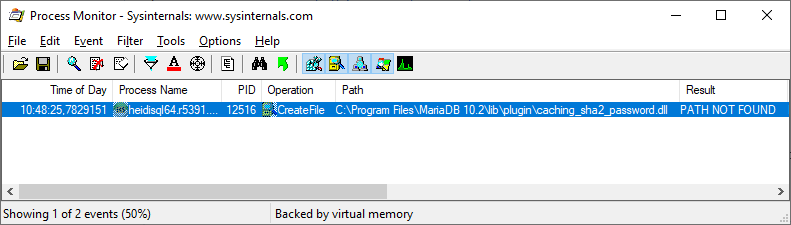
It means that the application is trying to load caching_sha2_password.dll from C:\Program Files\MariaDB 10.2\lib\plugin, and it fails because the DLL is not there.
So it seems that caching_sha2_password.dll is not even loaded.
But please don't ask me more details, I really don't know the source code of MariaDB...
mlocati
on 12 Dec 2018
@9EOR9 happy Christmas! :)
While the Connector v3.0.8 is available again now, it still seems to ignore any value for MYSQL_PLUGIN_DIR set via mysql_options() in the 64bit version. The 32bit libmariadb.dll works. Or is the 64bit version of the plugin somehow incompatible? Is this addressed in some bug report, as I can't find one on jira.mariadb.org, except for the initial one ?
It should be sufficient to set MYSQL_PLUGIN_DIR or?
mysql_options(FHandle, MYSQL_PLUGIN_DIR, 'c:\path\to\heidisql\plugins');
Would be nice to shed some light on this quite "popular" issue. Thanks for any help!
Here's a diff of the both 32/64bit versions of the plugin, which looks ok to me:

ansgarbecker
on 27 Dec 2018
Hi Ansgar,
merry Christmas to you too!
I will check this tomorrow and get back to you!
/Georg
On Thu, Dec 27, 2018 at 12:01 PM Ansgar Becker notifications@github.com
wrote:
@9EOR9 https://github.com/9EOR9 happy Christmas! :)
While the Connector v3.0.8 is available again now
https://downloads.mariadb.com/Connectors/c/connector-c-3.0.8/, it still
seems to ignore any value for MYSQL_PLUGIN_DIR set via mysql_options() in
the 64bit version. The 32bit libmariadb.dll works. Or is the 64bit version
of the plugin somehow incompatible? Is this addressed in some bug report,
as I can't find one on jira.mariadb.org, except for the initial one
https://jira.mariadb.org/browse/CONC-312 ?It should be sufficient to set MYSQL_PLUGIN_DIR or?
mysql_options(FHandle, MYSQL_PLUGIN_DIR, 'c:\path\toheidisqlplugins');
Would be nice to shed some light on this quite "popular" issue. Thanks for
any help!Here's a diff of the both 32/64bit versions of the plugin, which looks ok
to me:[image: grafik]
https://user-images.githubusercontent.com/7986591/50477947-eddb5c80-09ce-11e9-9224-510d42d4900e.png—
You are receiving this because you were mentioned.
Reply to this email directly, view it on GitHub
https://github.com/HeidiSQL/HeidiSQL/issues/163#issuecomment-450129773,
or mute the thread
https://github.com/notifications/unsubscribe-auth/AHhJVRf7Zcwm1Z_cF3MW8XUZHG2sdNHHks5u9KimgaJpZM4STosR
.
--
Georg Richter, Senior Software Engineer
MariaDB Corporation Ab
9EOR9
on 27 Dec 2018
Hi Ansgar,
I just downloaded the 64-bit msi and tested it, it works as expected with
a) mysql_options(mysql, MYSQL_PLUGIN_DIR, "....")
b) via environment variable MARIADB_PLUGIN_DIR
Do you get any error message?
9EOR9
on 28 Dec 2018
And of course you need to escape backslashes in mysql_options call.
9EOR9
on 28 Dec 2018
Hey Georg,
thanks for your quick input.
Yes, I am still getting this error in the 64bit version:
Plugin caching_sha2_password could not be loaded: Das angegebene Modul wurde nicht gefunden. Library path is 'lib/mariadb/plugin/caching_sha2_password.dll'
Did you also try a connection to MySQL 8 via that caching_sha2_password plugin? I guess you did, but just in case.
I ran a test by copying the 64bit caching_sha2_password.dll to "C:\path\to\heidisql\lib\mariadb\plugin\" the relative path mentioned in the above error message. This works! But I'd like to keep the plugins where they belong.
I did not escape the backslashes yet, as the 32bit version works without, and also I was thinking that escaping is just required in C applications due to the special meaning of a backslash. In Delphi applications, a backslash does not have a special meaning, so you normally don't need to double it for escaping. But probably you mean that libmariadb also wants an escaped string. I will give that another test round.
ansgarbecker
on 28 Dec 2018
Hi,
"Library path is 'lib/mariadb/plugin/caching_sha2_password.dll"
That means that MARIADB_PLUGIN_DIR env. variable was not set or
mysql_options(mysql, MYSQL_PLUGIN_DIR,...) did not work for some reason.
Can you provide me a link to the HeidiSQL version which you tested, so I
can try to debug.
/Georg
On Fri, Dec 28, 2018 at 10:50 AM Ansgar Becker notifications@github.com
wrote:
Hey Georg,
thanks for your quick input.
Yes, I am still getting this error in the 64bit version:
Plugin caching_sha2_password could not be loaded: Das angegebene Modul
wurde nicht gefunden. Library path is
'lib/mariadb/plugin/caching_sha2_password.dll'Did you also try a connection to MySQL 8 via that caching_sha2_password
plugin? I guess you did, but just in case.I ran a test by copying the 64bit caching_sha2_password.dll to
"C:\path\toheidisql*lib\mariadbplugin*" the relative path mentioned
in the above error message. This works! But I'd like to keep the plugins
where they belong.I did not escape the backslashes yet, as the 32bit version works without,
and also I was thinking that escaping is just required in C applications
due to the special meaning of a backslash. In Delphi applications, a
backslash does not have a special meaning, so you normally don't need to
double it for escaping. But probably you mean that libmariadb also wants an
escaped string. I will give that another test round.—
You are receiving this because you were mentioned.
Reply to this email directly, view it on GitHub
https://github.com/HeidiSQL/HeidiSQL/issues/163#issuecomment-450330359,
or mute the thread
https://github.com/notifications/unsubscribe-auth/AHhJVZLwIfkfYPxCCCwv-UCfrerse9SFks5u9el0gaJpZM4STosR
.
--
Georg Richter, Senior Software Engineer
MariaDB Corporation Ab
9EOR9
on 28 Dec 2018
Indeed, my call to mysql_options returns -1 on 64bit and 0 on 32bit (zero = success, non-zero = failed). I have no clue why.
ansgarbecker
on 28 Dec 2018
I can provide you a debug version of C/C if that might help.
/Georg
On Fri, Dec 28, 2018 at 5:29 PM Ansgar Becker notifications@github.com
wrote:
Indeed, my call to mysql_options returns -1 on 64bit and 0 on 32bit (zero
= success, non-zero = failed). I have no clue why.—
You are receiving this because you were mentioned.
Reply to this email directly, view it on GitHub
https://github.com/HeidiSQL/HeidiSQL/issues/163#issuecomment-450386877,
or mute the thread
https://github.com/notifications/unsubscribe-auth/AHhJVfrheJqglvxijRKvO4D5II20hIinks5u9kbfgaJpZM4STosR
.
--
Georg Richter, Senior Software Engineer
MariaDB Corporation Ab
9EOR9
on 28 Dec 2018
Solved it! I just had to ensure that the second parameter to mysql_options is a 32bit integer, not some Delphi enumeration which is internally handled as a lower numeric type like Byte or Smallint:
TMySQLOption = (
  MYSQL_OPT_CONNECT_TIMEOUT,
  ...,
  MYSQL_PLUGIN_DIR,
  );
mysql_options(FHandle, Integer(MYSQL_PLUGIN_DIR), 'c:\path\to\heidisql\plugins\');
That casting to Integer did the trick.
Delphi enumerations seem to be Byte or Smallint, while C enum's seem to be Int32 or UInt32.
ansgarbecker
on 28 Dec 2018
Glad to see that the Problem is fixed!
Am Fr., 28. Dez. 2018, 20:30 hat Ansgar Becker notifications@github.com
geschrieben:
Solved it! I just had to ensure that the second parameter to mysql_options
is a 32bit integer, not some Delphi enumeration which is internally handled
as a lower numeric type like Byte or Smallint:TMySQLOption = (
MYSQL_OPT_CONNECT_TIMEOUT,
...,
MYSQL_PLUGIN_DIR,
);
mysql_options(FHandle, Integer(MYSQL_PLUGIN_DIR), 'c:\path\toheidisqlplugins\');That casting to Integer did the trick.
Delphi enumerations seem to be Byte or Smallint, while C enum's seem to be
Int32 or UInt32.—
You are receiving this because you were mentioned.
Reply to this email directly, view it on GitHub
https://github.com/HeidiSQL/HeidiSQL/issues/163#issuecomment-450414463,
or mute the thread
https://github.com/notifications/unsubscribe-auth/AHhJVUlFmh3w-7gbOrKNWOurakE_RjFLks5u9nFDgaJpZM4STosR
.
9EOR9
on 28 Dec 2018
Hi guys, is there any way to fix this error about caching_sha2_password running HeidiSQL from Microsoft Store on Windows? I have any permission to write in the windows store path where heidiSQL is installed.
 AngelusGi
on 29 Jan 2019
AngelusGi
on 29 Jan 2019
@ansgarbecker
there is a bug. in 10.3.0.5771.
1、when i the first time connect to a mysql8 server use libmysql.dll, it report an error,access denied for user。
2、then i try that use libmariadb.dll,it success
3、then i switch back to libmysql.dll,it success
 trgfree
on 6 Jan 2020
trgfree
on 6 Jan 2020
Related issues
rentalhost
·
5Comments
 naoma123
·
3Comments
naoma123
·
3Comments
 cautionbug
·
4Comments
cautionbug
·
4Comments
 rkmaier
·
5Comments
rkmaier
·
5Comments
 dzintb
·
3Comments
dzintb
·
3Comments
Most helpful comment
I've been able to configure a development machine so that we can connect to in with HeidiSQL:
bin/mysql) I updated the password of the user I use with HeidiSQL: