Handsontable: Issues with scrolling in a parent element
We use handsontable for a few years as our main input table widget. We have multiple forms where we need to have synchronized scrolling with frozen row headers.
To achieve that we used to generate the tables inside a div with a designated width and overflow-x, while each table is created within a child div with a large width and all columns rendered.
This setup stopped working in version 0.20.3. with the following phenomena:
- While the height of the hider in the left container is correct (fit the rows) the height of the holders in each of the clones is wrong. We got over that by enforcing the hider height on all holders at the afterRender hook callback.
- When you scroll (horizontally), the afterScroll hook is fired only once, at the first scroll event but not on subsequent scrolls, although the onTableScroll of the overlay is fired everytime. It just gets to an execution flow without a refreshAll() call that drives the transformation of the left clone to the correct coordinates. This eliminates the header freezing effect.
- When the parent horizontal scrolling is not zero, the positioning of the editor container div has wrong offset as it doesn't compensate for the scrolling status of the parent element (which is calculated correctly in other places in the code.
We are open to other ways of setting synchronized scrolling of multiple tables, including with the built-in scroll bar, but there are other instances where the wrapping element is scrolled (often vertically), and then the editor positioning is wrong.
 ohadb1
All 28 comments
Welcome @ohadb1 can you create a demo code where we can track all the changes that are important to you?
 AMBudnik
on 12 Jan 2016
ohadb1
on 13 Jan 2016
AMBudnik
on 12 Jan 2016
ohadb1
on 13 Jan 2016
Thank you for demo.
I tried to check scrolling issue in comparison with older versions but I can't see the difference - although in none of them it was working fine till you use a new settings option called preventOverflow (since 0.20.3), when I added it to your instances' settings it provided correct behaviour: https://jsfiddle.net/ecn0njcs/7/
AMBudnik
on 13 Jan 2016
It was working on an older version. Anyway, this fixed only the height of the hider.
There are still two issues:
- the scrolling in the outer div doesn't fire the callback that sets the transform3d property of the left clone to compensate for the scrolling and float the row headers.
- The positioning of the editor container div doesn't compensate for scrolling, so if you have a non-zero scroll, the editor will appear to the left with the scroll offset instead of above the edited cell.
ohadb1
on 13 Jan 2016
Don't worry, I'll try to bring you answers to all issues.
When it comes to editor position (no 2) I guess it's a bug, We would have to check this one so I will mark the whole issue as a bug report.
AMBudnik
on 13 Jan 2016
Hi @ohadb1
do you experience any of those issue with the latest version?
AMBudnik
on 9 Sep 2016
I'm closing this issue due to lack of recent activity but feel free to leave a comment or create a new topic if needed.
AMBudnik
on 20 Sep 2016
I just tried the demo in this thread, and the editor position problem persists. While the demo's editor sits too far to the left when the view is scrolled, the problem in my code has the editor sitting too far above the cell being edited when the user scrolls down. This can make it entirely impossible to edit the cell, since the editor may be completely off screen.
 JohnSFisher
on 16 Jun 2017
JohnSFisher
on 16 Jun 2017
Hi @JohnFisherC2ITS
Can you record the behavior? It will help a lot.
AMBudnik
on 19 Jun 2017
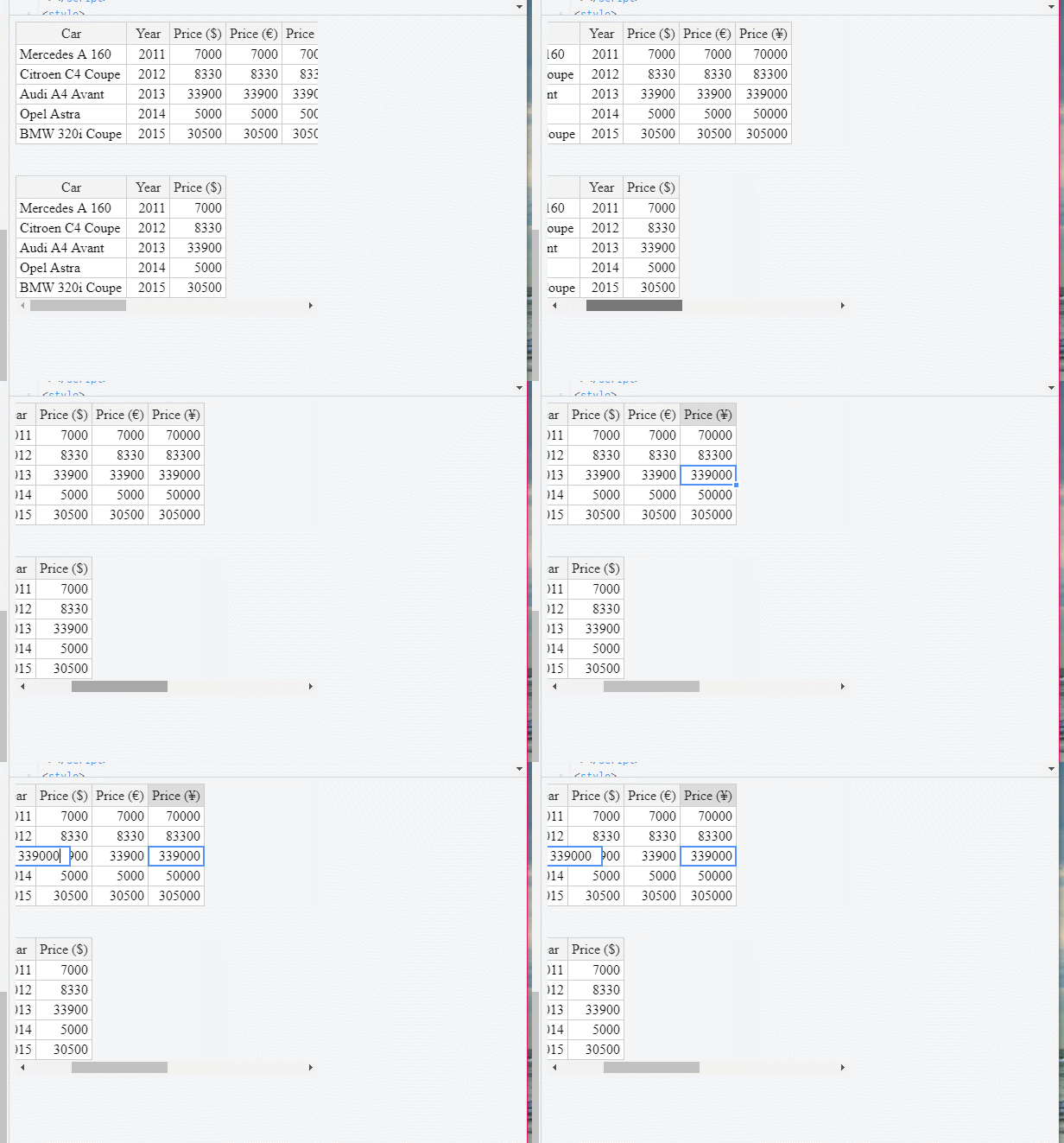
Here it is:
- Open the Fiddle from your comment above: https://jsfiddle.net/ecn0njcs/7/
- Use the horizontal scrollbar below the two grids to scroll right
- Double-click a cell to edit it
- Notice that the edit box is to the left of the cell instead of being in the cell's location
JohnSFisher
on 19 Jun 2017
Thank you very much for sharing @JohnFisherC2ITS I have replicated the same behavior in the newest version of Handsontable.
AMBudnik
on 20 Jun 2017
replicable in 0.34.5 https://jsfiddle.net/handsoncode/na5pr8ue/
AMBudnik
on 20 Nov 2017
The issue is very similar to https://github.com/handsontable/handsontable/issues/4832 (if not the same).
ps. it is replicable for v 0.38.1
AMBudnik
on 5 Apr 2018
Confirmed in 2.0.0.
 krzysztofspilka
on 5 Apr 2018
krzysztofspilka
on 5 Apr 2018
@ohadb1 @AMBudnik We would like to address this issue but struggle with figuring out the purpose of this change. Could you elaborate on what do you want to achieve (ultimately)? What is your target result?
krzysztofspilka
on 5 Apr 2018
What we want to achieve in this case is the ability to edit content in a table whose container’s ancestor is scrolled. The editor should appear correctly over the edited cell without missing the scroll offset of the ancestor.
The entire issue has a little more to it, and the idea is to have multiple tables synchronized in scrolling and column widths, while having fixed (frozen) row headers
ohadb1
on 9 Apr 2018
What do you think of a situation like this @ohadb1 http://jsfiddle.net/handsoncode/hjkxL9ss/?
In this example, if you move scroll of the first table the second one follows to the same first visible column.
AMBudnik
on 10 Apr 2018
@AMBudnik was this issue fixed? Would you please indicate code commit?
 obrizan
on 27 Apr 2018
obrizan
on 27 Apr 2018
Hi @ohadb1
the issue report is at https://github.com/handsontable/handsontable/issues/4832
It is still replicable in the newest version and hasn't been scheduled yet
AMBudnik
on 30 Apr 2018
@AMBudnik My team has also been experiencing this and other layout issues when the table is inside a scrolling element. Unfortunately, #4832 is a different issue and does not correctly address what @JohnFisherC2ITS reported, so this issue should be reopened.
In his example, the problem occurs when a container element has scrolling enabled. Instead of scrolling the entire window, only the container element is scrolled. When the text editor is shown for the active cell and the user scrolls, the editor position is refreshed by subtracting scroll offset of the container from the editor. That works fine when the container is the window, but when the container is another element within the document, the editor ends up moving away from the cell by the amount of scroll offset detected.
The solution is to subtract the offset amount only when the scrolling container is the window. When the scrolling container is not the window, the position of the table relative to its container is always the same. As you scroll horizontally, the left edge of the table is still the same number of pixels from the left edge of the container. Therefore, it is not required to subtract the scroll offset amount. Here is the fix:
TextEditor.prototype.refreshDimensions
```
//var editTop = currentOffset.top - containerOffset.top - editTopModifier - scrollTop;
//var editLeft = currentOffset.left - containerOffset.left - 1 - scrollLeft;
var editTop = currentOffset.top - containerOffset.top - editTopModifier;
if (scrollableContainer === window) editTop -= scrollTop;
var editLeft = currentOffset.left - containerOffset.left - 1;
if (scrollableContainer === window) editLeft -= scrollLeft;
Currently, scrollTop and scrollLeft are being subtracted regardless of whether the scrollableContainer is the window.

The same solution should be applied to other editors. I also have fixes for SelectEditor and Comments.

**SelectEditor.prototype.refreshDimensions**
Initially remove the scroll amount:
//editTop = currentOffset.top - containerOffset.top - 1 - (scrollableContainer.scrollTop || 0),
//editLeft = currentOffset.left - containerOffset.left - 1 - (scrollableContainer.scrollLeft || 0),
editTop = currentOffset.top - containerOffset.top - 1,
editLeft = currentOffset.left - containerOffset.left - 1,
Then subtract it when the window is the scrollable container:
if (scrollableContainer === window) {
editTop -= (scrollableContainer.scrollTop || 0);
editLeft -= (scrollableContainer.scrollLeft || 0);
}
**Comments.refreshEditor**
In the case of comments, the div is on the document body level instead of nested within the table, so this needs the opposite treatment from the text and select editors. When you scroll the container now, the comment stays in a fixed position...the initial position of the cell. We need to subtract the container scroll offset when the scrolled container is not the window.

After scrollableElement is defined:
var containerScrollTop = scrollableElement !== window ? scrollableElement.scrollTop : 0;
var containerScrollLeft = scrollableElement !== window ? scrollableElement.scrollLeft : 0;
Then subtract the offset from x and y:
//var x = cellLeftOffset + lastColWidth;
//var y = cellTopOffset;
var x = cellLeftOffset + lastColWidth - containerScrollLeft;
var y = cellTopOffset - containerScrollTop;
```
Similar to comments, the datepicker widget ends up in a fixed position. When you scroll the table container, the calendar doesn't follow. Unlike comments, there does not appear to be any method that refreshes the widget position, so I do not have a fix for it right now.
Please consider these changes and similar fixes for datepicker and any other affected editor for an upcoming release. Thanks.
 lharkleroad
on 17 May 2018
lharkleroad
on 17 May 2018
Thank you for investigating this issue @lharkleroad
I am reopening the issue report
AMBudnik
on 17 May 2018
I tried @lharkleroad 's solution above but it didn't work for me (my table is in a div not whole window).
What I did notice was that the code for selecting the scrollable container in TextEditor.prototype.refreshDimensions is quite different from that in SelectEditor.prototype.refreshDimensions
When I changed as follows in TextEditor.prototype.refreshDimensions
 //var scrollableContainer = this.instance.view.wt.wtOverlays.topOverlay.mainTableScrollableElement;
 var scrollableContainer = (0, _element.getScrollableElement)(this.TD);
the problem was fixed with this change alone.
 rdtrimble
on 5 Jun 2018
rdtrimble
on 5 Jun 2018
While it is certainly true that they are getting scrollableContainer two different ways, both methods return the same node. You can print the results of both of them to console.log to verify this. So changing to the other method of finding the container alone isn't going to change anything in relation to the offset position of editors. You still have to account for whether or not the scrollable container is the window vs another element on the page.
lharkleroad
on 5 Jun 2018
@lharkleroad Thank you!
 tyler-gross
on 12 Jun 2018
tyler-gross
on 12 Jun 2018
This broke again for me when I upgraded to Pro. This was my eventual fix for both TextEditor.prototype.refreshDimensions and SelectEditor.prototype.refreshDimensions:
var viewportOffset = this.TD.getBoundingClientRect();
var instanceOffset = this.instance.rootElement.getBoundingClientRect();
var editTop = viewportOffset.top - instanceOffset.top;
var editLeft = viewportOffset.left - instanceOffset.left;
Hope this helps someone until the Handsontable team can release a fix.
tyler-gross
on 22 Aug 2018
This is still a problem in v6.1.1.
tyler-gross
on 2 Nov 2018
This is still a problem in v7.1.1. Fix above.
tyler-gross
on 1 Oct 2019
@AMBudnik My team has also been experiencing this and other layout issues when the table is inside a scrolling element. Unfortunately, #4832 is a different issue and does not correctly address what @JohnFisherC2ITS reported, so this issue should be reopened.
In his example, the problem occurs when a container element has scrolling enabled. Instead of scrolling the entire window, only the container element is scrolled. When the text editor is shown for the active cell and the user scrolls, the editor position is refreshed by subtracting scroll offset of the container from the editor. That works fine when the container is the window, but when the container is another element within the document, the editor ends up moving away from the cell by the amount of scroll offset detected.
The solution is to subtract the offset amount only when the scrolling container is the window. When the scrolling container is not the window, the position of the table relative to its container is always the same. As you scroll horizontally, the left edge of the table is still the same number of pixels from the left edge of the container. Therefore, it is not required to subtract the scroll offset amount. Here is the fix:
TextEditor.prototype.refreshDimensions
 //var editTop = currentOffset.top - containerOffset.top - editTopModifier - scrollTop;
 //var editLeft = currentOffset.left - containerOffset.left - 1 - scrollLeft;
 var editTop = currentOffset.top - containerOffset.top - editTopModifier;
 if (scrollableContainer === window) editTop -= scrollTop;
 var editLeft = currentOffset.left - containerOffset.left - 1;
 if (scrollableContainer === window) editLeft -= scrollLeft;
Currently, scrollTop and scrollLeft are being subtracted regardless of whether the scrollableContainer is the window.
The same solution should be applied to other editors. I also have fixes for SelectEditor and Comments.
SelectEditor.prototype.refreshDimensions
Initially remove the scroll amount://editTop = currentOffset.top - containerOffset.top - 1 - (scrollableContainer.scrollTop || 0), //editLeft = currentOffset.left - containerOffset.left - 1 - (scrollableContainer.scrollLeft || 0), editTop = currentOffset.top - containerOffset.top - 1, editLeft = currentOffset.left - containerOffset.left - 1,Then subtract it when the window is the scrollable container:
if (scrollableContainer === window) { editTop -= (scrollableContainer.scrollTop || 0); editLeft -= (scrollableContainer.scrollLeft || 0); }Comments.refreshEditor
In the case of comments, the div is on the document body level instead of nested within the table, so this needs the opposite treatment from the text and select editors. When you scroll the container now, the comment stays in a fixed position...the initial position of the cell. We need to subtract the container scroll offset when the scrolled container is not the window.After scrollableElement is defined:
var containerScrollTop = scrollableElement !== window ? scrollableElement.scrollTop : 0; var containerScrollLeft = scrollableElement !== window ? scrollableElement.scrollLeft : 0;Then subtract the offset from x and y:
//var x = cellLeftOffset + lastColWidth; //var y = cellTopOffset; var x = cellLeftOffset + lastColWidth - containerScrollLeft; var y = cellTopOffset - containerScrollTop;Similar to comments, the datepicker widget ends up in a fixed position. When you scroll the table container, the calendar doesn't follow. Unlike comments, there does not appear to be any method that refreshes the widget position, so I do not have a fix for it right now.
Please consider these changes and similar fixes for datepicker and any other affected editor for an upcoming release. Thanks.
Thank you , you are a life saver
 marinoszago
on 16 Oct 2019
marinoszago
on 16 Oct 2019
Related issues
 andrewQwer
·
23Comments
andrewQwer
·
23Comments
 dansabirov
·
48Comments
dansabirov
·
48Comments
 lewisjb
·
33Comments
lewisjb
·
33Comments
 kakabomba
·
27Comments
kakabomba
·
27Comments
 Hokwang
·
69Comments
Hokwang
·
69Comments
Most helpful comment
@AMBudnik My team has also been experiencing this and other layout issues when the table is inside a scrolling element. Unfortunately, #4832 is a different issue and does not correctly address what @JohnFisherC2ITS reported, so this issue should be reopened.
In his example, the problem occurs when a container element has scrolling enabled. Instead of scrolling the entire window, only the container element is scrolled. When the text editor is shown for the active cell and the user scrolls, the editor position is refreshed by subtracting scroll offset of the container from the editor. That works fine when the container is the window, but when the container is another element within the document, the editor ends up moving away from the cell by the amount of scroll offset detected.
The solution is to subtract the offset amount only when the scrolling container is the window. When the scrolling container is not the window, the position of the table relative to its container is always the same. As you scroll horizontally, the left edge of the table is still the same number of pixels from the left edge of the container. Therefore, it is not required to subtract the scroll offset amount. Here is the fix:
TextEditor.prototype.refreshDimensions
```
//var editTop = currentOffset.top - containerOffset.top - editTopModifier - scrollTop;
//var editLeft = currentOffset.left - containerOffset.left - 1 - scrollLeft;
var editTop = currentOffset.top - containerOffset.top - editTopModifier;
if (scrollableContainer === window) editTop -= scrollTop;
var editLeft = currentOffset.left - containerOffset.left - 1;
if (scrollableContainer === window) editLeft -= scrollLeft;
//editTop = currentOffset.top - containerOffset.top - 1 - (scrollableContainer.scrollTop || 0),
//editLeft = currentOffset.left - containerOffset.left - 1 - (scrollableContainer.scrollLeft || 0),
editTop = currentOffset.top - containerOffset.top - 1,
editLeft = currentOffset.left - containerOffset.left - 1,
if (scrollableContainer === window) {
  editTop -= (scrollableContainer.scrollTop || 0);
  editLeft -= (scrollableContainer.scrollLeft || 0);
}
var containerScrollTop = scrollableElement !== window ? scrollableElement.scrollTop : 0;
var containerScrollLeft = scrollableElement !== window ? scrollableElement.scrollLeft : 0;
//var x = cellLeftOffset + lastColWidth;
//var y = cellTopOffset;
var x = cellLeftOffset + lastColWidth - containerScrollLeft;
var y = cellTopOffset - containerScrollTop;
```
Similar to comments, the datepicker widget ends up in a fixed position. When you scroll the table container, the calendar doesn't follow. Unlike comments, there does not appear to be any method that refreshes the widget position, so I do not have a fix for it right now.
Please consider these changes and similar fixes for datepicker and any other affected editor for an upcoming release. Thanks.