Handsontable: Handsontable cell is focusing, when focus in another input (for example, modal dialog)
Hi, @warpech !
Found interesting bug in new version of Handsontable.
I have a handsontable with outsideClickDeselects: false (I really need this option is set to false), and jquery ui dialog. When I select any cell in handsontable and showing my dialog (by pressing button) and trying to press in my input on dialog by mouse focus is setting to selected cell in handsontalbe.
Here is demonstration code http://jsfiddle.net/ggwgk/8/
Btw, there is no such problem in version 0.7.5
 dansabirov
All 48 comments
Just wondering if anyone has found a "work around" for this problem while @warpech tries to do a proper fix.
Anyone have any ideas?
 bruceh48
on 17 Mar 2013
bruceh48
on 17 Mar 2013
Hi, @bruceh48
I found workaround, that suits for my cases. I need to prevent focusing only while I show modal dialogs. So I added one more settings to handsontable, and on button click event (which cause showing modal dialog) I set blocked status to true like this:
$("#example").handsontable('updateSettings', { blocked: true });
When I close modal dialog I update setting and set blocked to false.
So now I need to use blocked in handsontable. Found editproxy property and prepare method (it should be line 1230 in 0.8.14 version), and change it to this:
prepare: function () {
if (priv.settings.asyncRendering) {
self.registerTimeout('prepareFrame', function () {
var TD = self.view.getCellAtCoords(priv.selStart.coords());
if(!priv.settings.blocked) {
TD.focus();
}
priv.editorDestroyer = self.view.applyCellTypeMethod('editor', TD, priv.selStart.row(), priv.selStart.col());
}, 0);
}
else {
var TD = self.view.getCellAtCoords(priv.selStart.coords());
TD.focus();
priv.editorDestroyer = self.view.applyCellTypeMethod('editor', TD, priv.selStart.row(), priv.selStart.col());
}
}
I know that this workaround is not good, but if you need it working without loosing time, it works good.
Hope this helps
dansabirov
on 18 Mar 2013
From version 0.8.15 there is no such problem, look issue https://github.com/warpech/jquery-handsontable/issues/408
dansabirov
on 19 Mar 2013
Hi @warpech,
Thanks for the "0.8.15" its much appreciated.
Although we can now able to 'select" input controls outside of the grid, we seem to loose the selection made in the grid.
See : http://jsfiddle.net/warpech/84Uch/1/
It would be great if we could could maintain the selection in the grid whilst entering in data into other controls outside of the grid. That way we can have the best of both worlds..
Is that something you would aim for in the future?
 brucelandgate
on 19 Mar 2013
brucelandgate
on 19 Mar 2013
@brucelandgate I think this has been fixed in one of previous releases. (sorry for a long reply)
We don't get new input since 4 months, so I'll close this issue.
Thanks for all for your discussion and of course for using Handsontable.
 setthase
on 3 Jul 2013
setthase
on 3 Jul 2013
I've this problem with handsontable 0.10.5: When I open a dialog from a context menu option, and start writing without clicking inside the dialog, sometimes the edit goes on the table beneath, even if I set focus on another input as soon as dialog open.
Example here:
http://codepen.io/Cirunz/pen/IcimK?editors=001
It doen't happens every time (but when it happens is destructive, because the user can edit lot of data before understanding what it's going on), I think it's time related: try to open the dialog and start writing soon after.
Also: often it only enter edit mode on the cell: the subsequent keys are printed correctly in the input on the dialog, so it seems that when the .focus() kicks in the effect disappear, but it's too late.
I've tried this on Chrome 33.0.1750.117, Firefox 29.0, Internet Explorer 11 and Opera 12.16.
It happens on any of them. The only difference I've found (but maybe it's only my perception) is how fast I've to start pressing keys after the click: on firefox it seems to happens only some time, only if I start pressing keys while clicking.
In the example I've applied the workaround proposed by @dansabirov but the problem still happens.
Thanks.
 Cirunz
on 22 May 2014
Cirunz
on 22 May 2014
I've updated the example:
http://codepen.io/Cirunz/pen/IcimK?editors=001
Now there is a second grid with a workaround: for this instance of handsontable there is not outsideClickDeselects option (so it's defaulted to true).
Instead, I keep track myself of the current selection on a global variable, that I set in the afterSelection event.
This way, the dialog works as intended: as soon as it appears I can write on the first input (automatically focused), and I can't break it, no matter how much I try.
In the first grid the problem is still there. It's like focus() is not as much effective as if manually click on the input field, or the dialog in general.
Cirunz
on 23 May 2014
Same issue here, I need to programatically set the focus on another input but the first key I press write inside the selected cell.
Unfortunately handsontable is part of our build process so I cannot edit it, unless I fork which I would love to avoid for such a minor thing.
Using version 0.17.0
 floribon
on 20 Nov 2015
floribon
on 20 Nov 2015
Hi guys, please update to 0.20.0 if possible, before that version we had some issues with focus it can be related to what you face with.
 AMBudnik
on 20 Nov 2015
AMBudnik
on 20 Nov 2015
Hi @AMBudnik I've upgraded to 0.20.0, unfortunately I still have that problem. I'm using jQUery to focus an input $('#myinput').focus() and I see the text blinking cursor on it, but when I type something the text get entered in the cell instead.
If I may, I guess you have a keypress listener, on which you could check if the focus is on the current cell before adding text to it.
floribon
on 20 Nov 2015
@floribon, I think @AMBudnik meant to say to try 0.20.1
 alexisszabo
on 22 Nov 2015
alexisszabo
on 22 Nov 2015
Thank you @alexisszabo yes I meant 0.20.1 where on of focus bugs were fixed.
AMBudnik
on 22 Nov 2015
The same issue with 0.20.1.
 kemins
on 8 Dec 2015
kemins
on 8 Dec 2015
Indeed, I forgot to reply but I actually upgraded to the latest at that moment, 0.20.1, which didn't solve the issue.
floribon
on 8 Dec 2015
Could you create a simple demo showing this bug with latest version applied?
AMBudnik
on 8 Dec 2015
Here it is:
http://plnkr.co/edit/7jpkMMoHtUT66SlL99F3?p=preview
I believe we could avoid it by "unselecting" the cell within the table first, if the API allows that.
But at best I would need the cell to keep being selected, with the blue border, yet still type text where the focus is.
PS: this plunkr uses 0.20.1 but same if we replace it by 0.20.2
floribon
on 8 Dec 2015
present in 0.24.1
AMBudnik
on 18 Mar 2016
Still present in 0.26.1
As a reminder, here is how to reproduce: http://plnkr.co/edit/7jpkMMoHtUT66SlL99F3?p=preview
floribon
on 24 Aug 2016
thanks for feedback @floribon
AMBudnik
on 31 Aug 2016
Hi @floribon
We have to discuss about this issue in the core-team, but for now we can recommend a workaround: http://plnkr.co/edit/lHsfQwhHLgJgdLOW1ntN?p=preview
 swistach
on 17 Oct 2016
swistach
on 17 Oct 2016
Hi @swistach, clear and simple, thanks!
floribon
on 17 Oct 2016
Hi,
Another curious variation on this subject: when the table is set to readOnly, input outside the table gets some of the keystrokes - letters etc. But arrows, delete & enter are still only captured on the table.
That is my use case - a readonly table, with a filter sidenav which should get the focus/input once the sidenav expands. Table selection should stay as indication where we are, on what row some action will perform - hence outsideClickDeslects: false. At least let the currentRowClassName stay on...
Modified workaround from swistach which shows this:
http://plnkr.co/edit/UKEhnk9O8FwOWD9J5x8u?p=preview
Oh, I bumped the example to 0.31.0
 zoladkow
on 6 Mar 2017
zoladkow
on 6 Mar 2017
Hi @zoladkow,
in your case, you have to use unlisten(): http://plnkr.co/edit/Jn9gHBgCTUjEkuhb9157?p=preview
Selection will stay without any changes but all mounted events will by stopped. When you click on the table, you will set again listening on the Handsontable.
Additionally you can remove outsideClickDeselect and then you can write something without losing cell selection, but when someone click outside of the table, then selection will be removed.
swistach
on 17 Jul 2017
Is there any workaround for situation when the invoker of focus does not know anything about HoT instance? There is a plugin on my page that listens globally the Ctrl+F event and sets focus to its input. Can I somehow subscribe to blur event of Hot and invoke "deselectCell" there, so it will work for every invokers of otherControl.focus()?
Here is the code: http://plnkr.co/edit/goNdd2afihh0UODEGn06?p=preview
Press CTRL+F on the hot
ps: How come this bug is closed if it's not fixed yet?
 pmunin
on 14 Mar 2018
pmunin
on 14 Mar 2018
Hi @pmunin
Above @swistach suggested unlisten method. Have you tried it?
AMBudnik
on 19 Mar 2018
@AMBudnik "unlisten" is a method of handsontable instance, which CTRL+F overrider have no access to - it's different 3rd party module. Is there any way to catch event of Handsontable loosing focus to execute "unlisten" there?
pmunin
on 20 Mar 2018
That is a good question. Unfortunately, I don't know an answer for it but will ask our developer for some hints.
AMBudnik
on 21 Mar 2018
Hi @pmunin
It looks like we would need to put some more logic.
Here I have a demo that works as expected http://plnkr.co/edit/CajKBFzyIAlkphVtDuep?p=preview but... it adds the editor: false (line 36) which disables the cell edition.
What you can test is adding the editor: true when a user uses Enter. I am not sure if that meets your project requirements but that's an option that should work.
AMBudnik
on 21 Mar 2018
@AMBudnik your code does not work, sorry - HoT still intercepts keys like: Arrow(Left/Right/Up/Down), Delete, Backspace, CTRL+A (Select all) after moving focus to Input via CTRL+F
pmunin
on 21 Mar 2018
Maybe I'm doing something wrong.
Here is this demo on Chrome/Windows 10 doing the steps listed there
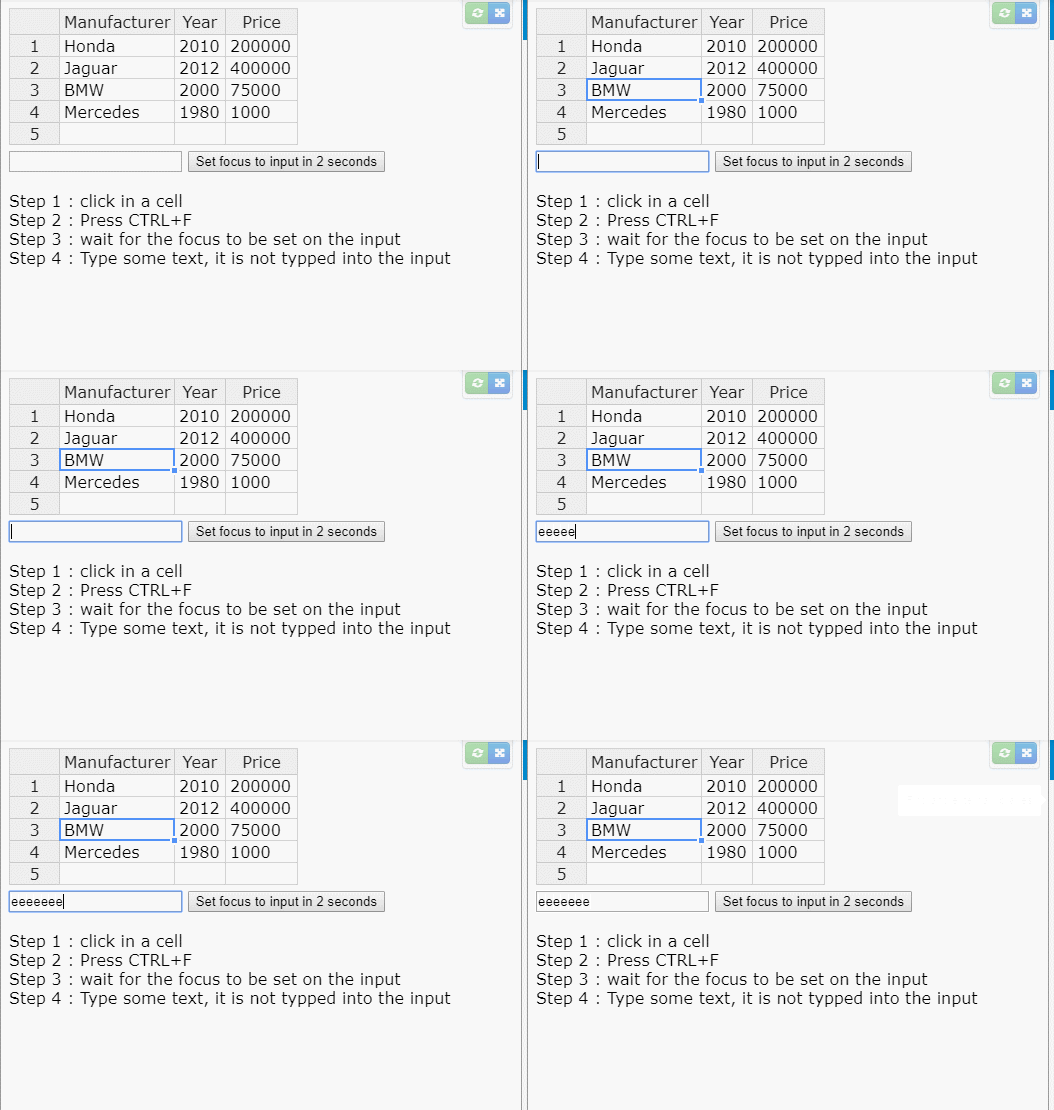
AMBudnik
on 21 Mar 2018
1) Select a cell in the HoT
2) Press CTRL+F (Focus moves to Input box)
3) In Input box: enter "hallo world" then press Backspace
Expected results: delete last letter "d" from the input box
Actual results: Removes HoT cell's content
Same for all other special keys like: Arrow(Left/Right/Up/Down), Delete, Backspace, CTRL+A,...
The only thing that works in your code is anything that ignored by HoT - which is typing a regular character in input box (because non-editable HoT ignores regular character input).
pmunin
on 21 Mar 2018
So that was what I've missed. You're right. I've used Backspace and it erased my cell instead of the input.
I am marking this topic as a bug
AMBudnik
on 22 Mar 2018
It works the same in v 5.0.1
AMBudnik
on 3 Sep 2018
Not a fix but this was my workaround:
outsideClickDeselects: (event) => {
// Deselect cells in grid unless the clicked element matches one of the listed selectors
// e.g. Grid control buttons or the dialog/popover they open
return !event.closest('.grid button, .bp3-dialog, .bp3-popover')
},
It let's you specify which clicked elements should or shouldn't deselect cells in the grid.
Note: .grid is my own class which wraps the Handsontable.
 kevincolyar
on 12 Dec 2018
kevincolyar
on 12 Dec 2018
Thank you for sharing the workaround @kevincolyar
AMBudnik
on 13 Dec 2018
Hi, any update on this very annoying bug ? (it's 5 years old...)
 GaelPaquet
on 21 Jan 2019
GaelPaquet
on 21 Jan 2019
You're right @GaelPaquet the issue had its ups and downs but it is old and still present. We had some attempts on fixing it (in development label on 21th of March) but it failed. I will discuss this subject with our CTO and share an update.
AMBudnik
on 22 Jan 2019
The issue for <input> should be fixed with https://github.com/handsontable/handsontable/pull/5631 (in the next release. The contenteditable="true" is another that that is not fixed within that snippet. That is why I am opening another issue for that bug.
AMBudnik
on 22 Jan 2019
It looks like the modal window + contenteditable="true" also does not allow us to replicate the issue, so the new issue was not created. I will close this one only after we publish the new version and check it once more.
AMBudnik
on 23 Jan 2019
Hey guys!
@dansabirov @bruceh48 @GaelPaquet @kevincolyar @pmunin @floribon @kemins @alexgann @Cirunz @codename- @dansabirov @brucelandgate
We've just fixed a very similar issue here https://github.com/handsontable/handsontable/issues/5541 for the Handsontable 7.0.0. Can you confirm that it works for you?
AMBudnik
on 6 Mar 2019
I believe that we can close the topic as there was no reply for more than 2 weeks, but if something is still wrong please let me know.
AMBudnik
on 22 Mar 2019
I'm still having this issue on v7.0.0
kevincolyar
on 22 Mar 2019
Thank you for a reply, @kevincolyar
I want to narrow down the issue as much as possible.
Does your workaround
outsideClickDeselects: (event) => {
// Deselect cells in grid unless the clicked element matches one of the listed selectors
// e.g. Grid control buttons or the dialog/popover they open
return !event.closest('.grid button, .bp3-dialog, .bp3-popover')
},
have any impact on the 7.0.0 or it works the same (not better/not worse)?
I am reopening the topic.
AMBudnik
on 22 Mar 2019
My workaround doesn't work in the case where:
- A handsontable cell is selected.
- A button is clicked to open a dialog with an text input automatically in focus.
- Any input intended for that dialog input box will be sent to the selected handsontable cell behind the dialog
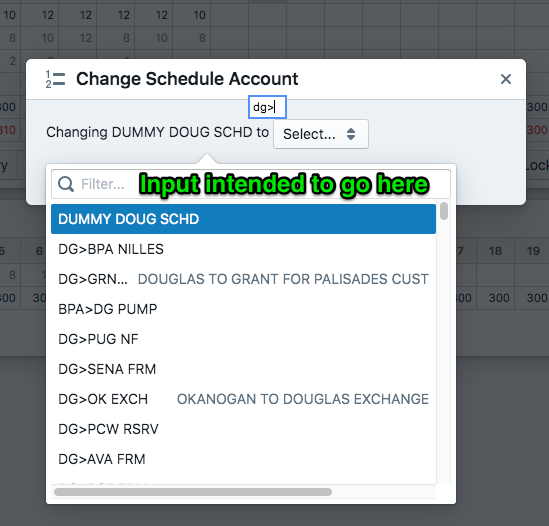
kevincolyar
on 22 Mar 2019
I believe I've found a work-around that solves this issue.
Adding the following key handler to the Handsontable constructor will stop it from stealing input from the specified container elements:
beforeKeyDown: (event) => {
  // Prevent Handsontable from stealing input from the following containers
  if(event.target.closest('.controls, .bp3-dialog, .bp3-popover, .bp3-overlay-backdrop, .bp3-fill'))
    event.stopImmediatePropagation()
},
I have this issue as well. Using the mouse to select an input on a modal will work for me, but not setting the focus programmatically...
Probably not a 100% solution, but I implemented @kevincolyar's work-around like this:
beforeKeyDown: (event: any) => {
   if (!event.target.closest(".handsontableInput")) {
      event.stopImmediatePropagation();
   }
},
Works well enough for me at the moment.
EDIT:
Does not work with locked cells...
 ottosson
on 6 Dec 2019
ottosson
on 6 Dec 2019
worked for me, maybe works w locked cells? Thanks @kevincolyar and @ottosson for the tips
beforeKeyDown: function(e) => {
   if (!e.target.closest(".handsontable")) {
      e.stopImmediatePropagation();
      return;
   }
}
 mewalig
on 27 Apr 2020
mewalig
on 27 Apr 2020
It works the same in v 7.4.2 https://jsfiddle.net/sqou6m7p/1/ and 8.0.0-beta2-rev18 https://jsfiddle.net/sqou6m7p/2/
AMBudnik
on 6 Jul 2020
Related issues
 dosaki
·
23Comments
dosaki
·
23Comments
 lewisjb
·
33Comments
lewisjb
·
33Comments
 azyubin
·
27Comments
azyubin
·
27Comments
 wojciechczerniak
·
21Comments
wojciechczerniak
·
21Comments
 mpetris
·
24Comments
mpetris
·
24Comments
Most helpful comment
I believe I've found a work-around that solves this issue.
Adding the following key handler to the Handsontable constructor will stop it from stealing input from the specified container elements: