Handbrake: Dimensions Tab Redesign.
Wrapped the following into this Issue:
2454 - Upscaling for Youtube
2415 - Offer a list of pre-defined resolution limits.
2436 - Make it easier to set No Crop
1633 - Allow some sensible level of upscaling in the UI.
890 - Allow upscale to the Anamorphic display dimensions
405 - Upscaling
_Bradley's comments:_
Here's an HTML+CSS+JS mock up I did a few years back for improving the dimensions tab with standard resolution presets and adding features such as upscaling and padding. Everything is open for discussion.
One thing I would like to add is a scaling algorithm control with useful presets, e.g. downscaling via Lanczos and upscaling via another sinc-based algorithm or bicubic to reduce artifacts and facilitate using one of the sharpening filters afterward. We could also make super resolution an upscaling option if such an algorithm is available to us via FFmpeg. See also #1515.
Update: #2219 discusses potential to improve automatic cropping and also reminded me about Loose Crop which is available in the Linux/GTK UI. I'd love to see a Loose Crop checkbox control in all GUIs but it does occur to me that the name isn't very self explanatory. Perhaps we could call it ~"Crop to Modulus"~ "Smart Crop"?
Screenshots:

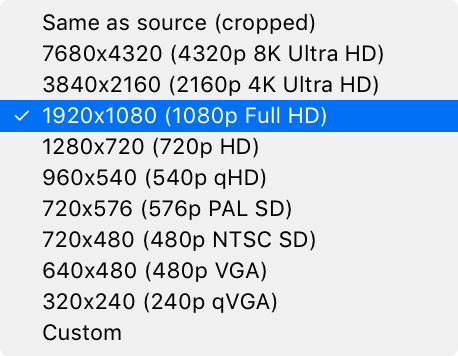
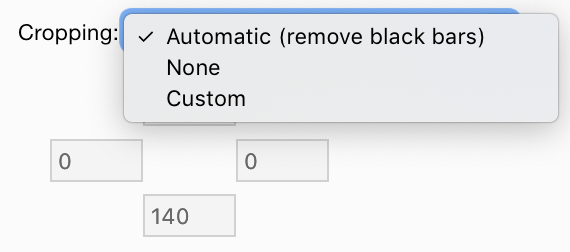
Video demo (zipped MP4):
Code:
Update 2020-05-17
Removes Modulus (and thus the need for Smart/Loose Crop), shows/hides resolution limit custom inputs, adds column headings, and simplifies to be less verbose yet still hopefully intuitive enough.
Screenshots:
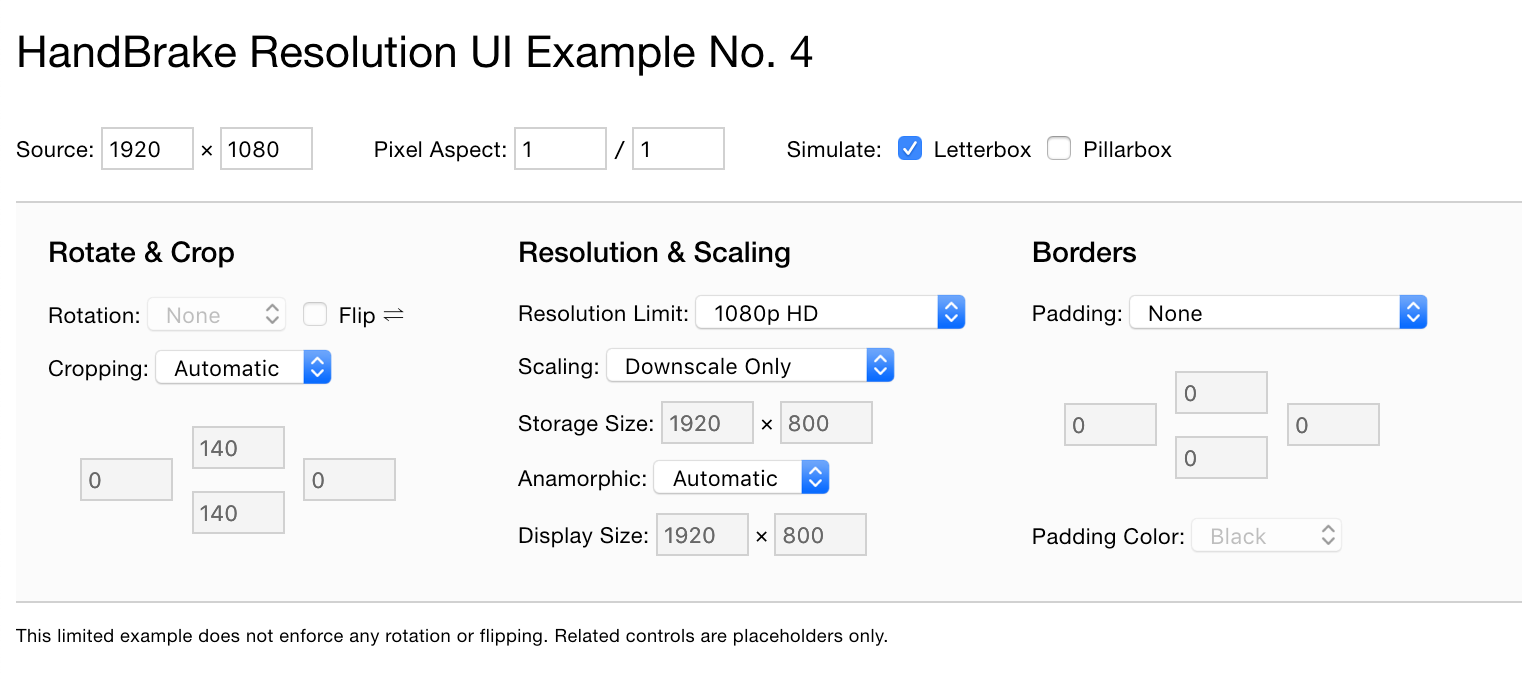
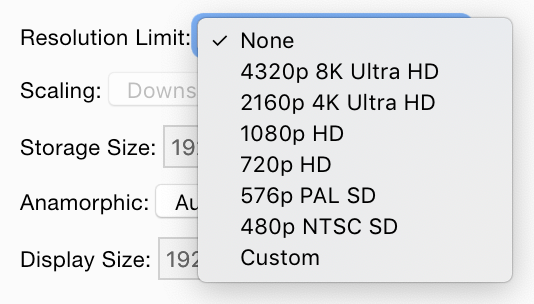
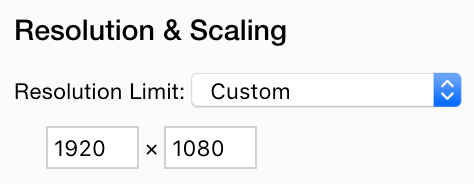
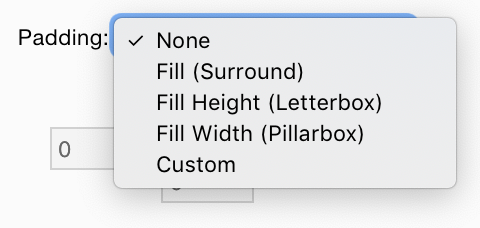
Code:
 sr55
sr55
All 24 comments
@bradleysepos feel free to edit the post above with your change details.
sr55
on 17 Nov 2019
Updated first post with more info for discussion.
 bradleysepos
on 24 Nov 2019
bradleysepos
on 24 Nov 2019
Added a screenshot of the cropping options, which do include "None" in favor of setting all sides to 0 (zero). See first post.
bradleysepos
on 4 Apr 2020
So, is now upscaling available or is this still on the stove ? Thanks !
 gordielachance
on 17 Apr 2020
gordielachance
on 17 Apr 2020
So, is now upscaling available or is this still on the stove ? Thanks !
The graphical interface is still cooking.
NB: Upscaling has been available on the CLI for a long time, without a choice of scaler (Lanczos3 only). If you're sure you want/need upscaling, see the Picture Options section of the CLI --help (also available here) for how to set dimensions manually. You'll want to set both width and maxWidth, height and maxHeight, to make sure you override any maximum limits imposed by a preset.
bradleysepos
on 17 Apr 2020
Couple of thoughts.
- It looks like we will need two new preset keys for the UI dropdowns that control the behaviour.
- PaddingMode
ResolutionLimitMode
Is there a reason the resolution is in the centre?
Resolution Limit Custom input boxes could be hidden when limit dropdown is not set to Custom.
Should modulus not be under the middle column?
sr55
on 17 May 2020
The layout is intended to be a logical top-to-bottom, left-to-right flow (it's not perfect). So I think the idea was to perceptually rotate first—though under the hood it might be less expensive to rotate later, all user settings depend on the final rotation—then crop, set resolution, etc.
Modulus is related to storage resolution and almost everything these days supports mod 2... I wonder if/when we can get rid of it entirely.
Yes those boxes could be hidden when not custom. I think at the time the idea was to show what was happening to the dimensions with each step, which may or may not be necessary.
Thanks for taking a look. 😸
bradleysepos
on 17 May 2020
I think only the Xbox Legacy (read: Xbox 360) and Apple 240p30 (read: old video iPod) official presets use non-mod2, and we've discussed removing them at some point. Maybe now's a good time? Remove the modulus control, move up the cropping controls, and Loose/Smart Crop isn't necessary anymore.
bradleysepos
on 17 May 2020
I guess it's logical but it feels "weird" to me. I'm not sure why.
To make space, Looks like I'm going to have to retire the old preset side panel and either do something similar to the mac with the dropdown button, or maybe implement a preset manager that I've been wanting to do for a while.
sr55
on 17 May 2020
I can certainly revisit the layout. Maybe simplify and make a bit more compact.
bradleysepos
on 17 May 2020
I'd rather use it as a reason to clear out the old preset pane. It's an old design that's not so fit for purposes these days. I have space when it's not cramping up the UI.
sr55
on 17 May 2020
Updated original post with a new revision based on some internal discussion.
bradleysepos
on 17 May 2020
I think the mockup looks great, great way to give more control while updating the interface.
In the #2219 we talked a bit about exposing "i = 0" cropping as an option too. It's not the loose cropping you're talking about here (dealing with modulus), it's not cropping "None," it's not the current autocrop that averages the frame sizes. i=0 is a way to crop only when it's perfectly safe to do so. It crops only those pixels that are always black, so it helps with changing aspect ratios and dark content like noir or sci fi.
Just never figured out what to call it. "Careful crop?" If you were willing to add that to the dropdown (and just have it set a flag that could be checked to set i = 0 in the autocrop code), that would solve #2219 too.
It'd be dead simple to implement, just setting one variable. Hardest part about it is really just figuring out what to call it.
 brownbat
on 13 Jun 2020
brownbat
on 13 Jun 2020
Apple 240p30 and Xbox Legacy 1080p30 have been removed on master branch. All official presets are mod 2 now.
bradleysepos
on 20 Jun 2020
Slowly chipping away at the Windows UI:
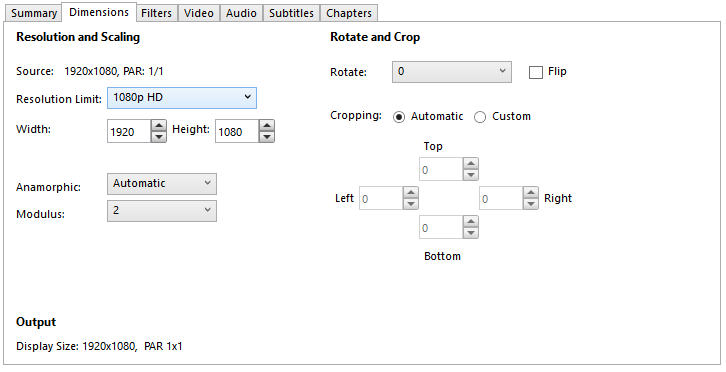
This re-uses the existing Max Width / Height to setup the Resolution Limit. If it matches a dropdown item, it'll default to using that, otherwise custom.
The only quirk to this is if the user does Custom and 1080p, it'll reload as 1080p not custom. I'm not sure how I feel about this but I didn't really want to add another preset key either.
Not done anything with changing crop over to a dropdown yet, or the scaling options. Will await your feedback before tackling that.
I'm going to side track into removing the legacy preset side panel next and replace that with either a preset manager or similar preset display to mac. Not sure what'll be best in the short term. That'll free up the horizontal space for the pad controls.
Supported still on the Add Preset view with similar logic:
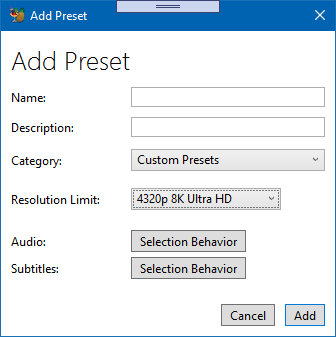
Codes available if you want to have a play. Will be in a nightly tomorrow sometime.
sr55
on 26 Jun 2020
Added a screenshot of the cropping options, which do include "None" in favor of setting all sides to 0 (zero). See first post.
Would this persist? Surely the same options need to be available in Preferences as a default.
 strontiumdesign
on 25 Jul 2020
strontiumdesign
on 25 Jul 2020
Would this persist? Surely the same options need to be available in Preferences as a default.
Official presets (except Production presets) all automatically crop by default. Persisting other cropping values will be accomplished the same as it is today: make your adjustments, then save a new HandBrake preset to use in the future.
bradleysepos
on 25 Jul 2020
The MacGui is almost done, there are some changes to be made in hb_preset_job_init and some new presets keys:
PictureAllowUpscaling
PictureUseMaximumSize
PicturePadMode = {none, fill, filHeight, fillWidth, custom}
for the padding filter custom mode we can reuse the preexisting PicturePad key.
I think it will be enough to modify hb_preset_job_init to handle these three new keys to get it working in the cli too.
 galad87
on 2 Oct 2020
galad87
on 2 Oct 2020
I guess I better get on this :grimacing: Would everyone be ok with targeting spring for a release with this feature? I've got a lot of irons in the fire right now.
 jstebbins
on 2 Oct 2020
jstebbins
on 2 Oct 2020
Works for me. It's been a crazy year for everyone.
bradleysepos
on 2 Oct 2020
We can get the mac/windows UI's done in the mean time.
I'm in no rush to get a release out this year. I have a few things started, not completed and not stabilised so best for everyone it moves into next year. 1.3 is reasonably stable anyway.
sr55
on 4 Oct 2020
I've missed much of the conversation around this. How is PictureAllowUpscaling, PictureUseMaximumSize used and how is it represented in the UI? I'm wondering if PictureAllowUpscaling is really needed since it seems to be only used in conjunction with PictureUseMaximumSize.
jstebbins
on 9 Oct 2020
My assumption is that PictureAllowUpscaling is required by the UI to enable or disable upscaling, so unfortunately both are required in this design.
Here's Bradley's latest UI example: http://s3.amazonaws.com/handbrake-public/resolution-ui-6/index.html
galad87
on 10 Oct 2020
One can upscale to less than the resolution limit and pad the rest with borders.
bradleysepos
on 10 Oct 2020
Related issues
 n2bisex4u
·
3Comments
n2bisex4u
·
3Comments
 taxen
·
3Comments
taxen
·
3Comments
 AnotherDimension-Ex
·
4Comments
AnotherDimension-Ex
·
4Comments
 miopad
·
6Comments
miopad
·
6Comments
 d4rkne55
·
5Comments
d4rkne55
·
5Comments
Most helpful comment
Slowly chipping away at the Windows UI:
This re-uses the existing Max Width / Height to setup the Resolution Limit. If it matches a dropdown item, it'll default to using that, otherwise custom.
The only quirk to this is if the user does Custom and 1080p, it'll reload as 1080p not custom. I'm not sure how I feel about this but I didn't really want to add another preset key either.
Not done anything with changing crop over to a dropdown yet, or the scaling options. Will await your feedback before tackling that.
I'm going to side track into removing the legacy preset side panel next and replace that with either a preset manager or similar preset display to mac. Not sure what'll be best in the short term. That'll free up the horizontal space for the pad controls.
Supported still on the Add Preset view with similar logic:
Codes available if you want to have a play. Will be in a nightly tomorrow sometime.