Handbrake: VOB files will not encode, "No valid source or titles found."
Handbrake 1.2.0
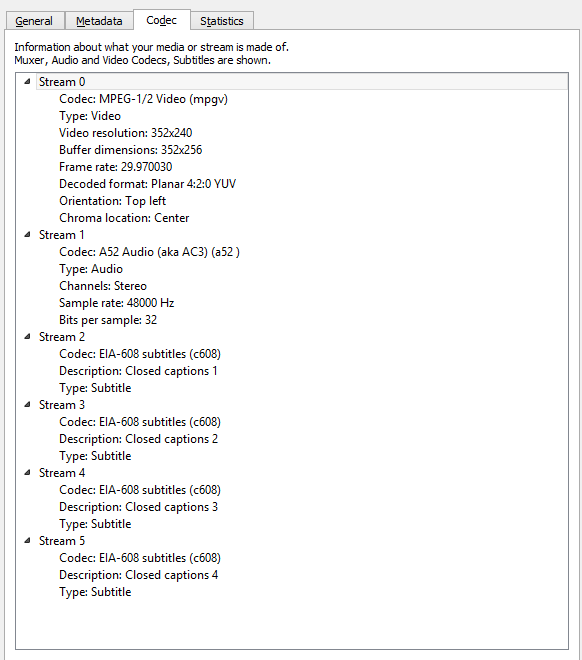
VLC 3.0.6 can view the files. Screenshot of VLC codec tab:
Error from activity log:
errorlog.txt
ffprobe output:
ffprobe version N-93094-g7f8bfbee36 Copyright (c) 2007-2019 the FFmpeg developer
s
built with gcc 8.2.1 (GCC) 20181201
configuration: --enable-gpl --enable-version3 --enable-sdl2 --enable-fontconfi
g --enable-gnutls --enable-iconv --enable-libass --enable-libdav1d --enable-libb
luray --enable-libfreetype --enable-libmp3lame --enable-libopencore-amrnb --enab
le-libopencore-amrwb --enable-libopenjpeg --enable-libopus --enable-libshine --e
nable-libsnappy --enable-libsoxr --enable-libtheora --enable-libtwolame --enable
-libvpx --enable-libwavpack --enable-libwebp --enable-libx264 --enable-libx265 -
-enable-libxml2 --enable-libzimg --enable-lzma --enable-zlib --enable-gmp --enab
le-libvidstab --enable-libvorbis --enable-libvo-amrwbenc --enable-libmysofa --en
able-libspeex --enable-libxvid --enable-libaom --enable-libmfx --enable-amf --en
able-ffnvcodec --enable-cuvid --enable-d3d11va --enable-nvenc --enable-nvdec --e
nable-dxva2 --enable-avisynth --enable-libopenmpt
libavutil 56. 26.100 / 56. 26.100
libavcodec 58. 46.100 / 58. 46.100
libavformat 58. 26.100 / 58. 26.100
libavdevice 58. 6.101 / 58. 6.101
libavfilter 7. 48.100 / 7. 48.100
libswscale 5. 4.100 / 5. 4.100
libswresample 3. 4.100 / 3. 4.100
libpostproc 55. 4.100 / 55. 4.100
Input #0, mpeg, from 'VTS_01_1.VOB':
Duration: 01:27:48.60, start: 0.266667, bitrate: 1630 kb/s
Stream #0:0[0x1bf]: Data: dvd_nav_packet
Stream #0:1[0x1e0]: Video: mpeg1video, yuv420p(tv), 352x240 [SAR 200:219 DAR
880:657], Closed Captions, 1283 kb/s, 29.97 fps, 29.97 tbr, 90k tbn, 29.97 tbc
Stream #0:2[0x80]: Audio: ac3, 48000 Hz, stereo, fltp, 256 kb/s
Unsupported codec with id 100357 for input stream 0
 keystrike
All 18 comments
Your better off raising this on the ffmpeg issue tracker since your ffprobe is showing an unsupported codec ID too.
Unsupported codec with id 100357 for input stream 0
If ffmpeg can't deal with this, HandBrake won't be either to either since we use them for decode.
 sr55
on 9 Feb 2019
sr55
on 9 Feb 2019
Thanks, opened an issue here: https://trac.ffmpeg.org/ticket/7729
keystrike
on 9 Feb 2019
There is nothing unusual about AV_CODEC_ID_DVD_NAV (0x18805) in a vob file, HandBrake should ignore all data streams imo.
 cehoyos
on 9 Feb 2019
cehoyos
on 9 Feb 2019
Error from activity log:
errorlog.txt
This looks like a libdvd* issue to me. It doesn't seem to have a clue how to parse that .VOB structure.
 Synapto
on 9 Feb 2019
Synapto
on 9 Feb 2019
Any chance of a short sample cut of that vob?
sr55
on 9 Feb 2019
The error log looks like the DVD structure is still encrypted. What was used to rip it from the DVD?
 woodstockathbf
on 10 Feb 2019
woodstockathbf
on 10 Feb 2019
The DVD was not encrypted. I had 32 VHS tapes transferred to DVD and all of them could be transcoded with handbrake except for two of them which failed with this error message. Those VOBs do successfully upload to YouTube. I can make a short sample available if it is helpful.
I trimmed it down to the first 50,000 bytes and still receive an error which is attached.
error.txt
keystrike
on 10 Feb 2019
I trimmed it down to the first 50,000 bytes and still receive an error which is attached.
Different error, though.
What happens when you bypass the navigation by loading the un-trimmed .VOB into Handbrake using single FILE, not Folder/Batch?
EDIT: I mean, copy the offending .VOB file, by itself, into an empty directory and load it as single file from there.
I suspect that there isn't anything wrong with the VOB after all, but that your .IFO's/.BUP's are corrupted or insanely mastered.
Synapto
on 10 Feb 2019
Here is the error when I put the .vob into its own directory. There are actually two vobs, I copied each separately to test and neither worked.
Directory structure of original files (above has just VTS_01_1.VOB by itself in a directory).
12/31/2008 09:00 PM 12,288 VIDEO_TS.BUP
12/31/2008 09:00 PM 12,288 VIDEO_TS.IFO
12/31/2008 09:00 PM 98,304 VIDEO_TS.VOB
12/31/2008 09:00 PM 57,344 VTS_01_0.BUP
12/31/2008 09:00 PM 57,344 VTS_01_0.IFO
12/31/2008 09:00 PM 1,073,739,776 VTS_01_1.VOB
12/31/2008 09:00 PM 476,252,160 VTS_01_2.VOB
keystrike
on 10 Feb 2019
Could you provide an ffprobe of one you say worked? I see something suspicious.
Stream #0:1[0x1e0]: Video: mpeg1video, yuv420p(tv), 352x240 [SAR 200:219 DAR
DVD is mpeg2
 jstebbins
on 10 Feb 2019
jstebbins
on 10 Feb 2019
DVD is _mpeg2_
MPEG-1 video is defined in the DVD standard.
 bradleysepos
on 10 Feb 2019
bradleysepos
on 10 Feb 2019
Hmm, well as far as I can tell, we've never supported MPEG-1 in DVD. I wonder if there is something in the DVD index to tell us it's MPEG-1 vs MPEG-2.
jstebbins
on 10 Feb 2019
Maybe I misremember but I thought all mpeg2 video decoders have to support mpeg1 video (as it is a subset).
cehoyos
on 10 Feb 2019
@cehoyos The ffmpeg mpeg2 parser changes AVCodecContext.codec_id on the fly based on what it parses. Normally this results in correct switching of decoders internally in ffmpeg. Due to some unfortunate ordering of how we initialize things when HandBrake is using it's own demuxers, avcodec_open gets called with the original AVCodec and the AVCodecContext.codec_id that was changed by the parser resulting in an error.
Further explanation... When using our own demuxers, there are some codecs that we have to parse out the extradata for prior to calling avcodec_open. avcodec_open fails if extradata isn't initialized for these codecs prior to the call. To initialize the extradata, we use parser->parser->split. I.e. the parser must be initialized and used prior to calling avcodec_open. When avcodec_open is called, it is using the original AVCodec that was used with avcodec_alloc_context3 (it will fail if AVCodec is not the same between avcodec_alloc_context3 and avccodec_open). The call to avcodec_open fails with "Codec type or id mismatches" since AVCodecContext.codec_id no longer matches AVCodec.id due to the parser changing the codec_id.
I can fix this by reallocating AVCodecContext with an updated AVCodec when the parser changes the codec_id. So not a huge deal. Just something I did not account for.
jstebbins
on 10 Feb 2019
Here is what ifoedit has to say about the IFO files in case it is of any use. Let me know if I should test anything else. I can test the next nightly if this change will be there.
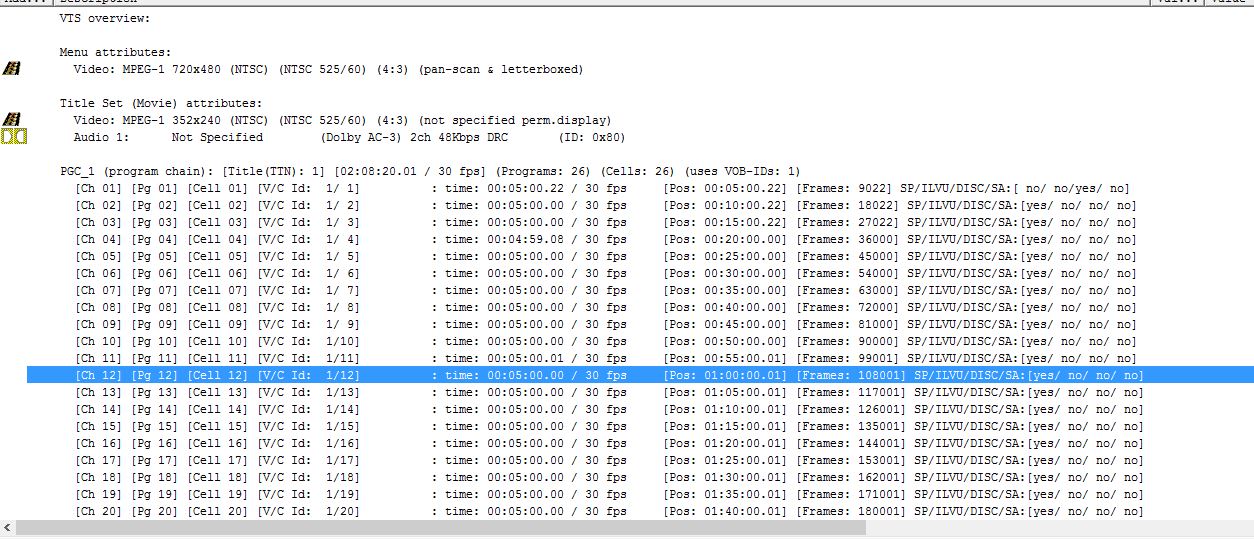
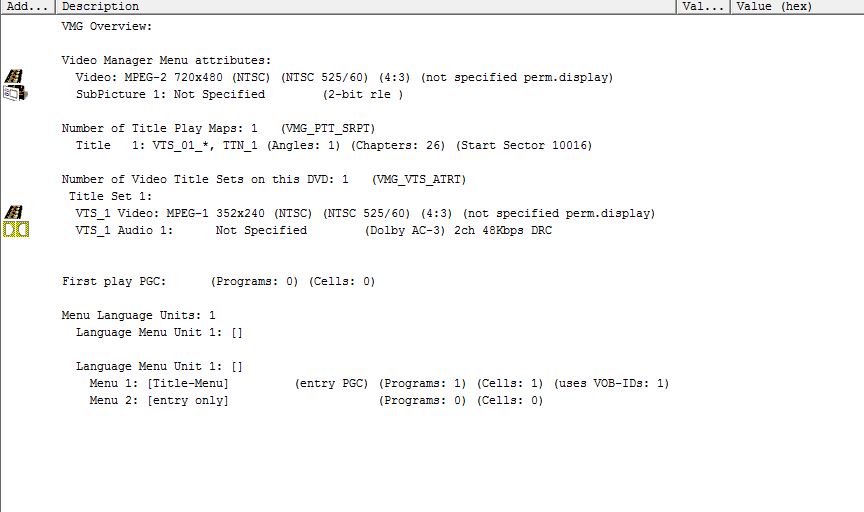
The VOBs are archived now so accessing them for other DVDs will take some time. But I can do that if it is important to help track down the bug further.
keystrike
on 11 Feb 2019
Please try the next nightly build. Hopefully I've fixed this.
jstebbins
on 11 Feb 2019
It worked! Thank you jstebbins.
Edit: I closed the ffmpeg bug report.
keystrike
on 11 Feb 2019
Excellent. Thanks for the feedback.
jstebbins
on 11 Feb 2019
Related issues
 iburunat
·
3Comments
iburunat
·
3Comments
 Vuurvlieg
·
5Comments
Vuurvlieg
·
5Comments
 n2bisex4u
·
3Comments
n2bisex4u
·
3Comments
 NiklasBr
·
3Comments
NiklasBr
·
3Comments
 rajibkhan
·
5Comments
rajibkhan
·
5Comments