Handbrake: [Enhancement] Add x265 animation tune preset to the list
Describe the change or feature you'd like to see added to HandBrake:
Currently the version of x265 which includes this addition is far from a release, so this is just meant as a reminder for a future version of HandBrake (maybe 1.3.0 or whatever). Recently x265 added a animation tune preset.
https://bitbucket.org/multicoreware/x265/commits/1951152ff12db320a4b626e57ee1c870d84d7f14
Would be nice to add this to the list of HandBrakes x265 tune options. Just building HandBrake with the current x265 default branch doesn't add this tune option (I tested it), so it seems this has to be registered somewhere in libhb(?). I don't know how or in which file, so I couldn't come up with a patch.
What version of HandBrake are you currently using? (e.g., 1.0.0)
1.2.0
What operating system and version are you running? (e.g., Ubuntu 16.04 LTS, macOS 10.3 High Sierra, Windows 10 Creators Update)
macOS 10.14
 Nomis101
All 18 comments
I think in a few days, you can use x265 v3.0. In these version u can use the preset Animation. I have tested the preset also in Handbrake. I use the commandline for this.
deblock=1:1:bframes=6:psy-rd=0.4:aq-strength=0.4
This is the line for medium.
But i don't like the settings.
I use my own for animation
deblock=1:1:bframes=6:no-strong-intra-smoothing:no-sao:psy-rd=1.50:aq-strength=0.6:ref=6
You can test both with an old animation film. But i have ssen, thats with the animation preset, you have more blocks/artefacte in picture.
 Mister-XY
on 6 Jan 2019
Mister-XY
on 6 Jan 2019
deblock=1:1:bframes=6:no-strong-intra-smoothing:no-sao:psy-rd=1.50:aq-strength=0.6:ref=6
Passing the option string for animation "deblock=1:1:bframes=6:no-strong-intra-smoothing:no-sao:psy-rd=1.50:aq-strength=0.6:ref=6" with "-x" option, CLI gives a warning stating "encx265: unknown option '1'"
Looking into CLI manual, it says
-7, --deblock[=string]  Deblock video with pp7 filter
                       Custom Format:
                           qp=q:mode=m:disable=d
                       Default:
                           qp=5
Is "deblock=1:1" part accurate in style?
 taxen
on 20 Jan 2019
taxen
on 20 Jan 2019
I have the settings here and it's run without any problems.
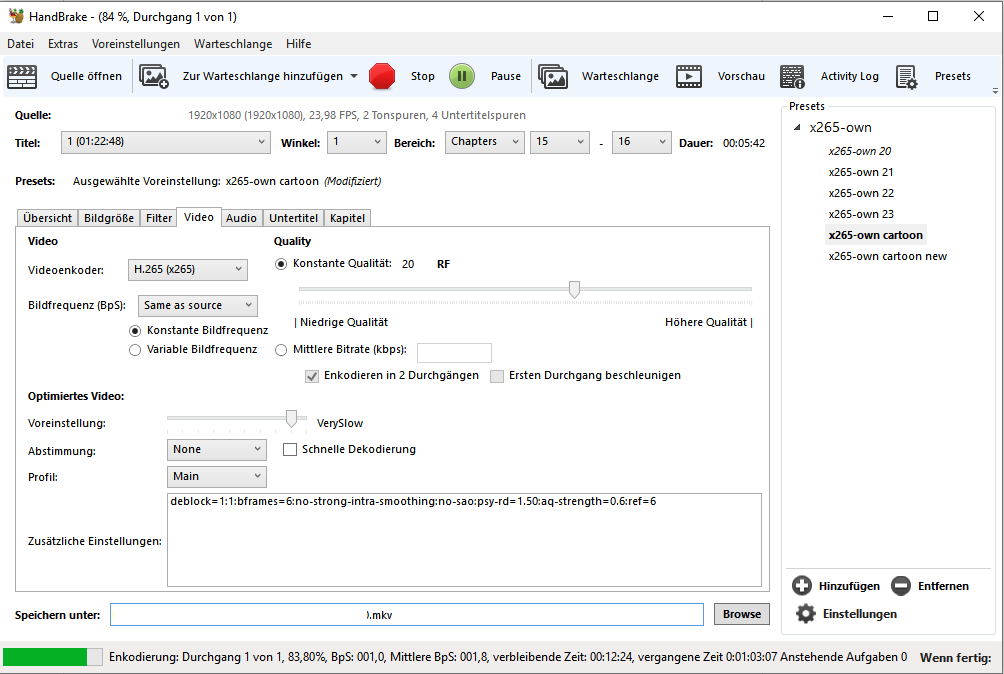
Mister-XY
on 20 Jan 2019
Is "deblock=1:1" part accurate in style?
Style for deblock in HB is "deblock=x,y" (in your case deblock=1,1).
But, with x265 3.0 and the x265 own preset in HB, you will not need any additional command line options.
Nomis101
on 20 Jan 2019
Thank you both. x265 is still in RC, so I will use "deblock=1,1" in case.
taxen
on 20 Jan 2019
Replace colons with commas. Colons in HandBrake separate individual parameters.
deblock=1,1 is correct.
 bradleysepos
on 20 Jan 2019
bradleysepos
on 20 Jan 2019
I think the official 3.0 x265 tag is now out: https://bitbucket.org/multicoreware/x265/commits/ed72af837053d708dee586aa27dac1d63ee0abd6
 dalnew
on 25 Jan 2019
dalnew
on 25 Jan 2019
Given the number of times x265 has repackaged a release, we'll probably give this at least a few days if not a week or two to settle before updating.
bradleysepos
on 25 Jan 2019
Yes, they broke building with HandBrake/ffmpeg and tagged 3.0-rc. Luckily after some complains, they fixed this before releasing 3.0.
https://bitbucket.org/multicoreware/x265/issues/458/commit-56a73c8-added-invalid-c-to-x265h
Its better to wait a few days until its sure nothing else is broken.
Nomis101
on 26 Jan 2019
x265 3.0 is out.
Mister-XY
on 27 Jan 2019
Did the Tune animation also come to Handbrake? I have see, hevc is update to 3.0 in handbrake. But the new animation tune did be missing.
Mister-XY
on 12 Feb 2019
It seems they forgot to add "animation" to the x265_tune_names in x265.h
 galad87
on 12 Feb 2019
galad87
on 12 Feb 2019
You are right. i have change the file and now, i can use the preset animation.
Mister-XY
on 12 Feb 2019
Oh, you are right. Works for me too. Thats the issue. So its an x265 problem and needs to be fixed upstream. I have opened a bug for that.
https://bitbucket.org/multicoreware/x265/issues/470/missing-entry-animation-in-the
Would it be possible in the meantime for HB to fix this internally with a patch for x265? Something like:
diff --git a/source/x265.h b/source/x265.h
--- a/source/x265.h
+++ b/source/x265.h
@@ -1835,17 +1835,17 @@ static const char * const x265_preset_na
  *      with ultrafast mapping to "0" and placebo mapping to "9".  This mapping may
  *      of course change if new presets are added in between, but will always be
  *      ordered from fastest to slowest.
  *
  *      Warning: the speed of these presets scales dramatically.  Ultrafast is a full
  *      100 times faster than placebo!
  *
  *      Currently available tunings are: */
-static const char * const x265_tune_names[] = { "psnr", "ssim", "grain", "zerolatency", "fastdecode", 0 };
+static const char * const x265_tune_names[] = { "psnr", "ssim", "grain", "zerolatency", "animation", "fastdecode", 0 };

 /*      returns 0 on success, negative on failure (e.g. invalid preset/tune name). */
 int x265_param_default_preset(x265_param *, const char *preset, const char *tune);

 /* x265_picture_alloc:
  *  Allocates an x265_picture instance. The returned picture structure is not
  *  special in any way, but using this method together with x265_picture_free()
  *  and x265_picture_init() allows some version safety. New picture fields will
Fixed in 9e6cfe80e. Thanks @Nomis101!
bradleysepos
on 14 Feb 2019
This has been fixed upstream now.
Nomis101
on 17 Apr 2019
Good news. x265 3.1 with the fix was released yesterday. :-)
https://bitbucket.org/multicoreware/x265/downloads/
Nomis101
on 3 Jul 2019
very nice. When comes handbrake with v3.1?
Mister-XY
on 3 Jul 2019
Related issues
 bohning
·
4Comments
bohning
·
4Comments
 a7dfj8aerj
·
3Comments
a7dfj8aerj
·
3Comments
 rajibkhan
·
5Comments
rajibkhan
·
5Comments
 28598519a
·
4Comments
28598519a
·
4Comments
 joshrabinowitz
·
5Comments
joshrabinowitz
·
5Comments
Most helpful comment
I think in a few days, you can use x265 v3.0. In these version u can use the preset Animation. I have tested the preset also in Handbrake. I use the commandline for this.
deblock=1:1:bframes=6:psy-rd=0.4:aq-strength=0.4This is the line for medium.
But i don't like the settings.
I use my own for animation
deblock=1:1:bframes=6:no-strong-intra-smoothing:no-sao:psy-rd=1.50:aq-strength=0.6:ref=6You can test both with an old animation film. But i have ssen, thats with the animation preset, you have more blocks/artefacte in picture.