Handbrake: Unable to remove a specific user-created preset in the Handbrake GUI anymore.
Description of problem or feature request
Unable to remove a specific user-created preset in the Handbrake GUI anymore. This was support by the current stable build of Handbrake.
Steps to reproduce the problem
N/A
HandBrake version (e.g., 1.0.0)
Version 20180128113848-eb78c4a-master (2018012901)
Operating system and version (e.g., Ubuntu 16.04 LTS, macOS 10.3 High Sierra, Windows 10 Creators Update)
macOS High Sierra
Error message text or screenshot
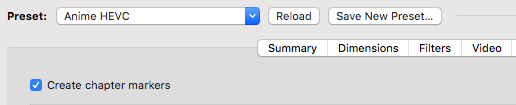
There is no remove button for the presets in the current version of Handbrake, nor the related menus.
 ShikiSuen
All 9 comments
This needs to be added to the Presets menu. In the meantime, customize your toolbar to add the Presets icon, and use the delete button there.
 bradleysepos
on 29 Jan 2018
bradleysepos
on 29 Jan 2018
@galad87 Is this something you want to look into or should I?
bradleysepos
on 30 Jan 2018
Looks like you folks are deprecating the preset icon and use the new preset dropdown menu instead.
ShikiSuen
on 30 Jan 2018
All the presets menu items works on the current presets outline view selection. The outline view selection is not always the same as the popup menu (the outline view lets you select a folder, and it will get out of sync when you reload a job from queue or you change the title), so adding a delete menu item will be the same of the reload button. Tt will make it easy to delete the wrong preset.
If you want it, feel free to implement it.
 galad87
on 30 Jan 2018
galad87
on 30 Jan 2018
Fair enough. I actually did notice this a couple days ago; the OP beat me to creating an issue. Will see what I can do.
bradleysepos
on 30 Jan 2018
@bradleysepos do feel we should bring the presets pane back then get popup to sync selection with bar. That stops any odd behaviours and makes the functionality more discover-able. I think button removal wasn't the right decision in this case.
 sr55
on 31 Jan 2018
sr55
on 31 Jan 2018
There is no discoverability issue, only a half-implemented feature with missing or broken controls on the Mac, where these are fully implemented on other systems. That is the actual issue.
The obvious and proper immediate solution is to add a Delete item to the Presets menu as in the other UIs. Then decouple/sync such controls from/to the old pane to make them work properly with the new popup.
bradleysepos
on 1 Feb 2018
See #1163.
bradleysepos
on 1 Feb 2018
These and related issues should be fixed in #1163 which is currently under review. Additionally, the Presets toolbar item is back as of https://github.com/HandBrake/HandBrake/commit/155e573654edcb1889b9d6c42e3f407889e1746f.
Thanks for the feedback! Closing.
bradleysepos
on 3 Feb 2018
Related issues
 YammYcoding
·
4Comments
YammYcoding
·
4Comments
 miopad
·
6Comments
miopad
·
6Comments
 bohning
·
4Comments
bohning
·
4Comments
 AnotherDimension-Ex
·
4Comments
AnotherDimension-Ex
·
4Comments
 taxen
·
3Comments
taxen
·
3Comments