Handbrake: Nvenc encoder is not supported yet!
ffmpeg has supported GPU acceleration,including nvenc(Nvidia) and QSV(Intel ), but the current version of HandBrake doesn't support nvenc, and it can't support QSV very well. Please add the function as soon as possible.
 liufeihong
All 123 comments
First, we don't use ffmpeg. We use libav and NVEnc hasn't hit a public release of libav yet.
We have no plans to add NVENC. Patches welcome although we won't work on this ourselves.
We already have QSV and it works fine. What do you think is wrong with it? Functionality wise, even if we used the libav wrapper, there wouldn't be any functioality changes.
AMD VCE will possibally be added in the not so distant future. (assuming that the patch every hits libav isn't abandonded. )
 sr55
on 12 Jul 2016
sr55
on 12 Jul 2016
Thanks your reply, but I found that libav has add H.264 & HEVC Encoders For NVIDIA's NVENC, please refer to the offical website: https://wiki.libav.org/Encoding/h264
Libav configuration
./configure --enable-nvenc --enable-cuda --enable-nonfree
liufeihong
on 15 Jul 2016
It's not in the release that we use. Not that it matters.
It's also non free so we can't add this implementation as its not GPL compatible
Edit: Might be free if filters are disabled.
Either way, anyone producing a patch must be aware that it won't be accepted with --enable-nonfree. It must be without.
sr55
on 15 Jul 2016
Libav 12 (released on 2016-10-18)
- NVIDIA NVENC-accelerated H.264 and HEVC encoding support
 marcomsousa
on 13 Jan 2017
marcomsousa
on 13 Jan 2017
As the issue tags say, Patch Welcome ;)
 Rodeo314
on 13 Jan 2017
Rodeo314
on 13 Jan 2017
@marcomsousa It requires --non-free so it's a non starter. We can't publish HandBrake releases with that flag turned on.
Edit, seems to depend on the version you use. Need to figure out if libav has the free version or not. if it does, patches will be welcomed.
sr55
on 14 Jan 2017
@sr55 not true anymore.
See https://git.libav.org/?p=libav.git;a=commitdiff;h=09522a303db014b48f844443f0f3aaa00af8f165
 SeanMcG
on 14 Jan 2017
SeanMcG
on 14 Jan 2017
See edit ;).
I guess we just need someone with a Nvidia card to give It a go now. Build issues aside, our libav wrapper should be reasonably easy to update.
Edit: apparently I didn't go back to update it again. Fail.
sr55
on 14 Jan 2017
I can test on a GTX 1070 if you like.
SeanMcG
on 14 Jan 2017
Got a patch too? ;)
I imagine remote debugging on someone else's pc's to find my coding screwups isn't a fun process. Think I'll pass.
p.s If anyone does want to have a go:
https://github.com/HandBrake/HandBrake/commit/fe32414aef3a21fc7f42b38cc1f8eea8a62476a3
Is the basics to get an encoder going.
There are various other changes for vpx such as presets in the history https://github.com/HandBrake/HandBrake/commits/master/libhb/encavcodec.c
sr55
on 14 Jan 2017
Ah, OK. I'll wait for the proverbial "welcomed" patch.
SeanMcG
on 14 Jan 2017
I am a novice on github . is there a build that has this enabled? i am using latest nightly but dont see this option . i hava a GTX 950 ti card. pointers to how I can enable this patch would be appreciated. happy to test and report back
 bikubay
on 11 Feb 2017
bikubay
on 11 Feb 2017
There is neither a build nor a patch. Just this feature request.
 bradleysepos
on 11 Feb 2017
bradleysepos
on 11 Feb 2017
Well, I'll join the request train in hopes this gets implemented soon.
 Kaijuzilla
on 6 Mar 2017
Kaijuzilla
on 6 Mar 2017
FYI I just got a new i7-7700k and installed a Nvidia GTX1050. I ran encoding tests (via MediaCoder) using a 720p/59.94 MPEG-2 source file and saving to 5Mbps H.265 HEVC format. x265 ran at about 80fps, Intel QuickSync ran at about 140fps and NVEnc ran at 590fps! That's an insane improvement over QS and this is a bottom of the line NVidia card vs a top of the line Intel CPU.
 Dan203
on 9 Mar 2017
Dan203
on 9 Mar 2017
Both hardware and software encoders can be made to run fast if quality is not considered. In the past, many hardware accelerated encoding schemes claimed to outpace the x264 encoder, but at similar fps the software encoder actually produced better quality. Only if your encodes are of nearly identical quality can fps comparisons be relevant.
bradleysepos
on 9 Mar 2017
I used the exact same settings, as far as bitrate, etc... go and the NVEncoder setting was set to "Highest" quality whereas x265 was set to "Faster". All other encoder specific settings were left at default. I watched about 30 seconds of all 3 files and they all looked fine to me, although I know that's not enough to determine true quality.
FYI I'm a developer for VideoReDo, so I know how this stuff works and what to look for. From what I can tell the basic specs of the QS encode and the NVEncoder are essentially identical. There are some differences in x265 encode, so that could perhaps explain it's more sluggish performance. But the difference between QS and NVEncode is still insane. If you're going to use GPU encoding, and have access to both, it seems NVEncode has a major speed advantage.
Dan203
on 9 Mar 2017
Last I looked, the H.265 encoder that Intel has is quite a bit more mature and feature packed comapred to NVEnc. It looks like NVEnc still doesn't support b-frames for example. only I and P. Their H.264 encoder seems more mature though at first glance. So I'd expect compression efficiency to suffer quite badly on NVEnc vs QS or even x265
In otherwords, it'll be interesting to see if Nvidia maintain that edge when they introduce better support in future hardware.
sr55
on 9 Mar 2017
I reran the test using H.264 instead and the NVEnc was still 2x faster then QuickSync. 630fps vs 330fps. And as far as I can tell the output is essentially the same. Wont compare x264 since it has way more options and getting them to match the GPU encoders exactly would be a nightmare.
The point is that I think adding NVEnc support to Handbrake would be a good idea. For those that have NVidia cards in their machines, and are willing to trade a little quality for speed, it provides a significant boost over QuickSync.
Dan203
on 9 Mar 2017
Me too comments won't get it done any faster. We have lots of feature requests and not enough people or time for them all. If you want it faster, submit a good patch.
 jstebbins
on 9 Mar 2017
jstebbins
on 9 Mar 2017
I'm not arguing against adding it. I'd also point out that you may not see NVEnc encoding at those kind of speeds in HandBrake. We have our own pipeline and filtering that takes up CPU time regardless of the encoder used. You only get those kinds of speeds when you use full stack with zero-copy. A lot of the features in HandBrake prevent that.
sr55
on 9 Mar 2017
We have the same problem in VideoReDo. We offer both QS and x264 in our product and neither one hit their full potential due to other limitations in the way data flows through the product. So I understand the numbers I'm seeing aren't necessarily indicative to what we'd see from Handbrake. I was simply pointing out that in my limited tests NVEnc seems to provide a significant boost compared to QS .
I also really wasn't trying to dump on your program or just be another "me too". I was just trying to offer numbers so you guys could see that it might be worth the effort. I was also amazed at how extreme the numbers were and just wanted to share them with someone. :)
Dan203
on 9 Mar 2017
No worries at all, and thanks for sharing.
Always good to keep in mind the three factors (which I'm sure you know): speed, quality, and size. Match two and you can get a somewhat accurate comparison of the third. If NVEnc's encoder(s) are I/P only, I'm willing to bet at the same quality, the output is larger.
bradleysepos
on 9 Mar 2017
There are B frames in the H.264 encode. Compared to the QS encode they're virtually identical. They have basically the same GOP length, they have the same IDR-B-B-P pattern, they have nearly identical SPS/PPS, they are roughly the same size and have almost the same bitrate. (the QS one is actually a little lower then what I set) So it seems to be an apples to apples comparison between QS and NVEnc. And since this is essentially the newest, top of the line, Intel CPU vs the cheapest NVidia 10 series card it's quite impressive that the NVEnc ran at nearly 2x the speed.
Dan203
on 9 Mar 2017
Cool. 😸
bradleysepos
on 9 Mar 2017
Fwiw, The performance of the low-end vs nvidia in theory, should be the same as the high end, barring any memory constaints. Same with QSV. High vs Low should be the same. So it's especially benifical for low-end users in both cases.
sr55
on 9 Mar 2017
I know this thread is a bit older, just tossing in me $.02... but I've spent a lot of time the past few months re-ripping and/or re-encoding content to h.265 (got about 3TB of space back on my nas so far, and another 4TB to process (should get more than half back)... I've been more relaxed on quality for h.265 as the blur doesn't bug me nearly as much as artifact blocks in 264.
That said, nvenc seems to go significantly faster at 15-30% larger size compared to x265... I'm willing to take the hit, as a lot what I have is now taking up a lot less space regardless, even if technically lower quality than the h.264... again, I don't mind the blur so much as artifacts. I find that CQ at 25-30 is fine... depends on source, of course, and for full hd content, it's a bit more flexible imho.
All of that said, the processing from Handbrake with x265 is much more consistent than using staxrip with nvenc... It's not the encoder, as I can use nvenc with avidemux, some files just seem more problematic... for BRRips, nvenc is great, for DVD sources, x265 is worth the extra time (to me)... of course, what takes nvenc under 8-10 hours, takes x265 3+ days... it's a huge difference.
 tracker1
on 17 Apr 2017
tracker1
on 17 Apr 2017
I would love to be able to encode my video on my GPU.
So I will +1 this feature request.
 Strit
on 26 Apr 2017
Strit
on 26 Apr 2017
Another reason for adding NVEnc support is that recent versions of Windows 10 no longer allow you to attach a virtual monitor to your Intel graphics card. Thus, if you have a discrete video card, you cannot enable QSV on your machine. Adding NVEnc would solve that problem for NVidia card owners and VCE would address AMD owners.
 DilatoryCheetah
on 27 Jun 2017
DilatoryCheetah
on 27 Jun 2017
At some point we'll hopefully move to D3d11 from D3d9 which should allow QS to just work which would solve the need for a virtual monitor to be attached.
sr55
on 27 Jun 2017
+1 from me too.
My motherboard doesn't have a graphics output, it requires a driver to route it over the PCIe graphics.. which doesn't work on Windows 10.. so QSV isn't an option for me.
nvenc on my GTX 760 is also about double the speed of CPU encoding (i7 2600K). 160fps CPU vs 310fps GPU
 NHellFire
on 18 Jul 2017
NHellFire
on 18 Jul 2017
why do i feel the need to comment when i will not be able to say anything useful.
Nvenc seems a bit silly to me when AMD's system will run on both cards.
I'll take any sort of boost i can get but i won't sacrifice quality or size and I'm prepared to wait for a decent h.265 file
I don't think my hd7700 would boost the Ryzen 1800x much anyway and i wouldn't upgrade gpu until you can make use of it as yours is the only app running.
 mdrodge
on 25 Jul 2017
mdrodge
on 25 Jul 2017
AMD's system will NOT run on both cards. VCE is AMD specific hardware. Both VCE and NVENC are proprietary ASIC hardware encoders.
I'm guessing your referring to OpenCL maybe? That's not a video encoder, nor does it suit video encoding.
If quality is your primary goal, then you should stick to software encoders like x264/5.
sr55
on 25 Jul 2017
Oh ok thanks for clearing that up.
Guess it would be a pain to add all 3 (intel, nv & amd)
Doesn't Adobe Premier do this with out sacrificing quality?
I understand that is a very expensive product and i can't afford it.
To be honest I'm quite happy with the way it is but you can't blame people for wondering what if.
mdrodge
on 25 Jul 2017
The Hardware encoders provide an API. Given the same source material and same settings, it doesn't matter what app calls it, the results are the same.
I don't know what premier's software encoders are like, but I do know that HandBrake is very popular for post-production encoding. (I.e build their content in Premier, Vegas or some other editor then export in a lossless intermediate format for encoding with HandBrake)
sr55
on 25 Jul 2017
Again very interesting stuff. 😆
mdrodge
on 25 Jul 2017
Keep up the good work
mdrodge
on 25 Jul 2017
I understand that software encoding will give the best quality, but there are times when I want to quickly encode a bunch of videos for mobile devices to take on vacation. In those instances, having a fast hardware encoder will be very useful.
DilatoryCheetah
on 26 Jul 2017
I hope this great tool can support hardware encode : P
 WebberLai
on 11 Aug 2017
WebberLai
on 11 Aug 2017
Two things.
(Just for fun) I have been using StaxRip to get some base line testing of quality vs the software encoder in handbrake. If I do a 480p conversion to x265 from RAM disk I am able to hit 800-900fps using a geforce 1050TI. Just a fun spec :)
I was trying to understand the code and possibly try and see if I can get this working in HB. My question is this. Is Libav 12 already Brough into the HB code base? Or does that merge need to happen. I was searching the repo and found a closed issue talking about Libav 12 being added. but I was not sure. thanks.
 kenthinson
on 23 Aug 2017
kenthinson
on 23 Aug 2017
Is Libav 12 already Brough into the HB code base?
HandBrake master branch (and nightly builds) are on Libav 12.1, with some additional patches from their release/12 branch that will be part of 12.2.
bradleysepos
on 23 Aug 2017
@bradleysepos sweet! that sounds like it should make it relatively easy. Just have to update the interface to talk to the API like in fe32414 as stated above. Any other advice you think I should know?
kenthinson
on 23 Aug 2017
NVENC is 5x faster. Using it with Adobe Premiere and its a DRASTICALLY improvement on encoding time.
Here is an example from another (paid) converter regarding speed of NVENC:
https://www.movavi.com/videoconverter/performance.html (scroll down)
which I can confirm from my experience with Adobe Premiere. So please add this to Handbrake.
 Symbai
on 3 Sep 2017
Symbai
on 3 Sep 2017
NVENC is 5x faster.
I was looking at using HandBrake for converting a DVD ISO, but I've been using ffmpeg directly.
Using hevc_nvenc on a GTX 1080 (Pascal) is up to _30x faster_ than libx265 in my case.
Instead of -crf 28, I had to use -cq:v 34 -rc:v vbr_hq -rc-lookahead 32 -no-scenecut 1 -init_qpP 23 -init_qpB 25 -init_qpI 21 -weighted_pred 1 to get a similar file size. With the default -cq setting (0), the target file is more than double the size of the source file.
 fireundubh
on 6 Sep 2017
fireundubh
on 6 Sep 2017
Yes, downloaded the video converter ive linked above I converted a video in less than 30 seconds while handbrake claims to take ~12 minutes.
And regarding those who say "what about AMD users?". According to steam stats (i cannot find a larger statistics) Nvidia has about >60% and AMD only 25%.
And regarding quality differences, there are literally none unless you go for maximum. But that shouldn't be the majority of handbrake users who just prefer a different format or a smaller file size. Just my 2 cents.
Symbai
on 7 Sep 2017
OBS recently got the ability to encode with nvenc. Surely it must be possible to do it with handbrake too.
Strit
on 12 Sep 2017
@Strit No-one said it was difficult to add. Technically it's quite easy actually. Probably not more than a few hours works. However, so far it's not been interesting enough to encourage any developers interest.
sr55
on 12 Sep 2017
A feature that let me converted 98 files in less than 10 minutes (thanks to NVenc and multi conversions at the same time) while Handbrake claims to take 20 minutes for the FIRST file is definitely not worth the interest.
I'm sure, for a video converter, >500% speed improvement is absolutely low priority.
Take a look a the last commits:
- Improve selection behavior.
- Summary tab font changed.
- Round text,
- code cleanup.
I can see the priority. But it's okay, handbrake is open source developers can decide theirselves...
Symbai
on 13 Sep 2017
User interest is no indication of developer interest.
Making HandBrake more usable (i.e. your list above) is definitely a higher priority for me than adding support for an encoder that helps a a few people that have the hardware, and want low quality very fast encodes. I would personally never use the nvenc encoder, thus it has very marginal interest to me.
jstebbins
on 13 Sep 2017
and want low quality very fast encodes.
This isn't true. Please stop repeating this "low quality" nonsense.
fireundubh
on 14 Sep 2017
I started to tinker with trying to add this encoder but not having any luck getting windows to pick it up in the list. I'm seeing it in linux but windows never seems to detect it when pulling back the list of video encoders. Would anyone be up for taking a peek and seeing if they can get the option? (I kind of half suspect I'm not getting hb.dll to build correctly in linux)
https://github.com/compninja28/HandBrake/tree/259-add-nvenc-encoder
 MatthewLazarow
on 25 Sep 2017
MatthewLazarow
on 25 Sep 2017
Test via the cli. I can prep a patch for the windows up to support it.
sr55
on 25 Sep 2017
My guess (without actually pulling the code to check) is
if (HandBrakeEncoderHelpers.VideoEncoders.All(a => a.ShortName != EnumHelper<VideoEncoder>.GetShortName(VideoEncoder.X264_NVENC)))
                 {
                    encoders.Remove(VideoEncoder.X264_NVENC);
                 }
HandBrakeEncoderHelpers.VideoEncoders calls into hb_video_encoder_get_next in libhb so if that's not returning a matching short name, it's getting removed.
Which would probably also show up as a rejected encoder name from the CLI I suspect.
sr55
on 25 Sep 2017
Yeah I think that is whats going on...well I think I don't have one of the settings correct yet. I was able to get the CLI to show the encoder in the job settings json as x264_nvenc (I'll fix the naming then too), but in the output I end up seeing "+ encoder: H.264 (libx264)". I'm thinking I'm probably not defining it correctly in common.h or something. I didn't think of using the CLI though to test...this helps a lot so hopefully will be able to make some traction now! I'll keep tinkering with this after work tomorrow. thank you!!
MatthewLazarow
on 26 Sep 2017
hey i didnt get very fat with this because I'm busy with school. But there is both x264 and x265 nvidia encoders just in case that information helps you at all. I'm excited to see your progress :)
kenthinson
on 26 Sep 2017
h not x
There is no Nvidia x264/5. x264 and 5 are H264/5 encoders. Nividia has H.264/5 encoders.
p.s @compninja28 You've named the encoders wrong in several places in your code. Correct that and it might lead to less confusion.
sr55
on 26 Sep 2017
@sr55 sorry when I started this I was going off the one h264 (x264) and at the time thought it was just the naming convention used within HB. I know better now :P
One thing that sill has me confused is how you're coming up with the hex values in common.h? Are these just random values with a little bit of buffer between to allow growth?
#define HB_VCODEC_FFMPEG_VP9   0x0000080
#define HB_VCODEC_FFMPEG_MASK  0x00000F0
#define HB_VCODEC_QSV_H264     0x0000100
#define HB_VCODEC_H264_NVENC    0x0000110
#define HB_VCODEC_HEVC_NVENC    0x0000120
#define HB_VCODEC_QSV_H265_8BIT     0x0000200
#define HB_VCODEC_QSV_H265_10BIT    0x0000400
@Symbai Please don’t post this multiple times on various issues.
bradleysepos
on 2 Oct 2017
@bradleysepos Sorry, can you delete it from other issue as well? I cannot as you locked it. Thanks
Symbai
on 2 Oct 2017
It’s fine, just beware as you’re triggering email notifications for dozens of people. Perhaps better to discuss the merits of hardware encoding on https://forum.handbrake.fr
See also Scott’s comment: https://github.com/HandBrake/HandBrake/issues/886#issuecomment-333670209
bradleysepos
on 2 Oct 2017
I keep working my way through this based on the example provided above (adding a VP9 encoder), but I'm wondering now if this is a little more involved than that example? Am I going to need to create a new hb_work_object_t type closer to how the encx264 and encx265 work objects are being invoked?
MatthewLazarow
on 4 Oct 2017
It's better to go through the libav wrapper (encavcodec) than to try accessing it directly like x264. It's a lot less work the path your taking and should be much easier to maintain.
If I can find some time at the weekend, I'll pull your repo and see if I can't get anywhere with it.
sr55
on 4 Oct 2017
Quick Update: I've been working on it locally. I've got libhb and libav setup correctly now and it tries to being encoding, but something in libav or downstream is trying to access libcuda.so which is preventing the encoder from initialising.
[h264_nvenc @ 00000000058d60c0] Cannot load libcuda.so
Just need to suss this one out and I may have the basic encode side of things working.
sr55
on 7 Oct 2017
https://gist.github.com/sr55/b62d6e9050cc0e574a2dc550f6162d3f (Not complete by any stretch but it's a start)
2 Problems.
- libav doesn't appear to support nvenc on windows. I hacked their nvenc.c to load nvcuda.dll instead of libcuda.so but that brings me to problem 2.
- While i get Video engine load showing up, the output video stream is busted. Our muxer seems to think it got a 14kbit stream but there doesn't appear to be anything in the file expcet audio and the video header.
sr55
on 7 Oct 2017
Log? :trollface:
jstebbins
on 7 Oct 2017
sr55
on 7 Oct 2017
You might want to try commenting out the line
av_log_set_level( AV_LOG_QUIET );
In decavcodec.c. Maybe there are error and warning messages that we are squelching.
jstebbins
on 7 Oct 2017
Doesn't appear to be. I'll have a poke around to see what other apps do. Maybe there is something extra we need to call to initialise this properly.
sr55
on 7 Oct 2017
@sr55 Is there any branch for Windows-specific nvenc integration into Handbrake to look at?
 KhabarlakKonstantin
on 8 Oct 2017
KhabarlakKonstantin
on 8 Oct 2017
Nope. just the patch I posted above to have a play around with it. I wasn't intending on spending an awful lot of time on it tbh. https://gist.github.com/sr55/b62d6e9050cc0e574a2dc550f6162d3f
Was more just trying to help compninja get past his problems. Unfortunately, ran into more.
Feel free to take a look (but if it's just testing your wanting to do, its not a usable patch)
sr55
on 8 Oct 2017
@sr55 Thank you so much for the patch! This really helped make a few things click for me here and I really appreciate it! I'm still a little confused where you found these values:
#define HB_VCODEC_FFMPEG_H264  0x0040000
#define HB_VCODEC_FFMPEG_H265  0x0050000
Is there something in ffmpeg/libav that declare these numbers, or are they just arbitrary?
MatthewLazarow
on 8 Oct 2017
Chose numbers that were not used. There doesn't seem to be a pattern. I think maybe originally it was Base 2 numbers, but that no longer seems to be the case. So as long as you don't have a match it seems to work.
sr55
on 8 Oct 2017
@sr55 HB_VCODEC_FFMPEG_MASK is used for getting libav specific encoder preset names (see hb_av_preset_get_names) and for support of importing a very old (pre-0.10) preset key (lavcOption).
So it would be best if the value chosen is covered by the mask. You can change the mask if you need more bits, but I don't think that's necessary. The values don't have to be individual bits, but they should be within the range coverd by the mask.
jstebbins
on 9 Oct 2017
Hi all, esp @jstebbins @sr55 and @compninja28
I have sent @compninja28 pull request https://github.com/compninja28/HandBrake/pull/1
of my same named branch https://github.com/sgothel/HandBrake/commits/259-add-nvenc-encoder
To make it work, I had to use FFMPEG 3.4 .. latest libav caused the muxer issues.
Below you see one more issue w/ h264_nvenc + MKV, maybe we can fix that soon.
Would love to see this work integrated in Handbrake after your review and cleanup.
Thank you.
+++
NVENC: Remaining fixes for a 1st working draft on GNU/Linux (GTK)
Basically working:
h264_nvenc
hevc_nvenc
Possible optimization:
Even in constant quality mode, a user ceiling bit_rate might be desirable,
currently only the maximum is used like in VP8/9: w x h x fps
Remaining issues:
Muxer issue with h264_nvenc + MKV, ffprobe shows:
[h264 @ 0x55ae4dedacc0] sps_id 32 out of range
[h264 @ 0x55ae4dedacc0] Invalid nal size 1677734572
[h264 @ 0x55ae4dedacc0] missing picture in access unit with size 40644
Notable: This does not happen with hevc_nvenc
Tested:
GNU/Linux Debian 9
GeForce GTX 950
BD 1080p source, cropped alignment 8: Around 90fps h264 + hevc cq 28, profile main
 sgothel
on 1 Nov 2017
sgothel
on 1 Nov 2017
Re FFMPEG 3.4, as you can see in commit https://github.com/sgothel/HandBrake/commit/231369ca904cf10d40ea96b42d8265455f774608
I have moved the libav patches away to 'old' since they no more apply.
I have added only my own non-essential 'verbosity' patch.
Since I cannot validate whether these patches are 'still' required .. please review and make a decision.
All I have tried is to apply a few and they mostly failed.
sgothel
on 1 Nov 2017
Next step would be to create a branch to HandBrake's master or 1.0.x branch to become a pull candidate?
Please let me know how you like to proceed.
Further I like to change the HB_VCODEC_FFMPEG_H264 id to HB_VCODEC_FF_H264_NVENC, etc.
This way we can add other hw accel codecs in the future and actual codepath assumes NVENC here,
so not a generic H264 FFMPEG path.
sgothel
on 1 Nov 2017
I added a note for build instructions of ffmpeg with NVENC here https://github.com/sgothel/HandBrake/blob/259-add-nvenc-encoder/contrib/ffmpeg/module.defs#L25
To build with nvenc:
See https://dwijaybane.wordpress.com/2017/07/19/ffmpeg-with-nvidia-acceleration-on-ubuntu-16-04-nvenc-sdk/
1) Copy NVENC SDK's Video_Codec_SDK_8.0.14/Samples/common/inc/*.h to /usr/local/include/
2) Build cudautils
wget http://developer.download.nvidia.com/compute/redist/ffmpeg/1511-patch/cudautils.zip
Copy cudautils.h and libcudautils.a are in their respective /usr/local/[include|lib]/
sgothel
on 1 Nov 2017
Created the master branch pull request https://github.com/HandBrake/HandBrake/pull/971
cherry picked patches from my '259-add-nvenc-encoder' branch, see https://github.com/sgothel/HandBrake/commits/259-add-nvenc-encoder
applicable on official master branch
I have not picked @compninja28 patches regarding windows components
due to heavy collisions:
3281077
634d2f7
Hopefully @compninja28 can help re-merging them.
added https://github.com/HandBrake/HandBrake/pull/971/commits/8205ea8cf39db3c078af075342c1fb5d6563b65d to reflect https://devtalk.nvidia.com/default/topic/1013152/video-technologies/crf-for-nvenc/post/5179877/#5179877
sgothel
on 1 Nov 2017
@sgothel sorry work got crazy the past few months and I haven't had much time to keep this moving. I didn't want to hold you up so did a quick look over the PR and merged. TBH though the other contributors here might be much better at providing feedback than I can; I'm still in the learning / discovery stages myself with handbrake. Thanks for keeping this moving!!
MatthewLazarow
on 2 Nov 2017
FYI
Sent pull request https://github.com/HandBrake/HandBrake/pull/973 for 'academic' branch
nvenc-encoder-libav. As name suggest this uses libav 12.2 but w/ nvenc files backported from ffmpeg.
This one has many issues over branch nvenc-encoder in https://github.com/HandBrake/HandBrake/pull/971 . However, it seems Handbrake is not just ready yet to move to ffmpeg, if at all.
I personally cont using nvenc-encoder w/ ffmpeg for my tasks here, maintaining nvenc-encoder-libav would require to fix the outstanding issues mentioned and maintain the nvenc code patches.
nvenc-encoder-libav issues:
- see https://github.com/HandBrake/HandBrake/commit/cf7c0271339702c5f60e8c31a9de395af16d7c27
- additional: The 'working' h264 case results in muxer (?) return code 4, causing the job to remain in the queue while artifacts seem to be OK. This doesn't happen w/ ffmpeg 3.4.
sgothel
on 2 Nov 2017
@sgothel Would like to build that myself, but are there any precompiled builds for those who are too lazy or couldn't be bothered to compile them?
 huckleberrypie
on 3 Nov 2017
huckleberrypie
on 3 Nov 2017
+1
 loicvan
on 3 Nov 2017
loicvan
on 3 Nov 2017
I agree, need to take care of multiple encoders and also need to revive the NVENC suffix to the HB nvenc IDs allowing other specific encoders like AMD etc
See @jstebbins https://github.com/HandBrake/HandBrake/pull/983#discussion_r149537326
case AV_CODEC_ID_H264:
{
if (job->vcodec == HB_VCODEC_NVENC_H264)
{
codec = avcodec_find_encoder_by_name("h264_nvenc");
}
Now HB_VCODEC_FFMPEG_H264, should be HB_VCODEC_FFMPEG_H264_NVENC and HB_VCODEC_FFMPEG_H264_AMD .. etc
sgothel
on 26 Dec 2017
Just a tip about parallelizing NVENC encoding tasks:
There are hardware limits to the number of workers. The official Video Encode and Decode GPU Support Matrix shows the # of chips, # of NVENC per chip, and the Max # of Streams for each chipset.
I'm not sure if the NVIDIA SDK provides a way to detect the worker limit, or if there's a way to detect the chipset so you can reference an internal dataset.
fireundubh
on 26 Dec 2017
NVENC detection 'as is' doesn't work, i.e. being claimed available on systems w/o NV hardware/driver.
Needs to be fixed. fixed
sgothel
on 28 Dec 2017
If it's fixed, that's great. Can we pull it onto master and then close this issue?
 Nachtfrische
on 11 Jan 2018
Nachtfrische
on 11 Jan 2018
No. This patch hasn't even been reviewed yet, let alone it's other dependencies. it'll be some time before it's added to master. 1.1 will has to go out the door first.
sr55
on 11 Jan 2018
So looking forward to this... :-D
tracker1
on 16 Jan 2018
Please do this! I need to save time and I have monster 1080Ti's in SLI that I want to leverage!
 UnInfamousGhost
on 29 Jan 2018
UnInfamousGhost
on 29 Jan 2018
@UnInfamousGhost Hate to be the bearer of bad news, but NVEnc is going to be the same speed on a 1050 as it is on a 1080. it's an dedicated ASIC, not a CUDA encoder so isn't affected by core count.
sr55
on 29 Jan 2018
@barnesma No idea where you are coming from on this, but personal attacks on others will get you banned. As far as I can tell, Scott was being direct, not rude. If you have a specific comment you are concerned about, feel free to address me personally with your concerns. Public name calling isn't in your or anyone else's best interest.
I really need to speed up work on our code of conduct.
bradleysepos
on 6 Feb 2018
@bradleysepos you're right. This isn't the right place for this conversation. I have just been paging through issues/comments relating to GPU encoding and have noticed a trend that I let get to me. I'm deleting the original comment.
 barnesma
on 6 Feb 2018
barnesma
on 6 Feb 2018
gupz,video engine load
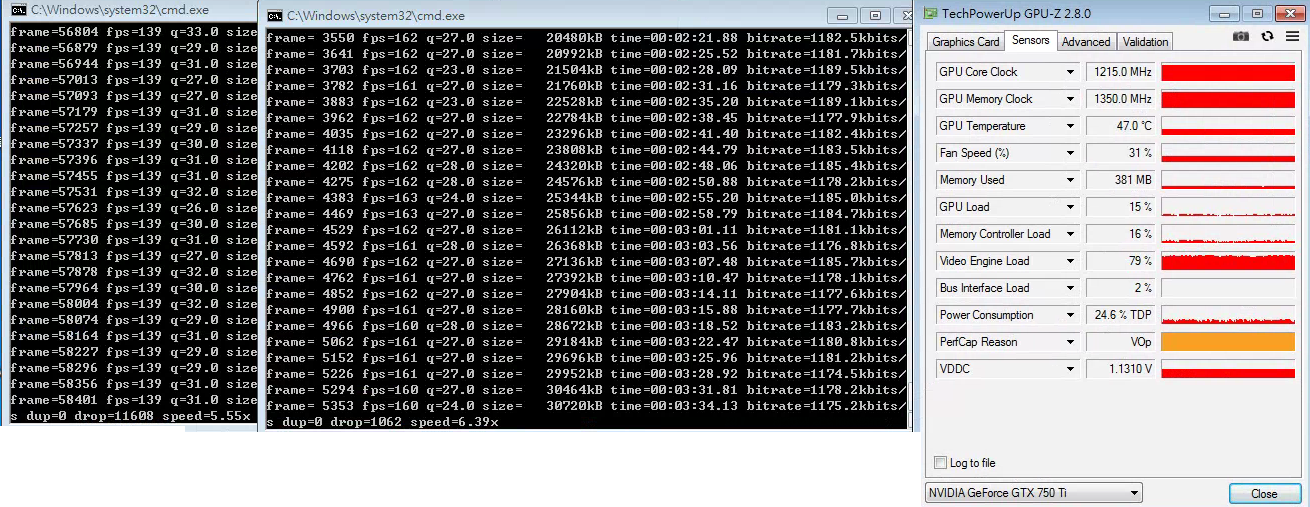
gtx 1080 ti 11.3x
gtx 980 7.53x
gtx 750 ti 8.5x
 satanupup
on 30 Mar 2018
satanupup
on 30 Mar 2018
How?
 UnInfamousAlec
on 30 Mar 2018
UnInfamousAlec
on 30 Mar 2018
agree @ SR55
satanupup
on 30 Mar 2018
I'm so glad to see this thread open 😃
I've tried installing Avidemux and MediaCoder that supposedly support NVENC, but gave up on them just because they couldn't deliver on a simple task (maybe not so simple to code, but for the end user to use) as loading DVD content (VOB files) and analyzing the titles properly. Not to mention I couldn't find the Animation Tune for the Denoise. HandBrake is so much simpler and nicer to use, and I would really love to harvest the power of my GPU.
If there's a tip jar, let me know. Thanks for your work!
G.
 gkemperle
on 25 Apr 2018
gkemperle
on 25 Apr 2018
Windows support just landed on master and will be in the next nightly builds.
bradleysepos
on 30 Jun 2018
Some users are having problems with nvenc support:
[h264_nvenc @ 000002c127255c00] Cannot get the preset configuration: invalid version (15)
https://www.reddit.com/r/handbrake/comments/8vs7ee/nvenc_support_in_nightly_build/
barnesma
on 4 Jul 2018
Updated graphics drivers and good to go!
barnesma
on 23 Jul 2018
Love the progress being made! Will have to play around to see if I can get QSV to work properly on my main system, however I noticed the NVENC is not detecting my Kepler GPU (760) not sure if Nvidia is still supporting these or not. I was able to encode on my Maxwell card (750).
Exact error:
[h264_nvenc @ 000001e25d832300] No NVENC capable devices found
 baker12
on 25 Jul 2018
baker12
on 25 Jul 2018
Make sure your drivers are up-to-date. Old drivers are not going to be supported. In theory 7 series cards should work.
We haven't tested or certified HandBrake will work on anything older than a 10-series though. (Don't have the hardware)
Ideally though, you don't want anything less than 2nd Gen Maxell or Pascal. (Same pretty much goes for all hardware encoders. It's not really been until the current generation has the hardware got to the point of being reasonable)
sr55
on 25 Jul 2018
Understandable. I know Kepler and The first set of Maxwells can't do H.265
Updated to 398.36 (latest as of today) before trying. Was hoping to see some sort of improvement bump on that system since it's running an older AMD CPU. It might just be something in the library that doesn't support the older Keplers. At least my 750 Maxwell seems to be working; still rocking the Ivy Bridge i5 for my main system which sports a lovely avg of 10 fps when rerendering a blu-ray rip.
While the NVENC boost is slight (up to 40-60fps) I'm very thankful for all who put their time and effort in.
baker12
on 25 Jul 2018
You might want to consider Quicksync Ivy over NVEnc in that generation. While Haswell was a pretty big step up, ivy If I recall was still usable, more so than the equiv nvenc of it's generation.
NVENC I believe has always had a raw speed advantage though.
Depends on what you want. if it's raw speed, stick with nvenc. If it's better compression / quality, go quicksync or x264 if you can tolerate the slower encodes.
sr55
on 25 Jul 2018
Sorry, newbie alert :-) I have a headless Ubuntu Linux server, and want to take advantage of the NVEnc with HandBrakeCLI, what the lowest spec or cheapest graphics card I need to buy and do I need to have loaded the Nvidia Linux drivers in system RAM with modprobe, etc.?
 plittlefield
on 13 Aug 2018
plittlefield
on 13 Aug 2018
Probably something like a GTX1030 would be a good bet.
In theory, as long as you've got an up-to-date Nividia driver running with your kernel it should work.
That said, we've done zero testing of this on Linux and won't be doing so, so your mileage may vary. There is no guarantee it'll work.
sr55
on 13 Aug 2018
OK, understood... no guarantees :-) I'll head off to an auction web site and see what the prices are and if it's worth it :-)
plittlefield
on 13 Aug 2018
Ah, I think I have found quite a nice web page on this:-
https://developer.nvidia.com/video-encode-decode-gpu-support-matrix
plittlefield
on 13 Aug 2018
huh, that says a 1030 isn't supported. That's a real shame.
sr55
on 13 Aug 2018
Indeed, just found one second hand for 40GBP :-( I'll keep looking...
plittlefield
on 13 Aug 2018
Yes, the 1030 has support for DECoding (HVDEC) but not ENCoding (HVENC).
Is that ("half the job") worth having?
plittlefield
on 13 Aug 2018
Nope. HandBrake won't use Nvidia decode. No point.
sr55
on 13 Aug 2018
OK, so I've bought a GTX 1050 and will be trying it soon.
I have compiled HandBrakeCLI from the github sources with --enable-nvenc and have installed the latest Nvidia Linux drivers.
Is there anything else I need to do?
plittlefield
on 21 Sep 2018
Install Windows ;)
Joking aside,
Technically, there is nothing stopping it from working under linux, but we have no developers on Linux that use / have it so it's completely untested. So just beware it's basically considered experimental.
Would be interested to hear if it works or not and what the performance is like.
Just specify the nvenc encoder via the -e option and your good to go once compiled.
sr55
on 21 Sep 2018
Hello,
Well, it works under Linux but the results are both surprising and disappointing at the same time.
In a nutshell, the 'nvenc_x265' encode is blisteringly fast (about 75fps which is 75 times faster!) but the output file size is much bigger than a regular 'x265' (medium) file using the CPU.
I am probably doing something wrong :-)
Here are the examples.
Command line to take the first chapter (12 minutes) of a Hugo Blu-ray MKV file...
"/usr/local/bin/HandBrakeCLI" --input "/home/paully/Downloads/Videos/Done/Hugo (2011).mkv" --main-feature --chapters 1 --crop 0:0:0:0 --encoder nvenc_h265 --encoder-preset medium --quality 22 --audio-lang-list eng --first-audio --aencoder ac3 --ab 384 --mixdown 5point1 --output "/home/paully/Hugo (2011) hb nvenc_h265 slow 1080p ac3 cpu50.mp4"
...produced a 1.1GB file in 3 minutes flat... yes, 3 minutes.
So, flipping fast but very big.
In contrast, the whole of Hugo using the regular 'x265' encoder took 43 hours and ended up being 2.8Gb.
The result is stunning but the wait is unbearable.
So, where am I going wrong?
The gritty details:-
Ubuntu 16.04.5 LTS
AMD FX(tm)-4350 Quad-Core Processor
16 GB RAM
Nvidia GTX 1050
HandBrake 20180928205937-77fa0c7-master (compiled with latest x264 and x265 libraries)
PS: as an aside, my HB log aoutput says...
x265 [info]: HEVC encoder version 2.8, x265 [info]: build info [Linux][GCC 5.4.0][64 bit][noasm] bit+10bit+12bit, x265 [info]: using cpu capabilities: none!
plittlefield
on 4 Oct 2018
Note, the x265 quality scale is not the same as nvenc h265 encode, so may require some adjustment to get the same ballpark bitrate for a fair comparison.
Also note, nvenc medium is not equivalent to x265 medium. It's very different.
NvEnc only supports a small subset of x264/5 features. So the software encoders can do a much better job.
For reference, in Nvidias latest release, they were saying the improvements they made to their RTX 20 series NVENC hardware, brings them up around x264 fast. The older 10 series cards are not as good. From looking at it, their 10 series h264 is reasonably mature and can do an OK job. Their h265 encoder is missing a lot of features. For example, there is no B-frame support in the HEVC encoder on the 10 series cards. (not sure about the 20 series)
Also, the reason x265 is so slow, is because it's not using CPU optimisations. You probably compiled it without having nasm on your system, or a version that's too old. It'll get an awful lot faster with it.
Not NVENC fast, but usable.
sr55
on 4 Oct 2018
Well, I am afraid to say that I am selling back my GTX1050 to Ebay... it's not doing what I thought it would do... use the GPU to number crunch and work with HB to produce a lovely picture with a small file. The 'nvenc_x265' encoder is fast but produces pointlessly large files that don't look as good as the normal 'x265' encoder that takes days to produce what I want... so, as they say on Dragon's Den... "It's a no from me, I'm out." :-(
plittlefield
on 23 Oct 2018
I'm assuming you did play with the "encoder preset" on the video tab? Even the "slow" preset is usually faster.
However even then, the hardware is locked in stone so there isn't much in the way of improvements aside from next-gen hardware.
On another note, if you compile the app with x265 properly, it'll go a bit faster.
sr55
on 23 Oct 2018
@plittlefield the nv encoder was first and formost for live-stream feeds afaik... also, it looks like the RTX series cards have a much better encoder, but I'm not willing to pay the price of entry to find out at this point. Sticking with x265 overnight encodes for now.
tracker1
on 25 Oct 2018
@sr55 I've now compiled HB and all codecs (nasm, x264, x265, ffmpeg, etc) from sources with full CPU supported flags and yes, speed of transcodes and quality of picture has improved. I've written it all down in my Wiki if anyone wants it in easy step by step instructions :-)
plittlefield
on 25 Oct 2018
https://handbrake.fr/docs/en/latest/developer/build-linux.html ;)
sr55
on 25 Oct 2018
@plittlefield : Would love to get some step by step instructions!
 FrancisChung
on 13 Apr 2019
FrancisChung
on 13 Apr 2019
@FrancisChung : how do you mean?
I don't use an nvidia card anymore, but happy to explain and help in anyway
I can.
:-)
Paully
On Sat, 13 Apr 2019, 02:11 FrancisChung, notifications@github.com wrote:
@plittlefield https://github.com/plittlefield : Would love to get some
step by step instructions!—
You are receiving this because you were mentioned.
Reply to this email directly, view it on GitHub
https://github.com/HandBrake/HandBrake/issues/259#issuecomment-482763573,
or mute the thread
https://github.com/notifications/unsubscribe-auth/AH4f6POOXkbr-2qhtF5PKfxjJrIpjkQdks5vgS7ZgaJpZM4JKN20
.
plittlefield
on 13 Apr 2019
Related issues
 n2bisex4u
·
3Comments
n2bisex4u
·
3Comments
 AlexPasternak
·
5Comments
AlexPasternak
·
5Comments
 toam-plus
·
3Comments
toam-plus
·
3Comments
 28598519a
·
4Comments
28598519a
·
4Comments
 NiklasBr
·
3Comments
NiklasBr
·
3Comments
Most helpful comment
Windows support just landed on master and will be in the next nightly builds.