Habitica: Missing sleeping_bed emoji image
General Info
- UUID: 0d8208a5-9485-4a2f-9be9-009d9ed5679f
- Browser: Google Chrome 61.0.3163.100 (Official Build) (64-bit)
- OS: macOS 10.12.6 (16G29)
Description
The sleeping_bed image for the emoji is missing



 luanmuniz
All 13 comments
This may be the case for other emojis as well.
 lemoness
on 3 Oct 2017
lemoness
on 3 Oct 2017
i submitted a "bug report" though the website about this last week, can confirm for other emojis: i have a lot of missing ones on my tasks etc. and then i just got curious and decided to check if there's an issue for it.
 sheley
on 9 Oct 2017
sheley
on 9 Oct 2017
I have investigated this issue for a bit but I could not know how you get the sleep_bed emoji in the first place. According to http://habitica.wikia.com/wiki/Emoji , if you use :melior:, emoji could be shown. In the emoji cheatsheet, there is no sleep_bed though.
 tim1234ltp
on 18 Oct 2017
tim1234ltp
on 18 Oct 2017
the other ones missing for me are:
🗣 speaking_head
🥗 green_salad
🎙 studio_microphone
🍽 plate_with_cutlery
🥄 spoon
(edit: hmm I also checked and see that these are all missing from the emoji cheatsheet page..)
interestingly i can see them all fine in the edit screen, but then the emoji disappears in the regular tasks view and the text appears instead
edit view:

task view:
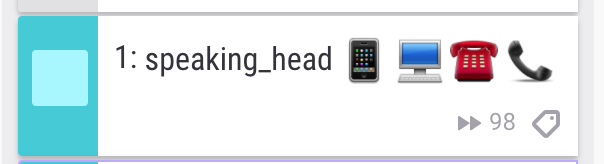
i got to them by using the emoji keyboard (on osx: ctrl + cmd + spacebar)
sheley
on 18 Oct 2017
Perhaps this is an issue of Habitica's support for emoji? From I what know, not all emoji icons in the cheatsheet are supported, let alone others outside of the cheatsheet.
tim1234ltp
on 18 Oct 2017
could be.
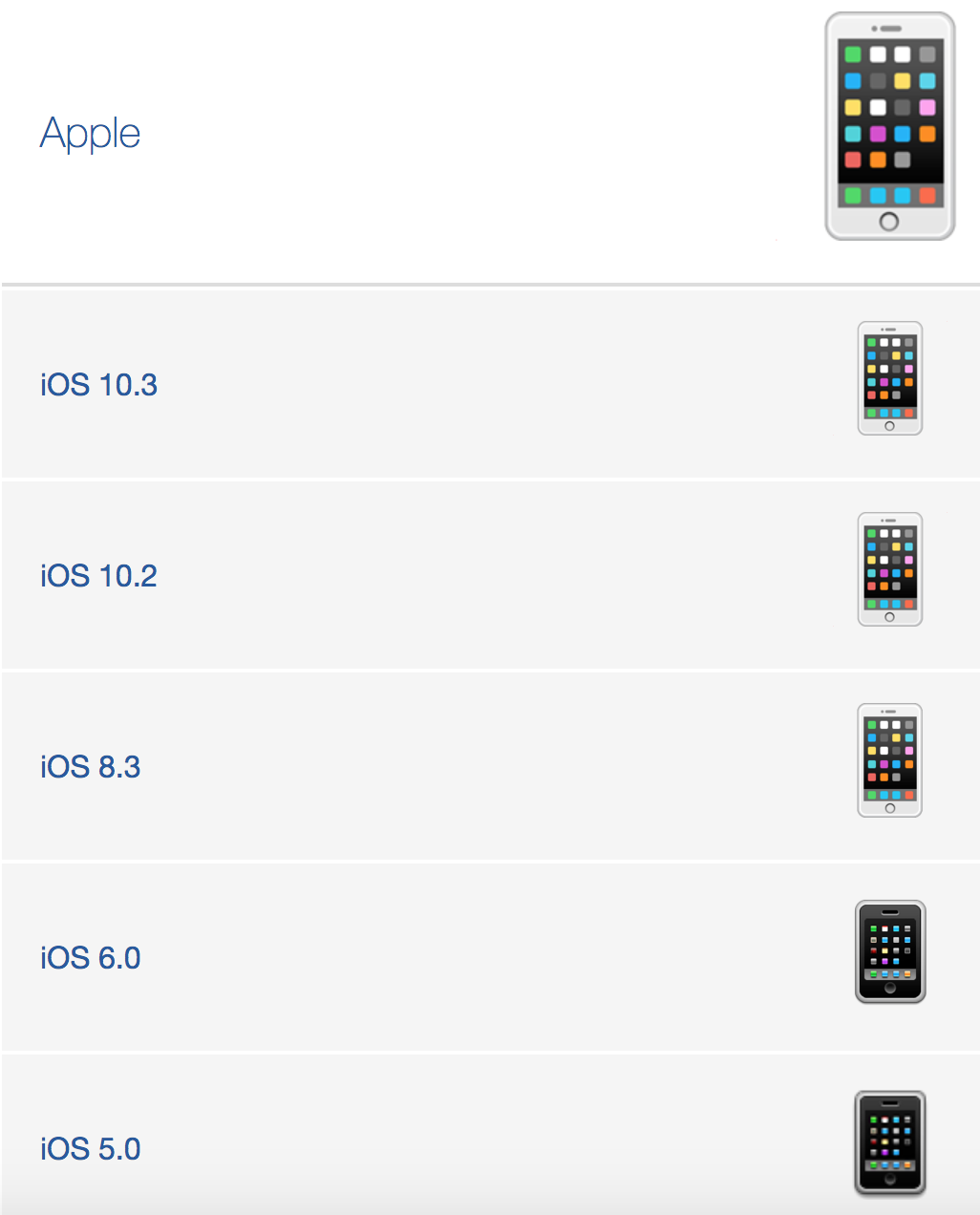
you can also see that the versions of emojis are different in my two screenshots. In the edit screen it looks like the most recent design of the emojis are being used. but in the task view (the second screenshot), the emoji design is different and i'm guessing an older generation.
Maybe the task view is displaying the older generation of emojis, which don't support the missing emojis i listed above because they're newer than that generation. which is maybe why those emoji are missing from the cheatsheet, which also seems to be outdated.
i'm not really sure how emojis work and how you choose which generation of them to display but maybe that is the fix??
sheley
on 18 Oct 2017
also to cite my source of where i thought the emojis displayed were the newer versions: https://emojipedia.org/mobile-phone/
sheley
on 18 Oct 2017
I found a closed issue https://github.com/HabitRPG/habitica/issues/7428 "Unicode emoji not changing to images". It was said to be fixed in the old Habitica. Perhaps it could give you some insights?
This repo is also something worth looking at: https://github.com/HabitRPG/habitica-markdown-emoji
tim1234ltp
on 18 Oct 2017
Here's my understanding of this issue:
There's two types of emoji. One type is specified by using words inside colons, for example :smile: - that's the only type that this issue is concerned with. It's supported by Habitica because it can be set up to use the same images on all platforms.
The other type can be specified by using the Apple keyboard, or other keyboards or methods of insertion, and it inserts images directly. Those images tend to vary widely across different platforms. There's no problem with players using that style of emoji in their own tasks but we're not considering them in this issue. We also don't really recommend that they be used in challenges, guild descriptions, etc if you want to be sure of everyone seeing the same image.
Habitica's website code uses the habitica-markdown library, which uses the habitica-markdown-emoji library (to specify custom emoji such as :melior:), and it in turn uses the third-party markdown-it-emoji library (which implements most standard emoji). So I believe that the lists of supported emoji words can be found at:
- markdown-it-emoji list (don't worry that the images there look wrong)
- habitica-markdown-emoji list
Within the website's code, when a piece of text needs to support emoji and markdown, that text needs to be parsed by the habitica-markdown library. There are places where that isn't being done but that can be handled in different issues than this one (for example, https://github.com/HabitRPG/habitica/issues/9223).
When a piece of text can show some emoji but not all of them, it means that the text is being parsed by the habitica-markdown library but one of these problems is happening:
- The missing emoji is not included in either of the above libraries. In this case you'll see that the emoji remains as text like this:
:emoji_word:. To fix that, someone would need to submit a PR to the habitica-markdown-emoji repository to add the emoji, but you should ask here first to make sure the emoji is suitable for Habitica. - The emoji is included in one of those libraries but Habitica's image for it doesn't exist in our Amazon AWS bucket. For example, the
:smiley:emoji works because it has an image in AWS: https://s3.amazonaws.com/habitica-assets/cdn/emoji/smiley.png but the:sleeping_bed:emoji doesn't work because the image is unavailable: https://s3.amazonaws.com/habitica-assets/cdn/emoji/sleeping_bed.png -- that's the problem that needs to be fixed.
 Alys
on 18 Oct 2017
Alys
on 18 Oct 2017
I've read through this ticket, and the similar one at #9223, and I think my issue is more like this one.
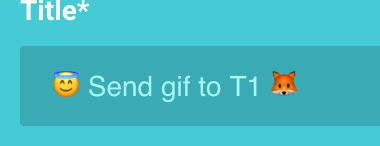
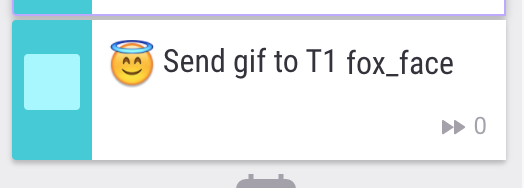
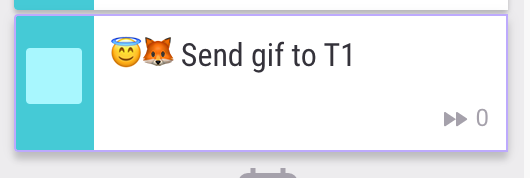
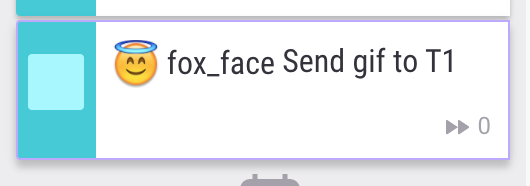
I am seeing the "missing emoji" problem, but it's a little more complex. When I put certain emojis in on their own, like "unicorn" or "fox face", they do not appear. However, when I put them directly next to another emoji, they do appear. If there is a space between the emojis, the problem one does not appear.
So it doesn't seem to be a problem with access to the image in a library - the image is shown properly under certain circumstances, such as in the edit window (but not the task list) and when it's next to another emoji.
Not sure what would cause this now-you-see-it-now-you-don't issue, but I'll add some screenshots to show what I mean.
Screenshot explanations:
In edit screen, with problem emoji at the end of the title:
In task list, with problem emoji at the end of the title:
In edit screen, with problem emoji directly next to non-problem emoji:
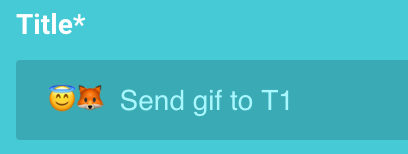
In task list, with problem emoji directly next to non-problem emoji:
In task list, with problem emoji and non-problem emoji separated by a space
 mitten
on 24 Oct 2017
mitten
on 24 Oct 2017
To expand on @mitten 's comment. I did some poking around and what seems to be happening is that the markdown-it library only parses chunks of strings at a time. So if you put in an emoji next to some other text, then markdown-it completely ignores the emoji since it thinks it is just part of the word. Thus it is "working" without a space next to it because it never gets transformed into the image tag with the AWS image bucket, you are just seeing the raw unicode character instead. This is also why you can get the two different versions of the emojis in a single app.
If there is a space, the emoji gets transformed into an <img> tag which either works because we have the image in AWS or the image fails to load because it doesn't exist so you just see the alt text on the image tag, which also happens to be the same name as the emoji. Similarly using the special emoji escapes like :bed: can also result in this broken image tag.
So there are a few ways to fix this, and someone above my pay grade should decide which one they want to implement:
- Fill in the missing images into the AWS store. If slack and trello can have all of the images why not habitica?
- Put the unicode character of the emoji into the alt text. So then when the image fails, you just see the unicode emoji and it looks like it is working. Putting in
token[idx].contentinto the alt text insideindex.jsof the habitica-markdown-emoji node_module should do the trick.
Thanks @Alys for pointing me in the right direction. Filling my tasks with a bunch of emoji is important to me for some reason. 👍 🎤 😹 🛌
 kipraske
on 14 Nov 2017
kipraske
on 14 Nov 2017
Some of the reports here might be caused by this issue: https://github.com/HabitRPG/habitica/issues/10927
Alys
on 1 Jan 2019
Closing this in favor of a holistic emoji ticket, created above.
 SabreCat
on 30 Oct 2020
SabreCat
on 30 Oct 2020
Related issues
Alys
·
4Comments
Alys
·
3Comments
Alys
·
4Comments
 Frownigami1
·
4Comments
Alys
·
3Comments
Frownigami1
·
4Comments
Alys
·
3Comments
Most helpful comment
To expand on @mitten 's comment. I did some poking around and what seems to be happening is that the markdown-it library only parses chunks of strings at a time. So if you put in an emoji next to some other text, then markdown-it completely ignores the emoji since it thinks it is just part of the word. Thus it is "working" without a space next to it because it never gets transformed into the image tag with the AWS image bucket, you are just seeing the raw unicode character instead. This is also why you can get the two different versions of the emojis in a single app.
If there is a space, the emoji gets transformed into an
<img>tag which either works because we have the image in AWS or the image fails to load because it doesn't exist so you just see the alt text on the image tag, which also happens to be the same name as the emoji. Similarly using the special emoji escapes like:bed:can also result in this broken image tag.So there are a few ways to fix this, and someone above my pay grade should decide which one they want to implement:
token[idx].contentinto the alt text insideindex.jsof the habitica-markdown-emoji node_module should do the trick.Thanks @Alys for pointing me in the right direction. Filling my tasks with a bunch of emoji is important to me for some reason. 👍 🎤 😹 🛌