Gvr-unity-sdk: Importing GoogleVR into a Unity 2017.3 project causes iOS apps crashing when loading PNGs
Summary:
A Unity 2017.3 project which loads a png image into a texture crashes on iOS when loading a PNG after importing the Google VR Unity SDK into the project.
E.g.:
public void LoadPNGFile ()
{
string tmpFile = Application.streamingAssetsPath + System.IO.Path.DirectorySeparatorChar + "AnyPNG.png";
byte[] fileData;
fileData = System.IO.File.ReadAllBytes(tmpFile);
Texture2D texture = new Texture2D(2, 2, TextureFormat.ARGB32, false);
texture.LoadImage(fileData); // This function crashes
rawImage.texture = texture;
}
Found using:
- Google VR SDK version: 1.130.1 (also reproduced with 1.120)
- Unity version: Unity 2017.3.1p4, issue can be reproduced with any Unity 2017.3 version.
- Phone manufacturer, model, and O/S version: iPhone 6s iOS 11.2.6 (crash seen all iPhones tested)
- Viewer manufacturer & model:
Steps to reproduce the issue:
- Have a simple Unity 2017.3 project which loads a PNG file into a texture, happens with textures loaded via WWW or from file.
- Compile as iOS app: loading of PNG file will work
- Import GoogleVR SDK into project
- Compile again as iOS app: app will crash when loading PNG.
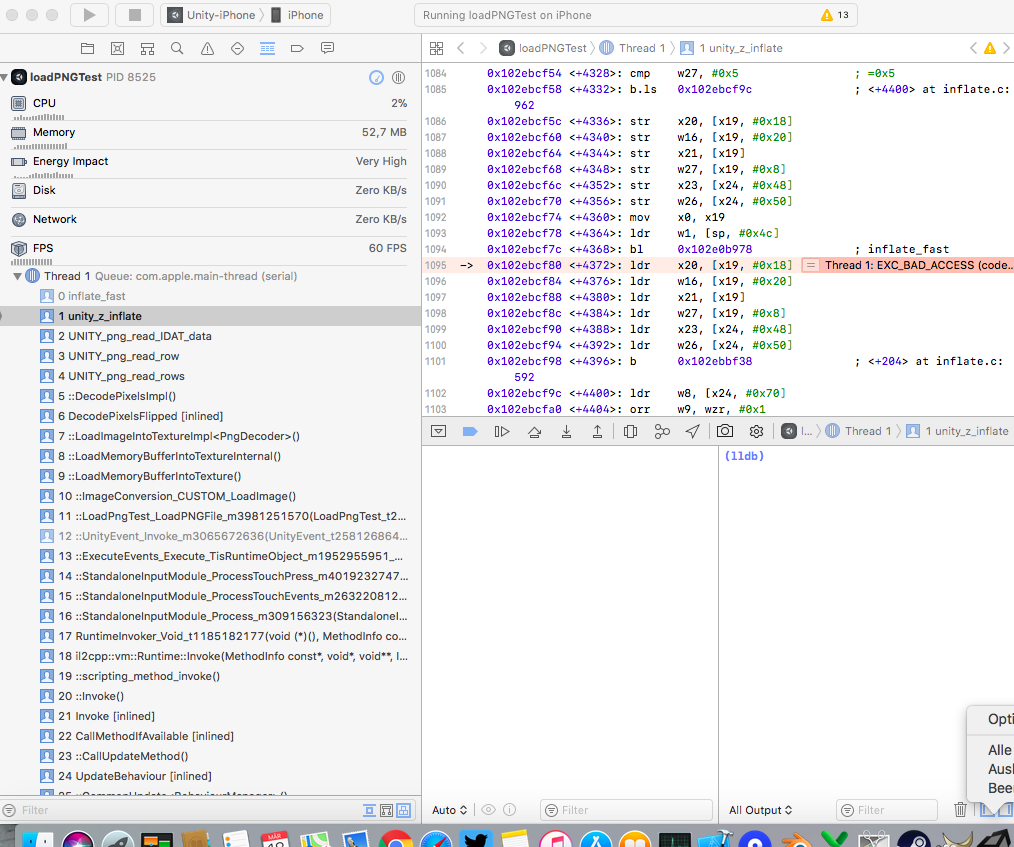
This issue has occurred with our app since Unity 2017.3.0, so I am not sure if this is a Unity issue or a gvr sdk issue, but apparently it starts to happen once importing the SDK.
 Marbl70
All 18 comments
Can you post a link to a sample project we can debug?
 rusmaxham
on 19 Mar 2018
rusmaxham
on 19 Mar 2018
This is a small project which just loads a png either from web or from local file.
It will work on Android and inside of Unity Editor, but crash on iOS.
When removing the GoogleVR folder it will work fine on iOS, too.
https://www.dropbox.com/s/w41j0r02516svc4/LoadPNGTest.zip?dl=0
Marbl70
on 20 Mar 2018
That project builds and runs without crashing for me in 2017.3.1f1, Xcode 9.2, iPhone 6s, iOS 11.2.2.
rusmaxham
on 22 Mar 2018
That is strange, just tried it again from scratch and it still either does not load the PNGs when the UI buttons "Load WWW PNG" or "Load local PNG" are pressed or the app crashes when one of the load PNG button is pressed. Do you see images underneath the buttons when you press one of them?
I am running the latest iOS version 11.2.6.
Question: where does the Pods project comes from which is attached to the unity Xcode workspace file?
Marbl70
on 22 Mar 2018
Met this issue too, tested Unity version:
2017.2.1p2 : Work
2017.2.2p1 : Failed
2017.3.0p1 : Work
2017.3.0p4 : Failed
2017.3.1f1 : Failed
2017.3.1p1 : Failed
2017.3.1p4 : Failed
2017.4.0f : Failed
I checked Xcode log, noticed the GVR version not loaded correctly in failed case.
(Initialize 1.00 version)
Worked case loads target version.
(Initialize 1.80 version)
Same project, any clue?
 shawnhsiao
on 23 Mar 2018
shawnhsiao
on 23 Mar 2018
I tried to test some versions of GVRSDK by rewriting Podfile on 2017.3.1p1.
- 1.80.0 : Success
- 1.100.0 : Failed
- 1.120.0 : Failed
You can temporarily avoid problems by rewriting Podfile as follows
target 'Unity-iPhone' do
  pod 'GVRSDK','< 1.100'
end
and do pod install
 takumi-shimomura
on 26 Mar 2018
takumi-shimomura
on 26 Mar 2018
The Load XXX PNG buttons don't seem to do anything when I tap them.
Now testing with 2017.3.1p4, Xcode 9.2, iPhone 7, iOS 11.2.6.
Logs show initializing GVR version 1.100.0. I did not do a pod update. Just ran stock, tried both Release and Debug builds out of Xcode.
rusmaxham
on 26 Mar 2018
Scratch, that, i thought the squares were the buttons. I repro'd the crash.
rusmaxham
on 26 Mar 2018
If I remove the Assets/GoogleVR folder entirely, the load PNG from WWW works, but not the load from file. Disabling VR SDKs gets the load from file to work. Even VR SDKs enabled, but with None then Cardboard (so it doesn't launch in VR mode) but still has all the GVR libs in it will cause the app to crash. Very strange.
rusmaxham
on 27 Mar 2018
Verified GVR SDK version regression. Using 2017.1.3f1, I do not see the crash with a build direct from Unity. If I then run pod update to update the GVRSDK pod from 1.80 to 1.120, it will crash.
rusmaxham
on 27 Mar 2018
Unity and Google are working to resolve this issue in an upcoming release. In the meantime, here is a workaround patch to resolve the issue. To apply the patch on Mac:
- Open your Unity project, and build a new iOS app as usual - which should generate the corresponding Xcode project.
- Close the Xcode project (if open already), and make sure you backup its contents, as the scripts will directly modify the library & project files in the Pods folder.
- Download and copy the attached script into the root folder of the generated Xcode project, i.e., the folder that contains the .xcodeproj file and the Pods folder (will be referred as $XCODE_PROJ_FOLDER below).
- Open Terminal, then run the following:
    cd $XCODE_PROJ_FOLDER
    chmod +x fixgvrunityios.sh
    ./fixgvrunityios.sh
- Once finished, open the Xcode project to build and run the iOS app. The new app should run as expected without any crashes now.
Please note that running this patch is required once, every time you generate a new Xcode project through Unity.
rusmaxham
on 28 Mar 2018
https://github.com/googlevr/gvr-unity-sdk/issues/878#issuecomment-376023241
You can temporarily avoid problems by rewriting Podfile as follows
Sorry, this report is wrong.
if downgrade gvrsdk, build will be faild by link error.
I misunderstood because no error with simulator.
takumi-shimomura
on 29 Mar 2018
Oh my gosh, I've been pulling my hair out for days on this. It's so random, for me every couple of runs after loading the 5th or 6th image I saw the crash above. I have been googling like crazy and never found this page until now.
Google search is you are reading this then: unity_z_inflate EXC_BAD_ACCESS LoadImageIntoTexture LoadImage
 peterept
on 19 Apr 2018
peterept
on 19 Apr 2018
Thank you @rusmaxham !!
I confirm your work-around does resolve the problem.
Without your patch I will crash consistently in one or two screen of my app (Unity 2017.1.3p1, XCode Version 9.2 (9C40b), iPad iOS 11.2). With patch no crashes.
Where do I send the beer?
peterept
on 19 Apr 2018
Unity 2017.4.1f1 has a patch included to address this issue, PNGs are loading fine again for me.
Thanks to all involved to resolve this issue!
Marbl70
on 19 Apr 2018
This is now fixed in Unity 2017.2.2p3, 2017.4.1f1, and 2018.1.0f1. The fix is on its way to an upcoming patch to 2017.1.
rusmaxham
on 20 Apr 2018
Cool
 sewasewa777
on 4 May 2018
sewasewa777
on 4 May 2018
now fixed in 2017.1.3p4.
rusmaxham
on 17 May 2018
Related issues
 TonGarcia
·
4Comments
TonGarcia
·
4Comments
 qiaonifengxue
·
5Comments
qiaonifengxue
·
5Comments
 nanweiqing
·
5Comments
nanweiqing
·
5Comments
 guneyozsan
·
6Comments
guneyozsan
·
6Comments
 vinhui
·
6Comments
vinhui
·
6Comments