Gui.cs: CJK chars display as ▯▯▯▯▯
Lastest Terminal.Gui with .NET 5 in Windows 10.

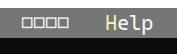
 qdwang
All 14 comments
What font type you are using?
 BDisp
on 15 Dec 2020
BDisp
on 15 Dec 2020
@BDisp I've tried all kinds of fonts(both fonts with only western chars and fonts with cjk chars). And I've tired to use chcp to change the code page to 437(us), 936(chinese) or 45001(utf-8). None of them works.
But the Russian chars and chars like ♥♦♣♠ display correctly.
BTW. I can directly type CJK chars at the CMD console prompt without any problem.
qdwang
on 15 Dec 2020
Have you tried creating a text file with those characters in it and printing it to the console with a normal dos/ps command?
 tznind
on 15 Dec 2020
tznind
on 15 Dec 2020
@tznind Adding Console.WriteLine("テスト"); to the program can correctly display the chars in terminal after exiting the gui.
qdwang
on 15 Dec 2020
@qdwang you have to change the console to support unicode 65001 (UTF-8) in the regional settings.
BDisp
on 15 Dec 2020
@BDisp
yeah, I've done that.
"Beta: Use Unicode UTF-8 for worldwide language support" checked.
qdwang
on 15 Dec 2020
What driver are you using, WindowsDriver, CursesDriveror NetDriver?
BDisp
on 15 Dec 2020
WindowsDriver. After adding Application.UseSystemConsole = true; before the Application.Init();, the ▯▯ still remains.
qdwang
on 15 Dec 2020
If you are running with the Application.UseSystemConsole = true then the app is using the NetDriveron all OS.
If you are running with the Application.UseSystemConsole = false then the app is using the WindowsDriverif you are running on a Windows 10 OS or using the CursesDriverif you are running on a Linuxor macOS OS.
BDisp
on 15 Dec 2020
And of course you have to use a font type that supports CJK, like KaiTi.
With Application.UseSystemConsole = true:

With Application.UseSystemConsole = false:
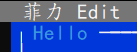
BDisp
on 15 Dec 2020
Thanks, but the issue still happens on my both desktop pc and laptop.
qdwang
on 16 Dec 2020
Did you try with theGUI Example project only replacing the Filemenu with chinese characters and I thing you already have the chinese language installed, of course. If it doesn't work to you, then I have no idea what is going on.
BDisp
on 16 Dec 2020
Good news. The package in master branch works fine with displaying CJK fonts.
It seems the issue comes from the nuget version 0.90.3
qdwang
on 16 Dec 2020
Closing the bug then
 migueldeicaza
on 16 Dec 2020
migueldeicaza
on 16 Dec 2020
Related issues
 MihaMarkic
·
17Comments
MihaMarkic
·
17Comments
 fergusonr
·
18Comments
fergusonr
·
18Comments
 Mgamerz
·
18Comments
Mgamerz
·
18Comments
 tig
·
21Comments
tig
·
21Comments
 timothyparez
·
26Comments
timothyparez
·
26Comments