Gui.cs: OpenDialog directory chooser UI is unintuitive and returns wrong or otherwise illogical paths in regards to what is displayed in the UI
I've been working on some stuff in my application to handle a user picking a location for a folder and I've had some significant challenges myself with the way the OpenDialog folder chooser works. It is not really obvious what will be returned. Here's some examples.
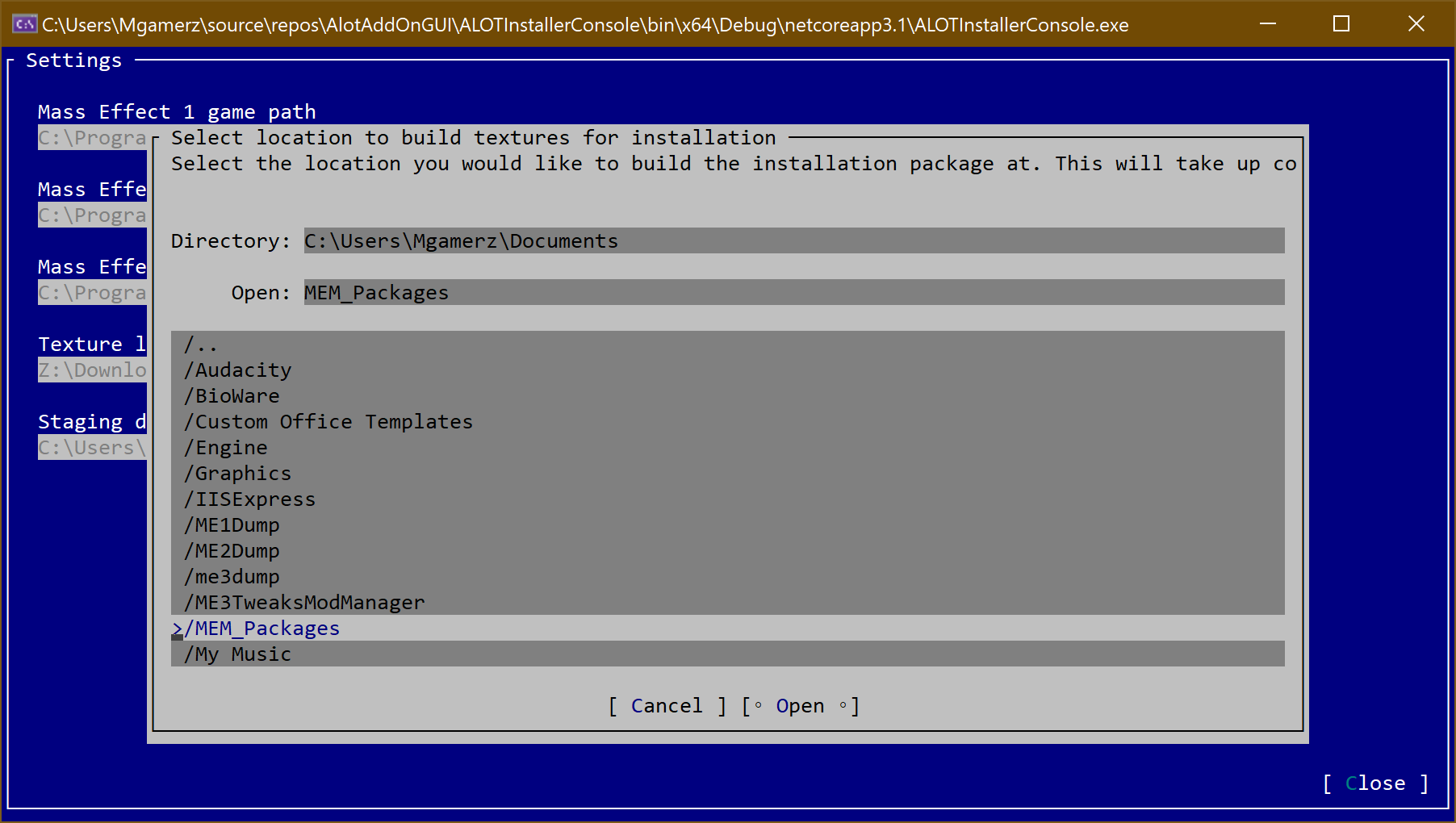
What I expect: C:\Users\Mgamerz\Documents\MEM_Packages
What is returned: C:\Users\Mgamerz \Documents
Why is this an issue?
The 'Open' text field, and the 'Open' button, have two different values. When I click Open, which I logically could assume is the folder being selected in the 'Open' text field (plus the directory above it, which is the currently displayed directory), is not what is returned. It returns the top directory instead. This is confusing as the wording makes it look like this is what you are selecting. If this is not the case, I'm not sure why you would ever need to have 'Open' since I can see what is being selected already (I guess unless you have a multi-select).
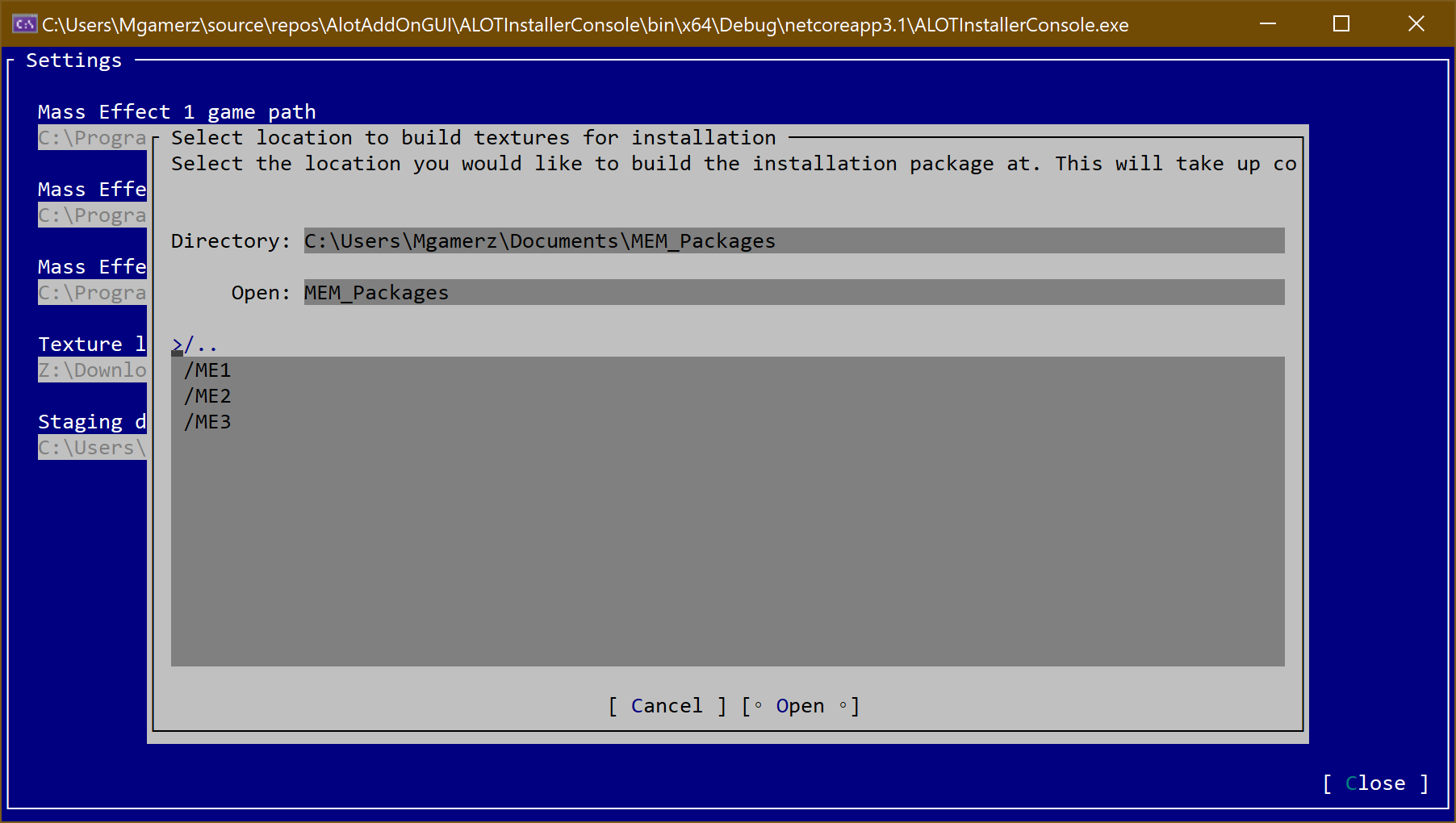
What I expect: C:\Users\Mgamerz\Documents\MEM_Packages
What is returned: C:\Users\Mgamerz
Why is this an issue?
The directory selected is _two_ whole directories away. Even if I was choosing '..' (why would anyone choose .. as a directory and not just choose the parent itself?), it is clearly not what I was trying to select. This is just plain wrong.

What I expect: C:\Users\Mgamerz\Documents\MEM_Packages\ME1
What is returned: C:\Users\Mgamerz\Documents\MEM_Packages
Why is this an issue?
The dialog looks like I'm choosing the ME1 folder for opening, but it's just opening the current path instead. While ultimately this is the folder I wanted, the way to select this is nothing like I've seen on other platforms such as Windows, Mac, and GUI based Linux.
 Mgamerz
All 18 comments
@Mgamerz even though this was closed automatically we'd appreciate you confirming this does in fact fix this bug. Thanks!
 tig
on 7 Aug 2020
tig
on 7 Aug 2020
Will take a look and get back to you today 👍
Mgamerz
on 7 Aug 2020
It seems partially fixed. The file filtering (in another issue) now work. The returned directory seems more consistent (.. only goes up one directory now), and highlighting a folder now returns that folder, so that's 2 of 3 fixed. The third is more complicated.
Selecting the current directory still appears like it is possible but it doesn't actually seem to be, even though the UI conveys it possibly could be. For example, if I click Open here, what value do you think I would get back from the dialog (without knowing the behind the scenes code)? I went into this directory by pressing enter to open it (Desktop), but then didn't select any option (just let it have the default).
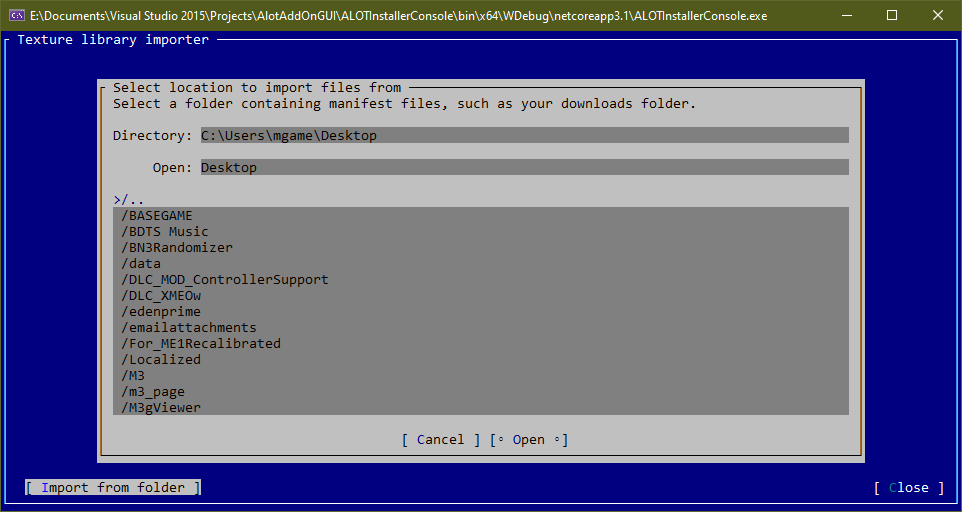
I'm not sure how you would approach this. In Windows Explorer's folder chooser (the Vista style one, not the tree XP version) you can click on a folder and then press Open to pick that folder. However, if you enter a folder and then click nothing, it will also choose the same folder. It's only once you select something that it then becomes what will become returned, until you enter another folder. I understand this is a limitation of the console so 'unselecting' an object in this type of setting is not really possible, unless there was another UI item for doing so, but I don't know if that would be very obvious to console norms.
The above picture for example yields this when you press enter, which doesn't match what's at the top of the dialog.

I think that's where I'm getting tripped up - selecting the currently viewed folder is difficult. In the above pic it shows C:Users\mgame\Desktop as the directory, and that's the one I want, but from current state of the dialog in the picture, I have no way to actually return this value. Selecting any folder gives me that folder and .. gives me the folder above. I don't know if doing something like . along with .. makes sense, where selecting . would just return the current folder (rather than adding a .). The 'Open: Desktop` makes me think that pressing Open will return me the current Desktop folder. But doing it returns .. which is the above folder. Or could be even a fake entry like (Current folder) work or something? Not sure how that would work since there could also be an item named (Current Folder). Just throwing out some ideas.
Mgamerz
on 7 Aug 2020
@Mgamerz as I already had said when I submitted my PR #845 "To select only a directory there must needed to enter to it too." is true if the CanChooseDirectoriesproperty is false. Now I fixed another bug that if the CanChooseDirectoriesproperty is true the selected(s) folder(s) appear on the open TextField. Thanks.
 BDisp
on 7 Aug 2020
BDisp
on 7 Aug 2020
I'm not entirely sure what that means. Are you saying you can't select directory if you're entered into it? (If this is the case, would it not be possible to select the root of a drive?)
Edit: testing shows doing .. at the root chooses the root. But this seems inconsistent with other behavior if you're in a subfolder, as choosing it in the first descendant also selects the root. It is these kinds of things that make it confusing what will be returned, selecting .. in two folders at different levels return the same results. If I only worked in subfolders and then moved to root, choosing .. is not what I would logically assume since it behaves differently in subfolders. This could just be me being pedantic though.
Mgamerz
on 7 Aug 2020
You must enter to it only if CanChooseDirectoriesis false. Now has I already fixed in my PR #855 you can get the selected folder from the selected folders and file (you can select by pressing Ctrl + enter key or click). Like on the demo.cs you get two values, FilePathis the Directory label and the FilePathsis the selected folders and files, dependent the configuration you have, like AllowsMultipleSelection, CanChooseDirectories, CanChooseFilesand AllowedFileTypes.
BDisp
on 7 Aug 2020
Ah, okay. That makes sense. I've been using FilePaths instead of FilePath. I think we're good then 👍
Mgamerz
on 7 Aug 2020
Okay, been playing around with this a bit more today, here's my thoughts on it now, there are still some issues. This is the screen I'll use for reference:
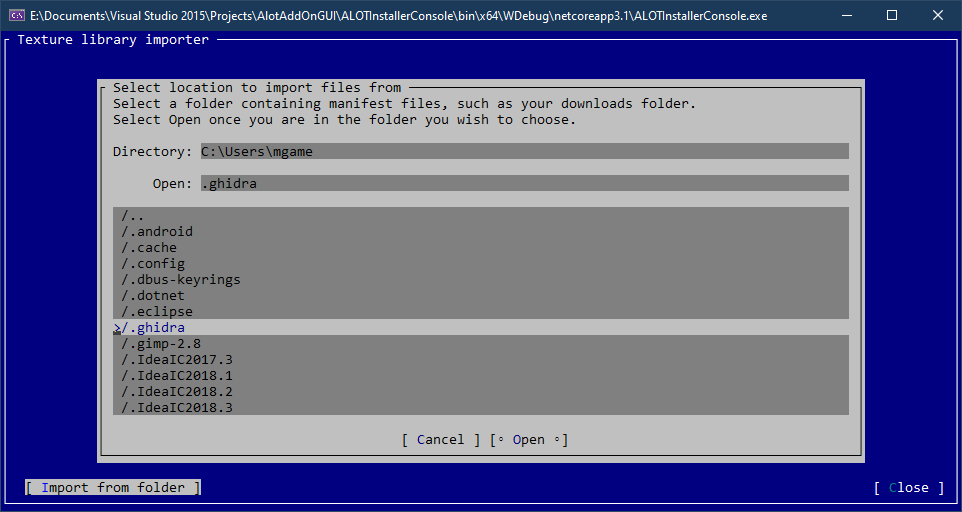
And the target folder I am trying to choose is C:\Users\mgame
There are 3 variables to access things in FileDialog/OpenDialog:
FilePath
FilePaths
DirectoryPath
FilePath will return whatever the highlighted object is. In this case, it would be /.ghidra, so C;\Users\mgame\.ghidra is what will be selected. The UI reflects what will be returned. At least, sometimes. I'm finding this isn't 100% accurate in what it returns when dealing with .. entry (written below)
FilePaths is a list of selected items. I'm going to assume it just returns a list of what is selected (I have not used multi-select). It's the same as FilePath, except it returns multiple selected items. So the UI will also correctly display.
DirectoryPath returns the current visible directory. In this case, C:Users\mgame. This is consistent in that it will always return what is displayed on the screen, however it doesn't line up with what the 'Open' text line shows. I know this was changed to 'File(s)' in a PR, but I am just using latest master branch code for the moment from this morning.
I know DirectoryPath and FilePath usage is up to the developer to determine what to use, so it is up to dev to get it right with what's shown on screen. However, this is where I'm still having issues: If I want the UI to be consistent with what is returned, I need to be using the FilePath/FilePaths. I guess if you could hide the 'Open: ' line that would solve the issue, but that would probably have to be developer configurable option then since it is useful in many other use cases.
Another small nitpick is this brand new, freshly opened dialog:
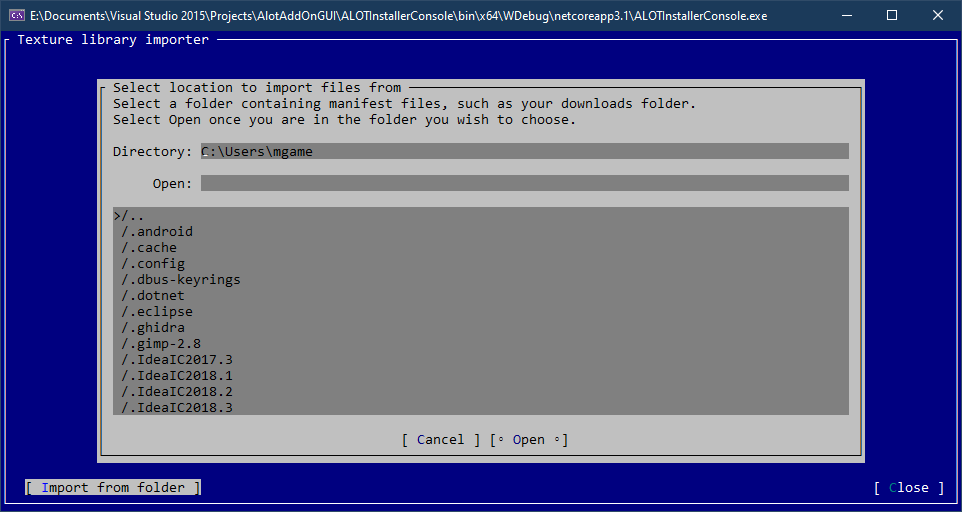
Now I will navigate one folder up and one folder down. Once I navigate back to my folder, I will do nothing, no clicks on items or scrolling (so I don't select anything).
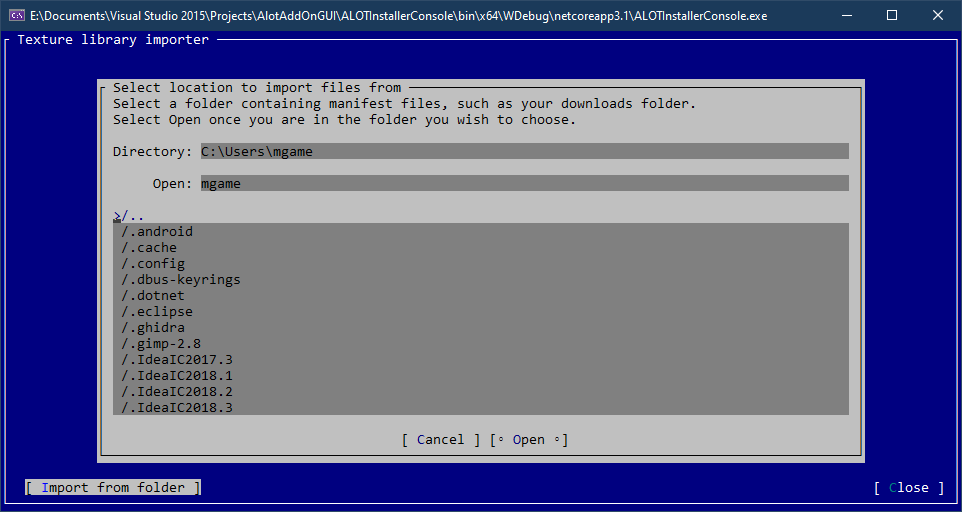
The second instance has a selected item by default, where as the first opening of the dialog does not. I assume this is to make it easier to use the keyboard to browse through folders quickly, whereas refocusing it would be tedious and annoying.
I did a small test and when nothing is selected, FilePath will return the current directory. If something is selected, it will return that, which to me, is correct behavior (at least for folder choosing). However if you ever select anything (which includes navigating folders with the keyboard/mouse (not typing it in), when the folder is navigated to, the first object is always highlighted. I'm not sure if there is a way to unselect an item if it's in non-multi mode, at least I haven't found one (ctrl click/ctrl space/ctrl enter doesn't do anything for me. Maybe it's in a PR?)
Issue with .FilePath returns on ..
Using same reference picture above with C:Users\mgame, I'm getting some odd results with ...
If nothing is selected (freshly opened dialog, directly pressed open) -> FilePath = C:Users\mgame
If I click ONCE on .., and the 'Open: ' text reads Users (one directory up) -> FilePath = C:Users\mgameUsers
If I navigate up a directory and then back down to my directory, you can clearly see something is highlighted (>/..) but the Open: item points to the current directory as if nothing is selected.
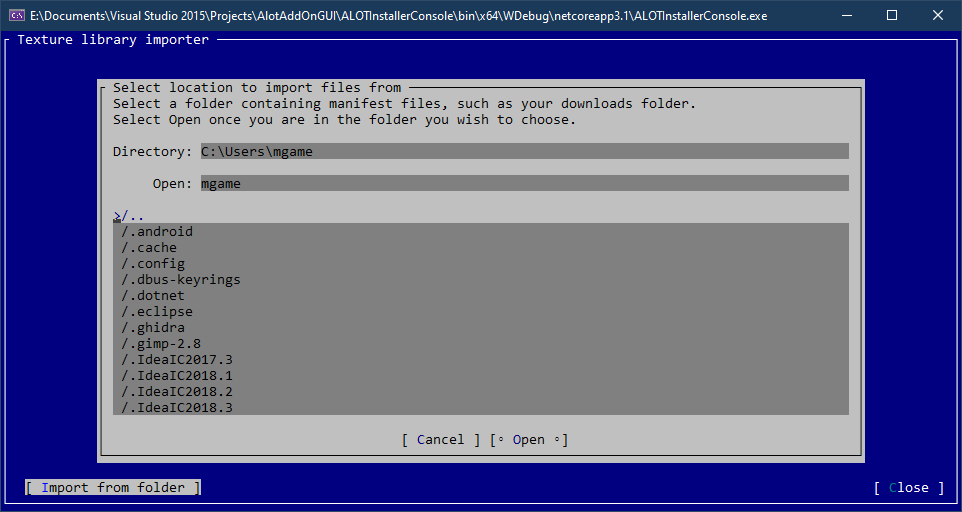
Selecting Open then returns C:Users\mgame\mgame.
I would use the demo/ui catalog apps, however a recent Visual Studio update makes it hang whenever Terminal.cs tries to load in an automated fashion (rather than manually loaded). I'm not sure why, but I'm working with Microsoft to get it fixed. I've worked around this in my project by loading my .sln without projects and then loading them manually, but whenever the uicatalog.csproj loads it tries to automatically load dependencies and it just hangs. It happens on multiple systems for me, I'm not sure if it has something to do with having this project as a git submodule to my main repo. I might try some other things to try and get them to not hang VS so I can look through them beyond just browsing code.
Mgamerz
on 7 Aug 2020
Tested with code from this PR, still same issues as latest comment.
Mgamerz
on 8 Aug 2020
I already had say before that typing in the open text there are no filter control. So you have to take care of the return value and verify if it's valid.
BDisp
on 8 Aug 2020
I am not typing anything in though? I am just opening the dialog and using
it's default navigation up and enter folder feature. At no point am I ever
modifying the path manually.
On Fri, Aug 7, 2020, 5:25 PM BDisp notifications@github.com wrote:
I already had say before that typing in the open text there are no filter
control. So you have to take care of the return value and verify if it's
valid.—
You are receiving this because you were mentioned.
Reply to this email directly, view it on GitHub
https://github.com/migueldeicaza/gui.cs/issues/844#issuecomment-670782149,
or unsubscribe
https://github.com/notifications/unsubscribe-auth/AAU4VFFLRIWADC5G733E6V3R7SEN3ANCNFSM4PSJSJOQ
.
Mgamerz
on 8 Aug 2020
Ah ok sorry I'll see that better later.
BDisp
on 8 Aug 2020
Here's a video showing it:
https://www.youtube.com/watch?v=IPPuOZsEC3c
Here's the code I used to produce the video:
while (true)
            {
                OpenDialog selector = new OpenDialog("Select location", "Select a folder.")
                {
                    CanChooseDirectories = true,
                    CanChooseFiles = false
                };
                Application.Run(selector);
                if (selector.Canceled)
                    break;
                else if (selector.FilePath != null)
                {
                    Debug.WriteLine(selector.FilePath);
                    MessageBox.Query("Result", selector.FilePath, "OK");
                }
            }
Here is the output:
C:\Users\Mgamerz\source\repos\AlotAddOnGUI\ALOTInstallerConsole\bin\x64\WDebug\netcoreapp3.1
C:\Users\Mgamerz\source\repos\AlotAddOnGUI\ALOTInstallerConsole\bin\x64\WDebug\netcoreapp3.1\Downloaded_Mods
C:\Users\Mgamerz\source\repos\AlotAddOnGUI\ALOTInstallerConsole\bin\x64\WDebug\netcoreapp3.1\Downloaded_Mods\Downloaded_Mods
C:\Users\Mgamerz\source\repos\AlotAddOnGUI\ALOTInstallerConsole\bin\x64\WDebug\netcoreapp3.1\netcoreapp3.1
It happens on multiple systems for me, I'm not sure if it has something to do with having this project as a git submodule to my main repo.
It's preferable to have a clone of the Gui on a separate folder and then add it to your solution. If you still have issue maybe it's some conflicting with dependencies through both projets, I think. If you want testing a PR that isn't yet merget you can checkout, compile it and using on your solution.
BDisp
on 8 Aug 2020
As it is a git submodule, it behaves like a standalone repo (git submodules
are a thing that seem designed for this kind of scenario). Its like having
a standalone git repo as a child of another repo, where it's linked rather
than uploaded into my repo. This way I can do a git pull and have the
library up to date in my solution but it's still linked your git. Even
GitHub shows what commit the submodule is at from your repo
https://github.com/ME3Tweaks/ALOTInstaller/tree/ALOT-v4
I don't commit anything to the local submodule repo and I can check out
branches on it. It is way more convenient than having to have an out of
solution clone. Visual studio git integration shows it's a submodule but I
can't do anything with it so I assume it's only partially supported.
Anyways this isn't that relevant to the issue, I was just mentioning why I
didn't look at uicatalog.
On Sat, Aug 8, 2020, 3:57 AM BDisp notifications@github.com wrote:
It happens on multiple systems for me, I'm not sure if it has something to
do with having this project as a git submodule to my main repo.It's preferable to have a clone of the Gui on a separate folder and then
add it to your solution. If you still have issue maybe it's some
conflicting with dependencies through both projets, I think. If you want
testing a PR that isn't yet merget you can checkout, compile it and using
on your solution.—
You are receiving this because you were mentioned.
Reply to this email directly, view it on GitHub
https://github.com/migueldeicaza/gui.cs/issues/844#issuecomment-670852925,
or unsubscribe
https://github.com/notifications/unsubscribe-auth/AAU4VFEMW26AEEO3HXRHBZDR7UOP3ANCNFSM4PSJSJOQ
.
Mgamerz
on 8 Aug 2020
Good to know it, thanks. I have the fix almost ready and i'll submit soon.
BDisp
on 8 Aug 2020
Done!
BDisp
on 8 Aug 2020
Commented on that PR, but it works as expected now 👍
Mgamerz
on 8 Aug 2020
Related issues
 migueldeicaza
·
8Comments
BDisp
·
7Comments
tig
·
7Comments
migueldeicaza
·
8Comments
BDisp
·
7Comments
tig
·
7Comments
 stevozilik
·
8Comments
stevozilik
·
8Comments
 alet
·
6Comments
alet
·
6Comments