Gui.cs: Dim.Percent() generating incorrect Width
The code below produces this result. The right hand TextField does not have a width of 40%

Application.Init();

var win = new Window("Test") { X = 0, Y = 0, Width = Dim.Fill(), Height = Dim.Fill() };

var textLeft = new TextField("Left") { X = 0, Y = 0, Width = Dim.Percent(40) };
var textRight = new TextField("Right") { X = Pos.Right(textLeft)+1,  Width = Dim.Percent(40) };
win.Add(textLeft, textRight);

Application.Top.Add(win);
Application.Run ();
 fergusonr
All 18 comments
I had already detected this when I changed Keys.cs at the request of @tig and intended to set the width of the four ListViewsas (30%, 30%, 20%, 20%) but did not respect any of these instructions. So I also think that Dim.Percent is not working properly.
 BDisp
on 5 Jun 2020
BDisp
on 5 Jun 2020
I've sensed something wrong here too, but wasn't sure. Thanks for getting a good repro!
 tig
on 5 Jun 2020
tig
on 5 Jun 2020
Actually, I believe Dim.Percent is designed to provide a width that is relative to the area to the right (or below) the view.
I don't particularly like this, but it does seem to be the design. It also seems it would be hard to change.
So the above, would be:
Application.Init();

var win = new Window("Test") { X = 0, Y = 0, Width = Dim.Fill(), Height = Dim.Fill() };

var textLeft = new TextField("Left") { X = 0, Y = 0, Width = Dim.Percent(40) };
var textRight = new TextField("Right") { X = Pos.Right(textLeft)+1,  Width = Dim.Percent(100) };
win.Add(textLeft, textRight);

Application.Top.Add(win);
Application.Run ();
What is strange is that before it worked more or less well. I think that due to clipping he is taking the dimension of the SuperViewframe badly. In the past, the problem with Percentis that if we had, for example, five View's with Percent (20), the last View was not accommodated correctly but the other four were with the correct dimensions. I'm curious about that.
BDisp
on 8 Jun 2020
Here's a very simple proof-of-concept fix. The proposed, "new" Dim.Percent() functionality is runtime enabled
https://github.com/fergusonr/gui.cs/commits/dim_percent_new_behaviour
Before
Application.NewDimPercentBehavior = false;
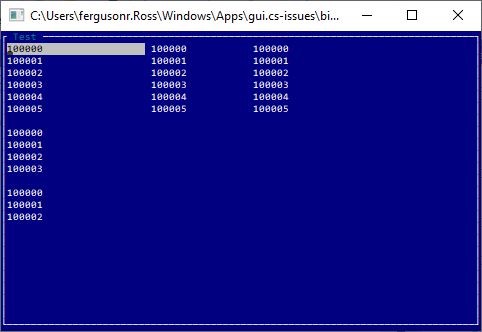
After
Application.NewDimPercentBehavior = true;
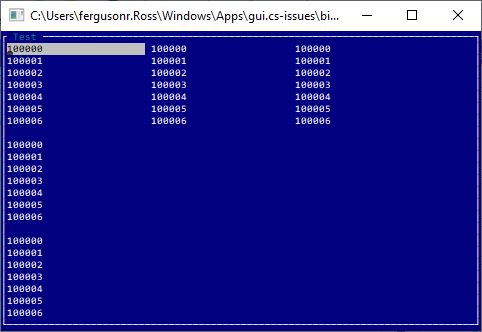
Application.Init();
Application.NewDimPercentBehavior = true;

var win = new Window("Test") { X = 0, Y = 0, Width = Dim.Fill(), Height = Dim.Fill() };

var list = Enumerable.Range(100_000, 100_100).ToList();

var textTopLeft = new ListView(list) { X = 0, Y = 0, Width = Dim.Percent(30), Height = Dim.Percent(30) };
var textTopMiddle = new ListView(list) { X = Pos.Right(textTopLeft) + 1, Y = 0, Width = Dim.Percent(30), Height = Dim.Percent(30) };
var textTopRight = new ListView(list) { X = Pos.Right(textTopMiddle) + 1, Y = 0, Width = Dim.Percent(30), Height = Dim.Percent(30) };

var textMiddleLeft = new ListView(list) { X = 0, Y = Pos.Bottom(textTopLeft) + 1, Width = Dim.Percent(30), Height = Dim.Percent(30) };
var textBottomLeft = new ListView(list) { X = 0, Y = Pos.Bottom(textMiddleLeft) + 1, Width =
Dim.Percent(30), Height = Dim.Percent(30) };

win.Add(textTopLeft, textTopMiddle, textTopRight, textMiddleLeft, textBottomLeft);

Application.Top.Add(win);
Application.Run();
Tag @migueldeicaza - need your input on this. What is the correct/expected behavior of Dim.Percent?
tig
on 11 Jun 2020
If I'm allowed my opinion, here goes. The SetRelativeLayoutmethod is incomplete in my opinion because it does not provide for cases in which the Dimclass uses DimFactor, as it only treats cases in which PosCenteris isolated, leaving all other cases, such as DimAbsolute, DimCombine, DimFactor, DimFilland DimViewbeing treated as identical cases. In the case of DimFactor, widthand heightdo not have to be deducted from _xand _ybecause they are only dependent on the hostFrame * percentage product.
BDisp
on 14 Jun 2020
Hello,
Well, when I wrote this, the idea was to use proportions that would feel intuitive to the user, and I can see that the problem is that the result when taking X into consideration can be confusing.
I am not convinced that the problem is the lack of special cases in SetRelativeLayout for the individual components. The real problem is that SetRelativeLayout and the Anchor are only given as much space as the remaining space.
The challenge really is that the Percent is computed based on the remaining space after the X position.
So the original example should likely should not use Width of 30% to achieve its goals, but the remaining space.
I see a few options to address this:
(a) Document the behavior "This allocates from the remaining space after the X/Y anchor positions are taken into consideration" - ie, no code changes.
(b) Splitting the meaning of Dim.Percent() into two classes (with different names), one that takes the whole original space into consideration, and one that takes the remaining space into consideration. For this scenario, like @BDisp points out,
SetRelativeLayoutneeds to be taught that theDim.Percentscenario does not subtract thexvalue that is set initially.(c) Embracing that the current meaning is wrong, and switch to just a single option that changes the existing behavior.
I agree that (a) is confusing, (b) seems like it might be hard to explain, unless we come up with good explanatory names, and (c) feels like a bridge too far. I do not have a strong opinion on this, and would love to hear your thoughts.
 migueldeicaza
on 14 Jun 2020
migueldeicaza
on 14 Jun 2020
This is one of those things where I think we leave well enough alone, as we drive to get a stable 1.0 out. (a) may be confusing (and non-intuitive) but it works.
Part of why I feel this way is I still don't grok it personally, esp SetRelativeLayout. I don't like changing things I don't understand. So, I'd be willing to accept going after b) or c) if someone were able to bring a great set of unit tests along with their change that helps prove correctness both in design and implementation.
tig
on 14 Jun 2020
Until now the three conditions of the width and height in the SetRelativeLayoutmethod are necessary, because they deals with the real situations. Perhaps may be necessary to add more conditions, at least in the Dim.Width (View) still have some issues when the windows is resized. I think it's more intituitive to deal with Percentlike I did because we don't have to worry about the remaing space as long as we get the desire sized. The equals now works with the Dim.Width in the units test. I'll always do the best to improve it as I can.
BDisp
on 14 Jun 2020
Well, I already did some test with my PR and I'm convinced it is very usefull. The Dim.Width (View) issue I mentioned it is about with unicode chars which not happens with normal chars. I have the same opinion as @tig but I would like to take the c) because if someone needs to put a view on the remaining space after the X/Y anchor positions there no need to use the Dim.Percent for that, it's enougth using X = Pos.Right (View) + space. If I have controls that use the Dim.Percent I would like to see that they fit well when the windows is resized. I'll present some unit test that will prove this.
BDisp
on 15 Jun 2020
But if you want the (b) option is also good. Perhaps maintaining the current Dim.Percent for the new behavior and creating another class named DimFactorRemaining with a method named Dim.PercentRemaining to the original behavior, that is, allocates from the remaining space after the X/Y anchor positions. What do you prefer (b) or (c)?
BDisp
on 15 Jun 2020
Nop. Both class are doing the same thing so I think it's better to add a bool field in the DimFactorclass and a bool parameter in the Dim.Percent with a default value equal to false which mean that it will execute the new behavior and true otherwise. So it will being like this.
else if (width is Dim.DimFactor && !((Dim.DimFactor)width).IsFromRemaining ())
    w = width.Anchor (hostFrame.Width);
else if (height is Dim.DimFactor && !((Dim.DimFactor)height).IsFromRemaining ())
    h = height.Anchor (hostFrame.Height);
I changed my PR #682 to prove this. I hope you like it.
BDisp
on 15 Jun 2020
Based on all this, I think we should do c).
I think having a config parameter passed to the constructor of Dim.Percent and Dim.Factor is clunky. Once you do that, why not add a property (public bool Remaining)? It just adds complexity.
If we go with c), and some user someday begs for the original behavior (remaining = true) then that API can be added as a new class (aka Dim.Remaining).
tig
on 15 Jun 2020
@tig I think that in this case there is no reason to create a property because you are not instantiating an object. It is only instantiated when it is called by the Anchorvirtual method. So it's not very practical to do as you intend, I think. And it is only necessary to set true when applicable.
var keyStrokeListView = new ListView (keyStrokelist) {
X = 0,
Y = Top.Top (keyLogLabel) + yOffset,
Width = Dim.Percent (30),
Height = Dim.Fill (),
};

it would have to be something like this:

var keyStrokeListView = new ListView (keyStrokelist) {
X = 0,
Y = Top.Top (keyLogLabel) + yOffset,
Width = new DimFactor (Dim.Percent (30))
Height = Dim.Fill (),
};
If we go with c), and some user someday begs for the original behavior (
remaining = true) then that API can be added as a new class (akaDim.Remaining).
If this happens, it is not necessary to create another class, just invert the default condition in the SetRelativeLayoutmethod.
BDisp
on 15 Jun 2020
Thank you for the explanation BDisp! I did notice it, and I could swear I put a comment somewhere, but not here.
Thank you!
migueldeicaza
on 16 Jun 2020
Related issues
 qdwang
·
14Comments
qdwang
·
14Comments
 daltskin
·
12Comments
daltskin
·
12Comments
 domhnal
·
13Comments
domhnal
·
13Comments
 timothyparez
·
26Comments
timothyparez
·
26Comments
 blakepell
·
13Comments
blakepell
·
13Comments