Gui.cs: UI Catalog - resize scrollbar issue
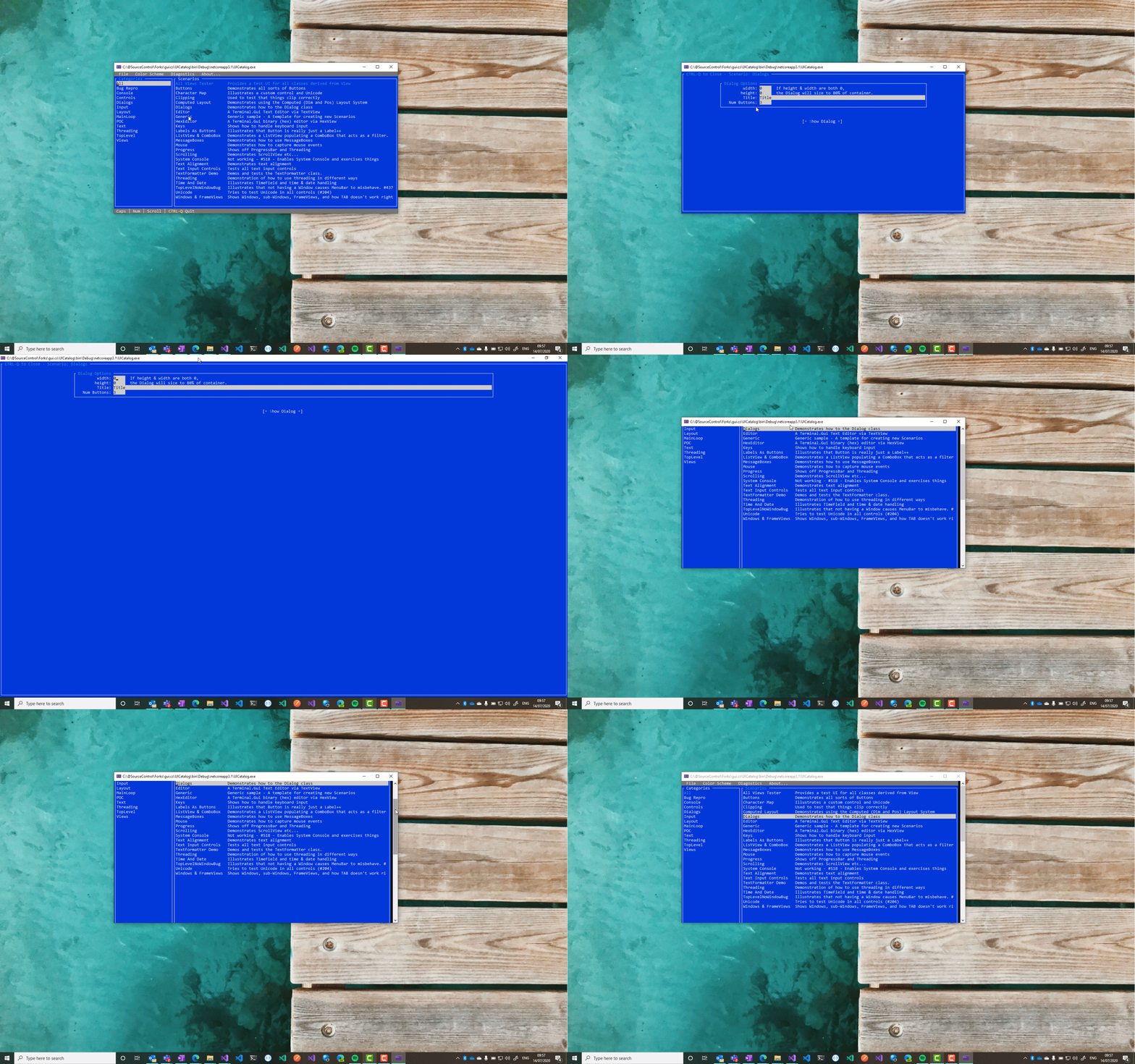
Title bar not visible after window resize.
- Select Dialog screen
- Double click title bar to go full window
- Double click title bar to minimise window
- Select CTRL Q to go back
Note the vertical scrollbar has not gone to the top. I've noticed this on ListViews where the current selected item is preserved, causing the scrolling to make that selected item at the top of the screen
 daltskin
All 12 comments
@daltskin I really preserved the current selected item but the behavior has to do with the WindowsDriverresize which maintain the current buffer after restore the window and the Driver.UpdateCursor will position the cursor to the current focused view forcing put it to the top because the buffer length is too big.
PS: On Linuxthis doesn't happen.
 BDisp
on 14 Jul 2020
BDisp
on 14 Jul 2020
Dupe (same root cause) of #786.
 tig
on 14 Jul 2020
tig
on 14 Jul 2020
@tig I think this is a different issue. It has to do with the shrinkage of the window where using the WindowsDriveralways showing the vertical scroll bar after a full screen.
BDisp
on 14 Jul 2020
Ok. Reopening. Thanks!
tig
on 14 Jul 2020
Lol. I couldn't fix this with the buffer length but the workaround with the PR #796 solve this behavior too. Great.
BDisp
on 15 Jul 2020
@daltskin will you please verify this is fixed. Thanks.
tig
on 16 Jul 2020
When leaving the scenario, the console occupies the entire length of the buffer, always without the vertical scroll bar.
BDisp
on 16 Jul 2020
Note the behavior for this will differ depending on which console is being used on Windows. I regularly try to test within:
cmd.exe- The console host you get in the VS debugger and when you runcmd.exe- Windows Terminal
- ConEmu - an open source console that's pretty darn good (but has bugs with console GUI apps)
tig
on 16 Jul 2020
Note the behavior for this will differ depending on which console is being used on Windows. I regularly try to test within:
* `cmd.exe` - The console host you get in the VS debugger and when you run `cmd.exe`
cmd.exeworks great. With full mouse support.
* Windows Terminal
Windows Terminalworks horrible very badly, leaving traces with many damaged layers. Mouse doesn't work. ExceptUbuntuworks like asWSL 2.
* ConEmu - an open source console that's pretty darn good (but has bugs with console GUI apps)
ConEmuworks badly too and blinking on resizing. Mouse doesn't work too.
On WSL 2 works very well. Better than cmd.exe on resizing. Mouse movements works with limitations with "export TERM=xterm-1002" or "export TERM=xterm-1003". See the differences here https://stackoverflow.com/questions/7462850/mouse-movement-events-in-ncurses. "export TERM=xterm-1006" doesn't support mouse movements any more now, it's a pity because it was the only one that supported the mouse on the entire screen of the application.
BDisp
on 16 Jul 2020
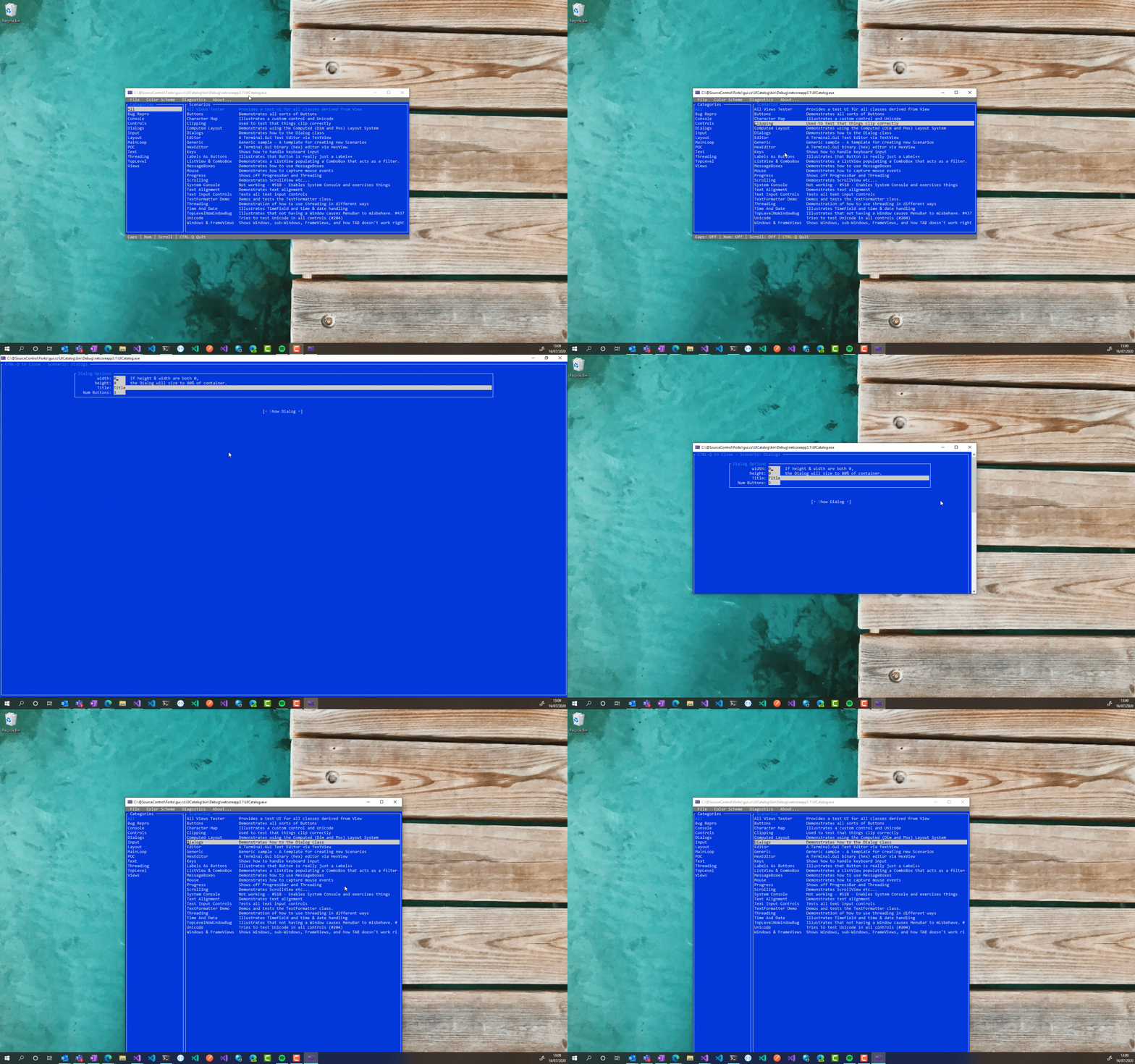
Hmm.. it's still not quite right I'm afraid.
After resizing (from full-screen) the height of the window changes. Also notice that the status bar is now out of view when you return to the main menu.
daltskin
on 16 Jul 2020
That behavior cannot be suppressed from WindowsDriverbecause of the buffer length that must be preserved otherwise it will throw an exception. In the Unix the Driverworks better in that case.
BDisp
on 16 Jul 2020
Just tested in Ubuntu (WSL) and as you say, behaves much better :)
daltskin
on 16 Jul 2020
Related issues
BDisp
·
39Comments
 rueckertch58521
·
16Comments
rueckertch58521
·
16Comments
 domhnal
·
13Comments
domhnal
·
13Comments
 psantosl
·
21Comments
BDisp
·
24Comments
psantosl
·
21Comments
BDisp
·
24Comments