I thought I knew how to build dotnet stuff on Linux, but obviously not.
I've got Ubuntu 18.04 running in WSL.
I've got dotnet installed.
When I do:
dotnet restore
dotnet build
I get:

I didn't think you could actually install .NET 4.7.2 on linux. If you can, I don't know how. Hence me asking here.
 tig
tig
All 17 comments
If you use Visual Studio 2019 like me, create a NetCore project and copy the Demo to the Program file. After the project has been compiled, you type the command dotnet /path_to_dll in WSL or create a sh file as a shortcut to the path. If you need do debug you must enable ssh in the WSL. You also need to install vsdbg in WSL. You can also install mono and run mono /path_to_dll. I didn't find how to debug with mono but with vsdbg we can. To debug you have to attach to process and choose ssh in the connection type and Managed (.Net Core for Unix) in the Select Code Type.
 BDisp
on 14 May 2020
BDisp
on 14 May 2020
Here's something I don't understand (related to this question and my PR to upgrade to dotnetcore):
Why do people think this project needs to target the .NET Framework at all? As far as I can tell, it has no dependencies on it, and if it purely targeted netstandard2.0 or netstandard2.1 everything would work fine.
What 'bad' would happen if we changed Terminal.Gui.csproj from:
<TargetFrameworks>net472;netstandard2.0</TargetFrameworks>
To
<TargetFrameworks>netstandard2.1</TargetFrameworks>
Seriously?
I can tell you the good:
- The project would 'just work' with the Github Actions 'dotnet core` actions.
- Building on Linux (this question) would just work.
- We could use C# 8.0 features with confidence.
- The overall project would be simplified.
@migueldeicaza , what am I missing in my thinking?
tig
on 20 May 2020
I don't know if it affect mono itself, so only @migueldeicaza could answer this which I'm very curious too.
BDisp
on 20 May 2020
I have been using Mono and its .NET Framework build tooling for it, as it is generally faster to develop when using Linux.
.NET Standard 2.1 is not supported in .NET Framework:
https://devblogs.microsoft.com/dotnet/announcing-net-standard-2-1/
Given many of the API additions in .NET Standard 2.1 require runtime changes in order to be meaningful, .NET Framework 4.8 will remain on .NET Standard 2.0 rather than implement .NET Standard 2.1. .NET Core 3.0 as well as upcoming versions of Xamarin, Mono, and Unity will be updated to implement .NET Standard 2.1.
 migueldeicaza
on 20 May 2020
migueldeicaza
on 20 May 2020
I already suspected that this was the cause. Thank you.
BDisp
on 20 May 2020
I think I understand what you are saying now Miguel.
But, do you know if there's some way we can have a our cake and eat it too? Is there someway to change the .csproj such that you can build using Mono on Linux, but the rest of us can use dotnetcore? As of now, if we change to my PR it breaks you. If we leave it in, I can build on Linux without mono (which I don't have time to learn) and I can help us use Github Actions.
tig
on 20 May 2020
I only use the mono to run the Example project in Linux. For normal work in Linux I use a netcoreapp that I create for that purpose, which I can debug very well and is very fast. So, for .Net Framework I'm forced to use mono in Linux.
BDisp
on 20 May 2020
Oh, and so you guys understand why I care about this:
I've become weirdly motivated to add tests to this project. I have been thinking about how to leverage my UICatalog and other stuff into a set of unit and regression tests. Having to deal with mono on Linux just buts a hurdle in my way on this.
tig
on 20 May 2020
@tig deal with Linux as a dotnet only like me. Believe me I'm not concerned learning mono until now to could still working on Linux.
BDisp
on 20 May 2020
You should be able to fix this by adding a reference to Microsoft.NETFramework.ReferenceAssemblies from nuget.
I ran into this exact same issue a while ago and there are a few ways to work around it one of which is just using the mono build tooling. But adding the full framework reference assemblies is the easiest one, I documented the others here: https://nvd.codes/post/dotnet-build-target-net4x-on-unix-systems.
Haven't tested this with gui.cs yet though, will see if I have some time this evening to give it a try.
 nickvdyck
on 25 May 2020
nickvdyck
on 25 May 2020
Seems this was once added in this commit: c4509edbae1786eb04b0baafa685d17d9c6bc327 but later got removed (next commit in this file) in this PR: 49cd29853f5de55547c9011996ed982040607b5c . Hard to say as to why it was removed, the changeset is quite large.
nickvdyck
on 25 May 2020
I have already tested methods 2 and 3 but without success. The first method I am not very interested in because it is not possible to debug monowith vs2019, in addition to not being a library as complete as dotnet. I preferred method 3 because it is simpler, but it does not work. It gives the following error with the two methods when I try to run on Linux:
A fatal error was encountered. The library 'libhostpolicy.so' required to run the application was not found in /gui.cs/Example/bin/Debug/
Failed to run as a self-contained app. If this should be a framework-dependent app, add the /gui.cs/Example/bin/Debug/Terminal.runtimeconfig.json file specifying the appropriate framework.
I think that the problem is the Terminal.runtimeconfig.json file that is missing, but how can to be generated?
BDisp
on 25 May 2020
@nickvdyck I added this configuration again in the Terminal.Gui project and it still gives the same error.
BDisp
on 25 May 2020
Seems this was once added in this commit: c4509ed but later got removed (next commit in this file) in this PR: 49cd298 . Hard to say as to why it was removed, the changeset is quite large.
As it happened, the PR was mine, but I didn't change it, because it was done with some rebasing.
BDisp
on 25 May 2020
Ah ok, I wasn't pointing fingers here only providing some context because I got interested. IMO I would also just use the last one, the others I included just as an FYI.
Anyways I just tried this out on my mac, don't have a linux setup with mono and dotnet core atm (will wack up a docker container and test later today) and it works for me.
Adding those references only allows you to build a dll or exe targetting full framework on unix. You still need a full framework runtime like mono or .NET Framework to run the generated binary. The Example and Designer projects are full framework so you can't use dotnet core to run those because doing so will give you the error you posted above.
Example:
mono Designer/bin/Debug/Designer.exe
This is how I run it but as I use vs2019with Windows 10 I can't debug when running on Mono. So I use a netcoreappthat compiles to dlland then I can debug through sshand dotnet. The problem is that I can only attach to the debugger after starting the application on WSL. If I need to debug when starting the application I use a Dockerimage. The problem with Dockeris that it does not open the console with the application running, as it appears only in the Outputof vs2019 but only as text, of course. What I really wanted was to have a way to open the WSLor Dockerwith the graphical visualization of the application when starting the netcoreappapplication execution.
BDisp
on 25 May 2020
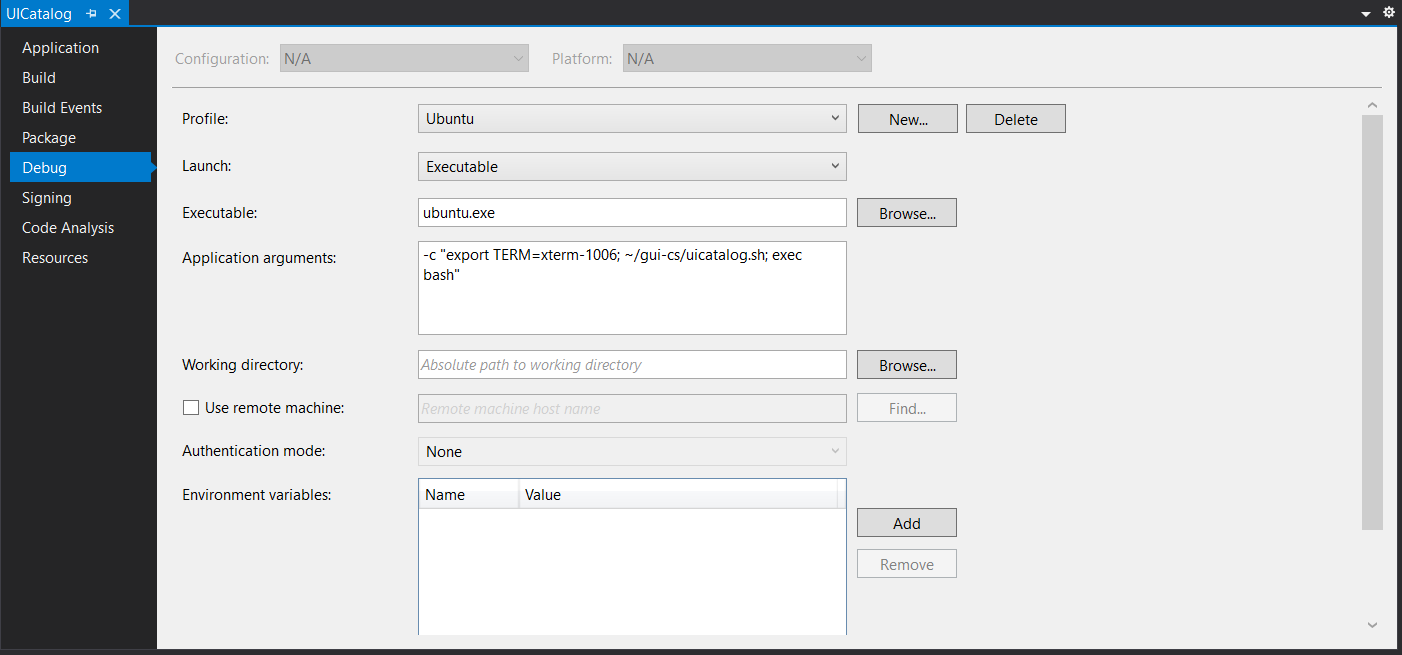
I would like to share and now if there is a way to improve it would be great. I created a new profile in the UICatalogproject as shown in the figure that allows me to run on Linuxwith automatic compilation. Sometimes I forgot to compile before executing and so it complements whenever there are changes to the code. If I need to debug I attach the project to VS2019using the keysCtrl + Alt + P. Of course, Linuxmust have ssh running. It is just not possible to debug right away when starting but it is already more automated. It consists of running ububtu.exe that is installed as a distro when activating WSL. In the argument, configure the TERMand execute uicatalog.sh which consists of a batch with the shortcut to UICatalog.dll. To execute it, just click on the Start Ububtubutton and voilá.
BDisp
on 30 May 2020
Related issues
BDisp
·
24Comments
 fergusonr
·
18Comments
fergusonr
·
18Comments
 MihaMarkic
·
17Comments
MihaMarkic
·
17Comments
 qdwang
·
14Comments
qdwang
·
14Comments
 timothyparez
·
26Comments
timothyparez
·
26Comments
Most helpful comment
Ah ok, I wasn't pointing fingers here only providing some context because I got interested. IMO I would also just use the last one, the others I included just as an FYI.
Anyways I just tried this out on my mac, don't have a linux setup with mono and dotnet core atm (will wack up a docker container and test later today) and it works for me.
Adding those references only allows you to build a dll or exe targetting full framework on unix. You still need a full framework runtime like mono or .NET Framework to run the generated binary. The
ExampleandDesignerprojects are full framework so you can't use dotnet core to run those because doing so will give you the error you posted above.Example: