Gui.cs: Enter special non-standard characters in TextField
Is it possible somehow processing non-standard characters in TextField like '=', '\' or numbers? Thanks.
 YauhenPyl
All 22 comments
Just ran into this as well. Is there only support for text without numbers?
 luetm
on 8 May 2018
luetm
on 8 May 2018
Team, I do not understand this, what platform is this, and what is the problem?
Perhaps you are using the Keypad, instead of the main keyboard?
 migueldeicaza
on 8 May 2018
migueldeicaza
on 8 May 2018
It is about non-standard characters, e.g. how to put the next string to TextField: Holly-Molly_23.
YauhenPyl
on 8 May 2018
This only happens on windows. For windows it uses a different key map function eg MapKey https://github.com/migueldeicaza/gui.cs/blob/master/Terminal.Gui/Driver.cs#L1056 . This does some filtering to only include characters between A-z. Because the mapping into a ConsoleKey only allows you to map to standard keys. The unix code path uses a different map function eg MapCursesKey https://github.com/migueldeicaza/gui.cs/blob/master/Terminal.Gui/Driver.cs#L545.
Currently tested on Microsoft Windows [Version 10.0.17134.1] with dotnet core 2.1.0.rc1
I can try to make a put together a patch if given some pointers. 😁
 nickvdyck
on 9 May 2018
nickvdyck
on 9 May 2018
Thanks for the bug report folks, and thanks for tracking this down @nickvdyck!
The fix should be in git now.
migueldeicaza
on 9 May 2018
@migueldeicaza Thank you! It now works for the en-US keyboard. With the de-CH (Swiss German) keyboard layout we also have keys like AltGr, which we use for thinkgs like @,# or \ . These don't work yet. Is this easy to implement or do you have to create keymaps for all keyboard layouts?
luetm
on 9 May 2018
Sorry, I didn't get it. Is there any plan to add supporting of this Windows symbols? Or is there any plan to add it? Sorry for bothering.
I am using

YauhenPyl
on 9 May 2018
@YauhenPyl For me it already works with 0.8.0
luetm
on 9 May 2018
@luetm: could you print out the results of using Console.ReadKey for any characters that are failing for you?
migueldeicaza
on 11 May 2018
Agreed with @luetm , it is actually working with 0.8:
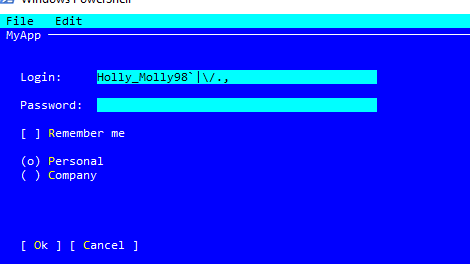
Thank you.
YauhenPyl
on 11 May 2018
Excellent - will close
migueldeicaza
on 13 May 2018
Sorry for the late reply.
I still cannot use the @ in 0.8.0. I think this might be a windows bug in relation to the de-CH layout. To make an @ with this layout I need to use this combo: https://i.imgur.com/k5WAs2y.png
Pressing this combination gives me the '2' character in a field. Any steps I can do to help debugging?
luetm
on 15 May 2018
Yes, can you use Visual Studio and debug what happens in read key event processing?
migueldeicaza
on 17 May 2018
I created a PR (https://github.com/migueldeicaza/gui.cs/pull/90). This seems to fix it, but like I mention there i found something else. Also occurs without my changes though. Maybe we'll open a new issue for that later.
luetm
on 17 May 2018
Can you please try the latest version, I have now a proper fix for the TextField.
migueldeicaza
on 18 May 2018
With 0.10.0 I get an exception every time I delete a character with backspace. AltGr + 2 still gives me a 2. But if the branch you use for nuget is master, the AltGr is not handeled. (https://github.com/migueldeicaza/gui.cs/blob/2af83a14cc6e543cd2cb08f2e5f59c8dc63ab092/Terminal.Gui/Drivers/WindowsDriver.cs#L663). The way I tried it here https://github.com/migueldeicaza/gui.cs/pull/90/commits/5bfeaa3bf29cde0a6e10c6546e601da33133bbc7 seems to work, since AltGr apparently is equivalent to Alt + Control.
I'll investigate the backspace problem a bit further.
System.InvalidOperationException: 'Operation is not valid due to the current state of the object.'
at Terminal.Gui.TextField.RuneIndexToByteIndex(Int32 index)
at Terminal.Gui.TextField.ProcessKey(KeyEvent kb)
at Terminal.Gui.View.ProcessKey(KeyEvent keyEvent)
at Terminal.Gui.View.ProcessKey(KeyEvent keyEvent)
at Terminal.Gui.Toplevel.ProcessKey(KeyEvent keyEvent)
at Terminal.Gui.View.ProcessKey(KeyEvent keyEvent)
at Terminal.Gui.Toplevel.ProcessKey(KeyEvent keyEvent)
at Terminal.Gui.Application.ProcessKeyEvent(KeyEvent ke)
at Terminal.Gui.WindowsDriver.Mono.Terminal.IMainLoopDriver.MainIteration()
at Mono.Terminal.MainLoop.MainIteration()
at Terminal.Gui.Application.RunLoop(RunState state, Boolean wait)
at Terminal.Gui.Application.Run(Toplevel view)
at Terminal.Gui.Application.Run()
at MailWilly.Program.Main(String[] args) in C:\Dev\VirtualWilly\VirtualWilly\Program.cs:line 62
luetm
on 18 May 2018
This is on Windows I imagine?
Could you try dumping the values that come out of reading the text when you do AltGr+2? I do not know how to achieve the same on my US keyboard.
migueldeicaza
on 20 May 2018
AltGr is like Ctrl + Alt. Full value of keyInfo:
Key D2 System.ConsoleKey
KeyChar 64 '@' char
Modifiers Alt | Control System.ConsoleModifiers
That was the point of https://github.com/migueldeicaza/gui.cs/pull/90 :)
The if (keyInfo.Modifiers == (ConsoleModifiers.Alt | ConsoleModifiers.Control)) return (Key)((uint)keyInfo.KeyChar); makes it work.
EDIT: Windows 10, .NET 4.6.1
luetm
on 22 May 2018
Thanks for the information, one last thing, as I do not have a german keyboard, what does AltGr + 2 produce on a text editor, or say notepad?
migueldeicaza
on 30 May 2018
The '@' symbol.
luetm
on 30 May 2018
Thanks for helping me track this down, this should be fixed now.
migueldeicaza
on 1 Jun 2018
Fixed. Closing.
 tig
on 24 May 2020
tig
on 24 May 2020
Related issues
 rueckertch58521
·
16Comments
rueckertch58521
·
16Comments
 qdwang
·
14Comments
qdwang
·
14Comments
 psantosl
·
21Comments
tig
·
21Comments
psantosl
·
21Comments
tig
·
21Comments
 timothyparez
·
26Comments
timothyparez
·
26Comments
Most helpful comment
Thanks for the bug report folks, and thanks for tracking this down @nickvdyck!
The fix should be in git now.