Guake: Can't bind since Ubuntu 18.04 update
Console show this :
* (guake:14095): WARNING *: 18:52:19.209: Binding '
My caracteristics:
Guake Terminal 3.2.2
VTE 0.52.1
Gtk 3.22.30
GNOME 3.28.1
 MrDJthib
All 18 comments
do you use wayland?
 gsemet
on 4 Jun 2018
gsemet
on 4 Jun 2018
Yes but before on Ubuntu 17.10 I was already on and binding worked perfectly
MrDJthib
on 4 Jun 2018
dont know how it worked i never had the binding working under wayland (see this page on the doc)
gsemet
on 4 Jun 2018
Can you see if this recommendation works: https://github.com/kupferlauncher/keybinder/issues/11
gsemet
on 4 Jun 2018
The solution with guake -t works well, i'll try the recommandation
MrDJthib
on 4 Jun 2018
The recommandation didn't work, I suppose the update of ubuntu updated wayland and so now makes this error
MrDJthib
on 4 Jun 2018
i though ubuntu reversed back to x11 ?
gsemet
on 4 Jun 2018
I think Ubuntu 18.04 gives X11 when it is the first installation but not when you're updating it.
For me, the upgrade updated all softwares and after I've got this bug. I'll take a look on previous version of Gnome, Guake, etc. when they were working to see differences.
MrDJthib
on 5 Jun 2018
"Because Gtk2 applications are ran in XWayland. env GDK_BACKEND=x11 would make a Gtk3 application run under XWayland too"
so guake 0.8 (on gtk2) should work natively on wayland, while gtk3 app (guake 3) should have this env var set prior to launch, apparently.
gsemet
on 5 Jun 2018
Ok I got it I was on guake 0.8 and the Ubuntu upgrade updated it to guake 3. Finally, the recommmandation with the environment variable worked, it was because I was doing it wrong.
Thank you :smile:
MrDJthib
on 5 Jun 2018
cool :) can you manage to make this environment variable in /usr/local/share/applications/guake.desktop ?
Something by replacing:
Exec=guake
by
Exec= env GDK_BACKEND=x11 guake
will it fix for everyone ?
gsemet
on 5 Jun 2018
Tested and it works on Wayland and X11 :)
MrDJthib
on 5 Jun 2018
great, I'll prepare a patch on master and if you agree to test, it will please all wayland users !
gsemet
on 5 Jun 2018
No problem :)
MrDJthib
on 5 Jun 2018
I just ran into this issue on Arch in 2019; GNOME 3.32, fully updated, Wayland. My solution was to add a manual keybinding for the "guake" command to F12 in GNOME Settings. Works like a dream!
 deekosta
on 27 Jul 2019
deekosta
on 27 Jul 2019
@deekosta Works for me too (Fedora 30). For others, see Gnome docs on custom shortcuts.
 samtuke
on 11 Nov 2019
samtuke
on 11 Nov 2019
Tried all solutions, still failing to bind indicator to guake:
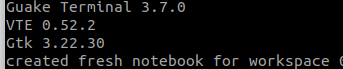
Enabled/Disabled Wayland
started with env GDK_BACKEND=x11 guake
No luck, Please Help
 charbelcs123
on 25 May 2020
charbelcs123
on 25 May 2020
env GDK_BACKEND=x11 guake-toggle
Solution for me. Faster to toggle. Maybe needs be be opened with env GDK_BACKEND=x11 guake at first.
 insign
on 20 Jun 2020
insign
on 20 Jun 2020
Related issues
 igorog
·
3Comments
igorog
·
3Comments
 ka4eli
·
4Comments
ka4eli
·
4Comments
 ludovicaelbrecht
·
5Comments
ludovicaelbrecht
·
5Comments
 k23363
·
3Comments
k23363
·
3Comments
 wada3n
·
3Comments
wada3n
·
3Comments
Most helpful comment
I just ran into this issue on Arch in 2019; GNOME 3.32, fully updated, Wayland. My solution was to add a manual keybinding for the "guake" command to F12 in GNOME Settings. Works like a dream!