Gridsome: Feature Request: Service Worker (PWA)
Summary
I have seen gridsome has "service worker" in their roadmap for 1.0 here is a list of flow I propose to add service worker, this is exact steps I used to create service worker for my project
Steps
1) Add workbox-cli as one of the npm dependencies
2) In the gridsome "create" command add a basic workbox-config.js in the created project.
Here is a workbox-config.js I use in my gridsome project
module.exports = {
  "globDirectory": "dist/",
  "globPatterns": [
    "**/*.{html,css,js,png,json}"
  ],
  "swDest": "dist/sw.js"
};
3) Exexute npx workbox generateSW workbox-config.js during gridsome build command
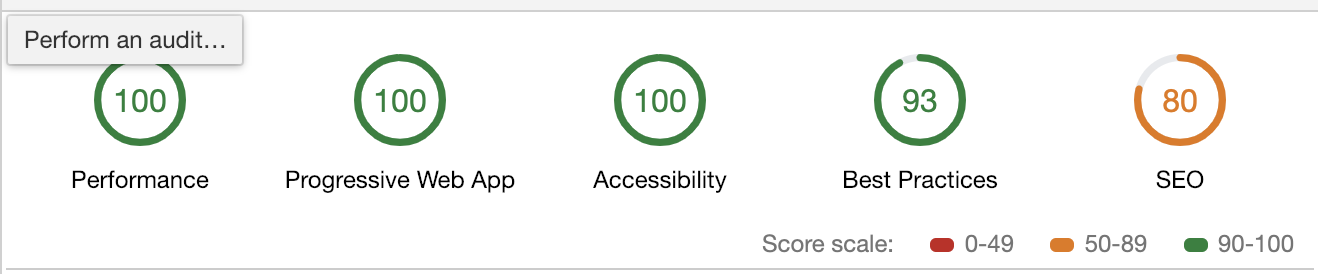
Hurray now we have a gridsome project with a 100 PWA score. Here is a really basic manifest.json file that is enough for my project.
{
    "name": "Gridsome Project",
    "short_name": "Gridsome",
    "icons": [
      {
        "src": "logo-192.png",
        "sizes": "192x192"
      },
      {
        "src": "logo-512.png",
        "sizes": "512x512"
      }
    ],
    "lang": "en-US",
    "start_url": "/",
    "display": "standalone",
    "theme_color": "#29b473",
    "background_color": "#FFF"
}
I have added this manifest.json and logo-512, logo-192 files inside my static folder.
 physcocode
All 26 comments
I have a plugin in a local branch that does almost what you are doing. I don't have much experience with Service Workers, but I can push the branch so you can see if it will work :)
 hjvedvik
on 1 Feb 2019
hjvedvik
on 1 Feb 2019
@hjvedvik I will definitely look into it and provide a PR if I can improve on that 😀
physcocode
on 1 Feb 2019
Pushed a plugin-pwa branch now that you can test. Would be great if you have the time to finish it :)
hjvedvik
on 1 Feb 2019
On to it
physcocode
on 1 Feb 2019
Just ran into a small problem otherwise plugin is ready to be in the core. I have hosted a test build on https://pwatestg.firebaseapp.com everything works fine. And here is the lighthouse test result
physcocode
on 1 Feb 2019
@hjvedvik you may close this issue once the plugin has been brought to master
physcocode
on 1 Feb 2019
The Firebase link doesn't work on my end.
 dark88888
on 1 Feb 2019
dark88888
on 1 Feb 2019
@darkrubyist sorry my bad its https://pwatestg.firebaseapp.com
physcocode
on 1 Feb 2019
@hjvedvik any update ? Waiting for this to be merged so that I can directly add with npm
physcocode
on 3 Feb 2019
I'll add documentation if its in line to merge @hjvedvik ?
physcocode
on 5 Feb 2019
@physcocode
Should we still use workbox to create the service worker? Also, are we supposed to manually add navigator.serviceWorker to index.html?
 ninest
on 22 Mar 2019
ninest
on 22 Mar 2019
@themindstorm we don’t need to manually add navigator.serviceWorker also this plugin has not yet bought to core yet
physcocode
on 22 Mar 2019
@hjvedvik what's the status on this?
 robaxelsen
on 7 Apr 2019
robaxelsen
on 7 Apr 2019
@hjvedvik Very curious on this as well! How's it going? :)
 lokecarlsson
on 11 Apr 2019
lokecarlsson
on 11 Apr 2019
how's this going?
 m1guelpf
on 2 May 2019
m1guelpf
on 2 May 2019
@physcocode Do you have the test repo public for me/us to take a peak at?
lokecarlsson
on 2 May 2019
@lokecarlsson plugin-PWA branch on gridsome’s github repo
physcocode
on 11 May 2019
Will there be a way to hook into the various service worker lifecycle methods like Vue cli 3 does?
 etiennemarais
on 21 May 2019
etiennemarais
on 21 May 2019
I checked out this branch and tested the build command. It creates the service worker fine but it does not seem to generate the manifest.json file.
Console Error

My config is set to super basic stuff.
...
    {
      use: '@gridsome/plugin-pwa',
      options: {
        title: 'Test Title',
        shortName: 'Short name',
        icon: '~/favicon.png'
      }
    }
Is there something else I need to set to get this working?
etiennemarais
on 21 May 2019
The last commit on this branch is quite old, from december 2018. I don't think it's up-to-date at the moment.
 steebchen
on 21 May 2019
steebchen
on 21 May 2019
@physcocode Do you perhaps have any insight on this issue please? Could you perhaps share your demo so we can compare notes?
etiennemarais
on 21 May 2019
I'm using gridsome-plugin-pwa but I don't understand why you go over all assets/static images and add them to manifest.json as icons...
From node_modules/gridsome-plugin-pwa/files/manifest.js:
  const iconsNames = _fsExtra.default.readdirSync(iconsDir).map(image => {
    return _path.default.join('assets/static/', image);
  });

  const icons = iconsNames.map(icon => {
    let iconData = (0, _imageSize.default)(
      _path.default.resolve(config.outDir, icon)
    );

    iconData.src = icon;
    return iconData;
  });
 eladcandroid
on 31 Jul 2019
eladcandroid
on 31 Jul 2019
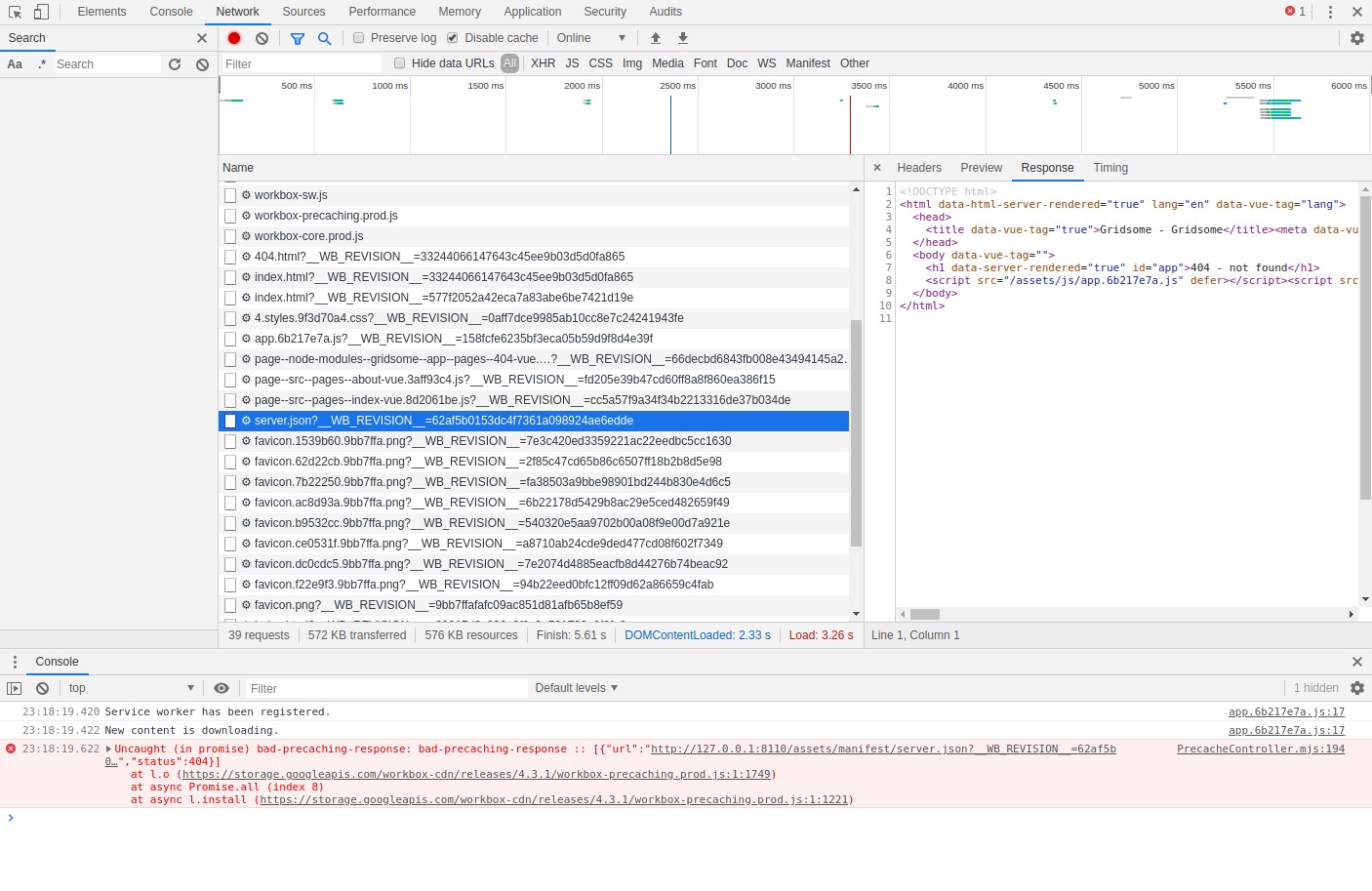
It kinda works with gridsome-plugin-pwa, except for one bug when launching the PWA for the first time. The error comes from workbox and it says assets/manifest/server.json is missing.
Uncaught (in promise) bad-precaching-response: bad-precaching-response :: [{"url":"http://127.0.0.1:8110/assets/manifest/server.json?__WB_REVISION__=62af5b0153dc4f7361a098924ae6edde","status":404}]
    at l.o (https://storage.googleapis.com/workbox-cdn/releases/4.3.1/workbox-precaching.prod.js:1:1749)
    at async Promise.all (index 8)
    at async l.install (https://storage.googleapis.com/workbox-cdn/releases/4.3.1/workbox-precaching.prod.js:1:1221)
cc @hjvedvik
steebchen
on 6 Sep 2019
Also, it seems that when you gridsome build, it adds the addEventListener(...) code to a root service-worker.js __each__ time...

steebchen
on 6 Sep 2019
It kinda works with gridsome-plugin-pwa, except for one bug when launching the PWA for the first time. The error comes from workbox and it says assets/manifest/server.json is missing.
@steebchen I have patched this in latest release. You may open issue at gridsome-plugin-pwa if it's not solved for you yet.
 rishabh3112
on 29 Sep 2019
rishabh3112
on 29 Sep 2019
To work with the proposed method with workbox I had to register my service-worker in the index.html like
<script>
// Check that service workers are supported
if ("serviceWorker" in navigator) {
  // Use the window load event to keep the page load performant
  window.addEventListener("load", () => {
     navigator.serviceWorker.register("/service-worker.js");
  });
}
</script>
 kasvith
on 19 Dec 2020
kasvith
on 19 Dec 2020
Related issues
 tanc
·
26Comments
tanc
·
26Comments
 SteveEdson
·
44Comments
SteveEdson
·
44Comments
 gongph
·
42Comments
gongph
·
42Comments
 wjustice
·
24Comments
wjustice
·
24Comments
 eleijonmarck
·
18Comments
eleijonmarck
·
18Comments
Most helpful comment
@steebchen I have patched this in latest release. You may open issue at gridsome-plugin-pwa if it's not solved for you yet.