Description
env
Steps to reproduce
- gridsome create my-gridsome-site. error report:
Error: Failed to install dependencies with yarn  Please enter my-gridsome-site directory and install dependencies with yarn or npm manually.
 Exit code 1
 at ChildProcess.child.on.code...
...
- cd my-gridsome-site
- yarn install. error report:
error E:\my-gridsome-site\node_modules\sharp: Command failed.
Command: (node install/libvips && node install/dll-copy && prebuild-install) ||
(node-gyp rebuild && node install/dll-copy)
...
why?
 gongph
All 42 comments
Have you tried to run npm install or yarn install from within your project directory?
 u12206050
on 5 Aug 2019
u12206050
on 5 Aug 2019
I'm running into the same errors.
win7 64
[email protected]
[email protected]
[email protected]
(not using yarn)
Same errors gongph is encountering. Doesn't matter if I install via gridsome create, or if I enter the newly created directory and npm install there.
error [email protected] install: '(node install/libvips && node install/dll-copy && prebuild-install) || (node-gyp rebuild && node install/dll-copy)'
error Exit status 1
error Failed at the [email protected] install script.
 kaigon
on 6 Aug 2019
kaigon
on 6 Aug 2019
Have you tried to run
npm installoryarn installfrom within your project directory?
I tried, but it still didn't work.
gongph
on 8 Aug 2019
Having the same issues here:
Mac OSX 10.14.6
[email protected]
[email protected]
Error:
`Error: Failed to install dependencies with npm. Please enter farnsco-blog directory and install dependencies with yarn or npm manually. Then run gridsome develop to start local development.
Exit code 1
at ChildProcess.<anonymous> (/Users/coffeepostal/.nvm/versions/node/v12.2.0/lib/node_modules/@gridsome/cli/lib/commands/create.js:102:17)
at ChildProcess.emit (events.js:196:13)
at maybeClose (internal/child_process.js:1011:16)
at Process.ChildProcess._handle.onexit (internal/child_process.js:268:5)`
 coffeepostal
on 11 Aug 2019
coffeepostal
on 11 Aug 2019
OK, I'm having luck with npm rebuild then re-running npm install. I feel like I've done exactly that a couple of times, but this last time, it seemed to take. Oh, and I also downgraded my Node to v10.16.0 and NPM is v6.9.0, that seems to be getting me through.
coffeepostal
on 12 Aug 2019
I'm unlucky in developing under Termux terminal on Android...
> [email protected] install /data/data/com.termux/files/home/voxelnoise/node_modules/sharp
> (node install/libvips && node install/dll-copy && prebuild-install) || (node-gyp rebuild && node install/dll-copy)

info sharp Downloading https://github.com/lovell/sharp-libvips/releases/download/v8.7.4/libvips-8.7.4-android-armv7.tar.gz
/data/data/com.termux/files/home/voxelnoise/node_modules/sharp/install/libvips.js:86
          throw new Error(`Status ${response.statusCode}`);
          ^

Error: Status 404
    at /data/data/com.termux/files/home/voxelnoise/node_modules/sharp/install/libvips.js:86
at f (/data/data/com.termux/files/home/voxelnoise/node_modules/once/once.js:25:25)
    at ClientRequest.<anonymous> (/data/data/com.termux/files/home/voxelnoise/node_modules/simple-get/index.js:63:5)
    at Object.onceWrapper (events.js:288:20)
    at ClientRequest.emit (events.js:200:13)
    at HTTPParser.parserOnIncomingClient [as onIncoming] (_http_client.js:565:23)
    at HTTPParser.parserOnHeadersComplete (_http_common.js:116:17)
    at TLSSocket.socketOnData (_http_client.js:452:22)
    at TLSSocket.emit (events.js:200:13)
    at addChunk (_stream_readable.js:294:12)
gyp ERR! find Python
gyp ERR! find Python Python is not set from command line or npm configuration
gyp ERR! find Python Python is not set from environment variable PYTHON
gyp ERR! find Python checking if "python" can be used
gyp ERR! find Python - "python" is not in PATH or produced an error
gyp ERR! find Python checking if "python2" can be used
gyp ERR! find Python - "python2" is not in PATH or produced an error
gyp ERR! find Python
gyp ERR! find Python **********************************************************
gyp ERR! find Python You need to install the latest version of Python 2.7.
gyp ERR! find Python Node-gyp should be able to find and use Python. If not,
gyp ERR! find Python you can try one of the following options:
gyp ERR! find Python - Use the switch --python="/path/to/pythonexecutable"
gyp ERR! find Python   (accepted by both node-gyp and npm)
gyp ERR! find Python - Set the environment variable PYTHON
gyp ERR! find Python - Set the npm configuration variable python:
gyp ERR! find Python   npm config set python "/path/to/pythonexecutable"
gyp ERR! find Python For more information consult the documentation at:
gyp ERR! find Python https://github.com/nodejs/node-gyp#installation
gyp ERR! find Python **********************************************************
gyp ERR! find Python
gyp ERR! configure error
gyp ERR! stack Error: Could not find any Python installation to use
gyp ERR! stack     at PythonFinder.fail (/data/data/com.termux/files/usr/lib/node_modules/npm/node_modules/node-gyp/lib/find-python.js:303:47)
gyp ERR! stack     at PythonFinder.runChecks (/data/data/com.termux/files/usr/lib/node_modules/npm/node_modules/node-gyp/lib/find-python.js:132:21)
gyp ERR! stack     at PythonFinder.<anonymous> (/data/data/com.termux/files/usr/lib/node_modules/npm/node_modules/node-gyp/lib/find-python.js:175:16)
gyp ERR! stack     at PythonFinder.execFileCallback (/data/data/com.termux/files/usr/lib/node_modules/npm/node_modules/node-gyp/lib/find-python.js:267:16)
gyp ERR! stack     at exithandler (child_process.js:297:5)
gyp ERR! stack     at ChildProcess.errorhandler (child_process.js:309:5)
gyp ERR! stack     at ChildProcess.emit (events.js:200:13)
gyp ERR! stack     at Process.ChildProcess._handle.onexit (internal/child_process.js:270:12)
gyp ERR! stack     at onErrorNT (internal/child_process.js:456:16)
gyp ERR! stack     at processTicksAndRejections (internal/process/task_queues.js:84:9)
gyp ERR! System Linux 3.18.79
gyp ERR! command "/data/data/com.termux/files/usr/bin/node" "/data/data/com.termux/files/usr/lib/node_modules/npm/node_modules/node-gyp/bin/node-gyp.js" "rebuild"
gyp ERR! cwd /data/data/com.termux/files/home/voxelnoise/node_modules/sharp
gyp ERR! node -v v12.4.0
gyp ERR! node-gyp -v v5.0.3
gyp ERR! not ok
Do I need to install Python?
 vintprox
on 25 Aug 2019
vintprox
on 25 Aug 2019
Ok, compiling for Android is clutter... I installed Python 2.7, but node-gyp also requires GCC, and installing it via Termux environment was not successful.
Now I have to use other JAMstack solution... 😪
vintprox
on 3 Sep 2019
Using Ubuntu 19.04, node 12.10.0
Getting build sharp 0.21.3 error
Have installed sharp (latest, 0.23.0 and 0.21.3)
Still error
Can't downgrade node due to latest needed.
Do I need to install some sort of node environment manager in order to use gridsome, or will the sharp package problem be fixed soon?
 PatrickLohan
on 12 Sep 2019
PatrickLohan
on 12 Sep 2019
Having same issues. Doesnt matter if i use the CLI or install from inside the dir.
OSX 10.14.5
Node v12.6 or v10.16.0
NPM 6.9.0.
Yarn 1.17.3
Running npm rebuild didn't help either.
Fails on [email protected] install, fatal error: 'vips/vips8' file not found
 courdek
on 23 Sep 2019
courdek
on 23 Sep 2019
I'm having the same issue now after trying to reinstall. Could it be a sharp issue?
u12206050
on 23 Sep 2019
Same issue here. I think it is a Sharp issue because I tried installing just that package with the same error. Is there a way to install Gridsome without sharp support?
 appdevnick
on 24 Sep 2019
appdevnick
on 24 Sep 2019
Same here. Probably related to Sharp but can't confirm so.
 brunodeangelis
on 24 Sep 2019
brunodeangelis
on 24 Sep 2019
I'm having the same issue now after trying to reinstall. Could it be a sharp issue?
Working for me this morning 👍
 lukepearce
on 24 Sep 2019
lukepearce
on 24 Sep 2019
So after some digging/searching and trying these steps solved it for me:
rm -rf /Users/{username}/.npm/_libvips
brew install vips // If this command throws some error about could not download cfitsio, just ignore.
rm -rf node_modules
npm install
u12206050
on 24 Sep 2019
It is working for me today as well. Thanks for the quick fix!
appdevnick
on 24 Sep 2019
So after some digging/searching and trying these steps solved it for me:
rm -rf /Users/{username}/.npm/_libvips
brew install vips// If this command throws some error about could not download cfitsio, just ignore.
rm -rf node_modules
npm install
Worked for me, thanks for the fix!!
 igortrinidad
on 19 Nov 2019
igortrinidad
on 19 Nov 2019
It doesn't work for me
OSX 10.15.1
Node v13.0.1
NPM 6.12.1
Yarn 1.19.2
 monkuver
on 23 Nov 2019
monkuver
on 23 Nov 2019
Same error after upgrade !!
OS: ArchLinux
Resolved by :
- switch to v10.16.0 with NVM
- delete node_modules
- run npm install
 igorvisi
on 24 Nov 2019
igorvisi
on 24 Nov 2019
@monkuver , im using node 10.16 like @igorvisi ... Try this too, may be it help you... If yes you could set your terminal to change node versions according folder/project...
igortrinidad
on 24 Nov 2019
Delete all dependencies with rm -rf node_modules and also delete /home/USER/.npm/_libvips/libvips-8.8.1-linux-x64.tar.gz and try again
That should fix.
Fix resolved in Gridsome & Gatsby https://stackoverflow.com/questions/58384116/i-cant-install-sharp-using-npm
 nandes2062
on 13 Feb 2020
nandes2062
on 13 Feb 2020
At the end your solution worked using
npm install --unsafe-perm
I am not sure about this flag capability I could not find it as a reference on npm but thanks for all
 michaelVictoriaDev
on 5 Mar 2020
michaelVictoriaDev
on 5 Mar 2020
Summary of mentions as above (it doesn't work for me at all)
$ rm -rf /Users/{username}/.npm/_libvips$ brew install vips
You should try downgrade node to stable version
sudo npm cache clean -f
sudo npm install -g n
sudo n stable

v13.10.1 -> v12.16.1
https://www.hostingadvice.com/how-to/update-node-js-latest-version/
 k3ntar0
on 17 Mar 2020
k3ntar0
on 17 Mar 2020
I have tried almost everything mentioned on this thread....even downgrading my node version from v12.16.3 to v10.16 but I still can't get Sharp working
MacOS: v10.15.4
Node: v10.16.0 & v12.16.3
npm: v6.4.1 & v6.14.4
yarn: v1.19.0
@gridsome/cli v0.3.2
gridsome v0.7.14
└── [email protected]
Everything seems fine when I try npm rebuild or npm install
[email protected] install /Users/aman/Documents/code/my-gridsome-site/node_modules/sharp
> (node install/libvips && node install/dll-copy && prebuild-install) || (node-gyp rebuild && node install/dll-copy)

info sharp Detected globally-installed libvips v8.9.2
info sharp Building from source via node-gyp
  TOUCH Release/obj.target/libvips-cpp.stamp
  CXX(target) Release/obj.target/sharp/src/common.o
  CXX(target) Release/obj.target/sharp/src/metadata.o
  CXX(target) Release/obj.target/sharp/src/stats.o
  CXX(target) Release/obj.target/sharp/src/operations.o
  CXX(target) Release/obj.target/sharp/src/pipeline.o
  CXX(target) Release/obj.target/sharp/src/sharp.o
  CXX(target) Release/obj.target/sharp/src/utilities.o
  SOLINK_MODULE(target) Release/sharp.node
But gridsome develop will throw this
Gridsome v0.7.14


Something went wrong installing the "sharp" module

dlopen(/Users/aman/Documents/code/my-gridsome-site/node_modules/sharp/build/Release/sharp.node, 1): no suitable image found.  Did find:
    /Users/aman/Documents/code/my-gridsome-site/node_modules/sharp/build/Release/sharp.node: mmap() errno=5 at address=0x105A82000, size=0x0002F000 segment=__TEXT in Segment::map() mapping /Users/aman/Documents/code/my-gridsome-site/node_modules/sharp/build/Release/sharp.node
I have tried
npm cache clean -fnpm install --unsafe-perm
Even tried
rm -rf /Users/{username}/.npm/_libvipsbrew install vips
But no luck yet :(
Anyone else still facing this issue?
 amanmohla
on 29 Apr 2020
amanmohla
on 29 Apr 2020
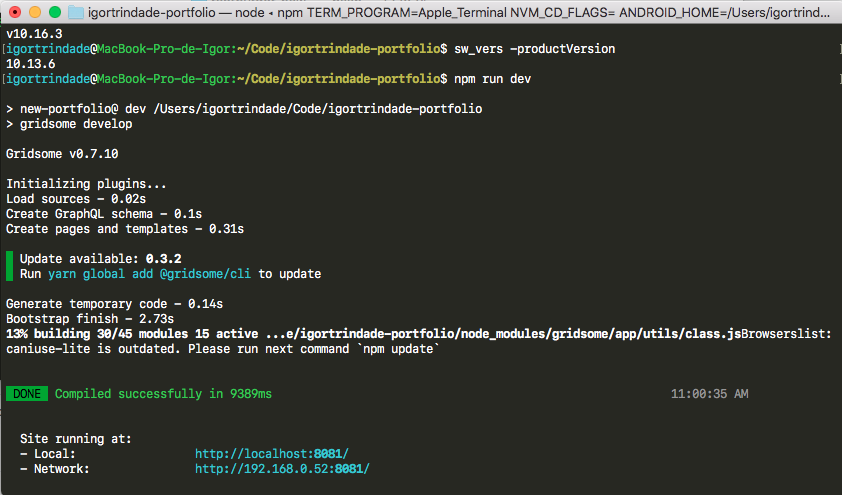
I tried right now and it works fine here, check my environment:
Mac 10.13.6
Node v10.16.3
"gridsome": "^0.7.0"
I don't know but sometimes you have to choose only one package manager, i faced some problems running yarn with npm install...
You can fork the project that i used this workaround to check if is something with your package.json or project...
igortrinidad
on 29 Apr 2020
I'm having these same issues, and nothing in the thread is working for me. (_Edit:_ this is both on my existing projects _and_ any new Gridsome project I try to spin up.)
Tried changing my Node version, removing the node_modules folder, all the brew things, and all the npm things, including rebuild and --unsafe-perm.
When I try to remove/reinstall node_modules, I get a ton of error messages , eventually culminating in this (username and project name removed):
> [email protected] install /Users/{username}/Projects/{project_name}/node_modules/sharp
> (node install/libvips && node install/dll-copy && prebuild-install) || (node-gyp rebuild && node install/dll-copy)
When I try to run gridsome develop, I get this:
Something went wrong installing the "sharp" module

Cannot find module '../build/Release/sharp.node'
Weird thing is, this just came out of nowhere. It was working perfectly today, then all of a sudden it just wasn't tonight, without any apparent changes made in my environment. I'm at the end of my wits. Any help appreciated.
 josh-collinsworth
on 12 May 2020
josh-collinsworth
on 12 May 2020
Which version of node are you using ?
With NVM I switch to v10.16.0 when I want to work with gridsome.
Try :
unset NPM_CONFIG_PREFIX
nvm use --delete-prefix v10.16.0
rm -rf node_modules
npm install
gridsome develop
Which version of node are you using ?
With NVM I switch to v10.16.0 when I want to work with gridsome.Try :
unset NPM_CONFIG_PREFIX
nvm use --delete-prefix v10.16.0
rm -rf node_modules
npm install
gridsome develop
Thank you for this; sadly, though I hadn't tried the first two commands before, they still gave me the same result. 😕
josh-collinsworth
on 12 May 2020
It may be relevant that the brew install vips command never seems to resolve for me. It always either fails to start, or hangs somewhere. It never gives me a success message (or an error, for that matter; it just goes silent as though it's stuck running forever).
josh-collinsworth
on 12 May 2020
The thing that finally worked for me was to install sharp myself. Doesn't feel like a great workaround, and yarn still spits out a ton of deprecation warnings when I run it, but at least my site is back accessible again after several hours.
npm install sharp
@josh-collinsworth Have you done this:
rm -rf /Users/{username}/.npm/_libvips
brew install vips
rm -rf node_modules
npm install
@josh-collinsworth Have you done this:
rm -rf /Users/{username}/.npm/_libvips
brew install vips
rm -rf node_modules
npm install
Yeah I did try that several times but eventually gave up because the brew command never finishes. FWIW, I'm not sure what I did this most recent time, but restarting my Mac is what seemed to make everything click again. Thanks for the reply though.
If you've found this thread and nothing's working for you: don't forget to restart occasionally.
I gather from other searches some of this may be related to MacOS Catalina, too. I found a separate thread about sharp and having to reinstall xcode on Catalina (which I also did).
josh-collinsworth
on 16 May 2020
Ouch! Im sorry to hear that! Have tried format your hd? I dont know, this shouldnt happens, but could something broken in your envronment... The keyboard of my macbook late 2011 had broken and while im waiting another kb arrive im using an Ubuntu to code and i builded the repo with gridsome yesterday with zero problems in this pc with ubuntu...
And i had digging into the graphql tool of gridsome and it was amazing 🤩🤓🤪
igortrinidad
on 17 May 2020
or you can download libvips's tar package of here , for example , i'm download libvips-8.9.1-linux-x64.tar.gz, then move libvips-8.9.1-linux-x64.tar.gz to ~/.npm/_libvips folder, and run npm/yarn install ,
$ cd /tmp && wget https://github.com/lovell/sharp-libvips/releases/download/v8.9.1/libvips-8.9.1-linux-x64.tar.gz
$ mv libvips-8.9.1-linux-x64.tar.gz ~/.npm/_libvips/
$ cd - && yarn install
 Kuri-su
on 1 Jun 2020
Kuri-su
on 1 Jun 2020
So after some digging/searching and trying these steps solved it for me:
rm -rf /Users/{username}/.npm/_libvips
brew install vips// If this command throws some error about could not download cfitsio, just ignore.
rm -rf node_modules
npm install
@u12206050 , this seems to be a solution if you're on a Mac.
Any solution for Windows? I'm getting the same "python" error (made a thread here) that another guy up top was getting. I've had this project for almost two years and suddenly when trying to run the project last week, I get the Python error.
I haven't been able to start this project since.
 jd-fillmore
on 3 Jul 2020
jd-fillmore
on 3 Jul 2020
Can we remove the dependence on sharp and libvips? vips is a hefty dependency to carry, in that on Linux this dependency is so big it's a nightmare (and often doesn't work because libvips is a nightmare source to begin with) and I'm not a big fan of having to install a thousand dependencies that I'll never use.
 envygeeks
on 24 Jul 2020
envygeeks
on 24 Jul 2020
I faced the same problem... node v12
https://github.com/lovell/sharp
Upgrade Sharp to 0.26 version. It's work for me.
 yesworld
on 16 Sep 2020
yesworld
on 16 Sep 2020
i got the same error today
i cannot update sharp to 0.26 because i didn't add this dependences my self
warning " > [email protected]" has incorrect peer dependency "react@^0.14.0 || ^15.0.0-0".
      [4/4] 🔨  Building fresh packages...
      [-/59] ⡀ waiting...
      [-/59] ⡀ waiting...
      [-/59] ⡀ waiting...
      [-/59] ⡀ waiting...
      error /Users/my-application/node_modules/sharp: Command failed.
      Exit code: 1
      Command: (node install/libvips && node install/dll-copy && prebuild-install) || (node-gyp rebuild && node install/dll-copy)
      Arguments:
      Directory: /Users/my-application/node_modules/sharp
      Output:
      info sharp Detected globally-installed libvips v8.10.1
      info sharp Building from source via node-gyp
      gyp info it worked if it ends with ok
      gyp info using [email protected]
      gyp info using [email protected] | darwin | x64
      gyp info find Python using Python version 2.7.16 found at "/System/Library/Frameworks/Python.framework/Versions/2.7/Resources/Python.app/Contents/MacOS/Python"
      gyp info spawn /System/Library/Frameworks/Python.framework/Versions/2.7/Resources/Python.app/Contents/MacOS/Python
      gyp info spawn args [
      gyp info spawn args   '/usr/local/Cellar/node/14.4.0/libexec/lib/node_modules/npm/node_modules/node-gyp/gyp/gyp_main.py',
      gyp info spawn args   'binding.gyp',
      gyp info spawn args   '-f',
      gyp info spawn args   'make',
      gyp info spawn args   '-I',
      gyp info spawn args   '/Users/my-application/node_modules/sharp/build/config.gypi',
      gyp info spawn args   '-I',
      gyp info spawn args   '/usr/local/Cellar/node/14.4.0/libexec/lib/node_modules/npm/node_modules/node-gyp/addon.gypi',
      gyp info spawn args   '-I',
      gyp info spawn args   '/Users/alain/Library/Caches/node-gyp/14.4.0/include/node/common.gypi',
      gyp info spawn args   '-Dlibrary=shared_library',
      gyp info spawn args   '-Dvisibility=default',
      gyp info spawn args   '-Dnode_root_dir=/Users/alain/Library/Caches/node-gyp/14.4.0',
      gyp info spawn args   '-Dnode_gyp_dir=/usr/local/Cellar/node/14.4.0/libexec/lib/node_modules/npm/node_modules/node-gyp',
      gyp info spawn args   '-Dnode_lib_file=/Users/alain/Library/Caches/node-gyp/14.4.0/<(target_arch)/node.lib',
      gyp info spawn args   '-Dmodule_root_dir=/Users/my-application/node_modules/sharp',
      gyp info spawn args   '-Dnode_engine=v8',
      gyp info spawn args   '--depth=.',
      gyp info spawn args   '--no-parallel',
      gyp info spawn args   '--generator-output',
      gyp info spawn args   'build',
      gyp info spawn args   '-Goutput_dir=.'
      gyp info spawn args ]
      gyp info spawn make
      gyp info spawn args [ 'BUILDTYPE=Release', '-C', 'build' ]
        TOUCH Release/obj.target/libvips-cpp.stamp
        CXX(target) Release/obj.target/sharp/src/common.o
        CXX(target) Release/obj.target/sharp/src/metadata.o
        CXX(target) Release/obj.target/sharp/src/stats.o
      ../src/stats.cc:130:19: error: no matching member function for call to 'Set'
              channels->Set(i, channelStat);
              ~~~~~~~~~~^~~
      /Users/alain/Library/Caches/node-gyp/14.4.0/include/node/v8.h:3639:37: note: candidate function not viable: requires 3 arguments, but 2 were provided
        V8_WARN_UNUSED_RESULT Maybe<bool> Set(Local<Context> context,
                                          ^
      /Users/alain/Library/Caches/node-gyp/14.4.0/include/node/v8.h:3642:37: note: candidate function not viable: requires 3 arguments, but 2 were provided
        V8_WARN_UNUSED_RESULT Maybe<bool> Set(Local<Context> context, uint32_t index,
                                          ^
      1 error generated.
      make: *** [Release/obj.target/sharp/src/stats.o] Error 1
      gyp ERR! build error
      gyp ERR! stack Error: `make` failed with exit code: 2
      gyp ERR! stack     at ChildProcess.onExit (/usr/local/Cellar/node/14.4.0/libexec/lib/node_modules/npm/node_modules/node-gyp/lib/build.js:194:23)
      gyp ERR! stack     at ChildProcess.emit (events.js:315:20)
      gyp ERR! stack     at Process.ChildProcess._handle.onexit (internal/child_process.js:276:12)
      gyp ERR! System Darwin 19.6.0
      gyp ERR! command "/usr/local/Cellar/node/14.4.0/bin/node" "/usr/local/Cellar/node/14.4.0/libexec/lib/node_modules/npm/node_modules/node-gyp/bin/node-gyp.js" "rebuild"
      gyp ERR! cwd /Users/my-application/node_modules/sharp
 alainib
on 24 Sep 2020
alainib
on 24 Sep 2020
i got this error with 2 differents projects also :(
alainib
on 28 Sep 2020
any fix please ?
alainib
on 30 Sep 2020
@alainib
Switch to version 10.16 of nodejs
The nvm tool can help
igorvisi
on 30 Sep 2020
@igorvisi
node --version
v15.0.1
i'am not sur about what you mean. can you give more details please ?
thanks
alainib
on 24 Nov 2020
@alainib
Version 10.16 of nodejs does not give any errors. It would be better to switch to this version when using gridsome.
There is an tool : NVM(Node Version Manager) that allows to easily switch from one version of nodejs to another per project.
- Just install it and switch to version 10.16 of nodejs,
- remove the node_modules folder from your project
- redo an npm install under version 10.16 of nodejs.
igorvisi
on 25 Nov 2020
Related issues
 Jonarod
·
21Comments
Jonarod
·
21Comments
 SteveEdson
·
44Comments
SteveEdson
·
44Comments
 itech001
·
32Comments
itech001
·
32Comments
 wjustice
·
24Comments
wjustice
·
24Comments
 ElliotPsyIT
·
17Comments
ElliotPsyIT
·
17Comments
Most helpful comment
So after some digging/searching and trying these steps solved it for me:
rm -rf /Users/{username}/.npm/_libvipsbrew install vips// If this command throws some error about could not download cfitsio, just ignore.rm -rf node_modulesnpm install