Gridsome: Failed to execute 'appendChild' on 'Node'
Description
I'm getting a really weird issue, that only appears to be happening on Chrome on Android (v72.0.3626, can't confirm other versions).
Steps to reproduce
On a Android device (ideally hooked up via ADB + Chrome inspector):
- go to https://2019.steveedson.co.uk
- click on one of my articles
- notice no console errors
- refresh the page
- Get the error:
Failed to execute 'appendChild' on 'Node': This node type does not support this method.
It will then break the rest of the JS execution, the router links and other Vue bindings no longer work. This is fine on desktop though.
"Error: Failed to execute 'appendChild' on 'Node': This node type does not support this method.
    at Object.appendChild (webpack:///./node_modules/vue/dist/vue.runtime.esm.js?:5161:8)
    at insert (webpack:///./node_modules/vue/dist/vue.runtime.esm.js?:5472:17)
    at createElm (webpack:///./node_modules/vue/dist/vue.runtime.esm.js?:5390:9)
    at createChildren (webpack:///./node_modules/vue/dist/vue.runtime.esm.js?:5481:9)
    at hydrate (webpack:///./node_modules/vue/dist/vue.runtime.esm.js?:5809:11)
    at hydrate (webpack:///./node_modules/vue/dist/vue.runtime.esm.js?:5824:34)
    at hydrate (webpack:///./node_modules/vue/dist/vue.runtime.esm.js?:5824:34)
    at hydrate (webpack:///./node_modules/vue/dist/vue.runtime.esm.js?:5824:34)
    at hydrate (webpack:///./node_modules/vue/dist/vue.runtime.esm.js?:5824:34)
    at VueComponent.patch [as __patch__] (webpack:///./node_modules/vue/dist/vue.runtime.esm.js?:5900:17)"
Expected result
No errors on mobile.
Environment
Libs:
- gridsome version: 0.5.4
- @gridsome/cli version: 0.0.7

Browser:
- [ ] Chrome (desktop) version XX
- [x] Chrome (Android) version v72.0.3626
- [ ] Chrome (iOS) version XX
- [ ] Firefox version XX
- [ ] Safari (desktop) version XX
- [ ] Safari (iOS) version XX
- [ ] IE version XX
- [ ] Edge version XX

For Tooling issues:
- Node version: v8.12.0
- Platform:  Mac / Linux
 SteveEdson
All 44 comments
I think I've just figured this out actually, the only thing I could think of was a share button that is only enabled if the browser supports the navigator.share API. I check for this in my main.js file:
export default (Vue, {router, head, isClient}) => {
Vue.prototype.$sharingEnabled = isClient && !!navigator.share;
...
and then use it in my templates like so:
<button class="uk-button uk-button-primary" v-if="$sharingEnabled" @click.prevent="sharePost">
<i class="fab fa-share"></i>
Share
</button>
I've just changed the v-if to v-show, and it's solved the issue. My only guess is that because the v-if removes the element during SSR, it can't be hydrated during the client side render, causing the issue? Would this make sense?
SteveEdson
on 6 Mar 2019
v-if should have worked while server-side rendering. You can try to build in development mode by adding config.mode('development') to your webpack config. That will give you a better error message to understand where hydration went wrong. Alternatively, disable JS in the browser and see if the DOM is how you would expect it to be.
 hjvedvik
on 6 Mar 2019
hjvedvik
on 6 Mar 2019
I'm getting the same issue on a site I recently deployed.
I'm traversing the DOM in the mounted() hook of a component. It simply gets all headings on the page and adds them to the data, so I can loop over them and show a table of contents to the side of the article.
More details in the issue; code can be seen here.
v-if really doesn't work, you can see on that site that the next/prev pagination at the bottom of the article is broken: if you come from the homepage, it works fine, but if you load some page _directly_, you'll see it's not actually there in the HTML... I've used the same approach as the Gridsome docs, part of the code you'll see it's taken straight from there...
However, I don't think my issue is related to v-if - even replacing it with v-show, I still get no rendered toc links in doc pages. Any help would be highly appreciated! :)
 cossssmin
on 30 Mar 2019
cossssmin
on 30 Mar 2019
@cossssmin You could check out the headings field for markdown nodes. It will generate a list of headings for you.
hjvedvik
on 31 Mar 2019
Thanks @hjvedvik , that solved it for me! :)
cossssmin
on 31 Mar 2019
For others that are having a similar issue, I was having the same error in sentry.io reports. It turned out to be that I had a computed property called gpsAvailable and was doing a v-if="gpsAvailable" in my template, I changed it to v-show="gpsAvailable" and that fixed it. apparently something to do with SSR re-hydration. Other googling lead me to similar things all dealing with newer browser API's like location or websharing etc or malformed HTML.
computed: {
gpsAvailable() {
     if(process.isClient && typeof window !== 'undefined' && typeof window.navigator !== 'undefined'){
        return navigator.geolocation ? true : false;
      }else{
        return false;
      }
    }
}
 NickStees
on 22 Aug 2019
NickStees
on 22 Aug 2019
I've tried replacing v-if with v-show but I'm still getting this error. I'm not using any new browser APIs, and it's happening in Firefox as well but with a slightly different message: HierarchyRequestError: Node cannot be inserted at the specified point in the hierarchy. Here's a deployment: https://5da7f5945b97a30008b6c5be--macguire.netlify.com/
Any ideas?
Edit: The issue was Netlify forms. Found the solution via #361 (not having a certain hidden input seems to be the problem — see here for the solution)
 macguirerintoul
on 17 Oct 2019
macguirerintoul
on 17 Oct 2019
Hi,
I run the exact same bug, and i'm kind of surprised that it is close
to us, a v-show is not an option since it will be rendered even if the condition is falsy - and so may duplicate some unwanted content...
I've made an exemple in this repo
Here's what we try to do
in main.js, we create a store that will compute a layout data state (desktop|mobile) based on our current viewport (and updated on resize)
so we may be able to display differents components based on our viewport
Since we don't have access to window during build, we default our state to a mobile layout
state(){
  return {
    layout: computeLayout(),
  }
},
...
function computeLayout() {
  if (process.isClient && document.body.offsetWidth >= 600) {
    return 'desktop';
  }
  return 'mobile';
}
Then, in our pages, we want to display different component so we use the v-if directive to do so
exemple
<Big3dHero class="hero" v-if="layout==='desktop'" />
<SimpleImageHero class="hero" v-else />
The error
since we build for mobile
if we load our page directly within a desktop viewport, we run this error
DOMException: Failed to execute 'appendChild' on 'Node': This node type does not support this method.
and then some part of our application break
But, if we load our same page from a mobile layout and then resize, or from an other page and then navigate to our buggy page, it will work as expected
Thanks
Please, have a look to that repo, I've tried to be as explicit as i can :)
Thanks a lot in advance
 nusson
on 22 Nov 2019
nusson
on 22 Nov 2019
Another instance where I've seen this error appear (just spent 2 hours debugging it 🤕) is if you have a <noscript> tag anywhere in your site. After I removed them and replaced them with v-ifs and a variable to see if a component has been mounted or not the error went away.
 weaversam8
on 29 Nov 2019
weaversam8
on 29 Nov 2019
Same issue here. I'm not using any v-if or v-show. Inserted no-ssr tag on netlify form, removed all g-image tags. Tried just about every fix I could find in these threads, though I didn't understand what @hjvedvik meant about headings field for markdown nodes.
I think it's a hydration error, but I can't figure out what to do about it. It only occurs when directly accessing the About page and trying to navigate elsewhere.
Console error is copied below, repo is here. Any help is appreciated!
Uncaught (in promise) DOMException: Failed to execute 'appendChild' on 'Node': This node type does not support this method.
    at Object.appendChild (webpack:///./node_modules/vue/dist/vue.runtime.esm.js?:5190:8)
    at insert (webpack:///./node_modules/vue/dist/vue.runtime.esm.js?:5501:17)
    at createElm (webpack:///./node_modules/vue/dist/vue.runtime.esm.js?:5428:7)
    at createChildren (webpack:///./node_modules/vue/dist/vue.runtime.esm.js?:5510:9)
    at hydrate (webpack:///./node_modules/vue/dist/vue.runtime.esm.js?:5838:11)
    at hydrate (webpack:///./node_modules/vue/dist/vue.runtime.esm.js?:5853:34)
    at hydrate (webpack:///./node_modules/vue/dist/vue.runtime.esm.js?:5853:34)
    at hydrate (webpack:///./node_modules/vue/dist/vue.runtime.esm.js?:5853:34)
    at VueComponent.patch [as __patch__] (webpack:///./node_modules/vue/dist/vue.runtime.esm.js?:5929:17)
    at VueComponent.Vue._update (webpack:///./node_modules/vue/dist/vue.runtime.esm.js?:3588:19)
    at VueComponent.updateComponent (webpack:///./node_modules/vue/dist/vue.runtime.esm.js?:3676:10)
    at Watcher.get (webpack:///./node_modules/vue/dist/vue.runtime.esm.js?:4062:25)
    at new Watcher (webpack:///./node_modules/vue/dist/vue.runtime.esm.js?:4051:12)
    at mountComponent (webpack:///./node_modules/vue/dist/vue.runtime.esm.js?:3683:3)
    at VueComponent.Vue.$mount (webpack:///./node_modules/vue/dist/vue.runtime.esm.js?:7819:10)
    at init (webpack:///./node_modules/vue/dist/vue.runtime.esm.js?:2816:13)
    at hydrate (webpack:///./node_modules/vue/dist/vue.runtime.esm.js?:5827:56)
    at VueComponent.patch [as __patch__] (webpack:///./node_modules/vue/dist/vue.runtime.esm.js?:5929:17)
    at VueComponent.Vue._update (webpack:///./node_modules/vue/dist/vue.runtime.esm.js?:3588:19)
    at VueComponent.updateComponent (webpack:///./node_modules/vue/dist/vue.runtime.esm.js?:3676:10)
    at Watcher.get (webpack:///./node_modules/vue/dist/vue.runtime.esm.js?:4062:25)
    at new Watcher (webpack:///./node_modules/vue/dist/vue.runtime.esm.js?:4051:12)
    at mountComponent (webpack:///./node_modules/vue/dist/vue.runtime.esm.js?:3683:3)
    at VueComponent.Vue.$mount (webpack:///./node_modules/vue/dist/vue.runtime.esm.js?:7819:10)
    at init (webpack:///./node_modules/vue/dist/vue.runtime.esm.js?:2816:13)
    at merged (webpack:///./node_modules/vue/dist/vue.runtime.esm.js?:2997:5)
    at hydrate (webpack:///./node_modules/vue/dist/vue.runtime.esm.js?:5827:56)
    at VueComponent.patch [as __patch__] (webpack:///./node_modules/vue/dist/vue.runtime.esm.js?:5929:17)
    at VueComponent.Vue._update (webpack:///./node_modules/vue/dist/vue.runtime.esm.js?:3588:19)
    at VueComponent.updateComponent (webpack:///./node_modules/vue/dist/vue.runtime.esm.js?:3676:10)
    at Watcher.get (webpack:///./node_modules/vue/dist/vue.runtime.esm.js?:4062:25)
    at new Watcher (webpack:///./node_modules/vue/dist/vue.runtime.esm.js?:4051:12)
    at mountComponent (webpack:///./node_modules/vue/dist/vue.runtime.esm.js?:3683:3)
    at VueComponent.Vue.$mount (webpack:///./node_modules/vue/dist/vue.runtime.esm.js?:7819:10)
    at init (webpack:///./node_modules/vue/dist/vue.runtime.esm.js?:2816:13)
    at hydrate (webpack:///./node_modules/vue/dist/vue.runtime.esm.js?:5827:56)
    at Vue.patch [as __patch__] (webpack:///./node_modules/vue/dist/vue.runtime.esm.js?:5929:17)
    at Vue._update (webpack:///./node_modules/vue/dist/vue.runtime.esm.js?:3588:19)
    at Vue.updateComponent (webpack:///./node_modules/vue/dist/vue.runtime.esm.js?:3676:10)
    at Watcher.get (webpack:///./node_modules/vue/dist/vue.runtime.esm.js?:4062:25)
    at new Watcher (webpack:///./node_modules/vue/dist/vue.runtime.esm.js?:4051:12)
    at mountComponent (webpack:///./node_modules/vue/dist/vue.runtime.esm.js?:3683:3)
    at Vue.$mount (webpack:///./node_modules/vue/dist/vue.runtime.esm.js?:7819:10)
    at eval (webpack:///./node_modules/gridsome/app/entry.client.js?:115:7)
    at eval (webpack:///./node_modules/vue-router/dist/vue-router.esm.js?:1960:11)
    at Array.forEach (<anonymous>)
    at eval (webpack:///./node_modules/vue-router/dist/vue-router.esm.js?:1959:25)
    at eval (webpack:///./node_modules/vue-router/dist/vue-router.esm.js?:2074:7)
    at step (webpack:///./node_modules/vue-router/dist/vue-router.esm.js?:1758:7)
    at step (webpack:///./node_modules/vue-router/dist/vue-router.esm.js?:1765:9)
* EDIT *
Had a p-tag on my javascript component, and body tags within layout tag, which I changed to div tags, solving the problem.
 MFukazawa
on 6 Dec 2019
MFukazawa
on 6 Dec 2019
Same problem, same solution as @MFukazawa , had a
<p v-html="">
changed it to a DIV tag and that was it.
Hard to find though ...
 vdilly
on 30 Dec 2019
vdilly
on 30 Dec 2019
Same problem Uncaught (in promise) DOMException: Failed to execute 'appendChild' on 'Node': This node type does not support this method. although it builds nicely https://5e2fb7375e4607000a01f8da--gracious-kirch-f30e90.netlify.com/
 ahsath
on 28 Jan 2020
ahsath
on 28 Jan 2020
I had invalid HTML. I found a duplicate id attribute by changing all v-if on the app to v-show. Making my ids unique again resolved the issue, I changed the v-show back to v-if afterwards.
[DOM] Found 2 elements with non-unique id #apero-firstname: (More info: https://goo.gl/9p2vKq)
Maybe this helps somebody struggling with this super unhelpful error message.
 tuelsch
on 14 Feb 2020
tuelsch
on 14 Feb 2020
Using Gridsome 0.7.13, I got the following error in Firefox (not Chrome):
HierarchyRequestError: Node cannot be inserted at the specified point in the hierarchy
Replacing v-if with v-show throughout my code fixed the issue.
 havardl
on 6 Mar 2020
havardl
on 6 Mar 2020
Another instance where I've seen this error appear (just spent 2 hours debugging it :face_with_head_bandage:) is if you have a
<noscript>tag anywhere in your site. After I removed them and replaced them withv-ifs and a variable to see if a component has been mounted or not the error went away.
@weaversam8 I'm running into this too. (Luckily I stumbled upon your post after 2 hours; else I'd have still been stumbling). Removing <noscript>s solved the problem. Should I open a new issue/bug report for this?
 badrihippo
on 15 Mar 2020
badrihippo
on 15 Mar 2020
Should open new issue/bug report for this?
@badrihippo - so far this issue is okay for recognizing and preventing the behavior, but if you want to open a new issue specifically targeting Gridsome's lack of <noscript> support, that wouldn't be a bad idea.
weaversam8
on 15 Mar 2020
Had the same issue. I can confirm the problem with the missing support for <noscript>. This should definitely be mentioned in the docs.
Sadly, just adding a <ClientOnly> around it does not do the trick. (But you can create a workaround with v-if and a variable which is set in the mounted hook after checking , like described by @weaversam8.)process.isClient
Actually since the mounted hook is never executed on the server you do not even have to make the check.
 Tummerhore
on 15 Mar 2020
Tummerhore
on 15 Mar 2020
@badrihippo @weaversam8 @Tummerhore I don't think Vue has support for <noscript> tags. I had the same problem when making the <g-image> component. It renders a fallback image in a <noscript> tag and I had to insert the fallback image as an HTML string to make it work (see here). I haven't tested, but <noscript v-html="..." /> might work too.
hjvedvik
on 15 Mar 2020
I've been running into this on build when deploying to Netlify (not in local dev).
Here's the error message in the latest Chrome, running Gridsome 0.7.13
Uncaught (in promise) DOMException: Failed to execute 'appendChild' on 'Node': This node type does not support this method.
at Object.appendChild (https://www.dharmaworks.com/assets/js/app.af37cffe.js:7:40605)
at h (https://www.dharmaworks.com/assets/js/app.af37cffe.js:7:53337)
at d (https://www.dharmaworks.com/assets/js/app.af37cffe.js:7:53074)
at p (https://www.dharmaworks.com/assets/js/app.af37cffe.js:7:53423)
at k (https://www.dharmaworks.com/assets/js/app.af37cffe.js:7:56761)
at k (https://www.dharmaworks.com/assets/js/app.af37cffe.js:7:56696)
at k (https://www.dharmaworks.com/assets/js/app.af37cffe.js:7:56696)
at k (https://www.dharmaworks.com/assets/js/app.af37cffe.js:7:56696)
at k (https://www.dharmaworks.com/assets/js/app.af37cffe.js:7:56696)
at k (https://www.dharmaworks.com/assets/js/app.af37cffe.js:7:56696)
I don't have a clue as to how to debug this. Any pointers would be appreciated.
 platform-kit
on 16 Mar 2020
platform-kit
on 16 Mar 2020
Hi @platform-kit!
Did you follow the debugging steps listed in this thread? The main cases of this error we've seen so far are:
- Including a
<noscript>tag - a<noscript>tag anywhere in your project could cause this - Adding HTML to an inline element - using the
v-htmldirective on a<p>tag instead of a<div>tag could cause this, for example - Using
v-if- If you're using thev-ifdirective instead ofv-show, this can sometimes cause this issue. If it's possible to usev-show, give that a try.
Am I missing anything here folks? If none of these solve your problem, could you post a link to your repository?
weaversam8
on 16 Mar 2020
I did see those ideas and none of them fixed the issue. For now, wrapping my entire layout in client-only has done the trick.
platform-kit
on 16 Mar 2020
@platform-kit - if you progressively move the <ClientOnly> tag to deeper and deeper levels, can you isolate the element / component which is causing this issue?
weaversam8
on 16 Mar 2020
I seem to have some odd variant of this issue. My site (based on github.com/calebanthony/gridsome-bulma) works normally in Firefox or Safari. In Chrome or Vivaldi, it initially loads properly. I can reload the "Index" page and it all reloads successfully. But if I reload a "Post" page by any means including Ctrl+F5, the lazy load images are stuck on the blurred versions - and the images in the Index page are then also left blurred. Until I do an intentional reload on the Index page.
Here is the Console error:
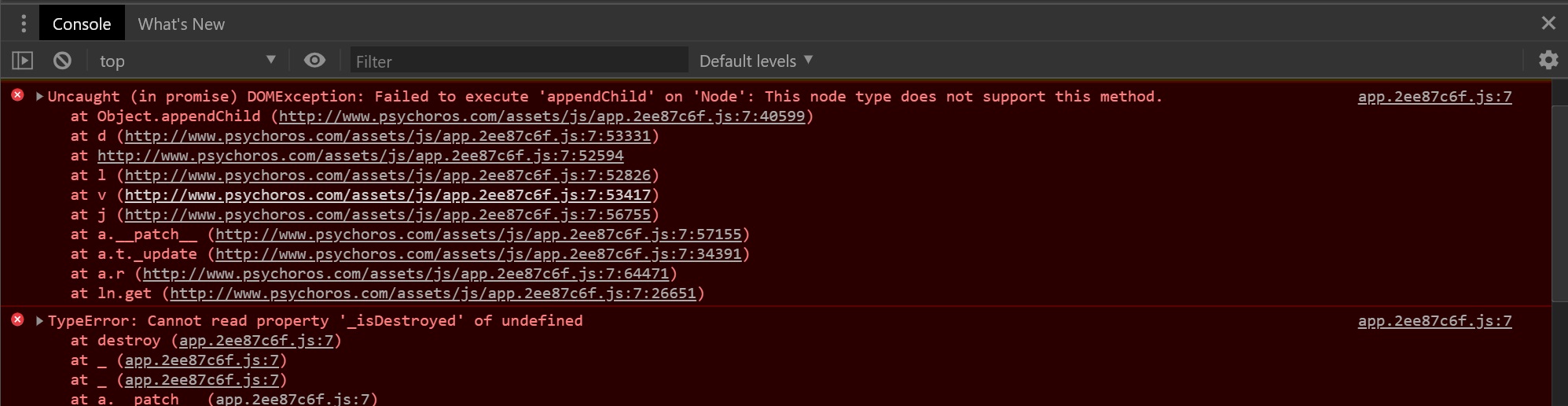
The main cases of this error we've seen so far are:
Including a _noscript_ tag - a _noscript_ tag anywhere in your project could cause this
"noscript" is not found anywhere in the part of my project I control. It appears 148 times in the dist files, node_modules.cache, and node_modules... js files that are automatically built that I've never touched.
Each image has a noscript section - but they are there exactly the same when the site loads properly:
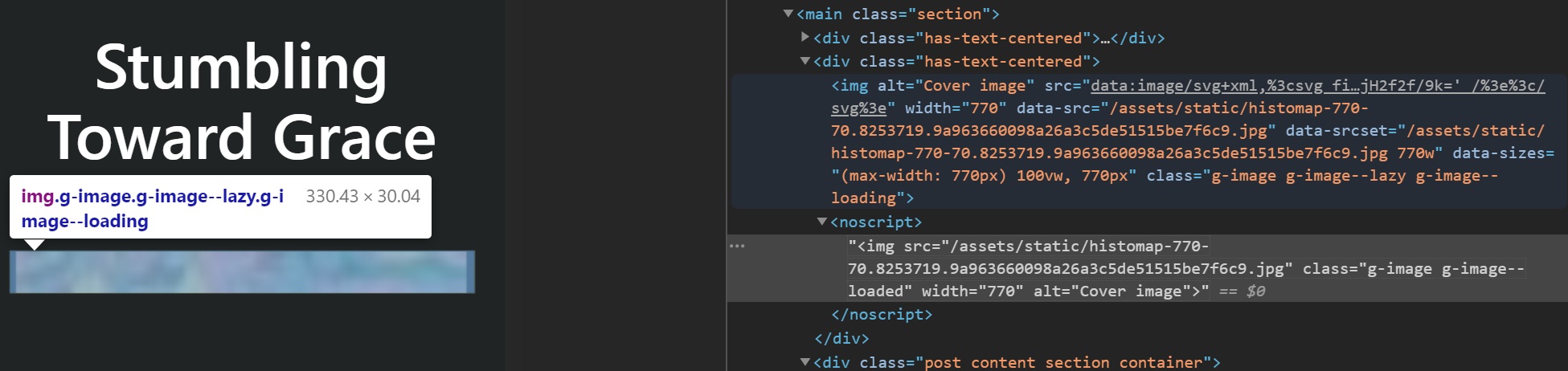
Adding HTML to an inline element - using the v-html directive on a _p_ tag instead of a _div_ tag could cause this, for example
Using v-if - If you're using the v-if directive instead of v-show, this can sometimes cause this issue. If it's possible to use v-show, give that a try.
"v-html" is likewise all over the cache and js files, but only two in my files - Post.vue:
    <div class="post content section container">
      <p v-html="$page.post.content" />
      <footer>
        <PostTags :post="$page.post" />
      </footer>
    </div>
And PostCard.vue
    <div class="card-content">
      <g-link
        :to="post.path"
        class="width-770 is-size-4 has-text-weight-bold"
      >
        {{ post.title }}
      </g-link>
      <p
        class="content"
        v-html="post.description"
      />
      <PostMeta :post="post" />
    </div>
Neither of those seem particularly focused on the images. "v-if" is in PostCard, plus Author.vue, PostMeta, and Default.vue. Also related to lots of elements which do not seem to be problems.
So the noscript section for every image seems most suspicious. But I don't (that I know of) have any control over that. And as I said, it is only a problem in Chrome-based browsers, and only if the user reloads a "Post" page - even though all images in all pages have the noscript section.
If anyone understands this I'd love to hear your thoughts!
 LorenAmelang
on 4 May 2020
LorenAmelang
on 4 May 2020
Here's a hunch - are you dynamically setting the src attribute of g-image? Something like <g-image :src="boundVariable /> vs something like <g-image src="~/assets/image.png" />?
weaversam8
on 4 May 2020
@weaversam8 Thank You! Looks like I am - in the "Post" pages that fail:
  <g-image
    alt="Cover image"
    :src="$page.post.cover_image"
  />
[Wow - the "code" and "quote" options here both still interpret a bunch of what I try to include... Had to cut it to bare minimum.]
And also in the template for Index page items:
  <figure class="image">
    <g-image
      alt="Cover image"
      :src="post.cover_image"
    />
  </figure>
I see what you're saying about an actual file as the target, but those templates format all of the posts on my site, reading the actual file instances from post files with only Markdown in them. Seems the variable is essential.
But then how does this work - the Index page strings together all of those "post card" instances with the variables for file name, and it works! Refreshing it fixes all the images (and doesn't get the exception) after refreshing a single post ruins them all:
<!-- List posts -->
<div class="posts">
  <PostCard
    v-for="edge in $page.posts.edges"
    :key="edge.node.id"
    :post="edge.node"
  />
</div>
Pretty obvious I'm in over my head here...
Also, I was wrong about Firefox and Safari not showing this problem. I couldn't make it happen last night, but when they woke up today both of them now show the same problem as Chrome / Vivaldi. I'm pretty sure this wasn't a problem a month ago. Could one of these updates have triggered it:
bulma ^0.7.5 → ^0.8.2
gridsome ^0.7.13 → ^0.7.14
babel-eslint ^10.0.3 → ^10.1.0
eslint ^5.16.0 → ^6.8.0
eslint-config-airbnb-base ^13.2.0 → ^14.1.0
eslint-plugin-gridsome ^1.4.0 → ^1.4.9
eslint-plugin-import ^2.19.1 → ^2.20.2
eslint-plugin-vue ^5.2.3 → ^6.2.2
gh-pages ^2.1.1 → ^2.2.0
lint-staged ^8.2.1 → ^10.2.2
node-sass ^4.13.1 → ^4.14.0
sass-loader ^7.3.1 → ^8.0.2
LorenAmelang
on 5 May 2020
@LorenAmelang - it's been a minute since I had this issue, but it was my understanding that you can run into issues when using dynamic image URLs with <g-image> specifically.
I just checked another one of my Gridsome projects though, and I use the same sort of thing.
The question you should ask yourself: can Gridsome easily calculate the image URLs during the build process? Since Gridsome has to generate the static HTML, we have to make sure the data is there and doesn't change during the generation process.
Sometimes, invalid code for the static site generator appears to work when you're navigating the application as a hydrated SPA (for example, start on the home page and click to a broken page and suddenly it works, but it doesn't work when you navigate to that page directly and reload.) Sometimes it's the other way around. Can you isolate either of these as the failure mode?
weaversam8
on 5 May 2020
@weaversam8 - Really appreciate your help!
Start on the home "Index" page, or refresh it if the images are broken, and everything works. Start on a "Post" page, or refresh one, and all images all over the site appear as the blurred initial version and never load the full resolution version. If I go click on dist
I'm not attached to the blurred initial images. I guess that "lazy load" thing supposedly gives you better performance stats? But my site is really simple, I'd be happy to just eliminate the blurred versions - but I haven't a clue how to do that.
"we have to make sure the data is there and doesn't change during the generation process" - I have no idea what order it creates things in, but I'm certainly not changing any sources during the build.
Here's the index.html version of the blurred image, with some line breaks added. The same stuff I see in DevTools in my browser:
<img alt="Cover image" src="data:image/svg+xml,%3csvg fill='none' viewBox='0 0 770 35' xmlns='http://www.w3.org/2000/svg' xmlns:xlink='http://www.w3.org/1999/xlink'%3e%3cdefs%3e%3cfilter id='__svg-blur-afb0f020fcfe09814c87a8675443b991'%3e%3cfeGaussianBlur in='SourceGraphic' stdDeviation='1'/%3e%3c/filter%3e%3c/defs%3e%3cimage x='0' y='0' filter='url(%23__svg-blur-afb0f020fcfe09814c87a8675443b991)' width='770' height='35'

xlink:href='data:image/jpeg%3bbase64%2c/9j/2wBDAAYEBQYFBAYGBQYHBwYIChAKCgkJChQODwwQFxQYGBcUFhYaHSUfGhsjHBYWICwgIyYnKSopGR8tMC0oMCUoKSj/2wBDAQcHBwoIChMKChMoGhYaKCgoKCgoKCgoKCgoKCgoKCgoKCgoKCgoKCgoKCgoKCgoKCgoKCgoKCgoKCgoKCgoKCj/wAARCAADAEADASIAAhEBAxEB/8QAFwABAQEBAAAAAAAAAAAAAAAAAAECCP/EACQQAAECBQMFAQAAAAAAAAAAAAEAAgMREjJhFCEiBDFCUXFB/8QAGAEAAgMAAAAAAAAAAAAAAAAAAQIAAwb/xAAfEQACAQQCAwAAAAAAAAAAAAAAAUECERIxIbFSssH/2gAMAwEAAhEDEQA/AOatREDZcJTAsb6%2bK6iJsOHkbG%2b/iItEqacrWmr4UvRD1ESnw2aJcG%2bhha1DzE3ouAsb2BOERKqU4hewTI6mJTVwnImxveQwmoiBplR%2bCxucIibFZaldMEFHURJgcJVHwbjCzqIlLbNmk2N774REuK4VvLpEg//Z' /%3e%3c/svg%3e" width="770"

data-src="/assets/static/dnaComp-770-35.8253719.0a243b868cff8b60aa0fcb682eaa2d15.jpg"
data-srcset="/assets/static/dnaComp-770-35.8253719.0a243b868cff8b60aa0fcb682eaa2d15.jpg 770w" data-sizes="(max-width: 770px) 100vw, 770px" class="g-image g-image--lazy g-image--loading">
And here's the full resolution version, always shown below the blurred code, in a noscript section - but pointing to the same exact .jpg file:
<noscript><img src="/assets/static/dnaComp-770-35.8253719.0a243b868cff8b60aa0fcb682eaa2d15.jpg" class="g-image g-image--loaded" width="770" alt="Cover image"></noscript>
Obviously the correct image file is built into the html. Somehow the appendChild DOMException just prevents the second form from being loaded over the first blurred one. But it only appears if the Post is accessed or refreshed directly, without loading the Index first. Maybe there is some "lazy load" routine that loads with Index but not with individual Posts?
I see people talking about a "replaceChild" call, which sounds like what needs to happen rather than appending another image. But I don't even know if that's what the appendChild call is trying to do. And my site used to work, with the current code...
LorenAmelang
on 5 May 2020
@LorenAmelang - if it's loading in certain scenarios and not others, that means you might have done something that doesn't work in the static site (like dynamic src attributes on g-image) but does work when the page hydrates into a Vue SPA.
If you want to load images without the blur / lazy loading, then just use an <img> tag instead of a <g-image> tag, and it should work fine.
weaversam8
on 7 May 2020
If you go to
https://calebanthony.github.io/gridsome-bulma/
it behaves exactly like my site did - refresh works on Index, shows blur image on Post, Index is then blurred and must be refreshed, which fixes Post.
If you go directly to
https://calebanthony.github.io/gridsome-bulma/markdown-test-file
Vivaldi and Firefox show the blur image right away and refresh doesn't fix it. For awhile, the Index page did not get corrupted, you could go there and see sharp images, and opening the Post again from the Index page loaded the full image. After several tests of this, Both browsers now show blur images on Index if you load a Post page directly as your first access to the site.
Somebody is apparently caching some files even through forced reloads!
Changing g-image to img flips the sort of the Index page, and shows no Post images at all:
<img alt="Cover image" src="[object Object]">
Changing back leaves the sort reversed, but the image blur is fixed!
Apparently the May 3 updates I installed replaced my modified utils.js file:
C:UserslorenDocumentsPsychorosGridsome Testbulmanode_modulesgridsomelibgraphqlnodesutils.js
// 200408LA - changed DESC to ASC:
exports.createSortOptions = function ({ sort, sortBy, order }) {
  if (sort && sort.length) {
    return sort.map(({ by, order }) => [by, order === 'ASC'])
  } else if (sortBy) {
    return [[sortBy, order === 'ASC']]
  }
--> Requires Ctrl+C and new Develop!
BUT somehow the Develop process didn't notice until just now when I changed my Post.vue! The sort order stayed reversed through tons of Develop and Build sessions over four days! Somehow calling img instead of g-image in Post.vue triggered the system to notice the new utils.js file.
The problem has been around for awhile - the build I saved before the updates shows it, as does the original starter site which I have no control over. The js updates have apparently fixed the problem - now that they have been noticed!
Is there some trick required when you change certain files, to get them noticed? It looks like everyone now uses Yarn to install updates. This machine has lots of other Node projects, like Node-RED, and all of it has been installed with npm. I tried using Yarn once to update Gridsome, and it destroyed my project. I ended up deleting everything and recreating all my work from scratch. So I'm now afraid to try Yarn on this machine. Maybe things aren't being tested with npm any more? Does the build system use Yarn info to detect updates?
As for how the image fail happened...
Blurred:
<img alt="Cover image" src="data:image/svg+xml,%3csvg fill='none' viewBox='0 0 770 70' xmlns='http://www.w3.org/2000/svg' xmlns:xlink='http://www.w3.org/1999/xlink'%3e%3cdefs%3e%3cfilter id='__svg-blur-0867bd701f8786bbbbce6cfed6e6dc12'%3e%3cfeGaussianBlur in='SourceGraphic' stdDeviation='1'/%3e%3c/filter%3e%3c/defs%3e%3cimage x='0' y='0' filter='url(%23__svg-blur-0867bd701f8786bbbbce6cfed6e6dc12)' width='770' height='70' xlink:href='data:image/jpeg%3bbase64%2c/9j/2wBDAAYEBQYFBAYGBQYHBwYIChAKCgkJChQODwwQFxQYGBcUFhYaHSUfGhsjHBYWICwgIyYnKSopGR8tMC0oMCUoKSj/2wBDAQcHBwoIChMKChMoGhYaKCgoKCgoKCgoKCgoKCgoKCgoKCgoKCgoKCgoKCgoKCgoKCgoKCgoKCgoKCgoKCgoKCj/wAARCAAGAEADASIAAhEBAxEB/8QAFwABAQEBAAAAAAAAAAAAAAAAAAUDBv/EACUQAAIBBAIBAwUAAAAAAAAAAAECAwAEESEFEoExQVETMkJh0f/EABcBAAMBAAAAAAAAAAAAAAAAAAIEBQP/xAAhEQACAgIBBAMAAAAAAAAAAAABAgADESEEEhMxQUJh0f/aAAwDAQACEQMRAD8Aq3b3LF1uJVWAsFMcIx2B3gk1b5fjDx1iswdW7EK6417Yx5pSoljEW1oPB8x5tVNZ8tyRFb8lPyMTRTwRFsIBgsAD6nY9a6bkrYWTiOMBlba9vb5/tKURc99V9bmnFYkFydkTmZrdJL4zyjMy5%2bCuBrWtVmOJmuLZoredYY3bP27XO9eaUqjgKuot0C%2b09zepRtuLv7WAfT5N1GfxXGf2axFneQOZkvXLuer9z3DeDSlAiKxJI3C5FK146cjH2f2f/9k=' /%3e%3c/svg%3e" width="770" data-src="/assets/static/histomap-770-70.8253719.9a963660098a26a3c5de51515be7f6c9.jpg" data-srcset="/assets/static/histomap-770-70.8253719.9a963660098a26a3c5de51515be7f6c9.jpg 770w" data-sizes="(max-width: 770px) 100vw, 770px" class="g-image g-image--lazy g-image--loading">
Working:
<img alt="Cover image" src="/assets/static/content/posts/images/histomap-770-70.jpg?width=770&fit=inside&blur=1&key=b2d844e" width="770" data-src="/assets/static/content/posts/images/histomap-770-70.jpg?width=770&fit=inside&blur=1&key=b2d844e" data-srcset="/assets/static/content/posts/images/histomap-770-70.jpg?width=770&fit=inside&blur=1&key=b2d844e 770w" data-sizes="(max-width: 770px) 100vw, 770px" class="g-image g-image--lazy g-image--loaded" srcset="/assets/static/content/posts/images/histomap-770-70.jpg?width=770&fit=inside&blur=1&key=b2d844e 770w" sizes="(max-width: 770px) 100vw, 770px">
Both have the same noscript section below this.
LorenAmelang
on 8 May 2020
@LorenAmelang The problem here is that the post content is wrapped in a paragraph. That will make the generated HTML invalid if it contains any block elements (h1, ul etc.). Changing it to <div v-html="$page.post.content" /> should help.
hjvedvik
on 8 May 2020
@hjvedvik - Thank You! My site was already working properly in "Develop" mode when I posted last, apparently due to the js updates being noticed. But when I actually used "Build", it went back to blurry images in the dist version. Your suggestion to use <div> instead of <p> seems to have made both versions work! Wonderful birthday present - thanks again!
LorenAmelang
on 8 May 2020
I'm having the same problem with no <noscript> is used in my code, I use v-html on some posts (from a starter kit where those worked) and in <svg /> tags.
Also, some v-if/v-else.
I'm not seeing any error on the dev version other than this on the production site which outputs:
app.cfad7772.js:7 Uncaught (in promise) DOMException: Failed to execute 'appendChild' on 'Node': This node type does not support this method.
    at Object.appendChild (http://localhost:5000/assets/js/app.cfad7772.js:7:40599)
    at d (http://localhost:5000/assets/js/app.cfad7772.js:7:53331)
    at l (http://localhost:5000/assets/js/app.cfad7772.js:7:53068)
    at h (http://localhost:5000/assets/js/app.cfad7772.js:7:53417)
    at A (http://localhost:5000/assets/js/app.cfad7772.js:7:56755)
    at A (http://localhost:5000/assets/js/app.cfad7772.js:7:56690)
    at A (http://localhost:5000/assets/js/app.cfad7772.js:7:56690)
    at A (http://localhost:5000/assets/js/app.cfad7772.js:7:56690)
    at A (http://localhost:5000/assets/js/app.cfad7772.js:7:56690)
    at a.__patch__ (http://localhost:5000/assets/js/app.cfad7772.js:7:57155)
 Berkmann18
on 31 May 2020
Berkmann18
on 31 May 2020
@Berkmann18 - in my experience, this error has tended to show up when there's invalid HTML. In the most recent example on this issue, it was because block elements (like <h1>, <ul>) were being placed inside an inline element (a <p> tag, for example)... Check out the comment above for an example on how to fix that.
If that isn't what's happening for you, maybe what you're doing inside the SVG is causing problems... try removing that and see what happens?
weaversam8
on 4 Jun 2020
If that isn't what's happening for you, maybe what you're doing inside the SVG is causing problems... try removing that and see what happens?
That's possibly the case, I commented out all the SVGs with a v-html="..." and I still get Error: Input file contains unsupported image format on the terminal when trying to build the site.
Berkmann18
on 4 Jun 2020
Huh, haven't seen that one before. Are you using a weird image in a <g-image> tag somewhere?
weaversam8
on 4 Jun 2020
@weaversam8 I do have a <g-image> but turning it from <g-image src="/images/favicon-32x32.png" class="logo"></g-image> to <img src="/images/favicon-32x32.png" class="logo"/> doesn't change the error.
Berkmann18
on 5 Jun 2020
Can you try moving the image to src/assets/favicon-32x32.png, and then setting your <g-image> to have a src attribute equal to ='~/assets/favicon-32x32.png'... Not sure if it's an issue but the <g-image> tag imports your images via the webpack module loading system, so I usually provide a relative path into the src directory to make it work.
weaversam8
on 5 Jun 2020
@weaversam8 I did that and still get the "Error: Input file contains unsupported image format".
Also, commenting out all the <img v-if="..." /> still gives the error, same thing if I comment out _all_ <svg> LOCs as well as all v-html="...".
Berkmann18
on 5 Jun 2020
changing from v-if to v-show reproduced what I had in dev in deployment but v-show breaks my app badly
 EmmyMay
on 16 Jun 2020
EmmyMay
on 16 Jun 2020
Did you folks try using self-closing tags for img and/or g-image?
 hacknug
on 23 Jun 2020
hacknug
on 23 Jun 2020
@hacknug Yup and that made no difference on the g-image tag I had.
Berkmann18
on 23 Jun 2020
Its more likely you are using an external library. wrapping page layouts with ClientOnly tag solved my problem. explained here
 idesignzone
on 18 Oct 2020
idesignzone
on 18 Oct 2020
Had the same problem.
Both <ClientOnly> and changing v-if to v-show worked for me.
The thing I've noticed is that when there is a tag with v-if, and this tag is not rendered during SSR, SSR puts a comment DOM node in its place. Then the client-side tries to appendChild to this comment node instead of appending it to the parent tag.
Having invalid/malformed HTML does not seem like a good excuse for this functionality not to work, as it is handled by the browser without a problem. So maybe this should be a bug in vue repository, and not gridsome?
 SorJEF
on 2 Nov 2020
SorJEF
on 2 Nov 2020
It seems rather strange that this is necessary (ie. not using v-if as normal), but I did realize that in my case I was using the result of a window size query to hide/show elements, which makes sense that it would only be done on the client (using ClientOnly).
 kendallroth
on 6 Dec 2020
kendallroth
on 6 Dec 2020
Related issues
 LukeXF
·
33Comments
LukeXF
·
33Comments
 kai-oswald
·
18Comments
kai-oswald
·
18Comments
 itech001
·
32Comments
SteveEdson
·
19Comments
itech001
·
32Comments
SteveEdson
·
19Comments
 stowball
·
26Comments
stowball
·
26Comments
Most helpful comment
For others that are having a similar issue, I was having the same error in sentry.io reports. It turned out to be that I had a computed property called
gpsAvailableand was doing av-if="gpsAvailable"in my template, I changed it tov-show="gpsAvailable"and that fixed it. apparently something to do with SSR re-hydration. Other googling lead me to similar things all dealing with newer browser API's like location or websharing etc or malformed HTML.