Description
When I run npm run dev, my site is fine and routing works correctly, however, on the generated SSR version, the routing doesn't work. Clicking a link updates the URL, however the page doesn't always load the new content.
Steps to reproduce
Not sure how to reproduce this just yet, but an example can be found at http://2019.steveedson.co.uk, clicking any link will update the URL, but won't affect the page content.
Expected result
The new page should load correctly.
Actual result
The URL updates, but not the page. Refreshing the page sometimes makes it work.
 SteveEdson
All 19 comments
@SteveEdson this happened to me as well. It usually means something in the hydration is broken. First try updating our node version to the newest stable one; I'm using v10.15.0.
Next take a look at whether you are attempting to do some heavy data load in your early lifecycles; running some code in create will break hydration as the server build will attempt to run that code. Next check if you are doing immediate watch statements on $route. You can add this.process.isClient/this.process.isServer to help control how things flow during the build out.
Finally, in gridsome.config.js, add:
chainWebpack: config => config.mode('development')
this will show you errors in hydration when viewing your static files. See if those steps uncover where your issue may lie!
 courcelan
on 31 Jan 2019
courcelan
on 31 Jan 2019
I'm not sure why the Vue app is mounted on a detached node when the hydration fails. Have to do some debugging :)
 hjvedvik
on 1 Feb 2019
hjvedvik
on 1 Feb 2019
referencing to #148 sometimes hydration fails causing unwanted side effects , would be nice if there is some sort of debugging , whenever a non SSR component causes a hydration fails I have noticed it causes due.meta to not work , everything else seems to work just fine
 physcocode
on 1 Feb 2019
physcocode
on 1 Feb 2019
 johnreginald
on 2 Feb 2019
johnreginald
on 2 Feb 2019
@johnreginald Take a look in the console. You can see there is a hydration error.
vue.runtime.esm.js:602 [Vue warn]: The client-side rendered virtual DOM tree is not matching server-rendered content. This is likely caused by incorrect HTML markup, for example nesting block-level elements inside
<p>, or missing<tbody>. Bailing hydration and performing full client-side render.
 tomtev
on 2 Feb 2019
tomtev
on 2 Feb 2019
Looks like you have nested <a> tags. That does not work.
tomtev
on 2 Feb 2019
Thanks. i've removed nested a tags. it's working now.
johnreginald
on 4 Feb 2019
I've fixed a couple of issues I had with block elements inside some inline ones, but I'm still getting the same issue. I can see a warning now about hydration bailing, but not sure why just yet.
The only thing I can think of, is that I have a component with a <static-query>, but I'm using the result in a Vue computed property, is this acceptable?
<static-query>
query Posts {
    allPost {
        edges {
            node {
                id
                title
                date
                content
            }
        },
    }
}
</static-query>

<script>
import _orderBy from 'lodash/orderBy';
import parse from 'date-fns/parse';

export default {
    props: {
        limit: {
            type: Number,
            required: false,
        }
    },
    computed: {
        sortedPosts() {
            let posts = _orderBy(this.$static.allPost.edges, (post) => parse(post.node.date), 'desc');

            if(this.limit) {
                posts = posts.slice(0, this.limit);
            }

            return posts;
        }
    }
};
</script>
also experiencing this issue again. this time i've removed all g-image tags in my code base, it's working fine now.
johnreginald
on 6 Feb 2019
I finally figured out my issue. I was always aware you can only have one top level element in Vue templates, I didn't realise this applied to the elements within the <Layout> element too. (I'm guessing this is because it only uses the first element as the slot content, and ignores the rest).
Changing my code from:
<template>
    <Layout>
        <div class="uk-container">
            ...
        </div>
        <div class="uk-container">
            ...
        </div>
        <div class="uk-container">
            ...
        </div>
    </Layout>
</template>
<template>
    <Layout>
        <div>
            <div class="uk-container">
                ...
            </div>
            <div class="uk-container">
                ...
            </div>
            <div class="uk-container">
                ...
            </div>
        </div>
    </Layout>
</template>
Fixed my routing issues. Not sure if this is a bug, or if there is anything that can be done in the build task to catch issues like this?
SteveEdson
on 18 Feb 2019
I spoke too soon, I'm still having an issue with this. If you go to https://2019.steveedson.co.uk/ and disable Javascript + refresh, you will see it renders:
<main class="main uk-padding uk-padding-remove-horizontal">
    <div>
        <div class="uk-container">
            ...
It only renders my posts list, and then the footer. But if you enable javascript and refresh again, it changes to:
<main class="main uk-padding uk-padding-remove-horizontal">
    <div class="uk-container">
without the wrapping div. It also renders the rest of my page, with the blue banner and my projects list. My layout/Default.vue looks like:
<template>
<div :class="[{'uk-background-secondary uk-light': darkMode }]">
<div>
<nav class="navigation sticky uk-navbar-container uk-navbar-transparent">
<div class="uk-container">
<div class="uk-navbar-left">
<g-link :to="{ name: 'home' }" class="uk-navbar-item uk-logo" active-class="uk-active">Steve Edson</g-link>
<div class="uk-navbar-left-center">
<ul class="uk-navbar-nav">
<li><g-link :to="{ name: 'posts' }" active-class="uk-active">Posts</g-link></li>
<li><g-link :to="{ name: 'projects' }" active-class="uk-active">Projects</g-link></li>
<li><g-link :to="{ name: 'about' }" active-class="uk-active">About</g-link></li>
</ul>
</div>
<div class="uk-navbar-right">
<div>
<a href="#" @click.prevent="toggleDarkMode"><img :src="sunIcon" alt="" style="width: 24px;" :class="['uk-margin-right', 'invertable', {'invert-icon': darkMode}]"></a>
<div class="uk-button-group">
<g-link v-if="$availableForWork" :to="{ name: 'contact' }" class="uk-button uk-button-secondary">Available for work</g-link>
<g-link :to="{ name: 'contact' }" class="uk-button uk-button-default">Contact</g-link>
</div>
</div>
</div>
</div>
</div>
</nav>
<main class="main uk-padding uk-padding-remove-horizontal">
<slot/>
</main>
</div>
<footer>
<div class="uk-card uk-card-secondary uk-card-body uk-padding-remove-horizontal">
<div class="uk-container">
<h6>© {{ currentYear }} Steve Edson ({{ $buildVersion }})</h6>
<ul class="footer-nav">
<li><g-link :to="{ name: 'posts' }" active-class="uk-active">Posts</g-link></li>
<li><g-link :to="{ name: 'projects' }" active-class="uk-active">Projects</g-link></li>
<li><g-link :to="{ name: 'contact' }" active-class="uk-active">Contact</g-link></li>
</ul>
</div>
</div>
</footer>
</div>
</template>
and my Index.vue:
<template>
    <Layout>
        <div class="uk-container">
            <posts-list></posts-list>
        </div>
        <div class="uk-section uk-section-primary uk-light uk-margin">
            <div class="uk-section uk-section-primary uk-light uk-margin">
                <div class="uk-container">
                    <h3>Available for Work</h3>

                    <div class="uk-grid">
                        <div class="uk-width-1-3">
                            <p>Lorem ipsum dolor sit amet, consectetur adipiscing elit, sed do eiusmod tempor.</p>
                        </div>
                        <div class="uk-width-1-3">
                            <p>Lorem ipsum dolor sit amet, consectetur adipiscing elit, sed do eiusmod tempor.</p>
                        </div>
                        <div class="uk-width-1-3">
                            <p>Lorem ipsum dolor sit amet, consectetur adipiscing elit, sed do eiusmod tempor.</p>
                        </div>
                    </div>
                </div>
            </div>
        </div>
        <div class="uk-container">
            <projects-list></projects-list>
        </div>
    </Layout>
</template>
I'm really struggling to see what I can be doing wrong here. Is this a bug, or?
SteveEdson
on 18 Feb 2019
After updating to 0.5.0, my issues seem to be fixed. Are you aware of anything that could have changed from 0.4.7 related to this?
SteveEdson
on 20 Feb 2019
@SteveEdson Not sure :) I will close this for now. Feel free to open if you have the problem again.
tomtev
on 22 Feb 2019
`Gridsome v0.7.11
Initializing plugins...
Load sources - 0.15s
Create GraphQL schema - 0.11s
Error: child "path" fails because ["path" with value "introduction-to-gridsome" fails to match the leading slash pattern]
at validate (/mnt/c/Users/crist/Projects/Portfolio/node_modules/gridsome/lib/pages/schemas.js:54:11)
at Pages.createPage (/mnt/c/Users/crist/Projects/Portfolio/node_modules/gridsome/lib/pages/pages.js:164:21)
at Object.createPage (/mnt/c/Users/crist/Projects/Portfolio/node_modules/gridsome/lib/app/actions.js:260:24)
at Template.createPage (/mnt/c/Users/crist/Projects/Portfolio/node_modules/gridsome/lib/plugins/TemplatesPlugin.js:375:23)
at createTemplate (/mnt/c/Users/crist/Projects/Portfolio/node_modules/gridsome/lib/plugins/TemplatesPlugin.js:295:24)
at TemplatesPlugin.api.createManagedPages (/mnt/c/Users/crist/Projects/Portfolio/node_modules/gridsome/lib/plugins/TemplatesPlugin.js:332:9)
at
at process._tickCallback (internal/process/next_tick.js:188:7)
`
Afer updating gridsome i got this issue.
 crstnmac
on 11 Dec 2019
crstnmac
on 11 Dec 2019
@crstnmac You have to start the path with a slash, in your case /introduction-to-gridsome
 Manzurkds
on 29 May 2020
Manzurkds
on 29 May 2020
I'm also facing this issue occasionally. Refreshing the page makes it working again. Using netlify without any minifying enabled
 mklueh
on 11 Oct 2020
mklueh
on 11 Oct 2020
I was facing the same issue. I tried all methods mentioned above but did not help me. Finally, I suspect about minifying since I was using Cloudflare. I disabled the HTML auto minify option under the Speed tab and resolve the issue. Now my website https://avesapi.com/ is working very well.
Keep in mind that method if you use Cloudflare!
this resolved my issue, it popped out from nowhere, routing was working ok and then just stopped
after disabling html minification it works again
 kacinskas
on 13 Oct 2020
kacinskas
on 13 Oct 2020
@SteveEdson this happened to me as well. It usually means something in the hydration is broken. First try updating our node version to the newest stable one; I'm using v10.15.0.
Next take a look at whether you are attempting to do some heavy data load in your early lifecycles; running some code in
createwill break hydration as the server build will attempt to run that code. Next check if you are doing immediate watch statements on$route. You can addthis.process.isClient/this.process.isServerto help control how things flow during the build out.Finally, in
gridsome.config.js, add:chainWebpack: config => config.mode('development')this will show you errors in hydration when viewing your static files. See if those steps uncover where your issue may lie!
Finally, in
gridsome.config.js, add:chainWebpack: config => config.mode('development')
Hi @courcelan , Thanks so much for this reply. Could you please help me to understand why the chainWepack config it's not working in my build. I execute gridsome build and then deploying to Netlify with netlify deploy. I can't see the errors in my netlify URL or locally in my static files. Could you please help me to understand what I'm missing?
 ricardov03
on 13 Oct 2020
ricardov03
on 13 Oct 2020
@ricardov03 try adding api.configureWebpack instead into your gridsome.server.js:
module.exports = function (api) {
...
  api.configureWebpack((config) => {
    config.mode = 'development';
    return config;
  });
...
}
@courcelan is right here, it's caused usually by hydration error. In my case it was invalid HTML.
Here are the steps that helped to me to figure out the issue:
- add
Vue.config.errorHandlerintomain.js
export default function (Vue, { router, head, isClient }) {
...
  Vue.config.errorHandler = function (err, vm, info) {
    console.log(err, vm.$options);
  };
...
}
this will tell you which component issue is in, in my case it was HeroBox:

- check your generated HTML file (the URL issue is happening on); in my case I had the following inside the component:
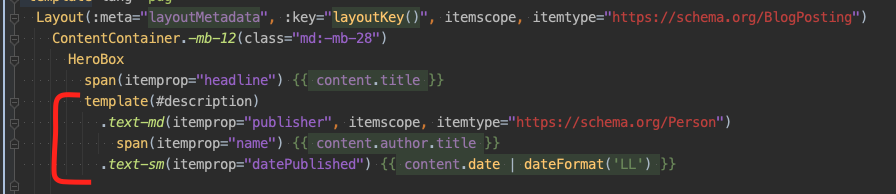
which generated invalid HTML:

 NetCZ
on 7 Dec 2020
NetCZ
on 7 Dec 2020
Related issues
 ElliotPsyIT
·
17Comments
ElliotPsyIT
·
17Comments
 bbugh
·
71Comments
bbugh
·
71Comments
 gongph
·
42Comments
gongph
·
42Comments
 Jonarod
·
21Comments
Jonarod
·
21Comments
 jakedohm
·
18Comments
jakedohm
·
18Comments
Most helpful comment
@SteveEdson this happened to me as well. It usually means something in the hydration is broken. First try updating our node version to the newest stable one; I'm using v10.15.0.
Next take a look at whether you are attempting to do some heavy data load in your early lifecycles; running some code in
createwill break hydration as the server build will attempt to run that code. Next check if you are doing immediate watch statements on$route. You can addthis.process.isClient/this.process.isServerto help control how things flow during the build out.Finally, in
gridsome.config.js, add:this will show you errors in hydration when viewing your static files. See if those steps uncover where your issue may lie!