Gridsome: g-images with dynamic paths not correctly generating full feature set
Summary
We have some components that we want to load images in. I've tried many variations on making this work, and in most cases, gridsome simply outputs the literal property path without actually transforming it. Using require() will correctly output the path, but then it doesn't output an actual g-image feature, just a generic unhashed img tag.
I'm quite surprised at this as I can't imagine the tool would be very useful without dynamic images in components.
There is an existing bug for this with a proposed solution, however as you'll see below, the proposed solution is actually not working.
Example code
<template>
  <div> <!-- ... some other html ... -->

    <!-- FAIL: with computed, it outputs the literal imagePath, broken image -->
    <g-image :src="imagePath" />

    <!-- FAIL: with direct prop, it outputs the literal prop, broken image -->
    <g-image :src="imageSrc" />

    <!-- FAIL: kind of works, but just directly outputs the direct image tag without any g-image features -->
    <g-image :src="webpackImagePath" />

    <!-- FAIL: works, but it's not dynamic! -->
    <g-image src="@/assets/images/literal-image-path.png" />
  </div>
</template>

<script>
export default {
  props: {
    imageSrc: {
      type: String,
      required: true
    }
  },
  computed: {
    imagePath () {
      return `@/assets/images/${this.imageSrc}`
    },
    webpackImagePath () {
      return require(`@/assets/images/${this.imageSrc}`)
    }
  }
}
Current behavior
Literal image path
Works as expected, but we need dynamic paths.
<img src="/assets/static/src/assets/images/literal-image-path.png?width=800" width="800" data-src="/assets/static/src/assets/images/literal-image-path.png?width=800" data-srcset="/assets/static/src/assets/images/literal-image-path.png?width=480 480w, /assets/static/src/assets/images/literal-image-path.png?width=800 800w" data-sizes="(max-width: 800px) 100vw, 800px" class="g-image g-image--lazy g-image--loaded" sizes="(max-width: 800px) 100vw, 800px" srcset="/assets/static/src/assets/images/literal-image-path.png?width=480 480w, /assets/static/src/assets/images/literal-image-path.png?width=800 800w">
[FAIL] Dynamic with property (no require):
It's outputting the literal image path passed in by the prop or computed.
<img src="@/assets/images/literal-image-path.png" class="g-image">
[FAIL] Dynamically using webpack require():
As you can see, it is outputting a transformed path, but it's not hashed, and it's missing all of the g-image features.
<img src="/assets/img/literal-image-path.png" class="g-image">
Expected behavior
Either one of:
- dynamic prop image paths are correctly loaded as a g-image
- webpack
require()is correctly loaded as a g-image
 bbugh
bbugh
All 71 comments
We are running into exactly the same issue -- I would love any hints on how to get this working.
 khuumi
on 19 Mar 2019
khuumi
on 19 Mar 2019
Edit: see this comment for a better temporary workaround.
You can work around it with slots. It's a poor solution (considering it's working around a bug of a core feature), but it's at least functional when you know the URL in advance.
We added slots to the template sections, rather than passing in the image link, then you can use the slot to pass in the g-image as content.
// SomeComponent.vue
<template>
<div>
<slot name="image" />
</div>
</template>
// somewhere else
<some-component>
<template v-slot:image>
<g-image src="@/assets/images/whatever.png" />
</template>
</some-component>
This will correctly generate the g-image. It still only works in the instances where you know the image path at development time, which is not the case for all of our images.
bbugh
on 20 Mar 2019
There is an additional issue that (I think) the first time a graphql image source from static-query is compiled, it doesn't work either, but subsequent loads will work. I believe that it's related.
I did some more investigation into both of these problems, and my best guess is that there's an order of operations issue with how g-image transforms to an img that is causing problems.
In vue-loader, the extra module assets is transforming via postTransformNode. However, at this point, the dynamic src attributes have not been evaluated by vue-loader. This is why the images aren't being transformed, because at this point they're still just something like "imagePath".
Here is an example log (that I added).
[FAIL] Using a computed value
Notice that at this point, the :src attribute is still the pre-computed value. The src attribute is as well.
[test] g-image node found with src: 'imagePath'
[test] Expecting to Transform 'g-image' with 'src' attr: 'imagePath'
[test] g-image src is not static, end of assessment
[SUCCESS] Using a static image src url
Notice that this properly replaces the url with the assets-loader require.
[test] g-image node found with src: '@/assets/images/literal-image-path.png'
[test] Expecting to Transform 'g-image' with 'src' attr: '"@/assets/images/literal-image-path.png"' (static)
[test] g-image src is static
[test] Attr value before: "@/assets/images/literal-image-path.png"
[test] Attr value after: require("!!assets-loader?!@/assets/images/literal-image-path.png")
Given this, it seems like putting the asset transformation in the vue-loader pipeline isn't the right approach. None of the vue-loader callbacks seem to have access to the node that has already been parsed. There does not seem to be a way for assets-loader to compute dynamic srcs as it is currently implemented.
It seems to me like a custom separate webpack-loader is the best approach, but I'm not a webpack expert.
bbugh
on 21 Mar 2019
Edit: nevermind, there are several issues with this workaround, it seems like webpack will only pick it up if parts of the path are hardcoded ¯\_(ツ)_/¯. It isn't usable for anything like production. Slots are still the only workaround I've found that are reliable.
Old post with incorrect advice
If you just care about a better (but still not great) workaround, here you go.
Knowing what the require with assets-loader is supposed to look like, you can do this:
<g-image :src="assetPath('~/assets/images/my-image-file.png', 'Test+Image', 400)
assetPath (path: string, alt: string, width: number) {
return require(`!!assets-loader?alt=${alt}&width=${width}!${assetPath}")
}
Which will result in what assets-loader is supposed to look like:
<img src="require('!!assets-loader?alt=Test+Image&width=800!~/assets/images/my-image-file.png">
Which will then correctly be assessed by the asset compilation.
This is obviously still a gross hack, but at least it can be abstracted away behind a function (or custom component) and not having to screw around with slots.
bbugh
on 21 Mar 2019
First I don't agree this is a bug. It is documented pretty clear:
The
srcattribute and options likewidth,heightandqualitymust be static values because they are compiled into an object which contains URLs and other information that will be rendered into an img tag.
This is because images processed by Webpack during build time. Don't forget there is no Webpack in your static site. G-image is just a lightweight functional component. It can't process any image you give to it on the fly.
 Al-Rozhkov
on 15 Apr 2019
Al-Rozhkov
on 15 Apr 2019
In one project I had very similar need as described in the issue summary. I solved it with Data Store API.
I have a field with fileName string in my content type and I have dir with images in my project repo. If file with fileName exists in the dir show it on Node component.
Here is my gridsome.server.js:
module.exports = function (api) {
api.loadSource(store => {
const path = require('path')
const { imageType } = require('gridsome/lib/graphql/types/image')
const posts = store.getContentType('MY_CONTENT_TYPE')
posts.addSchemaField('fakeImageField', () => ({
type: imageType.type,
args: imageType.args,
async resolve (node, args, context, info) {
const value = path.join(__dirname, 'static', 'my_images', `${node.fields.fileNameField}.jpg`)
try {
result = await context.assets.add(value, args)
} catch (err) {
return null
}
if (result.isUrl) {
return result.src
}
return {
type: result.type,
mimeType: result.mimeType,
src: result.src,
size: result.size,
sizes: result.sizes,
srcset: result.srcset,
dataUri: result.dataUri
}
}
}))
})
}
After that I insert fakeImageField (width: 720, height: 200, quality: 90) into my graphql query and simply use <g-image v-if="node.fakeImageField" :src="node.fakeImageField" /> to output processed image.
Note the line const value = path.join(__dirname, 'static', 'my_images', `${node.fields.fileNameField}.jpg`). This kind of computed property you want to use to construct your imagePath. You can use any field from your graphql content type with node.fields.
It is definitely not going to work if your images are remote (for now, v0.5.7).
Al-Rozhkov
on 15 Apr 2019
@Al-Rozhkov, thank you for the reply, I don't have a strong opinion on whether it's a bug or not, it just seems like one to me. I've used a number of static site generators, and the way Gridsome behaves is very unexpected! I'd love for this to be possible, because Gridsome was awesome otherwise when I was evaluating it.
As a simple example, we have a footer component. Depending on the sales page it appears on, it's going to have a different background image, but the component is the same on every sales page. (Same thing with the jumbotron).
We aren't using GraphQL for these pages because it doesn't make sense too, they're semi-complicated landing pages, not blog posts. It would just add a lot of questionable complexity to run them through a data endpoint, and we probably couldn't get the same results. We do have pages (blog posts and articles) that we do want to be data-driven, so it's going to be a combo of self-built component pages, and dynamically sourced ones.
Our simple footer component might look something like this:
<footer :image="thisPageFooterImage" />
This won't work in gridsome currently.
Whether it's a bug or a feature, what I'm saying is: I'd really love if local dynamic images work, and output them as part of the build process.
bbugh
on 15 Apr 2019
@bbugh looks like you don't need g-image component at all. If you provide your footer component code I will gladly show you how this is can be done.
Al-Rozhkov
on 15 Apr 2019
Hi @Al-Rozhkov, one of the reasons we're looking at Gridsome (other than Vue) is g-image, because it has built in automatically created responsive images. We have a lot of use cases where it will be very valuable. We already got it working with slots, but it ended up requiring a lot of extra effort to make work and we decided it wasn't worth it.
I'm happy to provide a sample of the footer in case you know some tricks that I haven't explored!
<template>
<footer class="row">
<div class="col-8">some text</div>
<div class="col-4">
<g-image :src="image" width="650" height="400" fit="contain"/>
</div>
</footer>
</template>
<script>
export default {
// ...,
props: {
image: {
required: true,
type: String
}
}
}
</script>
Since this issue is about dynamic paths I hoped to see how you want to construct your image path. Something like computed value imagePath in the issue summary.
As a simple example, we have a footer component. Depending on the sales page it appears on, it's going to have a different background image...
How and where you place your logic to make image dynamic?
Al-Rozhkov
on 16 Apr 2019
Hi @Al-Rozhkov, I think there might be a misunderstanding. I'm not computing or making anything "dynamic", just the paths are dynamically passed to a component from another component. This is why I think it is a bug.
Using the footer component in a real scenario looks like this:
// Some sales page
<template>
<div>
<h1>Some sales page</h1>
<h3>PASS: This works fine and outputs a responsive g-image</h3>
<g-image src="~/assets/images/some-image.png" width="650" height="400" fit="contain" />
<h3>
FAIL: The g-image in this component fails to load via webpack,
and outputs the literal string
</h3>
<footer image="~/assets/images/some-image.png" />
</div>
</template>
And here's how that output looks:
<!-- g-image output, correctly outputs the image -->
<img src="/assets/static/src/assets/images/some-image.png?width=650&height=400&fit=contain" width="650" data-src="/assets/static/src/assets/images/some-image.png?width=650&height=400&fit=contain" data-srcset="/assets/static/src/assets/images/some-image.png?width=480&height=296&fit=contain 480w, /assets/static/src/assets/images/some-image.png?width=650&height=400&fit=contain 650w" data-sizes="(max-width: 650px) 100vw, 650px" class="g-image g-image--lazy g-image--loaded" sizes="(max-width: 650px) 100vw, 650px" srcset="/assets/static/src/assets/images/some-image.png?width=480&height=296&fit=contain 480w, /assets/static/src/assets/images/some-image.png?width=650&height=400&fit=contain 650w">
<!-- footer g-image output, just literally outputs the path -->
<img src="~/assets/images/some-image.png" class="g-image">
I'd love to know a solution for this as well.
 mjatharvest
on 17 Apr 2019
mjatharvest
on 17 Apr 2019
Indeed I misunderstood you. I feel like I wasted a lot of your time. Sorry.
The cause of the failure is inside your props declaration. It has to be an Object not a String. In fact q-image accepts an object with following properties:
{
type
mimeType,
src,
size,
sizes,
srcset,
dataUri
}
If you directly print a String in <g-image> tag all magic is done by Webpack. If you use graphql everything handled in Data Store level. In your case image path remains a string because you declared it in the props:
props: {
imageSrc: {
type: String,
required: true
}
},
And it works with slots because Webpack can pick it up.
Al-Rozhkov
on 17 Apr 2019
Hi again, yes, that's the problem 👍. No time wasted, I'm happy to explain because I like gridsome and want it to succeed, and this particular use case seems like it will be an issue for a lot more people than just me and the other commenters.
You can pass an object to g-image, but that doesn't seem to be intended for users to do on their own. At the point that g-image receives the object you mentioned, it's been processed further upstream by the image processing queue and already has the sizes and srcset, etc. Here's where that is created:
I think it would defeat the purpose of g-image if users had to manually generate the object, when the image processing queue already handles that. You don't have to specify an object for a static link or a graphql link, because they're passed through the asset queue.
It seems to me that the fix for this issue is that string paths passed via a prop should be added to the asset queue somehow, and processed like static and graphql defined string paths. Given that the functionality for this already exists, it seems plausible to me.
Maybe there's a post-compilation step that generates all of the images like for the graphql? Or maybe there's an extra webpack hook (or whatever) so that if we do <g-image src="require('some_path')" /> it's automatically added to the asset queue (or whatever)?
bbugh
on 17 Apr 2019
The problem with dynamic src is that webpack doesn't have access to the JavaScript variables. We can look into require.context and see if that will make dynamic src paths possible.
 hjvedvik
on 17 Apr 2019
hjvedvik
on 17 Apr 2019
I just looked at Gatsby docs to understand how it handles images. And looks like the only way to get all those useful things like minimization, lazy loading, etc is to use graphql queries. I guess it is for a reason.
Al-Rozhkov
on 17 Apr 2019
The problem with dynamic src is that webpack doesn't have access to the JavaScript variables.
@hjvedvik yeah, that is the described issue! At the time that vue-loader is parsing g-image, the AST still only contains the source code values in the postTransformNode hook, not the compiled values. BUT! assets-loader is already dynamically added to static images and webpack picks it up, so it is possible. Here's where that happens:
I don't know if there's a "post-compile" vue-loader hook that can do something similar, but with the already code-compiled tree. The GraphQL code seems does it somehow, I'm guessing it's processed after Vue is, so it must hook into something to do it, right?
On another note, if when we explicitly specify the loader when setting the property image source, it will work, but setting the values via explicit loader statement sucks as a user experience. For example, this will work:
<!-- input -->
<footer :image="require('!!assets-loader?width=800!~/assets/images/some-image.png')" />
<!-- output -->
<footer class="row">
<div class="col-8">some text</div>
<div class="col-4">
<img src="/assets/static/src/assets/images/some-image.png?width=800" width="800" data-src="/assets/static/src/assets/images/some-image.png?width=800" data-srcset="/assets/static/src/assets/images/some-image.png?width=480 480w, /assets/static/src/assets/images/some-image.png?width=800 800w" data-sizes="(max-width: 800px) 100vw, 800px" class="g-image g-image--lazy g-image--loaded" sizes="(max-width: 800px) 100vw, 800px" srcset="/assets/static/src/assets/images/some-image.png?width=480 480w, /assets/static/src/assets/images/some-image.png?width=800 800w">
</div>
</footer>
But that's brittle and easy to mess up. Some other possible solutions:
- Maybe a helper function that auto generates the asset loader as part of the
g-imageprocess? - Maybe an extra data-attribute that says "process me later"?
- Some kind of helper function that creates that loader in a better way?
- Some kind of easier to produce options parameter?
- Or best yet, something in
g-imagethat handles this automatically?
@Al-Rozhkov I think this is important to resolve because this is basic Vue behavior and it's going to be a surprise to people. Deriving absolutely everything on a page from GraphQL seems overly complicated for a lot of use cases. What about a pricing page? You may want some images or icons, and you'd want a component for that shared behavior, and if you try to use images for the icons, this issue would come up. Maybe gridsome only wants to be a static blog or article generator, but Vue is awesome and it would be fantastic to use it for other static pages as well, especially when this is the only real showstopper I ran into.
I'm not sure how to solve it but I think this is a great discussion and will lead to great results!
bbugh
on 17 Apr 2019
require("!!assets-loader?${query}!${value}") generates a string based on a static src value. webpack can handle dynamic requires, but because it doesn't see the dynamic value at compile time, it generates a list of all possible files matching a certain regex and creates chunks for them. So if you have 100 images in a folder but only uses 3 of them, Gridsome will still process all the images.
I haven't done any testing, but I think something like this could work with require.context under the hood. The context attribute must be a static value that webpack can resolve. And it can look for images with supported extensions.
<g-image context="~/images" :src="node.imageFileName" />
Any news on this?
The only way it works is with this:
require('!!assets-loader?width=90!~/assets/img/' + img);
But this reduces the performance a lot.
Best
 dark88888
on 16 May 2019
dark88888
on 16 May 2019
Pinging @hjvedvik for visibility.
 robaxelsen
on 16 May 2019
robaxelsen
on 16 May 2019
I'm new to Gridsome and the amount of digging I've had to do to figure out why <g-image> wasn't working has been a big pain.
My use case is that of a single-file collection which is updated by Netlify CMS. It contains data applicable to the entire site (including paths to images I'd like optimised), and thus I can't import it with source-filesystem because I don't want routes generated for it.
The docs do mention the value can't be dynamic "unless it comes from GraphQL", so I then spent another half an hour looking at the as-yet-unknown-to-me Data Store API to add some global metadata containing the image, but then realised that <g-image> only works with <page-query>, not <static-query>; as the image is to appear in a global footer, I had to use the latter.
 snoopdouglas
on 30 Jun 2019
snoopdouglas
on 30 Jun 2019
I believe, you can use the source-filesystem plugin with no routes and it will not generate them. That is the what I have been doing for reusable content that I don't want urls for.
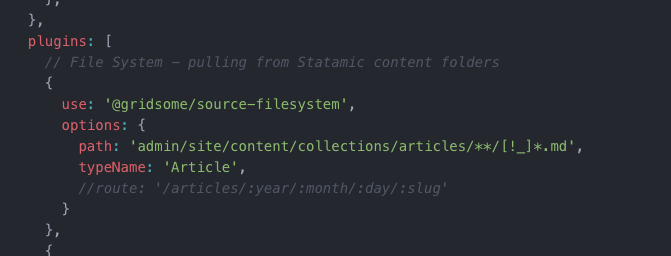
I've struggled with g-image also, and have used the code shown below when I wanted files that were not in Graph QL but were in the repo.
This could we be in the a vue component or page <template></template> tag
<g-image
class=""
:src="require('~/assets/images/vos-lockup-white-text.png')"
alt=""
/>
@mjatharvest - both of these look ideal. Couple of questions (because I'm afk right now):
- Won't that config generate routes for
admin/site/content/collections/articles/*? The docs seem to say this is the case. - Will the
require()work with dynamic values?
snoopdouglas
on 1 Jul 2019
@snoopdouglas based on the contents of my dist folder there are no routes / urls generated for the articles if no route is provided. @hjvedvik could confirm
Re dynamic values, not sure with require, but sometimes I've had to use a component with a template slot to avoid errors.
mjatharvest
on 1 Jul 2019
@mjatharvest @snoopdouglas @robaxelsen @hjvedvik @bbugh
Can you confirm that require method is working and has no drawbacks?
<g-image :src="require('~/assets/images/image.jpg')"/>
In my case, I can see the images but I don't them blured while loading.
 sergeyfilimonov
on 8 Jul 2019
sergeyfilimonov
on 8 Jul 2019
@sergeyfilimonov you're correct, looks like it's only loading image src and not creating srcset or lazy loading images
mjatharvest
on 8 Jul 2019
@mjatharvest yes, it's working just as img tag.
This is what I see in final HTML with require:
<img data-v-9d0f6718="" alt="arttsapko" src="/assets/img/arttsapko.22fce3d2.jpg" class="g-image">
This is what I see in final HTML with a static url:
<img src="/assets/static/src/assets/images/olga.jpg?width=853" width="853" data-src="/assets/static/src/assets/images/olga.jpg?width=853" data-srcset="/assets/static/src/assets/images/olga.jpg?width=480 480w, /assets/static/src/assets/images/olga.jpg?width=853 853w" data-sizes="(max-width: 853px) 100vw, 853px" class="relative rounded g-image g-image--lazy g-image--loaded" srcset="/assets/static/src/assets/images/olga.jpg?width=480 480w, /assets/static/src/assets/images/olga.jpg?width=853 853w" sizes="(max-width: 853px) 100vw, 853px">
I have run into this too, falling back to using normal img for now.
Looking forward to using g-image in my components files soon though, eager for an update!
 tbredin
on 10 Jul 2019
tbredin
on 10 Jul 2019
I suggest using an external image cdn service such as cloudinary it is very easy to use and you can enable auto upload and support dynamic sizes.
eg.
// imagePath = "website/customers/stylight-website-new.png"
<p>Image with a width of 600px</p>
<g-image :src="`https://cloudinary-res.cloudinary.com/image/upload/c_scale,f_auto,q_auto,600_w/${imagePath}`">
<p>Image with a width of 1200px</p>
<g-image :src="`https://cloudinary-res.cloudinary.com/image/upload/c_scale,f_auto,q_auto,1200_w/${imagePath}`">
<p>Image with a dynamic width and height</p>
<g-image :src="`https://cloudinary-res.cloudinary.com/image/upload/c_scale,f_auto,q_auto,${width}_w, ${height}_h/${imagePath}`">
You'ed have to for write some code to generate the placeholder dataURI that you then can pass with the src as an object to
 u12206050
on 10 Jul 2019
u12206050
on 10 Jul 2019
Cloudinary and friends will indeed do all of this for you, but other solutions exist for that. <g-image> seems a better fit for those of us who'd prefer not to rely on an external provider for our sites' images.
snoopdouglas
on 10 Jul 2019
If the images are in the local file system there must be a way to use g-image with GraphQL natively that I'm missing. The docs indicate it's possible https://gridsome.org/docs/images#usage-via-graphql
- First question, what should the GraphQL look like for an image? Can it be just a string? Or should it be an object? Here is an example of an image object I'm creating in
gridsome.server.js
const axios = require('axios')
module.exports = function (api) {
api.loadSource(async store => {
// JSON article data from local CMS
const { data } = await axios.get('http://mycms.local/articles?filter=published')
const contentType = store.addContentType({
typeName: 'Article',
route: '/articles/:year/:month/:day/:slug'
})
for (const item of data) {
contentType.addNode({
id: item.id,
title: item.title,
excerpt: item.excerpt,
content: item.content,
image: {
src: item.image,
width: '',
height: '',
quality: '',
fit: 'cover',
blur: '40',
immediate: false
},
date: item.date,
slug: item.slug
})
}
})
}
- Second question - what should the query look like in the Vue Template?
Does it need !!asset-loader or require
// src/pages/News.vue
<page-query>
news: allArticle (sortBy: "date", order: DESC) {
edges{
node {
id
title
path
excerpt
external_link
image {
src
}
}
}
}
}
</page-query>
<template>
<Layout>
<div v-for="(edge, index) in $page.news.edges" :key="edge.node.id">
<g-image :src="edge.node.image.src" :alt="edge.node.title" />
</div>
</Layout>
</template>
Would be great to sort this out and then update the docs.
mjatharvest
on 10 Jul 2019
In researching this further and some help from this thread, I was able to get g-image working with GraphQL using a full system path instead of a relative path. https://github.com/gridsome/gridsome/issues/459
mjatharvest
on 25 Jul 2019
@mjatharvest could you please share your code that works?
sergeyfilimonov
on 25 Jul 2019
@mjatharvest I'd be super interested to see what the code you used was as well!
tbredin
on 18 Aug 2019
@sergeyfilimonov @tbredin sorry for the delay, haven't been able to get this as quick as I'd like
I'm not about to post everything due to time constraints, but my solution has been to use gridsome.server.js and fetch data from an api similar to what you see below:
My case is probably not typical. It would depend on what your data from the api looks like.
I also use process.env to define different variables for development and production.
// Load Axios for Ajax Requests
const axios = require('axios')
// Set the url to Get data from Statmic (Different urls for production and local dev)
const apiHost = process.env.API_HOST
// Set the file path for image uploads (Different urls for production and local dev)
// In local looks like: '/Users/myusername/Sites/path/to/site/uploads/'
const uploadPath = process.env.UPLOADS_FULL_PATH
module.exports = function (api) {
/*
* Articles / News
*/
api.loadSource(async store => {
const { articleData } = await axios.get( apiHost)
const articles = store.addContentType({
typeName: 'Article',
route: '/articles/:year/:month/:day/:slug'
})
for (const item of articleData.data) {
articles.addNode({
id: item.id,
//path: '/',
title: item.title,
excerpt: item.excerpt,
external_link: item.external_link,
image: {
src: uploadPath + item.image.fileName,
},
source_date: item.source_date,
date: item.date.date,
slug: item.slug
})
}
})
}
the key is that a full system file path to the image must be used
mjatharvest
on 18 Aug 2019
For anyone that can't get their downloaded images' path absolute within GraphQL you can modify the existing ContentType and add a new field eg. absImage:
This should also work if you need to set the url of an image, just set ROOT to the url domain.
// gridsome.server.js
const ROOT = process.cwd()
module.exports = function (api) {
api.loadSource(({ addContentType }) => {
const articles = addContentType('Article')
articles.addSchemaField('absImage', ({ graphql }) => {
return ({
name: 'AbsoluteImagePath',
type: graphql.GraphQLString,
async resolve (node, args) {
return node.cover_image ? `${ROOT}/${node.relImage}` : null
}
})
})
})
}
Update cover_image to match the field that contains the relative path of the image.
u12206050
on 19 Aug 2019
Ran into this problem today. Can't use g-image as a child component because I can't pass "~/assets/image.png" to it in a prop.
 Zyles
on 21 Aug 2019
Zyles
on 21 Aug 2019
@Zyles try this:
<CustomComponent :image="require('!!assets-loader?width=800!~/assets/image.png')" />
u12206050
on 22 Aug 2019
@Zyles try this:
<CustomComponent :image="require('!!assets-loader?width=800!~/assets/image.png')" />
That gives me a <img src="[object Object]"> ?
Zyles
on 22 Aug 2019
That gives me a
<img src="[object Object]">?
The prop in this case image should be type Object within CustomComponent not string, could you check that?
u12206050
on 22 Aug 2019
Got it working now. I was trying to use a computed property.
Solved it by calling my component in Index.vue:
<MyCustomComponent imageFile="image.png">
And in my MyCustomComponent:
<template>
<g-image :src="require('!!assets-loader!~/assets/' + imageFile)" />
</template>
export default {
props: {
imageFile: String
}
}
@Zyles, I tried the code in your last comment but I'm getting Error: Cannot find module '!!assets-loader?...(image path here) in Gridsome 0.7.5. Is your solution still working for you?
 macguirerintoul
on 25 Sep 2019
macguirerintoul
on 25 Sep 2019
Thanks @Zyles, my approach without using props (for anyone who is trying to do similar is):
<g-image :alt="author.name" class="author__image" :src="author.img" width="180" height="180" blur="5" />
and
export default {
props: ['showTitle'],
computed: {
author() {
return {
name: 'Todd',
img: require('!!assets-loader!~/assets/images/todd.jpg')
}
}
}
}
I'm sure this approach is generally applicable regardless of where the data is coming from.
 toddheslin
on 11 Oct 2019
toddheslin
on 11 Oct 2019
I created a PR which is trying to solve this. It's using require.context to resolve the image paths.
hjvedvik
on 16 Oct 2019
Any news about this issue? I've had to use solution https://github.com/gridsome/gridsome/issues/292#issuecomment-524371751
 HZooly
on 26 Nov 2019
HZooly
on 26 Nov 2019
My solution to the issue is to just not to use <g-image> as a sub-component.
Instead what I do is create a slot where my g-image would have been and then just pass my g-image, tag and all, into the component using the slot.
Looks something like this...
~~~vue
// InlineIconFeature.vue
...
{{ heading }}
{{ description }}
...
~~~
Then in the parent template...
~~~vue
// Index.vue
description="Lorem ipsum, dolor sit amet consectetur adipisicing elit."
>
~~~
This is my way of putting a bandage over the problem while I wait for someone way smarter than me to come up with a better solution. 😁
 egrechko
on 28 Nov 2019
egrechko
on 28 Nov 2019
Any updates on this?
Currently when i want to v-for through Cards (data returned from NetlifyCMS) dynamic
:src on g-image is not working.
 Wvduijn
on 20 Dec 2019
Wvduijn
on 20 Dec 2019
Is there any solution now... for using dynamic path in g-image tag.
Example:
<g-image :src="imageUrl" width="500" />
data:()=> ({
imageUrl = "~/assets/image.png"
})
But it is not working... can any body help me...
 prashant1k99
on 21 Dec 2019
prashant1k99
on 21 Dec 2019
I had the same problem and this is what I did:
<g-image :src="'~/assets/' + imageUrl" width="500" />
data:()=> ({
imageUrl = "image.png"
})
 lvizcaya
on 29 Jan 2020
lvizcaya
on 29 Jan 2020
This has been working for me:
Go to gridsome.config.js and add an alias for your images folder inside of the chainWebpack function (you may need to add it):
module.exports = {
  siteName: 'Jeremy Jackson',
  plugins: [],
  chainWebpack: config => {
    config.resolve.alias.set('@images', '@/assets/images')
  },
  templates: {}
}
Save the file and restart the server.
Then in your code where you want to use the image you can do:
<g-image :src="require(`!!assets-loader!@images/${imageUrl}`)"/>
And the dynamic image shows up. This works inside of v-for as well.
For reference, here's the code I'm using inside of a v-for in my site:
<div id="project-images">
  <div class="section-header">Screenshots</div>
  <div class="row">
    <div
      class="col-xs-12 col-sm-3 project-image"
      v-for="(projectImage, index) in $page.project.images"
      :key="projectImage"
      @click="openLightBox(index)"
    >
      <g-image class="responsive-image" :src="require(`!!assets-loader!@images/${projectImage}`)"/>
    </div>
  </div>
</div>
and the result:
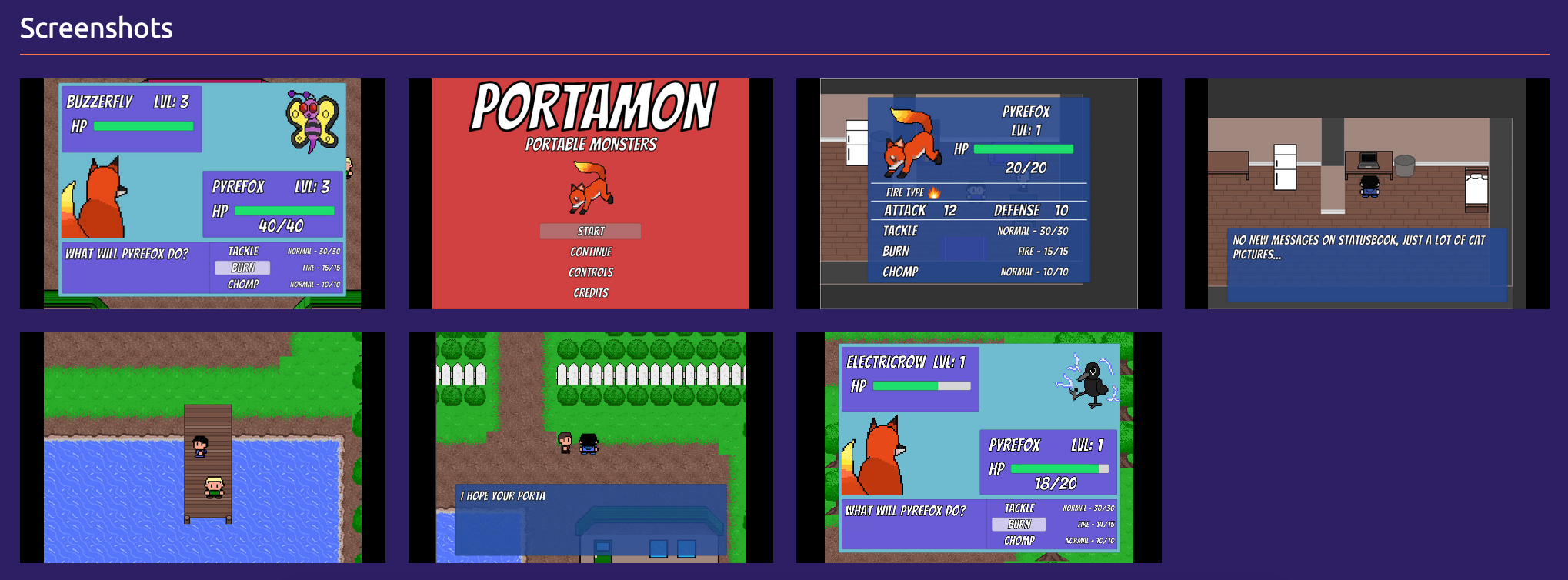
This has worked for me. If there's a better solution to this, let me know so I can fix my stuff ;)
 jeremyjackson89
on 8 Feb 2020
jeremyjackson89
on 8 Feb 2020
This has been working for me:
Go to
gridsome.config.jsand add an alias for your images folder inside of thechainWebpackfunction (you may need to add it):module.exports = { siteName: 'Jeremy Jackson', plugins: [], chainWebpack: config => { config.resolve.alias.set('@images', '@/assets/images') }, templates: {} }Save the file and restart the server.
Then in your code where you want to use the image you can do:
<g-image :src="require(`!!assets-loader!@images/${imageUrl}`)"/>And the dynamic image shows up. This works inside of v-for as well.
For reference, here's the code I'm using inside of a v-for in my site:
<div id="project-images">
  <div class="section-header">Screenshots</div>
  <div class="row">
    <div
      class="col-xs-12 col-sm-3 project-image"
      v-for="(projectImage, index) in $page.project.images"
      :key="projectImage"
      @click="openLightBox(index)"
    >
      <g-image class="responsive-image" :src="require(`!!assets-loader!@images/${projectImage}`)"/>
    </div>
  </div>
</div>
and the result:
This has worked for me. If there's a better solution to this, let me know so I can fix my stuff ;)
Thank you so much for this solution. It works to a point, but it doesn't seem to work correctly if you specify a width and height. For example:
<g-image :src="require(!!assets-loader!@images/${imageUrl})"/> will render the same as <g-image :src="require(!!assets-loader!@images/${imageUrl})" width="100" height="100"/>
This is not the case if the variable path is replaced with a local path, in that case the image is re-sized per the documentation.
Does anyone have a solution to get the fully documented use of g-image when images urls are set by a variable like this?
 x5hwuk7nc6jsudcc
on 12 Mar 2020
x5hwuk7nc6jsudcc
on 12 Mar 2020
Add a query string to the end of the file path, you should be able to set the width, height, quality, and blur through it.
 domcoleman
on 12 Mar 2020
domcoleman
on 12 Mar 2020
Add a query string to the end of the file path, you should be able to set the width, height, quality, and blur through it.
Thank you! For anyone who who finds themselves here from Google, the tldr is see jeremyjackson89's answer https://github.com/gridsome/gridsome/issues/292#issuecomment-583692119 and then to specify a width/height/etc you add a query string right before the path. So the example above would become:
<g-image class="responsive-image" :src="require(`!!assets-loader?width=250&height=250!@images/${projectImage}`)"/>
I see this solution is working.
Why it does not work when you pass the alias directly in the property value?
And why a new alias is required?
I mean, Shouldn't it work the same way if we simply pass a value like:
@/assets/images/myimage.jpg and then do <g-image :src="require(`!!assets-loader?${projectImage}`)"/>
PS: not a webpack guru or anything... Just trying to understand what's going on here
 luisjoserivera
on 15 Mar 2020
luisjoserivera
on 15 Mar 2020
I had the same problem and this is what I did:
<g-image :src="'~/assets/' + imageUrl" width="500" />data:()=> ({ imageUrl = "image.png" })
Not working form me
 crstnmac
on 18 Mar 2020
crstnmac
on 18 Mar 2020
I had the same problem and this is what I did:
<g-image :src="'~/assets/' + imageUrl" width="500" />data:()=> ({ imageUrl = "image.png" })Not working form me
@crstnmac Did you tried this one....
prashant1k99
on 19 Mar 2020
I had the same problem and this is what I did:
<g-image :src="'~/assets/' + imageUrl" width="500" />data:()=> ({ imageUrl = "image.png" })Not working form me
@crstnmac Did you tried this one....
Worked like charm
crstnmac
on 19 Mar 2020


 nousdesign
on 1 Apr 2020
nousdesign
on 1 Apr 2020
Hi everyone!
I'm using the require assets-loader solution by @bbugh, but, when I'm using with images with extension name uppercased (like myimage.PNG, or myimage.JPG) an error occurs on g-image tag:
Error in render: "TypeError: Cannot read property 'width' of undefined"
I believe this error occurs because the return of the require function is not the same when my image has the extension name uppercased, like the following:
When the image has the extension name in lowercase:
{
"type": "image",
"mimeType": "image/jpeg",
"src": "/assets/static/src/images/willian-justen-de-vasconcellos-11wof7joiek-unsplash.jpg?width=800&quality=100&fit=inside&key=3bf356f",
"size": {
"width": 800,
"height": 800
},
"sizes": "(max-width: 800px) 100vw, 800px",
"srcset": ["/assets/static/src/images/willian-justen-de-vasconcellos-11wof7joiek-unsplash.jpg?width=480&quality=100&fit=inside&key=3bf356f 480w", "/assets/static/src/images/willian-justen-de-vasconcellos-11wof7joiek-unsplash.jpg?width=800&quality=100&fit=inside&key=3bf356f 800w"],
"dataUri": "data:image..."
}
When the image has the extension name in uppercase:
{
"type": "file",
"mimeType": "image/jpeg",
"src": "/assets/files/src/images/_mg_0394.JPG"
}
My component:
<template>
<div>
<g-image :src="imageURL"></g-image>
</div>
</template>
<script>
export default {
props: ['blok'],
computed: {
imageURL () {
if (typeof this.blok.image === 'string') {
return this.blok.image
}
const path = this.blok.image.path
return require('!!assets-loader?width=800&quality=100&fit=inside!~/' + path)
}
}
}
</script>
Any suggestion? Thanks!
 emanuelgsouza
on 14 Apr 2020
emanuelgsouza
on 14 Apr 2020
@emanuelgsouza I encounter the same issue on my project, uppercase image ext are giving me the same error
 ahsath
on 3 May 2020
ahsath
on 3 May 2020
Is this planned to be solved? Seems like a very important core feature :smile:
 vimtor
on 12 May 2020
vimtor
on 12 May 2020
@jeremyjackson89 is my new hero. This worked like a charm.
 corybagozzi
on 7 Jun 2020
corybagozzi
on 7 Jun 2020
@jeremyjackson89 mine too! 🎉 And thanks @thecameronyoung for the resize explainer
 kaboomshebang
on 10 Jun 2020
kaboomshebang
on 10 Jun 2020
I tried just about every solution here, but @jeremyjackson89's is the only one that worked like a charm.
 nicklenihan
on 15 Jun 2020
nicklenihan
on 15 Jun 2020
This has been working for me:
Go to
gridsome.config.jsand add an alias for your images folder inside of thechainWebpackfunction (you may need to add it):module.exports = { siteName: 'Jeremy Jackson', plugins: [], chainWebpack: config => { config.resolve.alias.set('@images', '@/assets/images') }, templates: {} }Save the file and restart the server.
Then in your code where you want to use the image you can do:
<g-image :src="require(`!!assets-loader!@images/${imageUrl}`)"/>And the dynamic image shows up. This works inside of v-for as well.
For reference, here's the code I'm using inside of a v-for in my site:
<div id="project-images">
  <div class="section-header">Screenshots</div>
  <div class="row">
    <div
      class="col-xs-12 col-sm-3 project-image"
      v-for="(projectImage, index) in $page.project.images"
      :key="projectImage"
      @click="openLightBox(index)"
    >
      <g-image class="responsive-image" :src="require(`!!assets-loader!@images/${projectImage}`)"/>
    </div>
  </div>
</div>
and the result:
This has worked for me. If there's a better solution to this, let me know so I can fix my stuff ;)
Does anyone know if this works for remote images as well?
 Horlamedhey
on 15 Jul 2020
Horlamedhey
on 15 Jul 2020
Using @jeremyjackson89 's solution, but I'm still looking for a way to add the g-image properties dynamically.
So this
require(`!!assets-loader?width=1200&quality=85!@images/${filename}`)
is working, but this
require(`!!assets-loader${query}!@images/${filename}`)
isn't
any workaround for this, or is it simply not possible?
 HomelessRaccoon
on 16 Jul 2020
HomelessRaccoon
on 16 Jul 2020
The documentation probably needs to be improved to explain how this works.
I can't get the example provided in the documentation for using a path from graphql to without this method.
 spaceneenja
on 23 Aug 2020
spaceneenja
on 23 Aug 2020
@jeremyjackson89's solution worked for me too - docs could definitely be improved in this regard.
 knightspore
on 4 Sep 2020
knightspore
on 4 Sep 2020
@spaceneenja @knightspore it would be cool if you improved it, it's available in the gridsome.com repo https://github.com/gridsome/gridsome.org/tree/master/docs
sergeyfilimonov
on 4 Sep 2020
Hey everyone! I would like to know if someone else has been having the same problem with the application bundle size after the @jeremyjackson89 solution. I share with you two screenshots that you can see the differences in app.js file.
Before the solution with require statement:

After the solution:

As you can see, the app bundle size increased almost 200k after adding the require statement.
To do more context, my component:
<template>
  <figure class="c-image">
    <g-image
      :src="require(`!!assets-loader!@images/${imageName}`)"
      :alt="alt"
      :title="title"
      v-if="imageName"
    />
  </figure>
</template>

<script>
export default {
  name: 'CImage',
  props: ['image', 'alt', 'title'],
  computed: {
    imageName () {
      return this.image.filename || ''
    }
  }
}
</script>
And an issue in our repository with more examples: https://github.com/storyblok/storyblok-gridsome-boilerplate-moon/issues/7
I don't know why this happens and how can I fix. Is anyone here experiencing the same problem?
emanuelgsouza
on 4 Sep 2020
Yeah I'm seeing a similar issue.
on a page
no image:
1312 bytes
hardcode path:
4539 bytes
dynamic path:
16848 bytes
spaceneenja
on 7 Sep 2020
Related issues
 tanc
·
26Comments
tanc
·
26Comments
 wjustice
·
24Comments
wjustice
·
24Comments
 ElliotPsyIT
·
17Comments
ElliotPsyIT
·
17Comments
 eleijonmarck
·
18Comments
eleijonmarck
·
18Comments
 tyankatsu0105
·
22Comments
tyankatsu0105
·
22Comments
Most helpful comment
This has been working for me:
Go to
gridsome.config.jsand add an alias for your images folder inside of thechainWebpackfunction (you may need to add it):Save the file and restart the server.
Then in your code where you want to use the image you can do:
And the dynamic image shows up. This works inside of v-for as well.
For reference, here's the code I'm using inside of a v-for in my site:
and the result:
This has worked for me. If there's a better solution to this, let me know so I can fix my stuff ;)