Graphql-dotnet: Defining multiple schemas
This might be one of those "That's not the way to do it in GraphQL" questions, but I'm curious how you can define multiple schemas to one controller endpoint, if that's possible.
For example, let's say I want to create 2 different schemas, let's call them SoccerSchema & BaseballSchema. I want to define them separately because the info for Soccer & Baseball will be different, so different schemas to have a bit more logical separation. If I do something like the following, only the last one of the schemas will actually be accessible, since it's being added as a Singleton:
services.AddSingleton<ISchema>(new SoccerSchema(new FuncDependencyResolver(type => sp.GetService(type))));
services.AddSingleton<ISchema>(new BaseballSchema(new FuncDependencyResolver(type => sp.GetService(type))));
So when I try to run a live test, if I try to run something against SoccerQuery (The query attached to SoccerSchema), it'll give an error along the lines of "Can't query field on BaseballQuery". I'm assuming there's one of a few ways to deal with this:
- Some mystery way to define multiple schema to the same controller
- Setting up multiple controllers, one for each schema
- Merge all of the schemas down into one
If the first option is possible, I would love to know how. Otherwise just a general direction on the problem would be appreciated.
 maolivo
All 50 comments
one controller endpoint
What do you mean? Are you using GraphQL to maintain a separate REST method in your Web API?
GraphQL suggests one smart endpoint instead of multiple endpoints in REST, so usually you are supposed to use one schema in your application (Merge all of the schemas down into one). But generally speaking nothing prevents one from using different schemes in one application. In the case of DI, the situation naturally leads to the use of different instances of containers that do not interfere with each other. In ASP.NET / Core such a scenario would be problematic, since it uses a single built-in DI container. You can create your containers manually. It all depends on how much manual work you are willing to do.
 sungam3r
on 24 May 2019
sungam3r
on 24 May 2019
So, the GraphQL API that I'm trying to build is to help assemble multiple different data sources together, however the structure and query abilities of each of them are very different. So the idea I was looking into was setting up multiple different schemas, one for each of the different types of sources. Here's a more concreate example:
Let's say I have 3 different data source I want to allow querying of through my GraphQL API; a SQL database, a standard REST API, and another non-standard data storage type. My hope was to expose multiple schemas (and thus multiple queries) that would allow an end-user to query each of these in their respective ways. The goal is not to build a conforming data structure for all of them, so much as to build a singular point where all of these data sources can be queried. I obviously should be able to accomplish this by doing something like the following:
- MyGraphQLSchema
- SQLQuery
- SQLField1
- SQLField2
- RESTQuery
- OtherQuery
But I was more interested in doing something like the following:
- SQLSchema
- SQLQuery
- SQLField1
- SQLField2
- RESTSchema
- RESTQuery
- OtherSchema
- OtherQuery
Hopefully that might help convey a bit better what I'm going for and once again, might be one of those "That's not how you do it in GraphQL", which is a totally acceptable answer.
maolivo
on 24 May 2019
@maolivo ,
You can try the following:
- create your schemas :
e.g. ExternalSchema and IntenalSchema
-Add the following to Startup.cs > Configure method:
`
        app.UseGraphQL<InternalSchema>(path: "/api/internal/graphql");
        app.UseGraphQLPlayground(new GraphQLPlaygroundOptions
        {
            GraphQLEndPoint = "/api/internal/graphql",
            Path = "/api/internal/playground",
        });
        app.UseGraphQL<ExternalSchema>(path: "/api/external/graphql");
        app.UseGraphQLPlayground(new GraphQLPlaygroundOptions
        {
            GraphQLEndPoint = "/api/external/graphql",
            Path = "/api/external/playground",
        });
`
- access the schemas through the following paths:
{base-url}/api/external/graphql
{base-url}/api/external/playground
{base-url}/api/internal/graphql
{base-url}/api/internal/playground
 RyanGhd
on 2 Aug 2019
RyanGhd
on 2 Aug 2019
Yes, indeed it is possible to do so. Just remember that schemas will use the same DI container.
sungam3r
on 2 Aug 2019
Dear @RyanGhd / @sungam3r,
Please be so kind and share with us a small project with two different schema implementation. I need to accomodate two or more gql schemas on different controllers, each schema used by different applications.
Hope to hear you soon.
 HorjeaCosmin
on 10 Oct 2019
HorjeaCosmin
on 10 Oct 2019
Yes, indeed it is possible to do so. Just remember that schemas will use the same DI container.
Can you please provide a sample project using two independent schemas?
HorjeaCosmin
on 10 Oct 2019
@HorjeaCosmin I have prepared this example for you. You can launch it and then send request like
{
 droid(id: "3")
  {
    id
    name
    appearsIn
  }
}
to http://localhost:3000/s1 and http://localhost:3000/s2 to ensure that both schemas work as intended. In particular you will see different output in appearsIn field. I did not change anything else so that the example was minimal.
As you can see, working with multiple schemas is quite simple.

sungam3r
on 10 Oct 2019
@maolivo , @HorjeaCosmin If the answers and examples in this thread helped solve your problems, then we can close this issue.
sungam3r
on 10 Oct 2019
@sungam3r unfortunately I didn't succeed to implement in my solution.
Please find bellow my code:
Startup.cs
    public void ConfigureServices(IServiceCollection services)
    {
        ...

        services.AddTransient<DataAccess.Cloud.Contracts.IUser, DataAccess.Cloud.User>();
        services.AddTransient<DataAccess.Cloud.Contracts.ICustomer, DataAccess.Cloud.Customer>();
        services.AddTransient<DataAccess.Cloud.Contracts.IDelivery, DataAccess.Cloud.Delivery>();
        services.AddTransient<DataAccess.Cloud.Contracts.IWorkstation, DataAccess.Cloud.Workstation>();
        services.AddTransient<DataAccess.Inventory.Contracts.IWarehouse, DataAccess.Inventory.Warehouse>();
        services.AddTransient<DataAccess.Inventory.Contracts.IInventory, DataAccess.Inventory.Inventory>();
        services.AddTransient<DataAccess.Inventory.Contracts.IProduct, DataAccess.Inventory.Product>();

        ...

        //  GQL begin
        //      GQL Cloud begin
        services.AddSingleton<Types.GraphQL.Cloud.UserType>();
        services.AddSingleton<Types.GraphQL.Cloud.UserPhotoType>();
        services.AddSingleton<Types.GraphQL.Cloud.DeliveryTransactionType>();
        services.AddSingleton<Types.GraphQL.Cloud.DeliveryTransactionHistoryType>();
        services.AddSingleton<Types.GraphQL.Cloud.DeliveryTransactionStatusTypeType>();
        services.AddSingleton<Types.GraphQL.Cloud.DeliveryAddressType>();
        services.AddSingleton<Types.GraphQL.Cloud.DeliveryAddressInputType>();
        services.AddSingleton<Types.GraphQL.Cloud.PaymentBaseType>();
        services.AddSingleton<Types.GraphQL.Cloud.PaymentDetailType>();
        services.AddSingleton<Types.GraphQL.Cloud.CustomerType>();
        services.AddSingleton<Types.GraphQL.Cloud.OrderType>();
        //      GQL Cloud end

        //      GQL Inventory begin
        services.AddSingleton<Types.GraphQL.Inventory.WarehouseType>();
        services.AddSingleton<Types.GraphQL.Inventory.InventoryStatusTypeType>();
        services.AddSingleton<Types.GraphQL.Inventory.InventoryType>();
        services.AddSingleton<Types.GraphQL.Inventory.InventoryInputType>();
        services.AddSingleton<Types.GraphQL.Inventory.ProductType>();
        services.AddSingleton<Types.GraphQL.Inventory.ProductFilterMethodTypeType>();
        //      GQL Inventory end

        services.AddSingleton<IDataLoaderContextAccessor>(new DataLoaderContextAccessor());
        services.AddSingleton<DataLoaderDocumentListener>();
        services.AddSingleton<IDocumentExecuter, DocumentExecuter>();

        var serviceProvider = services.BuildServiceProvider();
        //  Cloud definitions
        services.AddSingleton<GQL.GraphQLQueries>();
        services.AddSingleton<GQL.GraphQLMutations>();
        services.AddSingleton<ISchema>(new GQL.GraphQLSchema(new FuncDependencyResolver(type => serviceProvider.GetService(type))));

        // Inventory definitions
        services.AddSingleton<GQL.GraphQLQueries2>();
        services.AddSingleton<GQL.GraphQLMutations2>();
        services.AddSingleton<ISchema>(new GQL.GraphQLSchema2(new FuncDependencyResolver(type => serviceProvider.GetService(type))));

        services.AddGraphQL(P => { P.ExposeExceptions = true; })
            .AddDataLoader();
        //  GQL end

        //  authentication begin
        services.AddTransient<DataAccess.Auth.Contracts.IApplication, DataAccess.Auth.Application>();

        services.AddAuthentication(JwtBearerDefaults.AuthenticationScheme)
            .AddJwtBearer(options =>
            {
                ...
            });
        //  authentication end

        //  authorization begin
        services.AddGraphQLAuthorization((_, s) =>
        {
            foreach (var item in Enum.GetValues(typeof(Database.Declarations.ServiceClientApplicationType)))
            {
                _.AddPolicy(item.ToString(), p => p.RequireClaim(item.ToString()));
            }
        });

        //  authorization end

        //  signalR begin
        ...
        //  signalR end
    }

    public void Configure(IApplicationBuilder app, IHostingEnvironment env)
    {
        ...

        app.UseGraphQL<GQL.GraphQLSchema>(path: "/cloud/graphql");
        app.UseGraphQLPlayground(new GraphQLPlaygroundOptions
        {
            GraphQLEndPoint = "/cloud/graphql",
            Path = "/ui/cloud/graphql/playground"
        });
        app.UseGraphQL<GQL.GraphQLSchema2>(path: "/inventory/graphql");
        app.UseGraphQLPlayground(new GraphQLPlaygroundOptions
        {
            GraphQLEndPoint = "/inventory/graphql",
            Path = "/ui/inventory/graphql/playground"
        });

        app.UseGraphQLAuthorization();
        app.UseAuthentication();

        app.UseSignalR(route =>
        {
            ...
        });

        app.UseMvc();
    }
GraphQLController.cs
[Authorize(AuthenticationSchemes = JwtBearerDefaults.AuthenticationScheme)]
public class GraphQLController: Controller
{
    private readonly ISchema _schema;
    private readonly IDocumentExecuter _documentExecuter;
    private readonly IEnumerable<IValidationRule> _validationRules;
    private readonly IDocumentExecutionListener _documentListener;

    public GraphQLController(ISchema schema,
        IDocumentExecuter documentExecuter,
        DataLoaderDocumentListener documentListener,
        IEnumerable<IValidationRule> validationRules)
    {
        _schema = schema;
        _documentExecuter = documentExecuter;
        _documentListener = documentListener;
        _validationRules = validationRules;

        _schema.RegisterValueConverter(new GQL.ByteType.ByteValueConverter());
    }

    [HttpPost]
    public async Task<IActionResult> Post([FromBody] GraphQLQuery query)
    {
        if (query == null)
            throw new ArgumentNullException(nameof(query));

        var inputs = query.Variables?.ToInputs();
// my custom context
using (var userContext = new GQL.Auth.GraphQLUserContext
{
User = HttpContext.User,
RequestServices = HttpContext.RequestServices
})
{
var result = await _documentExecuter.ExecuteAsync(options =>
{
options.Schema = _schema;
options.Query = query.Query;
options.Inputs = inputs;
options.UserContext = userContext;
options.ValidationRules = DocumentValidator.CoreRules().Concat(_validationRules).ToList();
                options.Listeners.Add(_documentListener);
            });

            if (result.Errors?.Count > 0)
                return BadRequest(result);

            return Ok(result);
        }
    }
}
Schemas
public class GraphQLSchema: GraphQL.Types.Schema
{
    public GraphQLSchema(IDependencyResolver resolver)
        : base(resolver)
    {
        Query = resolver.Resolve<GraphQLQueries>();
        Mutation = resolver.Resolve<GraphQLMutations>();
    }
}

public class GraphQLSchema2 : GraphQL.Types.Schema
{
    public GraphQLSchema2(IDependencyResolver resolver)
        : base(resolver)
    {
        Query = resolver.Resolve<GraphQLQueries2>();
        Mutation = resolver.Resolve<GraphQLMutations2>();
    }
}
My goals:
- access each schema in playground (use authorization in http header)
- be able to use one controller per schema (use above controller definition as a baseController)
I'm almost pretty sure there is something wrong in my Startup :(
HorjeaCosmin
on 11 Oct 2019
Yes, indeed.
- Update to the latest preview packages. There are no more
IDependencyResolver, useIServiceProviderinstead. - Do not call
services.BuildServiceProvider()inConfigureServices. This is unnecessary and generally leads to errors. - Change
services.AddSingleton<ISchema>(new GQL.GraphQLSchema(new FuncDependencyResolver(type => serviceProvider.GetService(type))));toservices.AddSingleton<GQL.GraphQLSchema>(), similar to the second schema. You should not bind two different implementations to one interfaceISchema - Change ctor of
GraphQLControllerto receive concrete Schema instead ofISchema.
It should be noted that you can use interfaces for schemas and put them in a DI container, but these should be different interfaces so that container can resolve them later in different controllers.
sungam3r
on 11 Oct 2019
After I made update to the last qgl preview version, I have problems in configure authorization.
My components bellow:
GraphQLSettings.cs
public class GraphQLSettings
{
    public Func<HttpContext, Task<object>> BuildUserContext { get; set; }
    public object Root { get; set; }
    public List<IValidationRule> ValidationRules { get; } = new List<IValidationRule>();
}
GraphQLExtension.cs
public static class GraphQLExtension
{
    public static void UseGraphQLAuthorization(this IApplicationBuilder app)
    {
        var settings = new GraphQLSettings
        {
            BuildUserContext = async ctx =>
            {
                var principalProvider = app.ApplicationServices.GetService<IHttpContextAccessor>();
                var principal = principalProvider.HttpContext.User;

                var userContext = new GraphQLUserContext
                {
                    User = principal
                };
                return await Task.FromResult(userContext);
            }
        };

        var rules = app.ApplicationServices.GetServices<IValidationRule>();
        settings.ValidationRules.AddRange(rules);

        app.UseMiddleware<GQL.Auth.GraphQLMiddleware>(settings);
    }

    public static void AddGraphQLAuthorization(this IServiceCollection services, Action<AuthorizationSettings, IServiceProvider> configure)
    {
        services.TryAddSingleton<IHttpContextAccessor, HttpContextAccessor>();
        services.TryAddSingleton<IAuthorizationEvaluator, AuthorizationEvaluator>();
        services.AddTransient<IValidationRule, AuthorizationValidationRule>();

        services.TryAddTransient(s =>
        {
            var authSettings = new AuthorizationSettings();
            configure(authSettings, s);
            return authSettings;
        });
    }
}
GraphQlMiddleware.cs
public class GraphQlMiddleware
{
private RequestDelegate Next { get; }
private ISchema Schema { get; }
private GraphQLSettings Settings { get; }
public GraphQlMiddleware(RequestDelegate next, ISchema schema, GraphQLSettings settings)
{
Next = next;
Schema = schema;
Settings = settings;
}
    public async Task Invoke(HttpContext httpContext, IDocumentExecuter documentExecuter)
    {
        var sent = false;
        if (httpContext.Request.Path.StartsWithSegments("/graph"))
        {
            using (var sr = new StreamReader(httpContext.Request.Body))
            {
                var query = await sr.ReadToEndAsync();

                if (!String.IsNullOrWhiteSpace(query))
                {
                    var request = JsonConvert.DeserializeObject<GraphQLQuery>(query);

                    var executionOptions = new ExecutionOptions
                    {
                        Schema = Schema,
                        Query = request.Query,
                        OperationName = request.OperationName,
                        Inputs = request.Variables != null ? JsonConvert.SerializeObject(request.Variables).ToInputs() : null,
                        ValidationRules = Settings.ValidationRules,
                        UserContext = Settings.BuildUserContext
                    };


                    try
                    {
                        var result = await documentExecuter.ExecuteAsync(executionOptions).ConfigureAwait(false);
                        if (result.Errors?.Count > 0)
                        {
                            var errors = WriteErrors(result);

                            await WriteResult(httpContext, new ExecutionResult
                            {
                                Errors = errors
                            },
                            400);
                        }
                        else
                        {
                            await WriteResult(httpContext, result, 200);
                        }

                    }
                    catch (Exception ex)
                    {
                        await WriteResult(httpContext, new ExecutionResult
                        {
                            Errors = new ExecutionErrors() { new ExecutionError(ex.Message, ex.InnerException) }
                        },
                        400);
                    }

                    sent = true;
                }
            }
        }
        if (!sent)
        {
            await Next(httpContext);
        }
    }

    private async Task WriteResult(HttpContext httpContext, ExecutionResult result, int statusCode)
    {
        var json = new DocumentWriter(indent: true).Write(result);

        httpContext.Response.StatusCode = statusCode;
        httpContext.Response.ContentType = "application/json";
        await httpContext.Response.WriteAsync(json);
    }

    private ExecutionErrors WriteErrors(ExecutionResult result)
    {
        var errors = new ExecutionErrors();
        foreach (var error in result.Errors)
        {
            var ex = new ExecutionError(error.Message);
            if (error.InnerException != null)
            {
                ex = new ExecutionError(error.Message, error.InnerException);
            }
            errors.Add(ex);
        }

        return errors;
    }
}
It seems like there are many compatibility breaks between versions (2.4 -> 3.0.0-preview-1271).
HorjeaCosmin
on 11 Oct 2019
I have problems in configure authorization
What problems?
It seems like there are many compatibility breaks between versions (2.4 -> 3.0.0-preview-1271).
Yes. There should be a few compilation errors.
sungam3r
on 11 Oct 2019
"What problems?"
When I start application, the following exception:
An unhandled exception occurred while processing the request.
InvalidOperationException: Unable to resolve service for type 'GraphQL.Types.ISchema' while attempting to Invoke middleware 'myService.API.GQL.Auth.GraphQLMiddleware'.
Microsoft.AspNetCore.Builder.UseMiddlewareExtensions.GetService(IServiceProvider sp, Type type, Type middleware)
Stack Query Cookies Headers
InvalidOperationException: Unable to resolve service for type 'GraphQL.Types.ISchema' while attempting to Invoke middleware 'myService.API.GQL.Auth.GraphQLMiddleware'.
Microsoft.AspNetCore.Builder.UseMiddlewareExtensions.GetService(IServiceProvider sp, Type type, Type middleware)
lambda_method(Closure , object , HttpContext , IServiceProvider )
Microsoft.AspNetCore.Builder.UseMiddlewareExtensions+<>c__DisplayClass4_1.
GraphQL.Server.Transports.AspNetCore.GraphQLHttpMiddleware
GraphQL.Server.Transports.AspNetCore.GraphQLHttpMiddleware
Microsoft.AspNetCore.Diagnostics.DeveloperExceptionPageMiddleware.Invoke(HttpContext context)
I use the this middleware:
public class GraphQLMiddleware
{
    private readonly RequestDelegate _next;
    private readonly GraphQLSettings _settings;
    private readonly IDocumentExecuter _executer;
    private readonly IDocumentWriter _writer;

    public GraphQLMiddleware(
        RequestDelegate next,
        GraphQLSettings settings,
        IDocumentExecuter executer,
        IDocumentWriter writer)
    {
        _next = next;
        _settings = settings;
        _executer = executer;
        _writer = writer;
    }

    public async Task Invoke(HttpContext context, ISchema schema)
    {
        if (!IsGraphQLRequest(context))
        {
            await _next(context);
            return;
        }

        await ExecuteAsync(context, schema);
    }

    private bool IsGraphQLRequest(HttpContext context)
    {
        return context.Request.Path.StartsWithSegments(_settings.Path)
            && string.Equals(context.Request.Method, "POST", StringComparison.OrdinalIgnoreCase);
    }

    private async Task ExecuteAsync(HttpContext context, ISchema schema)
    {
        var start = DateTime.UtcNow;

        var request = Deserialize<GraphQLRequest>(context.Request.Body);

        var result = await _executer.ExecuteAsync(options =>
        {
            options.Schema = schema;
            options.Query = request.Query;
            options.OperationName = request.OperationName;
            options.Inputs = request.Variables.ToInputs();
            options.UserContext = _settings.BuildUserContext?.Invoke(context);
            options.EnableMetrics = _settings.EnableMetrics;
            options.ExposeExceptions = _settings.ExposeExceptions;
            if (_settings.EnableMetrics)
            {
                options.FieldMiddleware.Use<InstrumentFieldsMiddleware>();
            }
        });

        if (_settings.EnableMetrics)
        {
            result.EnrichWithApolloTracing(start);
        }

        await WriteResponseAsync(context, result);
    }

    private async Task WriteResponseAsync(HttpContext context, ExecutionResult result)
    {
        context.Response.ContentType = "application/json";
        context.Response.StatusCode = result.Errors?.Any() == true ? (int)HttpStatusCode.BadRequest : (int)HttpStatusCode.OK;

        await _writer.WriteAsync(context.Response.Body, result);
    }

    public static T Deserialize<T>(Stream s)
    {
        using (var reader = new StreamReader(s))
        using (var jsonReader = new JsonTextReader(reader))
        {
            var ser = new JsonSerializer();
            return ser.Deserialize<T>(jsonReader);
        }
    }
}
In this context:
GraphQLExtension.cs
    public static void UseGraphQLAuthorization(this IApplicationBuilder app)
    {
        var settings = new GraphQLSettings
        {
            BuildUserContext = ctx =>
            {
                var principalProvider = app.ApplicationServices.GetService<IHttpContextAccessor>();
                var principal = principalProvider.HttpContext.User;

                var userContext = new GraphQLUserContext
                {
                    User = principal
                };

                return new Dictionary<string, object> { { "fo", userContext } };
            }
        };

        var rules = app.ApplicationServices.GetServices<IValidationRule>();
        settings.ValidationRules.AddRange(rules);

        app.UseMiddleware<GQL.Auth.GraphQLMiddleware>(settings);
    }

    public static void AddGraphQLAuthorization(this IServiceCollection services, Action<AuthorizationSettings, IServiceProvider> configure)
    {
        services.TryAddSingleton<IHttpContextAccessor, HttpContextAccessor>();
        services.TryAddSingleton<IAuthorizationEvaluator, AuthorizationEvaluator>();
        services.AddTransient<IValidationRule, AuthorizationValidationRule>();

        services.TryAddTransient(s =>
        {
            var authSettings = new AuthorizationSettings();
            configure(authSettings, s);
            return authSettings;
        });
    }
extension usage:
Startup.cs
    public void ConfigureServices(IServiceCollection services)
    {
...
        services.AddGraphQLAuthorization((_, s) =>
        {
            foreach (var item in Enum.GetValues(typeof(Database.Declarations.ServiceClientApplicationType)))
            {
                _.AddPolicy(item.ToString(), p => p.RequireClaim(item.ToString()));
            }
...
});
    public void Configure(IApplicationBuilder app, IHostingEnvironment env)
    {
...
app.UseGraphQLAuthorization();
app.UseAuthentication();
...
}
HorjeaCosmin
on 11 Oct 2019
You have this error because of injecting ISchema: public async Task Invoke(HttpContext context, ISchema schema). Since you now have 2 different schemas such injection does not work. There is no object in DI container binded to ISchema. You can always pass desired schema instance to ctor of your middleware and remove it from Invoke:
c#
 app.UseMiddleware<GQL.Auth.GraphQLMiddleware>(app.ApplicationServices.GetServices<Schema1>(), settings);
or use different middleware for each schema. So Invoke starts to receive Schema1 and Schema2 instead of ISchema. It is up to you how to configure object graph.
sungam3r
on 11 Oct 2019
Although error it's gone (using one middleware for each schema), it's seems like my UserContext is empty, actually _settings.BuildUserContext func is never invoked
Middleware look like this:
    private readonly RequestDelegate _next;
    private readonly GraphQLSettings _settings;
    private readonly IDocumentExecuter _executer;
    private readonly IDocumentWriter _writer;
    private readonly Schema1 _schema;

    public GraphQLMiddleware(
        RequestDelegate next,
        GraphQLSettings settings,
        IDocumentExecuter executer,
        IDocumentWriter writer,
        Schema1 schema)
    {
        _next = next;
        _settings = settings;
        _executer = executer;
        _writer = writer;
        _schema = schema;
    }

    public async Task Invoke(HttpContext context)
    {
        if (!IsGraphQLRequest(context))
        {
            await _next(context);
            return;
        }

        await ExecuteAsync(context, _schema);
    }
@HorjeaCosmin See how it is done in the server project. So if you use your own middleware instead "standard" GraphQLHttpMiddleware then you should call BuildUserContext yourself and eventually set result to options inside _executer.ExecuteAsync.
sungam3r
on 12 Oct 2019
@sungam3r, I really appreciate your effort to help me but I'm even more confused. While I'm trying to resolve my scenario I saw multiple versions of middlewares, which it's a little bit confusing for me. Do I really need to use a custom middleware to achieve my scope (expose multiple schemas and be able to use authorization)?
HorjeaCosmin
on 14 Oct 2019
I think you can use middleware from server project.
sungam3r
on 14 Oct 2019
You probably just didn’t notice it right away and started using the middleware from the examples. Examples and tests really have their own middlewares with slightly different behavior.
sungam3r
on 14 Oct 2019
@sungam3r, can you provide me the startup.cs code (using the defaults on last gql version) to configure authorization rules and some clues about how should I handle BuildUserContext func?
Thank you for your patience!
HorjeaCosmin
on 14 Oct 2019
@sungam3r, I rewrite my startup and it seems to work when I test the solution from Postman (using controller Post route). But when I used playground environment, user claims are not present. Do you have any ideas about this behaviour?
I'm using this:
        services.AddGraphQLAuthorization((_, s) =>
        {
            _.AddPolicy(Database.Declarations.AuthenticatedClientClaim, p => p.RequireClaim(Database.Declarations.AuthenticatedClientClaim));
            foreach (var item in Enum.GetValues(typeof(Database.Declarations.ServiceClientApplicationType)))
            {
                _.AddPolicy(item.ToString(), p => p.RequireClaim(item.ToString()));
            }
        });

        services.AddGraphQL(P => { P.ExposeExceptions = true; })
            .AddDataLoader()
            .AddUserContextBuilder(context => new GQL.Auth.GraphQLUserContext { User = context.User });
When then new GQL.Auth.GraphQLUserContext is hit, context.User.Claims is empty (I passed a valid authorization token in header).
HorjeaCosmin
on 15 Oct 2019
I passed a valid authorization token in header
Сheck again please. Often people make mistakes writing variables. This should be something like:
{
  "Authorization": "Bearer blablablablabla"
}
I've double, triple checked (no misspell). I used the same token between Postman and Playground. Anything else to check?
HorjeaCosmin
on 15 Oct 2019
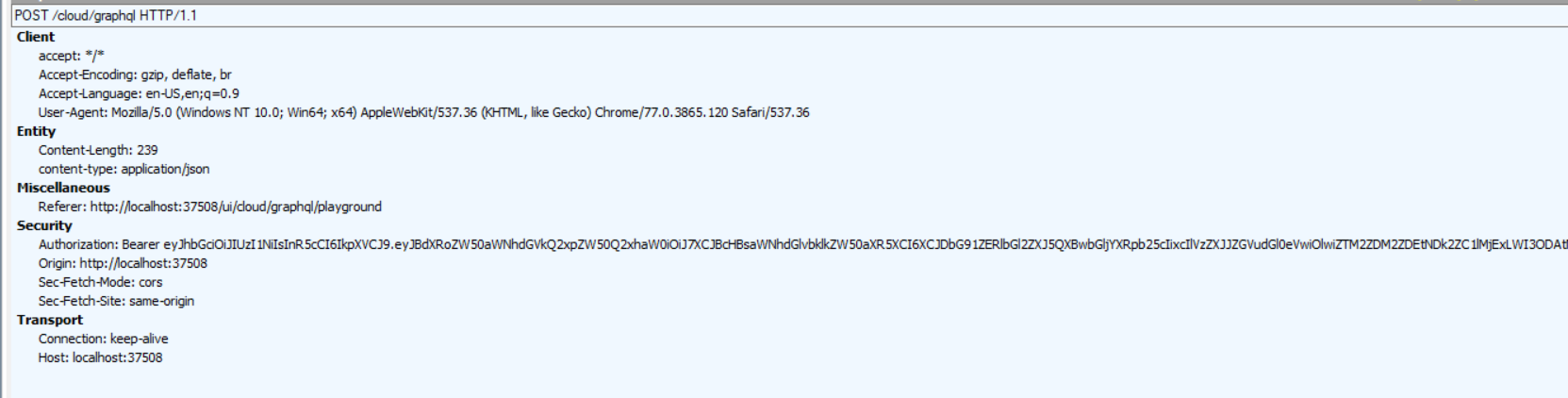
Look in the request object, does the necessary auth header come to the server.
sungam3r
on 15 Oct 2019
Using Fiddler, it seems like everything is there.
HorjeaCosmin
on 15 Oct 2019
There are two packages for authorization:
- https://github.com/graphql-dotnet/server/tree/develop/src/Authorization.AspNetCore
- https://github.com/graphql-dotnet/authorization
Did you mix their use in your code? For me some time ago, the existence of two projects at once became a discovery. I have some plans to generalize them into one.
sungam3r
on 15 Oct 2019
I only used this extension method
    public static void AddGraphQLAuthorization(this IServiceCollection services, Action<AuthorizationSettings, IServiceProvider> configure)
    {
        services.TryAddSingleton<IHttpContextAccessor, HttpContextAccessor>();
        services.TryAddSingleton<IAuthorizationEvaluator, AuthorizationEvaluator>();
        services.AddTransient<IValidationRule, AuthorizationValidationRule>();

        services.TryAddSingleton(s =>
        {
            var authSettings = new AuthorizationSettings();
            configure(authSettings, s);
            return authSettings;
        });
    }
Couldn't be a playground configuration problem?
HorjeaCosmin
on 15 Oct 2019
Playground is a client side code. Since your token successfully reached the server (as picture states) then it is problem on server.
sungam3r
on 15 Oct 2019
Which one of the above packages should use in my scenario (multiple schemas, default middleware)?
HorjeaCosmin
on 15 Oct 2019
I think the first one. The main thing is not to mix.
sungam3r
on 15 Oct 2019
Do you have any sample project using that approach?
HorjeaCosmin
on 15 Oct 2019
No yet. I looked only authorization
project (2) and samples in it - https://github.com/graphql-dotnet/authorization/blob/master/src/Harness/Startup.cs
sungam3r
on 15 Oct 2019
No, it doesn't work. I used the same extensions, same policy add approach.
I'm using this code in my controller:
[Authorize(AuthenticationSchemes = JwtBearerDefaults.AuthenticationScheme)]
public class GraphQLControllerBase<TSchema>: Controller
    where TSchema: GraphQL.Types.Schema
{
    private readonly TSchema _schema;
    private readonly IDocumentExecuter _documentExecuter;
    private readonly IEnumerable<IValidationRule> _validationRules;
    private readonly IDocumentExecutionListener _documentListener;

    public GraphQLControllerBase(TSchema schema,
        IDocumentExecuter documentExecuter,
        DataLoaderDocumentListener documentListener,
        IEnumerable<IValidationRule> validationRules)
    {
        _schema = schema;
        _documentExecuter = documentExecuter;
        _documentListener = documentListener;
        _validationRules = validationRules;

        _schema.RegisterValueConverter(new GQL.ByteType.ByteValueConverter());
    }

    [HttpPost]
    public async Task<IActionResult> Post([FromBody] GraphQLQuery query)
    {
        if (query == null)
            throw new ArgumentNullException(nameof(query));

        var inputs = query.Variables?.ToInputs();
        var userContext = HttpContext.RequestServices.GetRequiredService<DataAccess.Auth.Context.GraphQLUserContext>();

        var result = await _documentExecuter.ExecuteAsync(options =>
            {
                options.Schema = _schema;
                options.Query = query.Query;
                options.Inputs = inputs;
                options.UserContext = userContext;
                options.ValidationRules = DocumentValidator.CoreRules.Concat(_validationRules).ToList();

                options.Listeners.Add(_documentListener);
            });

        if (result.Errors?.Count > 0)
            return BadRequest(result);

        return Ok(result);
    }
}
GraphQLUserContext.cs
public class GraphQLUserContext : Dictionary<string, object>
{
    private Dictionary<Type, dynamic> _services = new Dictionary<Type, dynamic>();
    private readonly IHttpContextAccessor _context;

    public GraphQLUserContext(IHttpContextAccessor context)
    {
        _context = context;
    }

    public T Service<T>() where T : class
    {
        dynamic result;

        if (!_services.TryGetValue(typeof(T), out result))
        {
            result = _context.HttpContext.RequestServices.GetRequiredService<T>();
            _services.TryAdd(typeof(T), result);
        }

        return (T)result;
    }
}
After this line:
var userContext = HttpContext.RequestServices.GetRequiredService
- userContext._context.HttpContext.User.Claims contains all authentication claims
- _validationRules contain also all the policies
But when switch to query / mutation resolver.context, _context.HttpContext.User.Claims is empty.
GraphQLQuery.cs
public class GraphQLQueries: ObjectGraphType
{
    public GraphQLQueries()
    {
        this.AuthorizeWith(Database.Declarations.ServiceClientApplicationType.CloudDeliveryApplication.ToString());

        Field<ListGraphType<Types.GraphQL.Cloud.User>>(
            "DeliveryDrivers",
            resolve: context =>
            {
                var result = context.UserContext.As<DataAccess.Auth.Context.GraphQLUserContext>()
                    .Service<IUser>().GetUsers(null);
                return result;
            });

        Field<ListGraphType<Types.GraphQL.Cloud.DeliveryTransaction>>(
            "DeliveryTransactions",
            //  defined on top query arguments
            arguments: new QueryArguments(
                    new QueryArgument<IdGraphType> { Name = "deliveryBy" },
                    new QueryArgument<IdGraphType> { Name = "transactionKey" },
                    new QueryArgument<Types.GraphQL.Cloud.DeliveryTransactionStatusType> { Name = "statusType" }
                                        ),
            resolve: context =>
            {
                //  try get args
                var deliveryBy = context.GetArgument<Guid?>("deliveryBy");
                var transactionKey = context.GetArgument<Guid?>("transactionKey");
                var statusType = context.GetArgument<Database.Model.Cloud.BillDeliveryStatusType?>("statusType");

                var result = context.UserContext.As<DataAccess.Auth.Context.GraphQLUserContext>()
                    .Service<IDelivery>().GetTransactions(deliveryBy, transactionKey, statusType);
                return result;
            });
    }
}
A small correction: "But when switch to query / mutation resolver.context, _context.HttpContext.User.Claim is empty", becomes ... is empty when use playground (AuthorizeWith commented), and utilizable query / mutation when using controller Post method (AuthorizeWith commented) and non utilizable using AuthorizeWith.
HorjeaCosmin
on 15 Oct 2019
Well... Here is a small example in a separate branch. I successfully get claims in the resolver and return them.
Query:
{ test }
Result:
{
  "data": {
    "test": "a=1, b=2"
  }
}
But when switch to query / mutation resolver.context, _context.HttpContext.User.Claims is empty
I don't touch HttpContext in my resolver. What is _context? Is it IHttpContextAccessor? In principle, it is not required, since all the necessary information about claims is located in the GraphQLUserContext.User. It’s hard for me to say from pieces of code what is wrong. Compare the example with your code and try to find the problem step by step.
sungam3r
on 15 Oct 2019
Do you know any reason for
                   .AddUserContextBuilder(context =>
                        {
                            ...
                           // context.User.Claims is empty?
                        });
Yes, _context is IHttpContextAccessor. I use this custom context (GraphQLUserContext have IHttpContextAccessor in ctor) to acces user in SignalR hub as well. GraphQLUserContext is configured as scoped.
services.AddScoped
HorjeaCosmin
on 15 Oct 2019
Because I just didn’t pass anything there.
sungam3r
on 15 Oct 2019
@HorjeaCosmin I have one suspicion. Show please a screenshot of where you set auth token in the playground.
sungam3r
on 15 Oct 2019
Hi @sungam3r ,
I've setup a small project sample of my gql implementation (GQL.Auth.zip).
I'm using Postman for authentication (@localHost/api/authentication/Token), using:
{
"applicationName": "App",
}
{
"applicationName": "App1",
}
each one should authenticate access and authorize schema / schema1.
Postman queries run perfect if AuthorizeWith is commented, while Playground return errors with or without AuthorizeWith.
I'm looking forward for any advice,
Tks.
HorjeaCosmin
on 16 Oct 2019
@HorjeaCosmin I finally figured it out. Really mixed up a few things.
- Original culprit for me:
{
"Authorization": "Bearer blablabla"
}
Playground is very sensitive to comma :( So you should remove trailing comma if any.
- You use "generic" GraphQL.Authorization (not ASP.NET Core variant) so your
GraphQLUserContextMUST derive fromGraphQL.Authorization.IProvideClaimsPrincipal. After this add one line:
```c#
public ClaimsPrincipal User => _context.HttpContext.User;
3. One important thing - nothing will work until you initialize HttpContext.User. Now your application simply does not fill it and it remains filled with default values. Also `User.Identity.IsAuthenticated = false`. So you need to add [standard middleware](https://docs.microsoft.com/en-us/aspnet/core/migration/1x-to-2x/identity-2x?view=aspnetcore-3.0#jwt-bearer-authentication) **before** any graphql middleware to do it:
```c#
  app.UseAuthentication();
See https://github.com/graphql-dotnet/authorization/blob/master/src/GraphQL.Authorization/AuthorizationValidationRule.cs#L19. When I looked at the code, this moment caught my attention - authorization simply does not work quietly. I’ll think about how to supplement my PR to avoid ridiculous mistakes.
As a result, I managed to make it all work :)
sungam3r
on 16 Oct 2019
app.UseAuthentication();
Just a copy / paste accident, the original project have this line.
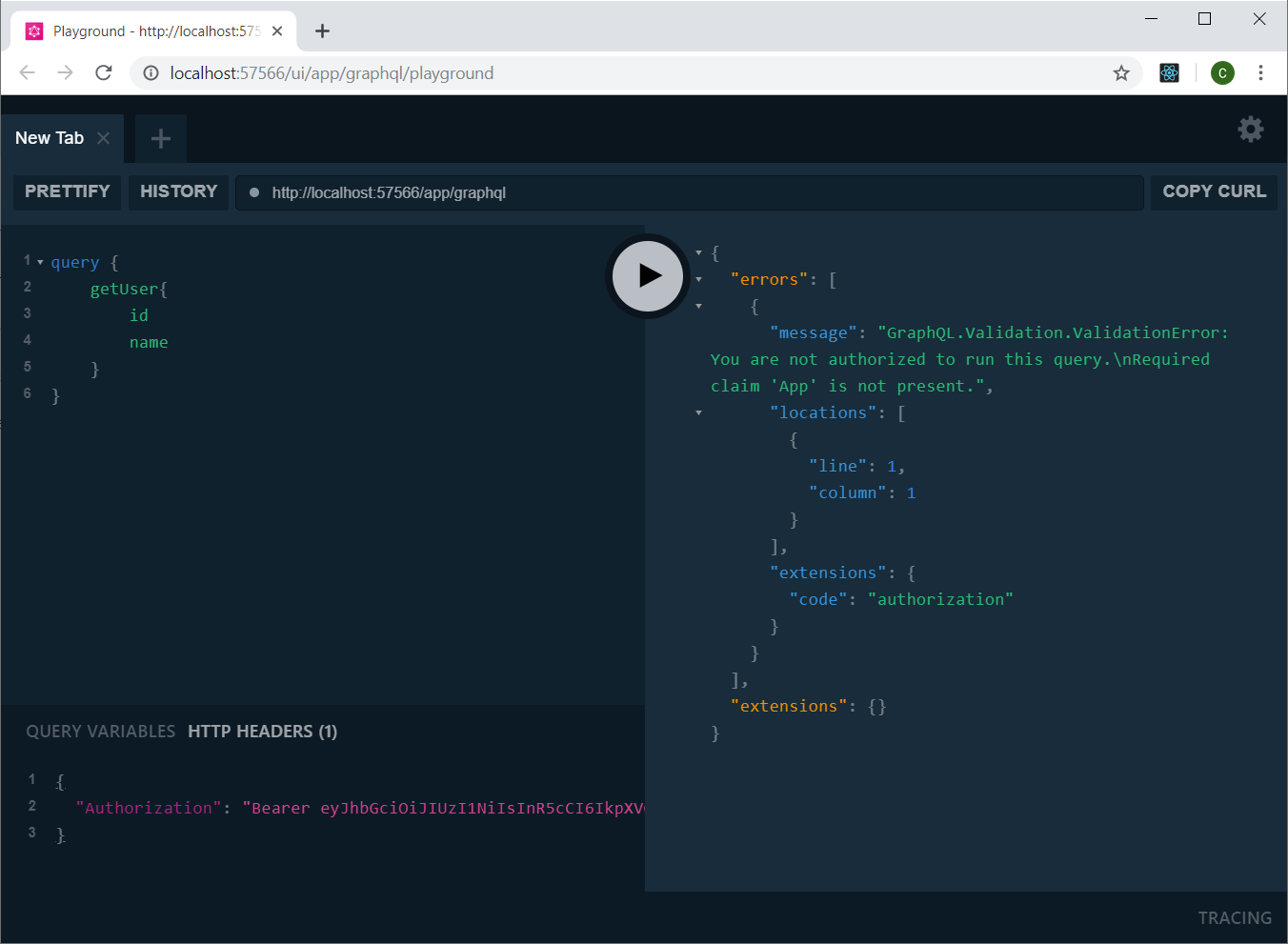
Using your AuthorizationValidationRule.cs and IProvideClaimsPrincipal, everything is fine using Postman 👍, playground it's still not running :(.

HorjeaCosmin
on 16 Oct 2019
@HorjeaCosmin Check trailing comma again
Here is a working example. See what you still forgot to fix.
GQL.Auth.Working.zip
sungam3r
on 16 Oct 2019
@sungam3r I found the small big difference between projects which make things running also in playground. In my project, UseAuthentication method was placed below UseGraphPlayground and not above it.
Thank you for your time and support @sungam3r!
HorjeaCosmin
on 17 Oct 2019
It was a long adventure.
sungam3r
on 17 Oct 2019
Yes, indeed.
- Update to the latest preview packages. There are no more
IDependencyResolver, useIServiceProviderinstead.- Do not call
services.BuildServiceProvider()inConfigureServices. This is unnecessary and generally leads to errors.- Change
services.AddSingleton<ISchema>(new GQL.GraphQLSchema(new FuncDependencyResolver(type => serviceProvider.GetService(type))));toservices.AddSingleton<GQL.GraphQLSchema>(), similar to the second schema. You should not bind two different implementations to one interfaceISchema- Change ctor of
GraphQLControllerto receive concrete Schema instead ofISchema.It should be noted that you can use interfaces for schemas and put them in a DI container, but these should be different interfaces so that container can resolve them later in different controllers.
I'm trying to do something similar but I'm getting this error when trying to access the playground
InvalidOperationException: No service for type 'GraphQL.Server.Internal.IGraphQLExecuter`1[NHLStats.Players.Data.GraphQL.PlayerSchema]' has been registered.
services.AddSingleton<PlayerSchema>();
...
public class PlayerSchema : Schema
    {
        public PlayerSchema(IServiceProvider provider) : base(provider)
        {
            Query = provider.GetRequiredService<PlayerQuery>();
            Mutation = provider.GetRequiredService<PlayerMutation>();
        }
    }
...
public PlayerGraphQLController(PlayerSchema playerSchema, IDocumentExecuter documentExecuter)
        {
            _playerSchema = playerSchema;
            _documentExecuter = documentExecuter;
        }
...
app.UseGraphQL<PlayerSchema>(path: "/player");
            app.UseGraphQLPlayground(new GraphQLPlaygroundOptions
            {
                GraphQLEndPoint = "/player",
                Path = "/player/playground",
            });
 jmsunseri
on 6 Dec 2019
jmsunseri
on 6 Dec 2019
Oh no, go through this one more time :)? You have not registered the necessary DI components. Please see an example - https://github.com/graphql-dotnet/server/blob/develop/samples/Samples.Server/Startup.cs
sungam3r
on 6 Dec 2019
@sungam3r does this example still compile? I don't see a signature for AddGraphTypes that accepts a type argument
jmsunseri
on 6 Dec 2019
Here is a full functioning example. https://github.com/graphql-dotnet/server/blob/develop/src/Core/GraphQLBuilderExtensions.cs#L51
sungam3r
on 7 Dec 2019
@sungam3r do you know if it is possible to have multiple dynamic schemas based on some header? So the number of schemas grows at runtime .
 ovidiubuligan
on 13 Dec 2020
ovidiubuligan
on 13 Dec 2020
Of cource it is possible. You can use as many schemas as you like and manually control them. Whether it is worth doing so is another question. Think about how you will respond to introspection requests.
sungam3r
on 13 Dec 2020
Related issues
 roybs2
·
20Comments
roybs2
·
20Comments
 Grauenwolf
·
26Comments
Grauenwolf
·
26Comments
 pranshuchittora
·
26Comments
pranshuchittora
·
26Comments
 bigbizze
·
22Comments
bigbizze
·
22Comments
 shoe-diamente
·
33Comments
shoe-diamente
·
33Comments