Graphql-dotnet: IntrospectionQuery returns error "A query is required"
I'm getting this error returned during an introspection query:
"GraphQL.ExecutionError: A query is required. ---> GraphQL.ExecutionError: A query is required.\r\n at GraphQL.DocumentExecuter.ValidateOptions(ExecutionOptions options)\r\n at GraphQL.DocumentExecuter.<ExecuteAsync>d__8.MoveNext()\r\n --- End of inner exception stack trace ---"
This could definitely be caused by something I'm doing wrong but it could also be a bug with GraphQL-Net, but I'm really not even sure how to approach identifying which of those it is because I'm not sure how GraphQL-Net handles the introspection operation.
This is the query being requested:
query IntrospectionQuery { __schema { queryType { name } mutationType { name } subscriptionType { name } types { ...FullType } directives { name description locations args { ...InputValue } } }}fragment FullType on __Type { kind name description fields(includeDeprecated: true) { name description args { ...InputValue } type { ...TypeRef } isDeprecated deprecationReason } inputFields { ...InputValue } interfaces { ...TypeRef } enumValues(includeDeprecated: true) { name description isDeprecated deprecationReason } possibleTypes { ...TypeRef }}fragment InputValue on __InputValue { name description type { ...TypeRef } defaultValue}fragment TypeRef on __Type { kind name ofType { kind name ofType { kind name ofType { kind name ofType { kind name ofType { kind name ofType { kind name ofType { kind name } } } } } } }}
This is my middleware:
public class GraphQLMiddleware
    {
        private readonly RequestDelegate _next;
        private readonly GraphQLSettings _settings;
        private readonly IDocumentExecuter _executer;
        private readonly IDocumentWriter _writer;
        private readonly DataLoaderDocumentListener _listener;
        private readonly ISchema _schema;
        public GraphQLMiddleware(
            RequestDelegate next,
            GraphQLSettings settings,
            IDocumentExecuter executer,
            IDocumentWriter writer,
            DataLoaderDocumentListener listener,
            ISchema schema)
        {
            _next = next;
            _settings = settings;
            _executer = executer;
            _writer = writer;
            _listener = listener;
            _schema = schema;
        }

        public async Task Invoke(HttpContext context)
        {
            context.CheckNotNull<HttpContext>();
            if (!IsGraphQLRequest(context))
            {
                await _next(context);
                return;
            }
            await ExecuteAsync(context);
        }

        private bool IsGraphQLRequest(HttpContext context)
        {
            return context.CheckNotNull<HttpContext>().Request.Path.StartsWithSegments(_settings.Path) && string.Equals(context.Request.Method, "POST", StringComparison.OrdinalIgnoreCase);
        }

        private async Task ExecuteAsync(HttpContext context)
        {
            var request = Deserialize<GraphQLRequest>(context.Request.Body);
            var result = await GetExecutionResultAsync(context, request);
            await WriteResponseAsync(context, result);
        }

        private async Task<ExecutionResult> GetExecutionResultAsync(HttpContext context, GraphQLRequest request)
        {
            return await _executer.ExecuteAsync(_ =>
            {
                _.Schema = _schema;
                _.ExposeExceptions = true;
                _.Query = request?.Query;
                _.OperationName = request?.OperationName;
                _.Inputs = request?.Variables.ToInputs();
                _.UserContext = _settings.BuildUserContext?.Invoke(context).GetAwaiter().GetResult();
                _.ValidationRules = DocumentValidator.CoreRules().Concat(new IValidationRule[]
                {
                    new AuthValidationRule()
                 });
                _.EnableMetrics = _settings.EnableMetrics;
                _.Listeners.Add(_listener);
                if (_settings.EnableMetrics)
                {
                    _.FieldMiddleware.Use<InstrumentFieldsMiddleware>();
                }
            });
        }
        private async Task WriteResponseAsync(HttpContext context, ExecutionResult result)
        {
            context.Response.ContentType = "application/json";
            context.Response.StatusCode = result.Errors?.Any() == true ? (int)HttpStatusCode.BadRequest : (int)HttpStatusCode.OK;
            await _writer.WriteAsync(context.Response.Body, result);
        }

        public static T Deserialize<T>(Stream s)
        {
            using var reader = new StreamReader(s);
            using var jsonReader = new JsonTextReader(reader);
            var ser = new JsonSerializer();
            return ser.Deserialize<T>(jsonReader);
        }
    }
Here is my Startup.cs:
public class Startup
    {
        public static void ConfigureServices(IServiceCollection services)
        {
            services.AddGraphQLAuth();
            services.AddDependencyInjection();
            RegisterTypes.AddTypeConversions();

            services.Configure<IISServerOptions>(options =>
            {
                options.AutomaticAuthentication = false;
            });
        }

        public static void Configure(IApplicationBuilder app, IHostingEnvironment env)
        {
            if (env.IsDevelopment())
            {
                app.UseDeveloperExceptionPage();
            }
            else
            {
                app.UseDeveloperExceptionPage();
                // The default HSTS value is 30 days. You may want to change this for production scenarios, see https://aka.ms/aspnetcore-hsts.
                //app.UseHsts();
            }
            app.UseCorsMiddleware();
            app.UseGraphQLWithAuth();
            app.UseGraphQLPlayground(new GraphQLPlaygroundOptions { Path = "/ui/playground" });

        }
    }
and here is my "UseGraphQLWithAuth.cs"
    public static class GraphQLAuthorizationService
    {
        public static void AddGraphQLAuth(this IServiceCollection services)
        {
            services.TryAddSingleton<IHttpContextAccessor, HttpContextAccessor>();
            services.TryAddSingleton<IAuthorizationEvaluator, AuthorizationEvaluator>();
            services.TryAddTransient<IValidationRule, AuthorizationValidationRule>();
        }
        public static void UseGraphQLWithAuth(this IApplicationBuilder app)
        {
            var settings = new GraphQLSettings
            {
                BuildUserContext = async ctx =>
                {

                    var userContext = new GraphQLUserContext
                    {
                        User = ctx.User,
                    };
                    return await System.Threading.Tasks.Task.FromResult(userContext);
                },
                EnableMetrics = true
            };

            var rules = app.CheckNotNull<IApplicationBuilder>().ApplicationServices.GetServices<IValidationRule>();
            settings.ValidationRules.AddRange(rules);

            app.UseMiddleware<GraphQLMiddleware>(settings);
        }

    }
If it's not likely to be a bug and is something I'm doing wrong, I would greatly appreciate someone pointing me the right direction in terms of how the IntrospectionQuery is supposed to be resolved & what code I could have introduced to potentially interfere with it working correctly.
I do have a single custom validation rule, but when I test the introspection query being sent from Postman, GraphQL playground or even just executing the above introspection query, it never actually hits my validation rule before returning the above error.
Thanks in advance.
 bigbizze
All 22 comments
Check this line _.Query = request?.Query;, it seems that query is null.
 sungam3r
on 2 Dec 2019
sungam3r
on 2 Dec 2019

The query is not not null as far as I can tell.
bigbizze
on 3 Dec 2019
sungam3r
on 3 Dec 2019
What package version do you use? Try the latest 3.0.0-preview.
sungam3r
on 3 Dec 2019
I was on the latest stable, 2.4 iirc.
Okay so I updated the project to whatever the most recent preview version is and I'm getting an error on any query (previously everything worked fine and the issue was with just introspection queries) with how I'm using Enumeration graph types to return delegate expressions (which was used because the data i'm integrating with only accepts extremely specific Linq queries for tens of thousands of unique fields across all the tables) for filtering data:
"message": "GraphQL.ExecutionError: Unable to register GraphType 'ApiGraph.CustomGraphQL.SupportGraphTypes.FilterInput
2[[ApiGraph.CustomGraphQL.GraphTypes.Enum.SalesOrderEnum, CustomApiGraph, Version=1.0.0.0, Culture=neutral, PublicKeyToken=null],[ApiGraph.Networking.Connection.SalesOrder, CustomApiGraph, Version=1.0.0.0, Culture=neutral, PublicKeyToken=null]]' with the name 'FilterInput_2';\nthe name 'FilterInput_2' is already registered to 'ApiGraph.CustomGraphQL.SupportGraphTypes.FilterInput2[[ApiGraph.CustomGraphQL.GraphTypes.Enum.SalesOrderDetailEnum, CustomApiGraph, Version=1.0.0.0, Culture=neutral, PublicKeyToken=null],[ApiGraph.Networking.Connection.SalesOrderDetail, CustomApiGraph, Version=1.0.0.0, Culture=neutral, PublicKeyToken=null]]'. ---> System.InvalidOperationException: Unable to register GraphType 'ApiGraph.CustomGraphQL.SupportGraphTypes.FilterInput2[[ApiGraph.CustomGraphQL.GraphTypes.Enum.SalesOrderEnum, CustomApiGraph, Version=1.0.0.0, Culture=neutral, PublicKeyToken=null],[ApiGraph.Networking.Connection.SalesOrder, CustomApiGraph, Version=1.0.0.0, Culture=neutral, PublicKeyToken=null]]' with the name 'FilterInput_2';\nthe name 'FilterInput_2' is already registered to 'ApiGraph.CustomGraphQL.SupportGraphTypes.FilterInput2[[ApiGraph.CustomGraphQL.GraphTypes.Enum.SalesOrderDetailEnum, CustomApiGraph, Version=1.0.0.0, Culture=neutral, PublicKeyToken=null],[ApiGraph.Networking.Connection.SalesOrderDetail, CustomApiGraph, Version=1.0.0.0, Culture=neutral, PublicKeyToken=null]]'.\r\n at GraphQL.Types.GraphTypesLookup.SetGraphType(String typeName, IGraphType type)\r\n at GraphQL.Types.GraphTypesLookup.AddType(IGraphType type, TypeCollectionContext context)\r\n at GraphQL.Types.GraphTypesLookup.AddTypeIfNotRegistered(Type type, TypeCollectionContext context)\r\n at GraphQL.Types.GraphTypesLookup.HandleField(Type parentType, FieldType field, TypeCollectionContext context)\r\n at GraphQL.Types.GraphTypesLookup.AddType(IGraphType type, TypeCollectionContext context)\r\n at GraphQL.Types.GraphTypesLookup.AddTypeIfNotRegistered(Type type, TypeCollectionContext context)\r\n at GraphQL.Types.GraphTypesLookup.HandleField(Type parentType, FieldType field, TypeCollectionContext context)\r\n at GraphQL.Types.GraphTypesLookup.AddType(IGraphType type, TypeCollectionContext context)\r\n at GraphQL.Types.GraphTypesLookup.AddTypeIfNotRegistered(Type type, TypeCollectionContext context)\r\n at GraphQL.Types.GraphTypesLookup.HandleField(Type parentType, FieldType field, TypeCollectionContext context)\r\n at GraphQL.Types.GraphTypesLookup.AddType(IGraphType type, TypeCollectionContext context)\r\n at GraphQL.Types.GraphTypesLookup.AddTypeIfNotRegistered(Type type, TypeCollectionContext context)\r\n at GraphQL.Types.GraphTypesLookup.HandleField(Type parentType, FieldType field, TypeCollectionContext context)\r\n at GraphQL.Types.GraphTypesLookup.AddType(IGraphType type, TypeCollectionContext context)\r\n at GraphQL.Types.GraphTypesLookup.Create(IEnumerable1 types, IEnumerable1 directives, Func2 resolveType, IFieldNameConverter fieldNameConverter, Boolean seal)\r\n at GraphQL.Types.Schema.CreateTypesLookup()\r\n at System.Lazy1.CreateValue()\r\n at System.Lazy1.LazyInitValue()\r\n at System.Lazy1.get_Value()\r\n at GraphQL.Types.Schema.FindType(String name)\r\n at GraphQL.Types.Schema.Initialize()\r\n at GraphQL.DocumentExecuter.d__7.MoveNext()\r\n --- End of inner exception stack trace ---",
This was a somewhat hacky solution, I'll admit, but I'm now wondering if this is related to the introspection problem above. Could this have potentially broken the document executor's ability to register the graphQL schema correctly? I guess it's just strange that all operation outside of introspection would execute correctly prior to the upgrade if that were the case.
For reference, i'm using enums like this:
    public class ContactEnum : EnumerationGraphType
    {
        public ContactEnum(IOptionSetLookups lookup)
        {

            AddValue("id", @"Enter a string representing the type Guid", value: (Func<string, Expression<Func<Contact, bool>>>)(x => (y => y.Id.Equals(new Guid(x)))));
        }
    }
And my filtering functionality is this:
    public class FilterInput<T, T2> : InputObjectGraphType
        where T : EnumerationGraphType
        where T2 : Entity
    {
        public FilterInput()
        {
            Field<T>("where");
            Field<T>("and");
            Field<T>("or");
            Field<ListGraphType<FilterInput<T, T2>>>("andFilter");
            Field<ListGraphType<FilterInput<T, T2>>>("orFilter");
            Field<StringGraphType>("eq");
            Field<StringGraphType>("not");
        }
    }
    public class FilterArgument<T> where T : Entity
    {
        public Func<string, Expression<Func<T, bool>>> Where { get; set; }
        public Func<string, Expression<Func<T, bool>>> And { get; set; }
        public Func<string, Expression<Func<T, bool>>> Or { get; set; }
        public FilterCollection<T> AndFilter { get; set; }
        public FilterCollection<T> OrFilter { get; set; }
        public string Eq { get; set; }
        public string Not { get; set; }
    }
    public class FilterCollection<T> : List<FilterArgument<T>> where T : Entity
    {
        private ExpressionStarter<T> PredicateExpression;
        private readonly int AllowedDepth = 10;
        private int CurrentDepth;

        public Expression<Func<T, bool>> ToExpression()
        {
            return BuildExpressionPredicate();
        }

        public Expression<Func<T, bool>> ToExpression(int level)
        {
            CurrentDepth = level + 1;
            if (CurrentDepth >= AllowedDepth) { return null; }
            return BuildExpressionPredicate();
        }

        public Expression<Func<T, bool>> BuildExpressionPredicate()
        {
            string validatedArguments = ValidateArguments();
            if (validatedArguments != null) { return null; }
            PredicateExpression = PredicateBuilder.New<T>();
            ChainPredicates();
            return PredicateExpression;
        }

        /// <summary>
        /// This iterates the arguments and adds the correct conditional to the predicate to represent it.
        /// If nested conditionals are used this is where the recursion begins.
        /// </summary>
        private void ChainPredicates()
        {
            foreach (var filter in this)
            {
                if (filter.And != null || filter.Or != null) { GetPredicateForTopLevelConditional(filter); }
                else { GetPredicateForNestedConditional(filter); }
            }
        }

        /// <summary>
        /// This function gets a new predicate if the type is different than the previous filter, else it gets the current predicate, and appends the correct predicate (and / or, true / false) for the filter.
        /// </summary>
        private void GetPredicateForTopLevelConditional(FilterArgument<T> filter)
        {
            bool isTrueCondition = filter.Eq != null;
            if (filter.And != null)
            {
                PredicateExpression = GetExpressionFunctionAnd(PredicateExpression, isTrueCondition ? filter.And(filter.Eq) : filter.And(filter.Not).Not());
            }
            else
            {
                PredicateExpression = GetExpressionFunctionOr(PredicateExpression, isTrueCondition ? filter.Or(filter.Eq) : filter.Or(filter.Not).Not());
            }
        }

        /// <summary>
        /// Nested conditionals (lists from the argument andFilter & orFilter) are child FilterCollection objects.
        /// To resolve them we recursively call .ToExpression(CurrentDepth), where the CurrentDepth flag ensures that the user cannot cause stack overflow.
        /// </summary>
        private void GetPredicateForNestedConditional(FilterArgument<T> filter)
        {
            if (filter.AndFilter != null)
            {
                PredicateExpression = PredicateExpression.And(filter.AndFilter.ToExpression(CurrentDepth));
            }
            else
            {
                PredicateExpression = PredicateExpression.Or(filter.OrFilter.ToExpression(CurrentDepth));
            }
        }

        /// <summary>
        /// Validate the given filter arguments.
        /// </summary>
        private string ValidateArguments()
        {
            foreach (var filter in this)
            {
                bool tooManyArgs = new bool[5] { filter.Where != null, filter.And != null, filter.Or != null, filter.AndFilter != null, filter.OrFilter != null }
                    .Where(x => x == true)
                    .Count() != 1;
                if (tooManyArgs) { throw new ArgumentException("You cannot have more than one of: where, and, or, andFilter or orFilter in a single filter argument!"); }
            }

            if (Count == 0) { throw new ArgumentException("You have entered a filter argument collection with no length!"); }
            if (this[0].Where == null) { throw new ArgumentException("The first filter argument must be where!"); }
            if (this.Skip(1).Where(x => x.Where != null).Any()) { throw new ArgumentException("You cannot use where after the first argument!"); }
            this[0].And = this[0].Where;
            return null;
        }

        private static ExpressionStarter<T> GetExpressionFunctionOr(ExpressionStarter<T> predicateChain, Expression<Func<T, bool>> lambdaExpression) => predicateChain.Or(lambdaExpression);

        private static ExpressionStarter<T> GetExpressionFunctionAnd(ExpressionStarter<T> predicateChain, Expression<Func<T, bool>> lambdaExpression) => predicateChain.And(lambdaExpression);

    }

    public static class ExpressionExtensions
    {
        public static Expression<Func<T, bool>> Not<T>(this Expression<Func<T, bool>> expr)
        {
            if (expr == null) { return null; }
            return Expression.Lambda<Func<T, bool>>(Expression.Not(expr.Body), expr.Parameters);
        }
    }
which is being used like this:
    FieldAsync<ListGraphType<ContactGraphType>>(
                "contact",
                description: "Retrieve information about a Contact record.",
                arguments: new QueryArguments { new QueryArgument<ListGraphType<FilterInput<ContactEnum, Contact>>> { Name = "filter" } },
                resolve: async context =>
                {
                    var filterArguments = context.GetArgument<FilterCollection<Contact>>("filter");
                    if (filterArguments != null) { return await serviceProvider.ContactRepository.GetManyWithFilter(filterArguments); }
                    else { return null; }
                }).AuthorizeWith("RequiresAuth");
Thought I'd check if this could be the cause of the issue before I went too much further trying to resolve whether the above error is a problem with the change from 2.4 -> 3.0 and not a manifestation of the Introspection error itself.
bigbizze
on 3 Dec 2019
As spec says all graphql types MUST have unique names: https://graphql.github.io/graphql-spec/June2018/#sec-Schema
In a number of recent commits, we have added several checks that make sure of this. Previously, you could create such a schema in which the types had the same name (or even create a type without a name). Sometimes this led to strange behavior, sometimes to runtime errors. Now it is checked at the stage of creating the schema. Each graphtype gets a default name in the constructor:
https://github.com/graphql-dotnet/graphql-dotnet/blob/aed5298a435012d41d42dd0a9accebdb3cff1de3/src/GraphQL/Types/GraphType.cs#L18
You can optionally set your name, or you can leave the one that was set in the constructor. For generic types, there will obviously be a name conflict - FilterInput_2 in your case. In this case, you have to look for workarounds, for example, to inherit. The second option is to change the default name so that it displays a name with an even generic parameters. I deliberately did not do this until the first necessity. In this case, you will get a graphtype with a name like this:
FilterInput_Of_SalesOrderDetailEnum_And_SalesOrderDetail
I hope that you understand why I did not do this right away. In addition, the users of your api will see these names. I do not think this will be a positive experience for them. By the way, I even wondered - how did your api look like before? What type names did it provide to clients?
sungam3r
on 3 Dec 2019
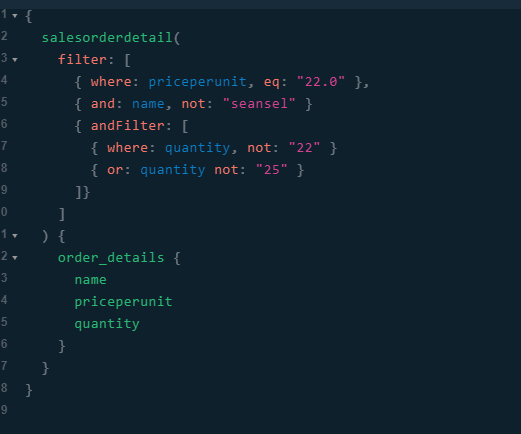
This is the querying syntax for the above functionality so far (and it's incomplete as I still need to implement different primitive types, different operators etc.) and would translate into:
            var zz = context.SalesOrderDetail
                .Where(x => x.PricePerUnit.Equals(22.0)
                    && x.Name.Equals("sneasel")
                    && (x.Quantity.Equals(22) || x.Quantity.Equals(25)))
                .Select(x => new { name = x.Name, PricePerUnit = x.PricePerUnit, Quantity = x.Quantity });
The clients see an additional type (the enumeration type) for each entity type, ideally named "SalesOrderArguments" or something along those lines. Since it's used for filtering as an input object they never actually reference the type itself, and the corresponding FilterInput that wraps the argument syntax is similar. It worked prior to that change you mentioned because a field knew which resolved to type it was, and with that it could resolve the correct filter input type to deserialize the filter object. For what it's worth, we are in the process of moving our API over, and because of that our clients haven't been exposed to anything yet.
For the record, this introspection queries issue is, at least I thought, orthogonal to the one that occured when attempting to upgrade to 3.0 pertaining to the FilterInput
I'll get back to you on the introspection query error after implementing what you suggested and hopefully then, finishing the upgrade to 3.0
bigbizze
on 4 Dec 2019

I got around to upgrading to 3.0 today and it appears like cleaning up what I was naming types in general & adding a custom name for each FilterInput solved the issue.
This is what I ended up doing for setting a unique name of the generic:
public class FilterInput<T, T2> : InputObjectGraphType
        where T : EnumerationGraphType
        where T2 : Entity
    {
        public FilterInput()
        {
            Name = "FilterInput" + typeof(T2).Name;
            Field<T>("where");
            Field<T>("and");
            Field<T>("or");
            Field<ListGraphType<FilterInput<T, T2>>>("andFilter");
            Field<ListGraphType<FilterInput<T, T2>>>("orFilter");
            Field<StringGraphType>("eq");
            Field<StringGraphType>("not");
        }
    }
Is using reflection here going to add a lot of overhead to the system?
The second option is to change the default name so that it displays a name with an even generic parameters.
What did you mean by this specifically?
Before I close the issue, do you have any insight into why GraphQL playground intellisense doesn't work?

I've always had the "Server cannot be reached" thing at the top right; I'm not sure if that's relevant or not.
The first image is the query used by playground when fetching the schema and it returns without issue so I'm confused as to why it wouldn't be working.
I understand this might/probably isn't the right place to ask this but I thought I'd check to see if it's obvious or something I can fix easily before opening an issue about the playground.
Thanks for the help though, I really appreciate it.
bigbizze
on 6 Dec 2019
"Server cannot be reached" thing
My only guess would be to make sure that the url configured is the correct one on startup (presumably it is, it defaults to just /graphql on GraphQLPlaygroundOptions.GraphQLEndpoint). You may not get intellisense if the initial introspection query fails for whatever reason. I would check to see if the initial http request is successful or not, since that is what should also be displaying the Schema.
 joemcbride
on 7 Dec 2019
joemcbride
on 7 Dec 2019
Is using reflection here going to add a lot of overhead to the system?
It depends.
What did you mean by this specifically?
I mean that I can myself get the full name of type - generic or not. And this name will be unique in the schema.
sungam3r
on 7 Dec 2019
Before I close the issue, do you have any insight into why GraphQL playground intellisense doesn't work?
Enable server logs / change VS exception settings to show all errors, etc. For some reason your request fails.
sungam3r
on 7 Dec 2019
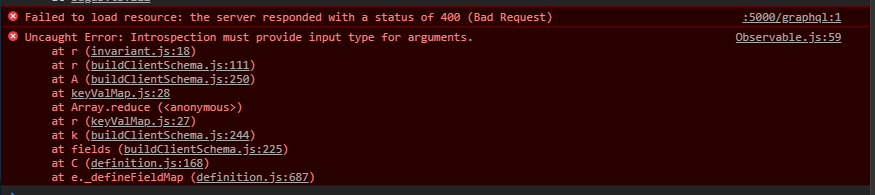
Opening up console when in playground is showing me the above error.
This seems like it's probably still related to how I'm naming things
bigbizze
on 7 Dec 2019
I mean that I can myself get the full name of type - generic or not. And this name will be unique in the schema.
I tried inheritance with overwriting the _name property and didn't have any luck, how would one go about actually implementing what you're suggesting..? Do I need to inherit from InputObjectGraphType or something?
bigbizze
on 7 Dec 2019
Is this potentially related to using a non-ObjectGraphType wrapped type in the input type declaration for arguments or something?
SalesOrderEnum is an EnumerationGraphType and has a schema name, so my first thought would be that it's trying to find a name for SalesOrder which isn't a GraphQL type so it can't, however I'm only using SalesOrder in this case to supply the TReturnType which shouldn't require a Name, no?
QueryArgument<ListGraphType<FilterInput<SalesOrderEnum, SalesOrder>>> { Name = "filter" } }
to
Field<ListGraphType<FilterInput<T, T2>>>("andFilter");
bigbizze
on 7 Dec 2019
That error says to me that you are using a non-input type somewhere where you shouldn't.
You can print your Schema using SchemaPrinter to view what is actually being constructed and look for problems.
var printer = new SchemaPrinter(Schema);
Console.WriteLine(printer.Print());
Does TReturn type on a field of an InputGraphType need to be a graph type as well?
Here is the relevant portion after using SchemaPrinter:
type QueryResolver {
  salesorder(filter: [FilterInputSalesOrder]): [SalesOrder]
}
In your example, SaleOrder should be an ObjectGraphType and FilterInputSalesOrder should be an InputObjectGraphType. All properties of FilterInputerSalesOrder should either be scalars or other InputObjectGraphType. You can never mix input objects with just objects and vise versa. Scalars, including enumerations, can be used in both.
joemcbride
on 7 Dec 2019
Okay, so after testing to ensure the issue was actually with FilterInput it turns out that it isn't and this actually works fine after all of the fixes the both of you suggested above, and the issue was in a separate part of my code that should be easy enough to clean up.
Thanks for the help guys, much appreciated, keep up the good work!
bigbizze
on 7 Dec 2019
I'm having a similar issue in that my root level query object type I have two fields that use the same class with different type arguments. I supplied the name property but that doesn't give a friendly name to the response type. It throws an error saying we already have a ResultListType_2
Field<ResultListType<Action,ActionType>>(
                "actions",
                arguments: new QueryArguments(new QueryArgument<NonNullGraphType<ActionQueryInputType>> { Name = "queryObject" }),
                resolve: context => scope.Resolve<ActionQueryHandler>().Handle(context.GetArgument<ActionQueryRequest>("queryObject"))   );
Field<ResultListType<Jurisdiction,JurisdictionType>>(
                "jurisdictions",
                arguments: new QueryArguments(new QueryArgument<NonNullGraphType<JurisdictionQueryInputType>> { Name = "queryObject" }),
                resolve: context => scope.Resolve<JurisdictionQueryHandler>().Handle(context.GetArgument<JurisdictionQueryRequest>("queryObject")));
 jmsunseri
on 10 Jan 2020
jmsunseri
on 10 Jan 2020
Presumably the name of the type ResultListType<Action,ActionType> and ResultListType<Jurisdiction,JurisdictionType> are both being set as ResultListType_2. I would guess that those two types have different fields? Have you made sure the name of those two different types are unique?
joemcbride
on 10 Jan 2020
Joe,
Thank you for that! I didn't think about setting a name in the ResultListType constructor till now
this.Name = "ResultListType_" + typeof(T).ToString().Split(".")[typeof(T).ToString().Split(".").Length -1];
jmsunseri
on 10 Jan 2020
This was discussed in https://github.com/graphql-dotnet/graphql-dotnet/issues/1444#issuecomment-561391612
sungam3r
on 11 Jan 2020
Related issues
 msheldon83
·
30Comments
msheldon83
·
30Comments
 BhaskaranR
·
23Comments
BhaskaranR
·
23Comments
 shoe-diamente
·
33Comments
shoe-diamente
·
33Comments
 pranshuchittora
·
26Comments
pranshuchittora
·
26Comments
 justusburger
·
22Comments
justusburger
·
22Comments
Most helpful comment
In your example,
SaleOrdershould be anObjectGraphTypeandFilterInputSalesOrdershould be anInputObjectGraphType. All properties ofFilterInputerSalesOrdershould either be scalars or otherInputObjectGraphType. You can never mix input objects with just objects and vise versa. Scalars, including enumerations, can be used in both.