Graphql-dotnet: Inject schema in .net framework 4.6.1 with Unity
Hey,
I'm trying to run GraphQL on .net framework 4.6.1 with Unity as dependency injection framework
All examples are with dependency injection in .net core.
I couldn't understand how to inject the query and schema in .net framework.
Schema should get IDependecyResolver, but I didn't understand what should I send there.
But nothing worked.
that is my schema:
    public class EasyStoreSchema : Schema
    {
        public EasyStoreSchema(IDependencyResolver resolveType)
            : base(resolveType)
        {
            Query = resolveType.Resolve<EasyStoreQuery>();
        }
    }
According to this issue:
Dependency injection example using unity container in .net framework 4
I tried to implement my own dependency resolver but still nothing worked.
            Container.RegisterType<IDependencyResolver, MyUnityDependencyResolver>();
            Container.RegisterType<ISchema, EasyStoreSchema>();
any suggestions how to inject it?
And how to work with it without injection?
If someone have example for project in .net framework with graphql and can share it, it will be great!
tnx all.
 roybs2
All 20 comments
Please, show MyUnityDependencyResolver source code.
 sungam3r
on 10 Jul 2019
sungam3r
on 10 Jul 2019
Please, show
MyUnityDependencyResolversource code.
I copy it exactly like in 843 ticket (I put the link in the original post)
public class MyUnityDependencyResolver : IDependencyResolver
{
private readonly IUnityContainer _container;
    public MyUnityDependencyResolver(IUnityContainer container)
    {
        _container = container;
    }

    public T Resolve<T>()
    {
        return (T)Resolve(typeof(T));
    }

    public object Resolve(Type type)
    {
        return _container.Resolve(type);
    }
}
Have you register EasyStoreQuery?
sungam3r
on 11 Jul 2019
        Container.RegisterType<IDependencyResolver, MyUnityDependencyResolver>();
        Container.RegisterType<ISchema, EasyStoreSchema>();
        Container.RegisterType<EasyStoreQuery>(new ContainerControlledLifetimeManager());
I saw in examples of .net core that I have to inject the dependency resolver inside the schema, but I didnt succeed to do it with unity...
roybs2
on 11 Jul 2019
Are you getting an error? What does “not succeeding” mean?
 joemcbride
on 11 Jul 2019
joemcbride
on 11 Jul 2019
DT: 2019-07-11 09:41:37.9186 | LV: Error | CID: | SId: | TKID: | Url: | REF: | IP: | xFor: | CSys: | PID: 13504 | TID: 22 | SRC: Payoneer.Infrastructure.WebApi.Core.Logging.WebApiExceptionHandler.HandleAsync | Msg: System.InvalidOperationException: An error occurred when trying to create a controller of type 'GraphQLController'. Make sure that the controller has a parameterless public constructor. ---> System.ArgumentException: Type 'Payoneer.Applications.StoreManagementApp.Service.WebApp.Controllers.GraphQLController' does not have a default constructor at System.Linq.Expressions.Expression.New(Type type) at System.Web.Http.Internal.TypeActivator.CreateTBase at System.Web.Http.Dispatcher.DefaultHttpControllerActivator.GetInstanceOrActivator(HttpRequestMessage request, Type controllerType, Func`1& activator) at System.Web.Http.Dispatcher.DefaultHttpControllerActivator.Create(HttpRequestMessage request, HttpControllerDescriptor controllerDescriptor, Type controllerType) --- End of inner exception stack trace --- at System.Web.Http.Dispatcher.DefaultHttpControllerActivator.Create(HttpRequestMessage request, HttpControllerDescriptor controllerDescriptor, Type controllerType) at System.Web.Http.Controllers.HttpControllerDescriptor.CreateController(HttpRequestMessage request) at System.Web.Http.Dispatcher.HttpControllerDispatcher.
This is my controller:
 [Route("graphql")]
    public class GraphQLController : ApiController
    {
        private readonly ISchema _schema;
        private readonly IDependencyResolver _dependencyResolver;
        public GraphQLController(ISchema schema, IDependencyResolver dependencyResolver)
        {
            _schema = schema;
            _dependencyResolver = dependencyResolver;
        }

        [HttpPost]
        public async Task<ExecutionResult> Post([FromBody]GraphQLQuery query)
        {
            if (query == null) { throw new ArgumentNullException(nameof(query)); }
           var executionOptions = new ExecutionOptions { Schema = new EasyStoreSchema(_dependencyResolver)
                { Query = new EasyStoreQuery()}, Query = query.Query };
            try
            {
                var schema = _schema;

                //var result = await new DocumentExecuter().ExecuteAsync(_ =>
                //{
                //    _.Schema = schema;
                //    _.Query = query.Query;
                //}).ConfigureAwait(false);

                var result = await new DocumentExecuter().ExecuteAsync(executionOptions).ConfigureAwait(false);
                if (result.Errors?.Count > 0)
                {
                    return result;
                }
                return result;
            }
            catch (Exception ex)
            {
                throw new Exception(ex.Message);
            }
        }
    }
Unity:
            Container.RegisterType<EasyStoreQuery>(new ContainerControlledLifetimeManager());
            Container.RegisterType<ICategoryRepository, CategoryRepository>(new ContainerControlledLifetimeManager());
            Container.RegisterType<IProductRepository, ProductsRepository>(new ContainerControlledLifetimeManager());
            Container.RegisterType<CategoryType>(new ContainerControlledLifetimeManager());
            Container.RegisterType<ProductType>(new ContainerControlledLifetimeManager());
            Container.RegisterType<StoreType>(new ContainerControlledLifetimeManager());
            Container.RegisterType<IDependencyResolver, MyUnityDependencyResolver>();
            Container.RegisterType<ISchema, EasyStoreSchema>();
Query:
public class EasyStoreQuery : ObjectGraphType
{
public EasyStoreQuery()
{
Field
"hero",
resolve: context => new Category { Id = 1, Name = "R2-D2" }
);
}}
Schema:
    public class EasyStoreSchema : Schema
    {
        public EasyStoreSchema(IDependencyResolver resolveType)
            : base(resolveType)
        {
            Query = resolveType.Resolve<EasyStoreQuery>();
        }
    }
You haven't hooked up unity as your dependency resolver for asp.net?
 pekkah
on 11 Jul 2019
pekkah
on 11 Jul 2019
If I understood you so yes I did.
This is an existing project, unity works fine with other classes.
This is my startup class:
check out this line: UnityConfig.InitializeUnityContainer(httpConfiguration);
 public void Configuration(IAppBuilder app)
        {
            var httpConfiguration = new HttpConfiguration();
            httpConfiguration.MapHttpAttributeRoutes(new CustomDirectRouteProvider());

            httpConfiguration.Formatters.JsonFormatter.SerializerSettings.ReferenceLoopHandling = ReferenceLoopHandling.Ignore;

            // To ensure that test calls from browsers get json by default. XML is still supported by setting
            // Content-Type: application/xml
            httpConfiguration.Formatters.JsonFormatter.SupportedMediaTypes.Add(new MediaTypeHeaderValue("text/html"));

            httpConfiguration.Services.Replace(typeof(IExceptionHandler), new WebApiExceptionHandler());

            // CORS
            httpConfiguration.MessageHandlers.Add(new PreflightRequestsHandler());
            app.Use(typeof(CorsMiddleware));

            app.UseWebApi(httpConfiguration);

            UnityConfig.InitializeUnityContainer(httpConfiguration);

            ApplicationDetails.Instance.StartUpAssembly = System.Reflection.Assembly.GetExecutingAssembly();

            SwaggerConfig.Register(httpConfiguration);

            httpConfiguration.EnsureInitialized();
        }
That error looks like you haven’t configured ASP.NET to use your Unity Container. See this example for using a custom Container with an ASP.NET Web api.
https://github.com/graphql-dotnet/examples/blob/master/src/AspNetWebApi/WebApi/Bootstrapper.cs
And here’s an example GraphQL controller.
joemcbride
on 11 Jul 2019
GraphQL has the IDependencyResolver interface. ASP.NET WebApi also has that same interface. Are you using the right one? Also for it to work the GraphQL IDependncyResolver needs to be using the same instance of your container. Your setup looks to be using some sort of static configuration. So you would essentially be creating an infinite loop of containers.
joemcbride
on 11 Jul 2019
Thanks for the references.
I'm using UnityConatiner
That is my unity config class:
 public static class UnityConfig
    {
        public static IUnityContainer Container { get; set; }

        public static IUnityContainer InitializeUnityContainer(HttpConfiguration configuration)
        {
            Container = new UnityContainer();

            //Container.RegisterType<IDocumentExecuter, DocumentExecuter>(new ContainerControlledLifetimeManager());

            Container.RegisterType<EasyStoreQuery>(new ContainerControlledLifetimeManager());
            Container.RegisterType<ICategoryRepository, CategoryRepository>(new ContainerControlledLifetimeManager());
            Container.RegisterType<IProductRepository, ProductsRepository>(new ContainerControlledLifetimeManager());
            Container.RegisterType<CategoryType>(new ContainerControlledLifetimeManager());
            Container.RegisterType<ProductType>(new ContainerControlledLifetimeManager());
            Container.RegisterType<StoreType>(new ContainerControlledLifetimeManager());
            Container.RegisterType<IDependencyResolver, MyUnityDependencyResolver>();
            Container.RegisterType<ISchema, EasyStoreSchema>();

            var locator = new UnityServiceLocator(Container);
            ServiceLocator.SetLocatorProvider(() => locator);

            return Container;
        }
    }
I looked on the example you put here..
Unity injection is a little bit different..
So this line is not working..
container.Singleton<ISchema>(new StarWarsSchema(new FuncDependencyResolver(type => container.Get(type))));
I didn't figure out how to it with UnityConatiner....
roybs2
on 11 Jul 2019
Try using registering an instance.
Container.RegisterInstance<IDependencyResolver>(new MyUnityDependencyResolver(Container));
It's working!!!!!!!!
Thank you so much!!!!
roybs2
on 11 Jul 2019
Going to close this, let us know if you have further questions.
joemcbride
on 12 Jul 2019
I appologize for a bit of offtopic, but how did you make the library work with Unity at all? It does not work for me because it requires C# 8 features, while Unity only supports C# up to 6.
 noncom
on 22 Jan 2020
noncom
on 22 Jan 2020
Which place requires C# 8 features?
sungam3r
on 22 Jan 2020
Which place requires C# 8 features?
For example:
- the
value switchfeature, like in https://github.com/graphql-dotnet/graphql-dotnet/blob/399632681d59d3558275654ac161e91a778862f7/src/GraphQL/Types/UShortGraphType.cs#L7 - the
??=conditions, like in https://github.com/graphql-dotnet/graphql-dotnet/blob/399632681d59d3558275654ac161e91a778862f7/src/GraphQL/DataLoader/BatchDataLoader.cs#L22 - the
return variable switchconstructions, like in https://github.com/graphql-dotnet/graphql-dotnet/blob/a19522c4e84afd0b61a313d8caa8ba36ad90b26b/src/GraphQL/Execution/ExecutionStrategy.cs#L173
it looks like this in Rider:
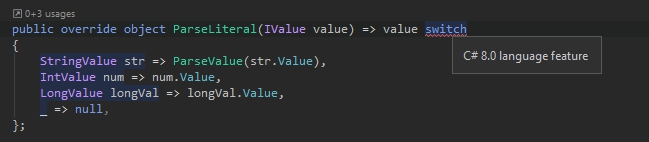
the testing was done by copying the GraphQL namespace source of the library to Unity the project, I get a lot of errors like this.
noncom
on 22 Jan 2020
the testing was done by copying the GraphQL namespace source of the library to Unity the project
Only if in this case, but generally after compilation, an assembly is obtained that is no different from others.
but how did you make the library work with Unity at all?
So my question is - why are you copying source codes instead of using compiled assembly?
sungam3r
on 22 Jan 2020
So my question is - why are you copying source codes instead of using compiled assembly?
Just to be able to see what's going on, to debug and understand. I am not a .NET pro and GraphQL is new to me, so I would have liked to pore more over what actually happens and to have more insight into problems should they occur. Especially that our server team is currently in the early stages of developing the server GraphQL interface, so I expect a lot of interaction issues and bugs.
Besides, having the source directly is pretty common when using libraries in Unity especially that there's no real project and dependency manager like Gradle/Maven (I'm coming from JVM land), and using NuGet with Unity feels more like a workaround. And pulling in sources alongside the assemblies to automatically associate the read-only code with the compiled version, like Java/Kotlin/Scala sources alongside jars is not something I've seen here.
If you think that using the compiled assembly is the way to go in this case, I can give it a try.
noncom
on 22 Jan 2020
1109, #843 - some examples related to Unity usage
sungam3r
on 22 Jan 2020
Related issues
 jbliss1234
·
26Comments
jbliss1234
·
26Comments
 bigbizze
·
22Comments
bigbizze
·
22Comments
 shoe-diamente
·
33Comments
shoe-diamente
·
33Comments
 fulviocanducci
·
29Comments
fulviocanducci
·
29Comments
 Shane32
·
31Comments
Shane32
·
31Comments