Googleads-mobile-unity: cannot resolve AndroidJavaException: java.lang.ClassNotFoundException: com.google.android.gms.ads.AdSize
Hi,
I am using version 3.7.1 of googleads mobile unity plugin downloaded from below URL for one of my game that i am developing in Unity.
URL : https://github.com/googleads/googleads-mobile-unity/releases
Version : 3.7.1
However, this doesn't work for me. When i tried to run the game and test out the ad, i am getting below error:
I/Unity﹕ AndroidJavaException: java.lang.ClassNotFoundException: com.google.android.gms.ads.AdSize
java.lang.ClassNotFoundException: com.google.android.gms.ads.AdSize
at java.lang.Class.classForName(Native Method)
at java.lang.Class.forName(Class.java:251)
at java.lang.Class.forName(Class.java:216)
at com.unity3d.player.UnityPlayer.nativeRender(Native Method)
at com.unity3d.player.UnityPlayer.a(Unknown Source)
at com.unity3d.player.UnityPlayer$c$1.handleMessage(Unknown Source)
at android.os.Handler.dispatchMessage(Handler.java:98)
at android.os.Looper.loop(Looper.java:136)
at com.unity3d.player.UnityPlayer$c.run(Unknown Source)
Caused by: java.lang.NoClassDefFoundError: com/google/android/gms/ads/AdSize
at java.lang.Class.classForName(Native Method)
at java.lang.Class.forName(Class.java:251)
at java.lang.Class.forName(Class.java:216)
at com.unity3d.player.UnityPlayer.nativeRender(Native Method)
at com.unity3d.player.UnityPlayer.a(Unknown Source)
at com.unity3d.player.UnityPlayer$c$1.handleMessage(Unknown Source)
at android.os.Handler.dispatchMessage(Handler.java:98)
at android.os.Looper.loop(Looper.java:136)
at com.unity3d.player.UnityPlayer$c.run(Unknown Source)
Caused by: java.lang.ClassNotFoundException: Didn't find class "com.google.android.gms.ads.AdSize" on path: DexPathList[[zip file "/data/app/com.YRZGames.PlaneOCopter-1.apk"],nativeLibraryDirectories=[/data/app-lib/com.YRZGames.PlaneOCopter-1, /vendor/lib, /system/lib]]
at dalvik.system.BaseDexCl
I am not sure what i am doing wrong, i tried to look into other open issues, but could not resolve my issue. I would appreciate if some one can guide/help me to resolve this issue.
Regards,
Yash
 YashSOA
All 5 comments
@YashSOA are you including the required Play Services AARs in your Unity project? If these AARs are not present in the Assets/Plugins/Android directory of your Unity project, perform dependency resolution by selecting Assets -> Play Services Resolver -> Android Resolver -> Resolve in the Unity Editor.
 rampara
on 3 Oct 2017
rampara
on 3 Oct 2017
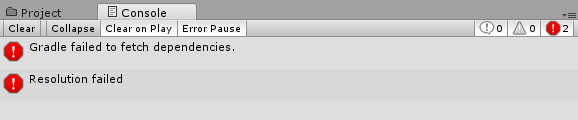
Thanks for the quick response. I checked the plugins/android and can see that there is no aar file present. I can see two errors in console window (attached the snap), maybe this is the reason why there is no aar present.
Error - 1) Gradle failed to fetch dependencies.
Gradle failed to fetch dependencies.
Failed to run 'Temp\PlayServicesResolverGradle\gradlew.bat -b Temp\PlayServicesResolverGradle\PlayServicesResolver.scripts.download_artifacts.gradle --no-daemon "-PANDROID_HOME=E:\Users\dominic\AppData\Local\Android\sdk" "-PTARGET_DIR=E:\unitygames\try\finaltry\Assets\Plugins\Android" "-PMAVEN_REPOS=https://maven.google.com" "-PPACKAGES_TO_COPY=com.google.android.gms:play-services-ads:11.2.2"'
stdout:
Unzipping C:\Users\dominic.gradle\wrapper\dists\gradle-3.2.1-bin\erlz51pt56t1o6vc7t39cikug\gradle-3.2.1-bin.zip to C:\Users\dominic.gradle\wrapper\dists\gradle-3.2.1-bin\erlz51pt56t1o6vc7t39cikug
stderr:
Exception in thread "main" java.util.zip.ZipException: error in opening zip file
at java.util.zip.ZipFile.open(Native Method)
at java.util.zip.ZipFile.
at java.util.zip.ZipFile.
at java.util.zip.ZipFile.
at org.gradle.wrapper.Install.unzip(Install.java:215)
at org.gradle.wrapper.Install.access$600(Install.java:27)
at org.gradle.wrapper.Install$1.call(Install.java:75)
at org.gradle.wrapper.Install$1.call(Install.java:48)
at org.gradle.wrapper.ExclusiveFileAccessManager.access(ExclusiveFileAccessManager.java:69)
at org.gradle.wrapper.Install.createDist(Install.java:48)
at org.gradle.wrapper.WrapperExecutor.execute(WrapperExecutor.java:107)
at org.gradle.wrapper.GradleWrapperMain.main(GradleWrapperMain.java:61)
exit code: 1
UnityEngine.Debug:LogError(Object)
GooglePlayServices.PlayServicesResolver:LogDelegate(String, LogLevel)
Google.JarResolver.PlayServicesSupport:Log(String, LogLevel, Boolean)
GooglePlayServices.
GooglePlayServices.
GooglePlayServices.PlayServicesResolver:PumpUpdateQueue()
UnityEditor.EditorApplication:Internal_CallUpdateFunctions()
Error - 2) Resolution failed.
Resolution failed
Failed to fetch the following dependencies:
com.google.android.gms:play-services-ads:11.2.2
UnityEngine.Debug:LogError(Object)
GooglePlayServices.PlayServicesResolver:LogDelegate(String, LogLevel)
Google.JarResolver.PlayServicesSupport:Log(String, LogLevel, Boolean)
GooglePlayServices.ResolverVer1_1:LogMissingDependenciesError(List1)
GooglePlayServices.<DoResolutionUnsafe>c__AnonStorey17:<>m__26(List1)
GooglePlayServices.
GooglePlayServices.
GooglePlayServices.PlayServicesResolver:PumpUpdateQueue()
UnityEditor.EditorApplication:Internal_CallUpdateFunctions()
I am new to the gradle. Can you please suggest what can fix this issue?
YashSOA
on 3 Oct 2017
Can you try navigating to the `C:\Users\dominic.gradle\wrapper\dists\gradle-3.2.1-bin\' directory and removing all of its contents before attempting dependency resolution again?
rampara
on 3 Oct 2017
sure! giving it a try !
YashSOA
on 3 Oct 2017
well, that worked! AAR files showed up in the folder , and when i build and run the game on my phone, test ads started coming up.
Appreciate your quick help on this. Thanks :+1: :100:
I would close this issue. Thanks for your help.
YashSOA
on 3 Oct 2017
Related issues
 pacoelayudante
·
6Comments
pacoelayudante
·
6Comments
 crSudo
·
4Comments
crSudo
·
4Comments
 hnim
·
6Comments
hnim
·
6Comments
 jaceks454
·
5Comments
jaceks454
·
5Comments
 AdnanNazir
·
4Comments
AdnanNazir
·
4Comments
Most helpful comment
@YashSOA are you including the required Play Services AARs in your Unity project? If these AARs are not present in the
Assets/Plugins/Androiddirectory of your Unity project, perform dependency resolution by selectingAssets -> Play Services Resolver -> Android Resolver -> Resolvein the Unity Editor.