Googleads-mobile-unity: Banner size gets larger when showing video
The environment I'm using
- Unity version: 2020.1.13f1
- Google Mobile Ads Unity plugin version: 5.4.0
- Platform: Android
- Platform OS version: Android 9 and above (not related)
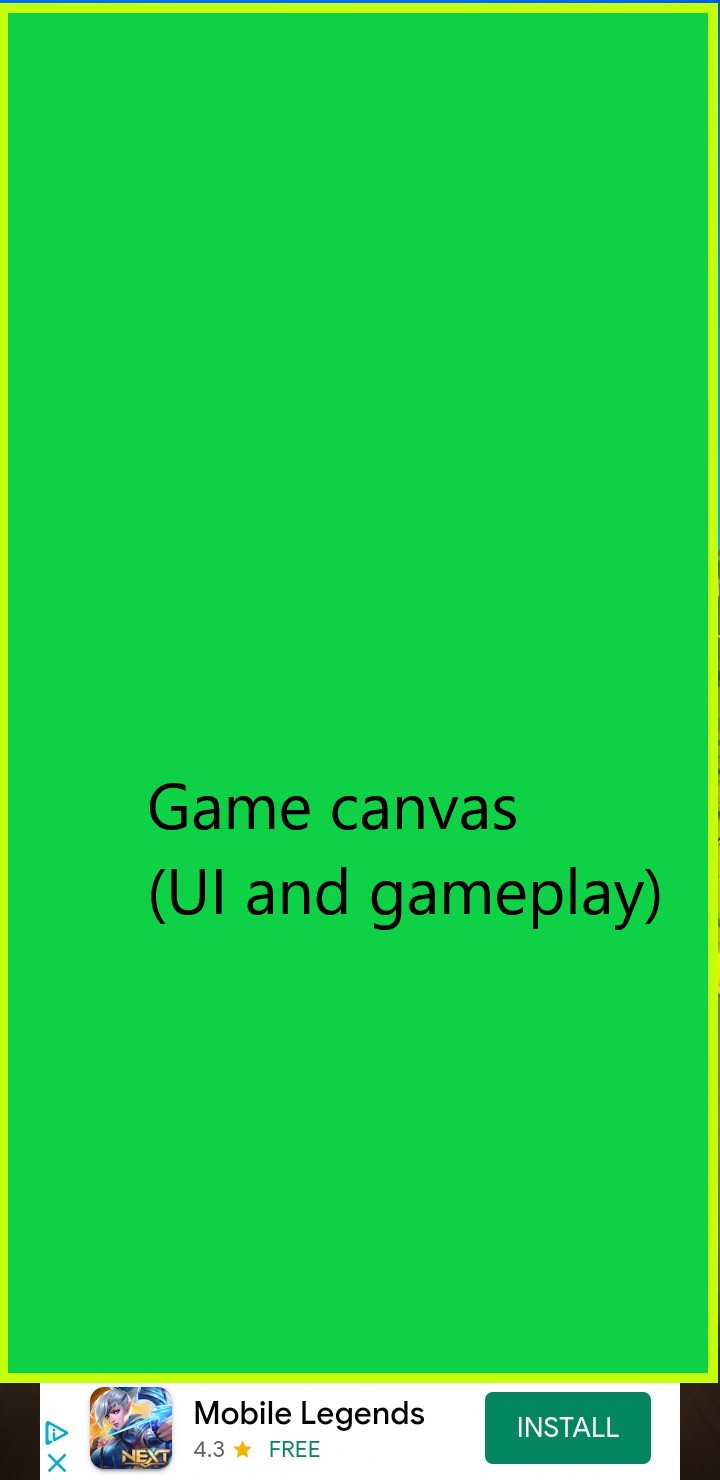
We have added the admob banners to the project (rewarded ads are currently being used in release version), and after a little testing when banner is being shown in bottom, occasionally when the showing add has video, after downloading the ad resizes to thrice its expected size and starting showing the video.
Picture 1 | Picture 2
------------ | -------------
 |
| 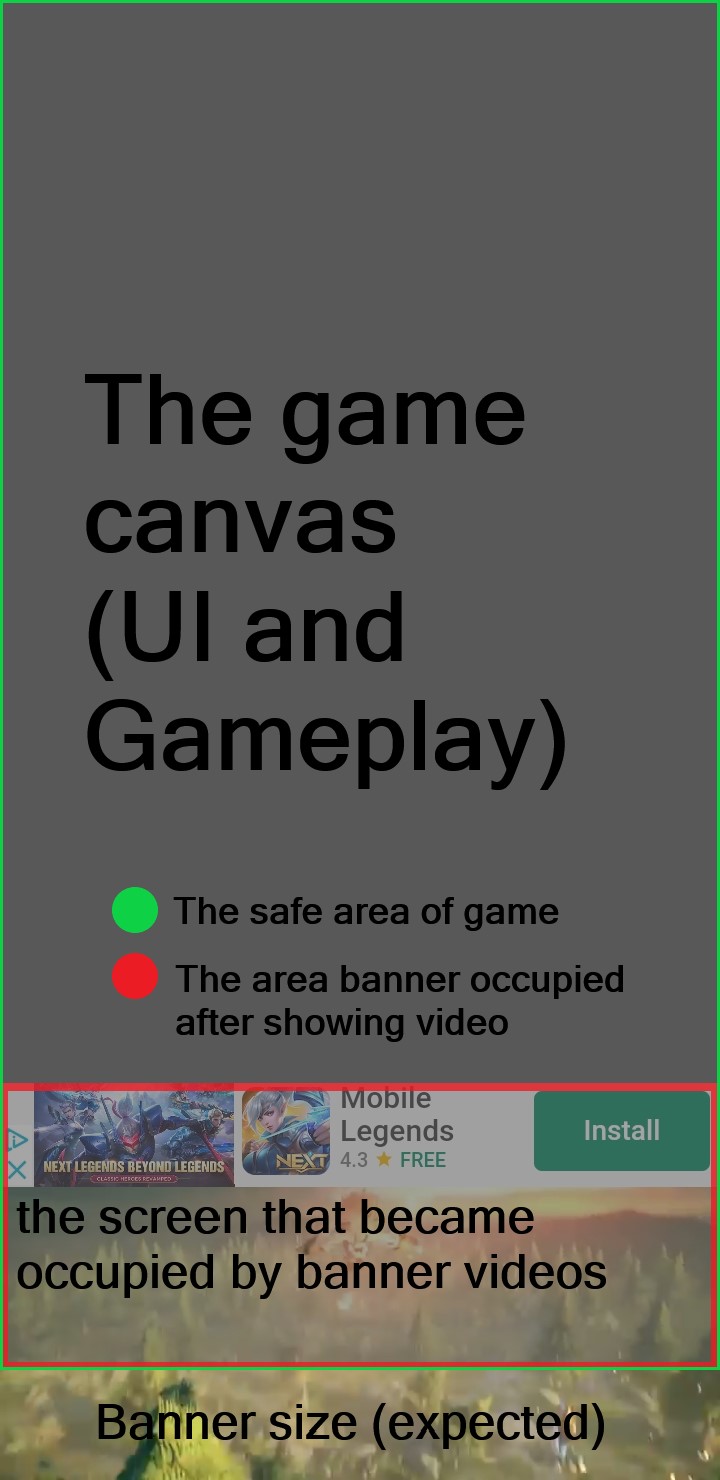
Picture 1 is the normal banner and picture 2 is when it becomes larger and showing video. So this thing is killing me, I have seen a lot of banners showing small videos at top or bottom of screen (of course inside the installed size), but for me when trying to show video banner gets larger than expected.
Banner becoming larger than its expected size ruins my canvas and gameplay. For the record I have absolutely followed the admob website guide step by step and the ad request class is like below:
private string unitId = "XXXXXXSample";
string appId = "XXXXXXSample";


public static GoogleMoblieAdScript ins;
private RewardBasedVideoAd rewardBasedVideoAd;
private Action<bool> callBackRewarded;
private bool reloadAds = false;
private Coroutine videoRelode;

private bool soundWasMute = false;
private bool musicWasMute = false;
private bool appSoundHandled = true;

public BannerView bannerViewAd;
#region init

private void Awake()
{
    if (ins == null)
    {
        ins = this;
    }
    else if (ins != this)
    {
        Destroy(gameObject);
    }

    DontDestroyOnLoad(gameObject);
}

#endregion

// Use this for initialization
void Start()
{

    MobileAds.Initialize(appId);

    if (this.bannerViewAd != null)
    {
        this.bannerViewAd.Destroy();
    }

    this.rewardBasedVideoAd = RewardBasedVideoAd.Instance;
    // Called when an ad request has successfully loaded.
    rewardBasedVideoAd.OnAdLoaded += HandleOnAdLoaded;
    // Called when an ad request failed to load.
    rewardBasedVideoAd.OnAdFailedToLoad += HandleOnAdFailedToLoad;
    // Called when an ad is shown.
    rewardBasedVideoAd.OnAdOpening += HandleOnAdOpening;
    // Called when the ad starts to play.
    rewardBasedVideoAd.OnAdStarted += HandleOnAdStarted;
    // Called when the user should be rewarded for watching a video.
    rewardBasedVideoAd.OnAdRewarded += HandleOnAdRewarded;
    // Called when the ad is closed.
    rewardBasedVideoAd.OnAdClosed += HandleOnAdClosed;
    // Called when the ad click caused the user to leave the application.
    rewardBasedVideoAd.OnAdLeavingApplication += HandleOnAdLeavingApplication;


    //Load Ads in Start
    this.LoadRewardBasedAd();

}
public void RequestBanner(string unitID)
{

    // Clean up banner ad before creating a new one.
    if (this.bannerViewAd != null)
    {
        Debug.Log("|||| Prev Banner removed!");
        this.bannerViewAd.Destroy();
    }

    AdSize adaptiveSize =
        AdSize.GetPortraitAnchoredAdaptiveBannerAdSizeWithWidth(AdSize.FullWidth);

    // Create a 320x50 banner at the top of the screen.
    this.bannerViewAd = new BannerView(unitID, adaptiveSize , AdPosition.Bottom);

    // Called when an ad request has successfully loaded.
    this.bannerViewAd.OnAdLoaded += this.HandleOnAdLoaded;
    // Called when an ad request failed to load.
    this.bannerViewAd.OnAdFailedToLoad += this.HandleOnAdFailedToLoad;
    // Called when an ad is clicked.
    this.bannerViewAd.OnAdOpening += this.HandleOnAdOpened;
    // Called when the user returned from the app after an ad click.
    this.bannerViewAd.OnAdClosed += this.HandleOnAdClosed;
    // Called when the ad click caused the user to leave the application.
    this.bannerViewAd.OnAdLeavingApplication += this.HandleOnAdLeavingApplication;

    // Create an empty ad request.
    AdRequest adRequest = new AdRequest.Builder().Build();

    // Load the banner with the request.
    this.bannerViewAd.LoadAd(adRequest);
}

public void HandleOnAdLoaded(object sender, EventArgs args)
{
    MonoBehaviour.print("HandleAdLoaded event received");
}

public void HandleOnAdFailedToLoad(object sender, AdFailedToLoadEventArgs args)
{
    MonoBehaviour.print("HandleFailedToReceiveAd event received with message: "
                        + args.Message);
}

public void HandleOnAdOpened(object sender, EventArgs args)
{
    MonoBehaviour.print("HandleAdOpened event received");
}

public void HandleOnAdClosed(object sender, EventArgs args)
{
    MonoBehaviour.print("HandleAdClosed event received");
}

public void HandleOnAdLeavingApplication(object sender, EventArgs args)
{
    MonoBehaviour.print("HandleAdLeavingApplication event received");
}
 alipjxhub
All 5 comments
Same issue here!
 EmadAbdoli
on 16 Jan 2021
EmadAbdoli
on 16 Jan 2021
I remember at the time we had the same problem , so we gave up using banners in our game.
 SINAKZM
on 16 Jan 2021
SINAKZM
on 16 Jan 2021
We are using picture banners too, seems like banners with video have changing banner size issues for everyone.
 saeedasadsh
on 16 Jan 2021
saeedasadsh
on 16 Jan 2021
me too
 Jiang00
on 18 Aug 2021
Jiang00
on 18 Aug 2021
Google disabled ads in my application because of resize.
I disabled video ads for banner and hope it will solve the problem.
A solution to enable video ads in a banner ?
Thanks.
 RedDuckGames
on 30 Dec 2021
RedDuckGames
on 30 Dec 2021
Related issues
 bigmonmulgrew
·
4Comments
bigmonmulgrew
·
4Comments
 AdnanNazir
·
4Comments
AdnanNazir
·
4Comments
 Kendja
·
6Comments
Kendja
·
6Comments
 Seanm07
·
3Comments
Seanm07
·
3Comments
 Epiczzor
·
8Comments
Epiczzor
·
8Comments
Most helpful comment
Same issue here!