Godotsteam: Game crashes when accepting a lobby invite from a friend while the game is not running
To reproduce:
- Don't have the game open
- Accept a lobby invite from a friend
We get the following errors:
ERROR: No loader found for resource: res://+connect_lobby
ERROR: Failed loading scene: res://+connect_lobby
By default, when accepting a lobby invite, Steam launches the game with command line arguments +connect_lobby <SteamIDLobby>, but I guess in Godot it searches for a scene if given cmd args.
The current workaround is to simply open the game first before accepting a lobby invite
 Frostings
All 3 comments
The reason for this is simple: when receiving command line arguments, Godot treats first argument as the path to the scene that should be loaded when starting the game. The workaround for this is the following: you should specify the name of your starting scene in Steam launch options:
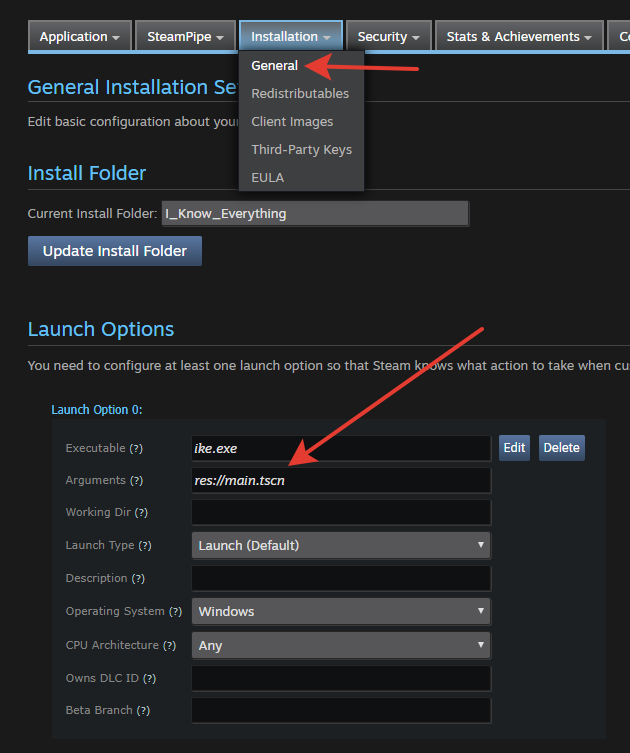
Please note that I've placed res://main.tscn into the Arguments box, that should do the trick. In this case the actual command line will be: res://main.tscn +connect_lobby <SteamIDLobby>
And of course, you should also handle +connect_lobby command line parameter. You can use, for example, the following code:
var args = OS.get_cmdline_args()
var has_lobby_invite = false
for arg in args:
    if has_lobby_invite:
        connect_to_lobby(int(arg))
        return
    if arg == "+connect_lobby":
        has_lobby_invite = true
You can use the source code of our game 'I Know Everything' for reference, if you want:
https://github.com/Antokolos/know-everything-os/blob/master/godotsteam.gd
 Antokolos
on 21 Aug 2019
Antokolos
on 21 Aug 2019
Thank you! It works perfectly
Frostings
on 21 Aug 2019
Man, I was super late to the game on this one. However, @Antokolos kicking ass with the answer! That is pretty much was I would have said but less explanatory. Excellent code snippet, sir!
 Gramps
on 22 Aug 2019
Gramps
on 22 Aug 2019
Related issues
 MichaelBelousov
·
5Comments
MichaelBelousov
·
5Comments
 ProbDenis
·
12Comments
MichaelBelousov
·
7Comments
ProbDenis
·
12Comments
MichaelBelousov
·
7Comments
 aikoncwd
·
6Comments
aikoncwd
·
6Comments
 Luekuu
·
8Comments
Luekuu
·
8Comments
Most helpful comment
Thank you! It works perfectly