Godot: Skeleton2D/Polygon2D combo bug
Not sure if it is the same issue, as "fogine" has posted, but relates to similar problem.
Godot version:
Official 3.1 version (Godot_v3.1-stable_win64.exe).
OS/device including version:
Windows 10 64-bit
NVidia GeForce GTX 1070 Ti
Issue description:
In some special combination of scenes/polygons2d/skeletons2d they start to act oddly and the issue is more visible the more scenes with poly/skeleton are used. The skeleton itself behaves accurately, while polygon2d vertices seem to be influenced by improper skeleton movements.
Steps to reproduce:
Run the project's attached main scene. It will animate few subscenes with poly/skeletons. Some will animate properly, some will act oddly. There are godot icon sprites attached to bones so You can see where bone is at the moment in comparison to polygon.
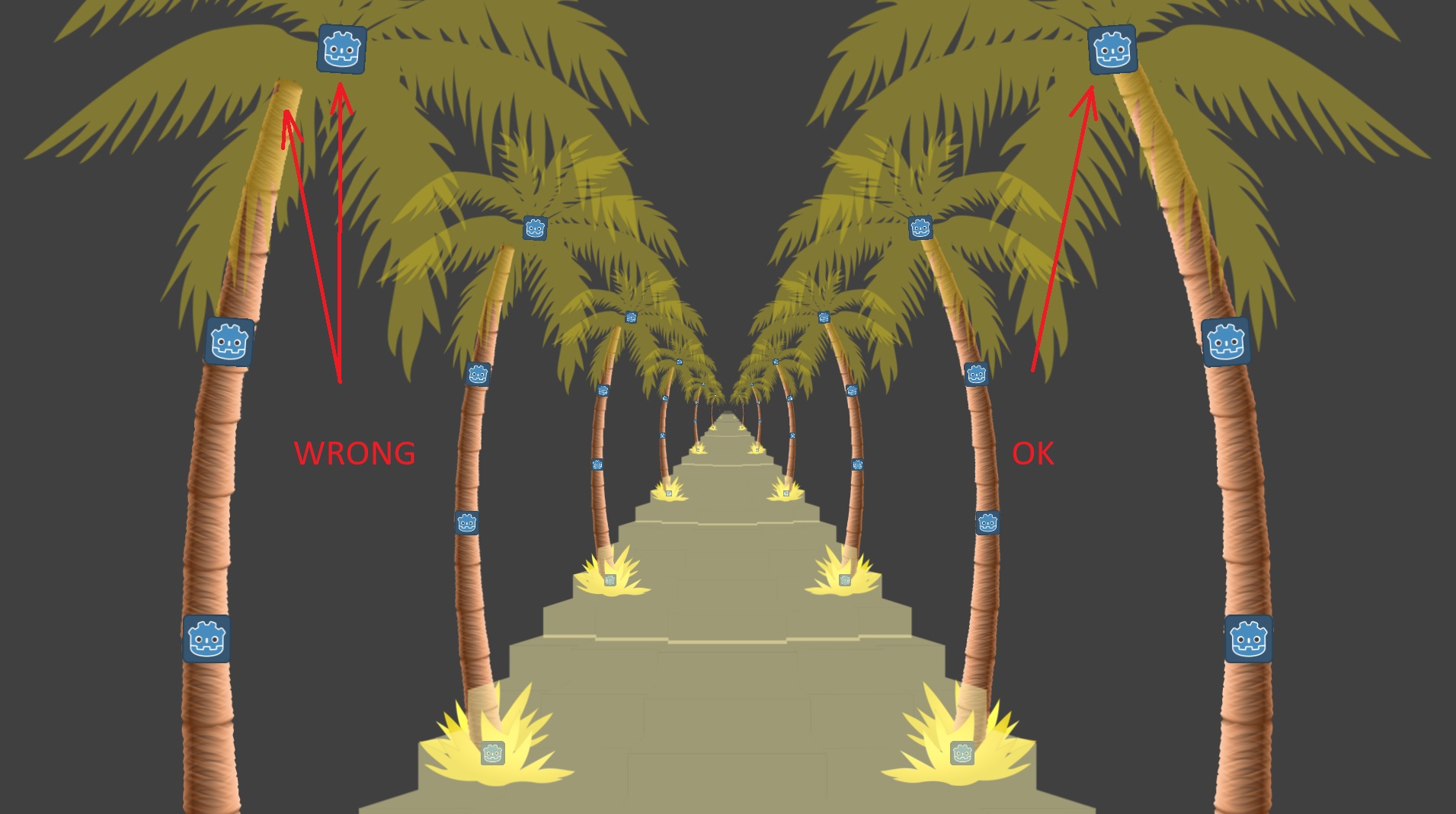
Minimal reproduction project:
I hope the material provided will help to find and kill that bug soon.
Have a nice day.
 kozaluss
All 5 comments
I have also a similar problem. I have a scene containing multiple Skeleton2Ds and multiple Polygon2Ds as I was working on it, suddenly another skeleton2D in the same scene stopped functioning. Bones are on the wrong place or are getting ignored it just gets really messy. But they animate alone fine in the Editor...
Currently, Skeleton2D + Polygon2D works on a simple Skeleton structure, like a single leaf, windy hair or a single tentacle. But if you're going to make a fully animated Octopus, each tentacle containing mini tentacles (for example) and each tentacle has its own Skeleton2D, it will definitely break.
Not sure if it's oke to have skeletons as sub children of another skeleton either... because I like to swap skeletons in-code too. But I think having too many Skeletons2D nodes around makes stuff unstable.
 Qws
on 3 Jun 2019
Qws
on 3 Jun 2019
So I have looked a bit deeper into issues on git and found this one: #25911. And it seems it is the same issue, because when I've changed driver from GLES3 to GLES2, the problem seems to dissappear. Just wanted to add this as additional info - it seems like only GLES3 has the problem.
kozaluss
on 3 Jul 2019
@kozaluss not really, it also happens with GLES2 as I've previously reported in #29353
 fogine
on 3 Jul 2019
fogine
on 3 Jul 2019
I can reproduce something similar in our project.
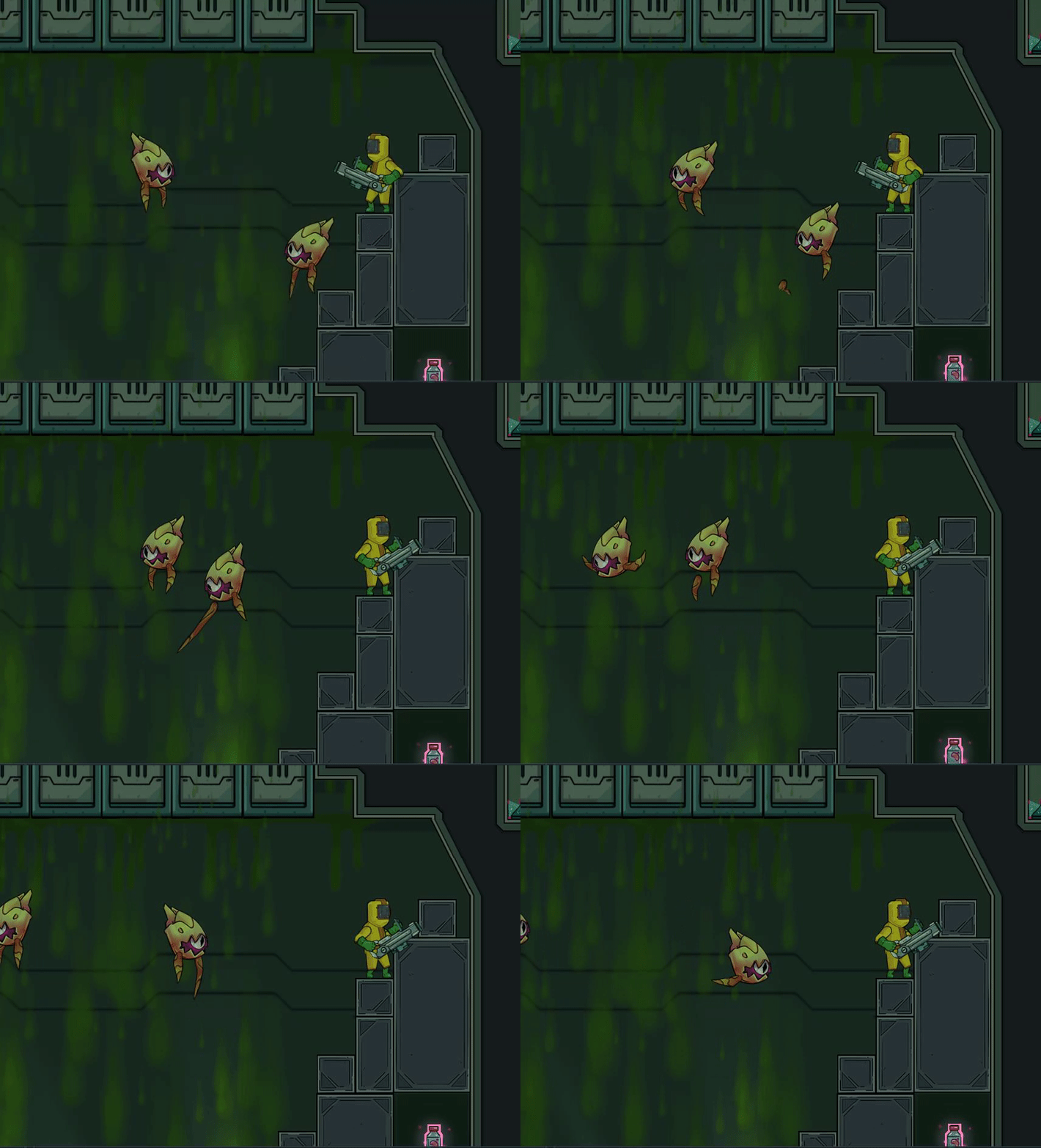
We also have multiple Skeleton2Ds and multiple Polygon2Ds in the instanced scene of those flying enemies. One difference is we also can observe some of the tearing inside the editor.
 andrewstrauch
on 2 Oct 2019
andrewstrauch
on 2 Oct 2019
Looks alright in 3.2.3
 KoBeWi
on 4 Nov 2020
KoBeWi
on 4 Nov 2020
Related issues
 n-pigeon
·
3Comments
n-pigeon
·
3Comments
 testman42
·
3Comments
testman42
·
3Comments
 EdwardAngeles
·
3Comments
EdwardAngeles
·
3Comments
 mefihl
·
3Comments
mefihl
·
3Comments
 nunodonato
·
3Comments
nunodonato
·
3Comments
Most helpful comment
I have also a similar problem. I have a scene containing multiple Skeleton2Ds and multiple Polygon2Ds as I was working on it, suddenly another skeleton2D in the same scene stopped functioning. Bones are on the wrong place or are getting ignored it just gets really messy. But they animate alone fine in the Editor...
Currently, Skeleton2D + Polygon2D works on a simple Skeleton structure, like a single leaf, windy hair or a single tentacle. But if you're going to make a fully animated Octopus, each tentacle containing mini tentacles (for example) and each tentacle has its own Skeleton2D, it will definitely break.
Not sure if it's oke to have skeletons as sub children of another skeleton either... because I like to swap skeletons in-code too. But I think having too many Skeletons2D nodes around makes stuff unstable.