Godot: Unable to modify animation tracks to on imported models
Same as this: #6169
Godot version: 3.1
OS/device including version: Ubuntu 18.10
Issue description:
Imported a collada file that had a rigging and couple animations, made the animation player part of an Animation Tree, added a call method track to it, but the method is never called if the animation is run. Also, if I restart the project, the call method track disappears.
Minimal reproduction project:
AnimTest.zip
Click the AnimationPlayer node
add a call method track to the 'move_loop' animation and set it to animate AnimationTree
Right click and insert key on that track
choose the 'say_msg' function
run the scene, no message is printed
 Miziziziz
All 9 comments
To have extra animation tracks persist in an imported 3D scene you need to have your animations imported as separate files, which you can do via an import preset.
Select your 3D model file in the FileSystem dock, go to the Import dock and click the "Preset..." button, then select the "Import with Separate Materials+Animations" option:
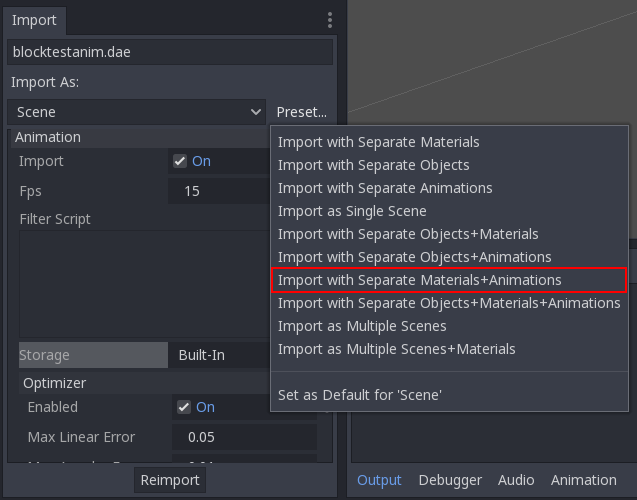
Click Reimport and your custom tracks should now persist.
If you want this preset applied to all 3D scenes imported from now on, open the preset menu and select "Set as Default for 'Scene'" (should be at the bottom). It's worth noting that other 3D scenes that have been imported before this won't be affected, so you'll need to select them all and apply the preset to them manually.
EDIT: You might have to close and re-open any scenes that have the scene open before the new import settings apply.
 ghost
on 22 Apr 2019
ghost
on 22 Apr 2019
Thanks for sharing how to do that, but that's a pretty unintuitive way of doing it. Seems like it should work the way I was doing, after all the gui allows me to do it, but just doesn't actually affect anything.
Miziziziz
on 23 Apr 2019
It doesn't affect anything because Godot can't edit or save to imported 3D scenes. That's why the "import animations as separate files" option exists; it works around that limitation by having the animations be native Godot resources that can be freely edited. On further reimports, the importer can then scan those animation files and try to update tracks while leaving your manually-created ones untouched.
Anyway I added a warning so people can know what's up.
ghost
on 23 Apr 2019
that sounds great, thanks!
Miziziziz
on 23 Apr 2019
On further reimports, the importer can then scan those animation files and try to update tracks while leaving your manually-created ones untouched.
@homer666 you're saying this _should_ be implemented, not that it already is, right?
I've found that if you need to make any changes to your scene and you export it again, all of the tracks you added in Godot will be overwritten. This means there's no good way to add call tracks or audio tracks to animations. There are a number of use cases this has been troublesome for:
- I want to refill the player's ammo when the reload animation completes
- I want to play footstep sounds at the appropriate points during the walk animation
- I want to shrink the character's collision shape when they crouch
To make matters worse, if you're using AnimationTree, you can't even hook into the AnimationPlayer's animation_finished, so you have no way to know when an animation completes.
 rcorre
on 28 Apr 2019
rcorre
on 28 Apr 2019
you're saying this should be implemented, not that it already is, right?
It's implemented, I just tested it myself. The custom call track I added to a test scene persists between exports just fine, no matter what I do to it in Blender, and even after restarting Godot to completely refresh things.
What kind of changes are you making to your scenes? Also, what format are you exporting to? (.escn, .glb/.gltf, or .dae?)
Also, in case you aren't using presets, did you make sure to enable "Keep Custom Tracks"?
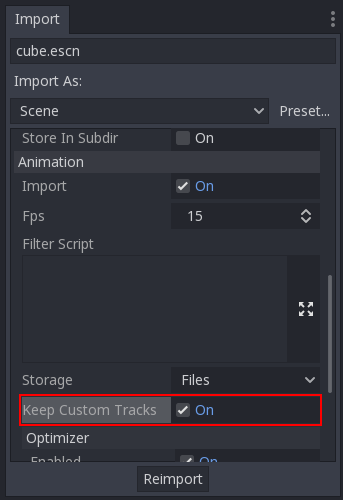
Keep in mind that there's a bug preventing that option from appearing until after you've:
- set "Storage" to "Files"
- re-imported
- refreshed the import dock by selecting something else in the FileSystem then selecting the scene again.
It's really annoying, and I'm gonna have to look into fixing it sometime, but in the meantime it's something you'll have to watch out for.
I don't know about the AnimationTree problem as I've never used that node, but it seems unrelated. You can find some issues outlining quirks with that signal by searching for animation_finished. What I gathered from reading them is that this is by design; maybe try using animation_changed instead? I dunno.
ghost
on 29 Apr 2019
@homer666 "Keep Custom Tracks" appears to be exactly what I needed. With that enabled, added tracks are preserved after modifying and re-exporting (I'm using godot-blender exporter .escn format). I had no idea that option even existed due to the bug you mentioned. Is there a separate issue tracking that?
Thanks!
rcorre
on 29 Apr 2019
@rcorre I figured out how to fix it: #28507
ghost
on 29 Apr 2019
Fixed by #28507.
 akien-mga
on 29 Apr 2019
akien-mga
on 29 Apr 2019
Related issues
 kirilledelman
·
3Comments
kirilledelman
·
3Comments
 EdwardAngeles
·
3Comments
EdwardAngeles
·
3Comments
 Zylann
·
3Comments
Zylann
·
3Comments
 RebelliousX
·
3Comments
RebelliousX
·
3Comments
 mooseyfaith
·
3Comments
mooseyfaith
·
3Comments