Godot: Remove [Empty] tab when no scene is open
Just a suggestion for an enhancement to Godot.
Godot has an unusual UX behaviour that I think should be corrected as it runs contrary to how software normally works. When you close the last open tab on Godot, instead of displaying an empty space in the middle of the editor, it instead shows an empty scene with a title for the tab called [Empty]. While this is not a problem as such, this behaviour is 'weird' in my opinion, and would be better off removed.
The empty space that replaces the [Empty] tab could have a 'New Scene' button in the middle and perhaps a list of recent scenes to open.
 mindinsomnia
All 6 comments
It basically just opens a new, unsaved scene with no nodes in it. I can see the argument why you would expect it to be different, but I wouldn't say its 'weird'. I think its a matter of preference, really.
 TicklesTheBrain
on 14 Apr 2019
TicklesTheBrain
on 14 Apr 2019
You could see it as the equivalent of creating a new document in a word processor and seeing "Untitled" in the window title, even though the document hasn't been saved yet. Maybe we should rename "[empty]" to "Untitled"?
 Calinou
on 14 Apr 2019
Calinou
on 14 Apr 2019
Well, I know this isn't critical to the functionality of Godot, but as a UX issue, it feels weird to me. I draw a parallel to other applications like say Photoshop or Krita. Those applications have tabs for open documents as well.
When you open those applications, what you're greeted with is a dialog asking you to create a new image or open a recent one. As you open images they appear as tabs, and as you close the last one you're back to that 'Create a new image / Open a recent' dialog.
I know 'Godot isn't Photoshop / Krita' but that's usually how applications that show tabs for open documents work, when you close the last one, it disappears. In Godot, it just instantly transforms into an [Empty] scene. It just seems odd to me that a tab hangs around and it visually looks like you have something open, when in fact what's showing is like Calinou said more like a new empty document, even though the user didn't ask to create that through the UI, they instead wanted to close the tab.
It just feels a bit weird to me, like it visually doesn't make sense.
Of course it's up to the leadership of Godot to decide on this stuff, but just giving my feedback. =)
mindinsomnia
on 15 Apr 2019
I think the reason this behavior seems weird is that, going with @Calinou 's analogy, it appears after closing documents rather than opening a word processor. I expect to see "[empty]" or something similar when I click the + button, and probably also when Godot first starts, but perhaps not if I close everything.
If this is desired to be changed, it could be changed to just have a + at the top when nothing was open. Instead of the scene view it could show a message of "Open a scene" or something.
But I think the current behavior is fine.
 aaronfranke
on 15 Apr 2019
aaronfranke
on 15 Apr 2019
I'll absolutely say that I don't think the current behaviour 'breaks' anything about the software and it's certainly not a critical bug, it's at most a papercut.
It just seems weird to me since the behaviour doesn't match the UI for the reason you stated. It feels like a logical disconnect when closing something instead seems to create something new.
But I'm perfectly happy to be told that it's just me that this behaviour is fine if everyone else doesn't think there's a problem with it, I'll respect any decision made here on this, it just felt like to me, as a new Godot user of a few weeks now, like an odd UI quirk that stood out.
mindinsomnia
on 15 Apr 2019
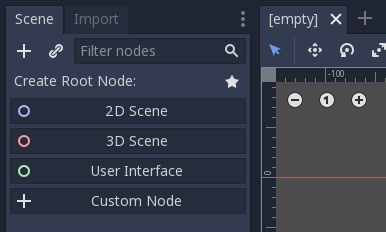
When you create a new scene or close all active scenes:
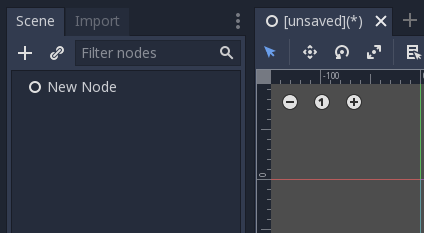
When you add nodes to that scene:
When you save that scene:
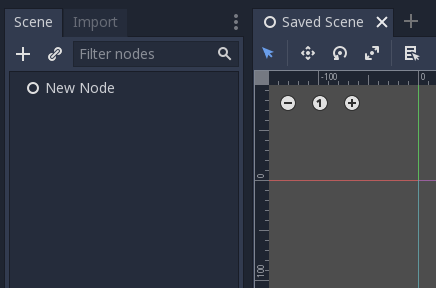
Seems good to me.
 Jummit
on 16 Apr 2019
Jummit
on 16 Apr 2019
Related issues
 ndee85
·
3Comments
ndee85
·
3Comments
 RebelliousX
·
3Comments
RebelliousX
·
3Comments
 bojidar-bg
·
3Comments
bojidar-bg
·
3Comments
 EdwardAngeles
·
3Comments
EdwardAngeles
·
3Comments
 mefihl
·
3Comments
mefihl
·
3Comments