Godot: Singleton enums not usable as constant expressions
Version: Godot 3, beta 1.
If you have an enum in a script, you are able to use it as an export hint:
export(MyEnum) var options
If you have an autoload singleton with an enum, there is an error stating "Expected constant expression":
export(MySingleton.MyEnum) var options
Steps to reproduce:
- Create an autoload singleton with an enum
- Try to use that enum as an export hint in another script
Link to minimal example project: SingletonEnum.zip
 menip
menip
All 20 comments
CC @bojidar-bg - I'm not sure if singletons can be used at all in constant expression though, they might be registered too late for that.
 akien-mga
on 15 Dec 2017
akien-mga
on 15 Dec 2017
It works if you use
export(preload("res://enum.gd").ENUMERATOR) var enumeration
 thimenesup
on 15 Dec 2017
thimenesup
on 15 Dec 2017
It should work as long as const X = MySingleton.MyEnum works, since it uses the same way to get the constant value.
 bojidar-bg
on 15 Dec 2017
bojidar-bg
on 15 Dec 2017
@thimenesup Confirming that this works.
menip
on 15 Dec 2017
@bojidar-bg Doesn't work, still requires a preload.
menip
on 15 Dec 2017
Am I missing something about how autoload singletons work? I thought that one of their benefits is you could use them in other classes, without having to preload.
For single values and calling functions, you don't need to preload. Why do you need to do it for these kind of assignments?
menip
on 15 Dec 2017
When I'm using export(preload("res://enum.gd").ENUMERATOR) var enumeration the dropdown will show up in the inspector but when evaluating the value in the script it is always null.
Edit:
It is only null if the enum has the default value. If the dropdown is changed the value is correct, even if it is set to the value that is the default value.
Basically the enum only has the correct value as long as the reset-value button is shown.
 BeayemX
on 28 Dec 2017
BeayemX
on 28 Dec 2017
Basically the enum only has the correct value as long as the reset-value button is shown.
I was searching issues to see if someone had made an issue for this, and I was otherwise going to. It's not the main point of this issue so I think it warranted its own issue: #15585.
 rosshadden
on 11 Jan 2018
rosshadden
on 11 Jan 2018
Hi,
I'm running into this same issue. I'd like to export an enum defined in a singleton.
I would like to avoid having to preload everything, as that defeats the purpose of singletons.
I can confirm that trying to use
const _my_enum = singleton.target_enum
export(_my_enum) var the_enum
does not work either, and is still an extra, unnecessary step.
Is this impossible due to the current implementation of singletons?
Thank you,
-Devin
 DevinPentecost
on 28 May 2018
DevinPentecost
on 28 May 2018
I forgot about this. Now that singletons are loaded in-editor this is easy to fix.
 vnen
on 28 May 2018
vnen
on 28 May 2018
Happens again on 3.1.1-stable, but it's also possible to work around it with preload as @thimenesup suggested. Assigning to a const also causes the same error.
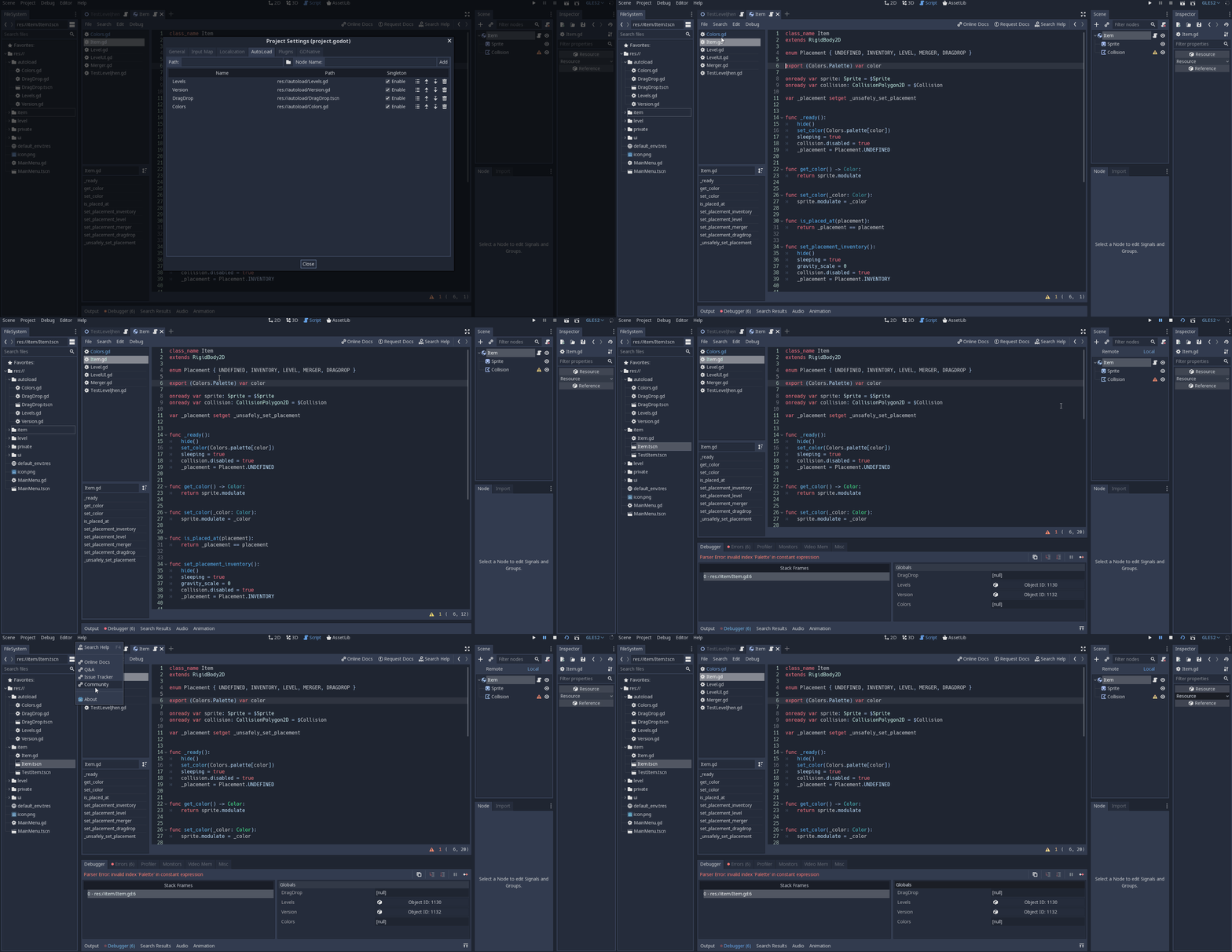
 Jendoliver
on 21 Sep 2019
Jendoliver
on 21 Sep 2019
I just ran into the same problem on the master branch (latest commit 5a23ab61fae79cce576fe7ec60fd928d2bd27fca).
 thomas-goerlich
on 6 Oct 2019
thomas-goerlich
on 6 Oct 2019
@Jendoliver Happens again on 3.1.1-stable, but it's also possible to work around it with preload as @thimenesup suggested. Assigning to a const also causes the same error.
That's weird, I have similar code and it works fine in 3.1.1-stable (tested in the editor with and without tool mode, and in the exported game).
Minimal example project: SingletonEnums.zip
 williamd1k0
on 6 Oct 2019
williamd1k0
on 6 Oct 2019
@Jendoliver Happens again on 3.1.1-stable, but it's also possible to work around it with preload as @thimenesup suggested. Assigning to a const also causes the same error.
That's weird, I have similar code and it works fine in 3.1.1-stable (tested in the editor with and without tool mode, and in the exported game).
Minimal example project: SingletonEnums.zip
This code is working for me in 3.1.1 stable as well as on my master branch.
I think i found the problem at least in my case. In my globals file i define an enum and i preload another scene which is using the enum. That does not seem to work. If i do not preload the scene in the globals everything is fine.
My Code:
GameOfLife.zip
Same enum lines in game.gd/tile.gd. Working fine in game.gd, error in tile.gd. If preload line is moved from globals.gd to game.gd everything is fine.
From this error i would assume that i can only access the enums ones the whole file is parsed?
thomas-goerlich
on 6 Oct 2019
@thomas-goerlich Can confirm removing the preloaded scenes from the autoloaded script fixed the issue for me in 3.2 alpha 1.
 tristongilley
on 8 Oct 2019
tristongilley
on 8 Oct 2019
This is still happening in version 3.2.2.
Please check again!
 rasikrodri
on 22 Jul 2020
rasikrodri
on 22 Jul 2020
@rasikrodri Please upload a minimal reproduction project to make this easier to troubleshoot.
 Calinou
on 22 Jul 2020
Calinou
on 22 Jul 2020
@rasikrodri I just ran the minimal reproduction project linked in original post via 3.2.2, and everything seems fine.
menip
on 23 Jul 2020
preload() calls break enums within the same singleton class on each project reopening. This is still happening in 3.2.3.
This causes a chain of broken scripts consisting of:
- classes accessing the singleton enum.
- classes inheriting these ones.
It also causes a kind of temporary data loss when scenes with affected scripts are resaved in a broken state which results in export values disappearing and Git marking them as "changed".
This is especially inconvenient for larger projects.
Temporary workaround (also shown in the gif):
- Edit the singleton class (no saving required) and see the constant expression error vanishing in the affected scripts.
- Edit the broken class (no saving required) to rerun the parser and make export variables reappear in the inspector since the script is now valid again.
- (if applicable, repeat step 2 for all inheriting classes)
Basically the syntax parser has to revisit all broken scripts to validate them.

Permanent workaround
Outsource the enums into a distinct singleton or use something like const SingletonClass = preload("res://SingletonClass.gd") within the script depending on it.
Minimal reproduction project:
SingletonEnum2.zip
 artism90
on 20 Sep 2020
artism90
on 20 Sep 2020
Hello, this problem just goes from bad to worse, with seemingly no fix.
If you have more than one enum and try to use the preload option, e.g.
file1:
export(preload("res://singletons/Globals.gd").PICKUP) var pickup_type
file2:
export(preload("res://singletons/Globals.gd").WEAPON) var weapon_type
On one of the files your game aborts with the error:
E 0:00:00.555 load: Resource: 'res://singletons/Globals.gd' is already being loaded. Cyclic reference?
So you cannot call export(Globals.MYENUM) as you get index errors and you cannot call preload because you get cyclic errors. What do I/we do?
 chucklepie
on 12 Nov 2020
chucklepie
on 12 Nov 2020
Related issues
 kirilledelman
·
3Comments
kirilledelman
·
3Comments
 ndee85
·
3Comments
ndee85
·
3Comments
 blurymind
·
3Comments
blurymind
·
3Comments
 n-pigeon
·
3Comments
n-pigeon
·
3Comments
 ivanskodje
·
3Comments
ivanskodje
·
3Comments
Most helpful comment
It works if you use
export(preload("res://enum.gd").ENUMERATOR) var enumeration