Godot: Godot_v3.0-beta1_mono_osx64 won't launch with Mono
Operating system or device, Godot version, GPU Model and driver (if graphics related):
Godot_v3.0-beta1_mono_osx64
Issue description:
I downloaded Godot_v3.0-beta1_mono_osx64 and Mono (for the first time) today. Godot wouldn't launch. I tried "Show Package Contents" and launched Godot in a terminal window to look at the error output and saw the message below. I noticed that Godot was looking for Mono.framework 5.4.0 and the version that I had downloaded today was 5.4.1. As an experiment I changed the name of my version folder to 5.4.0 and after doing that, Godot launched.
Mono: Initializing module...
The assembly mscorlib.dll was not found or could not be loaded.
It should have been installed in the `/Library/Frameworks/Mono.framework/Versions/5.4.0/lib/mono/4.5/mscorlib.dll' directory.
logout
Saving session...
...copying shared history...
...saving history...truncating history files...
...completed.
Deleting expired sessions...13 completed.
Steps to reproduce:
Link to minimal example project:
 daniel-e-houghton
All 4 comments
13355 duplicate.
Rollback to Mono 5.4.0 or rebuild with 5.4.1.
Renaming folder will not work (mono use hardcoded paths?) but you can create symlink to current version (Godot starts but I didn't test Mono features):
sudo ln -s /Library/Frameworks/Mono.framework/Versions/Current /Library/Frameworks/Mono.framework/Versions/5.4.0
 bruvzg
on 2 Dec 2017
bruvzg
on 2 Dec 2017
Thanks for the symlink idea!
daniel-e-houghton
on 2 Dec 2017
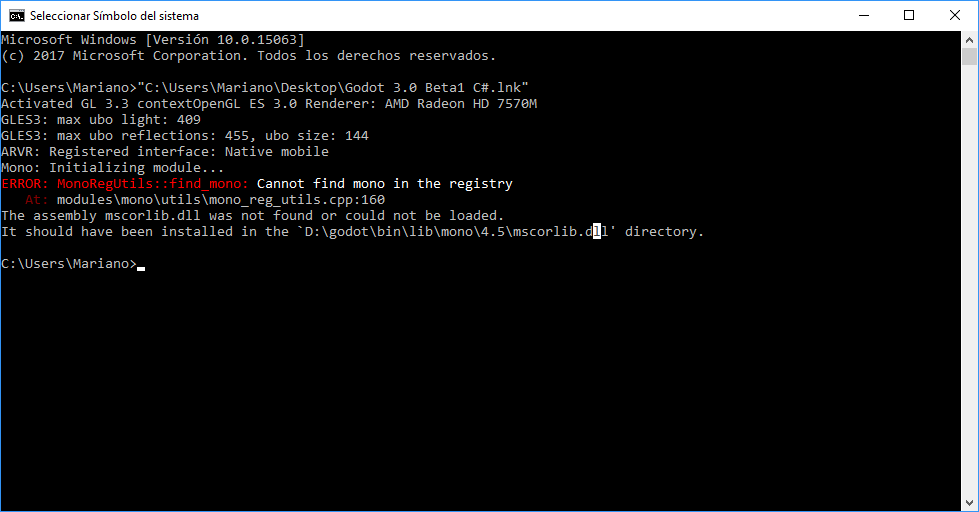
I have this problem for windows with beta1, not sure what am i missing, if i try to install .net 4.5 installer says it's already installed, also error says it's searching on the exe's path
 MarianoGnu
on 15 Dec 2017
MarianoGnu
on 15 Dec 2017
Closing as duplicate of #13355.
 akien-mga
on 21 Dec 2017
akien-mga
on 21 Dec 2017
Related issues
 n-pigeon
·
3Comments
n-pigeon
·
3Comments
 Spooner
·
3Comments
Spooner
·
3Comments
 timoschwarzer
·
3Comments
timoschwarzer
·
3Comments
 EdwardAngeles
·
3Comments
EdwardAngeles
·
3Comments
 ndee85
·
3Comments
ndee85
·
3Comments
Most helpful comment
13355 duplicate.
Rollback to Mono 5.4.0 or rebuild with 5.4.1.
Renaming folder will not work (mono use hardcoded paths?) but you can create symlink to current version (Godot starts but I didn't test Mono features):