Godot: [Suggestion] Visually Linking Nodes
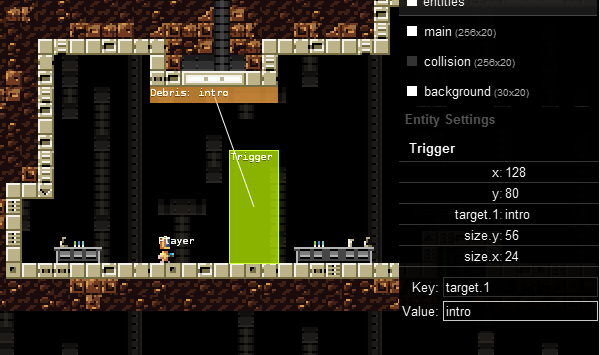
One thing that I think will help _tremendously_ with map creation is the ability to link nodes together on the scene editor. This idea came from using the ImpactJS engine years ago.
Example:
Godot's version:

I'm not sure if this is possible already (havn't found anything yet :8ball: ), but I think this would make complex map creation much easier. And also resulting in much more complex games / maps being created with Godot :)
 ghost
ghost
All 11 comments
Don't really understand what this is
On Tue, Aug 2, 2016 at 6:14 PM, Dillybob92 [email protected] wrote:
One thing that I think will help _tremendously_ with map creation is the
ability to link nodes together on the scene editor. This idea came from
using the ImpactJS engine years ago.Example:
Godot's version:
[image: untitled]
https://cloud.githubusercontent.com/assets/10387670/17345326/49ca7a76-58ba-11e6-89d8-7285d8ab7688.pngI'm not sure if this is possible already (havn't found anything yet 🎱 ),
but I think this would help the map creation process and make it extremely
versatile and allow for devs to create more complex maps.—
You are receiving this because you are subscribed to this thread.
Reply to this email directly, view it on GitHub
https://github.com/godotengine/godot/issues/6015, or mute the thread
https://github.com/notifications/unsubscribe-auth/AF-Z29LRuuv-Ww9GiaQykJZD5UHiKsr7ks5qb7MtgaJpZM4JbDoZ
.
 reduz
on 2 Aug 2016
reduz
on 2 Aug 2016
I looks like a visual representation of referencing nodes withing other nodes. For example, Warp Trigger would teleport the player to WarpTo, which is done by referencing WarpTo into WarpTrigger. The line makes it easier to visualize.
This is nice, but it can actually be done already, it just needs a bit of tool code. A generic implementation would inspect the node's properties, and if one is a NodePath or a Node, find that node and draw a line between the source and destination.
 Zylann
on 3 Aug 2016
Zylann
on 3 Aug 2016
@reduz Sorry, bad at explaining things, @Zylann basically hit the nail on the head. This is very useful if you have a ton of warping going on in the map (not so much for lets say one or two, but once you start making complex maps I think is when it will really shine). Or maybe just the ability to link nodes together and draw a line between them would be another option (manually linking, instead of reading the attached script (and exported variables)).
Edit: Not just for warping, for trigger objects as well
ghost
on 3 Aug 2016
Blender does this nicely with dashed bluish lines between objects that referred by another.
Basically, as @Zylann said, we need to get all export(NodePath) properties, and connect the centres of the nodes related (with or without an arrow).
I think I requested this before, but I can't find the issue. Maybe I was just thinking of it :wink:
 bojidar-bg
on 3 Aug 2016
bojidar-bg
on 3 Aug 2016
Look at this video he has implemented something similar.
 puppetmaster-
on 3 Aug 2016
puppetmaster-
on 3 Aug 2016
I was able to make a quick-and-(very)-dirty EditorPlugin with GScript for this:

The hardest part was getting access of the scene, but it's doable with workarounds :wink:
I might upload it to the asset library, unless someone thinks it should be in core. (Also, it currently isn't done for 3D, but it shouldn't be too hard.)
bojidar-bg
on 3 Aug 2016
@bojidar-bg That's sweet. How did you get which nodes to check? I'm assuming you didn't go through the whole tree.
[Edit] Ah, I see from EditorPlugin you can get_selection().get_selected_nodes(). Cool. I should play around with plugins more.
 rgrams
on 4 Aug 2016
rgrams
on 4 Aug 2016
Actually, I realised that most of what I've done should be thrown away, since it is way too hackish. But that would be another day :smile:
@reduz Do you think this can/should go into core?
bojidar-bg
on 4 Aug 2016
This sounds like a REALLY cool idea, maybe make it an option in editor settings or "Edit" panel? (the panel with the pixel snap etc.)
would definitely +1 into making it a core feature
 spookdogg
on 7 Aug 2016
spookdogg
on 7 Aug 2016
Maybe add it as an option when exporting variables? Something like this:
export(NodePath, true, "#ffffff", "dotted") var node
 Nearoo
on 22 Aug 2016
Nearoo
on 22 Aug 2016
Bug triage note: The original issue reporter closed all their issues before deleting their account. If you are affected by a similar issue/want a similar feature, please file a new ticket (referencing this one if it contains useful information) so that it can be further looked at and eventually resolved.
 akien-mga
on 9 Nov 2017
akien-mga
on 9 Nov 2017
Related issues
 SleepProgger
·
3Comments
rgrams
·
3Comments
SleepProgger
·
3Comments
rgrams
·
3Comments
 n-pigeon
·
3Comments
n-pigeon
·
3Comments
 EdwardAngeles
·
3Comments
EdwardAngeles
·
3Comments
 kirilledelman
·
3Comments
kirilledelman
·
3Comments
Most helpful comment
I was able to make a quick-and-(very)-dirty EditorPlugin with GScript for this:

The hardest part was getting access of the scene, but it's doable with workarounds :wink:
I might upload it to the asset library, unless someone thinks it should be in core. (Also, it currently isn't done for 3D, but it shouldn't be too hard.)