The link (https://we.tl/cs9b6FQIwv) to download the project demo at https://godotengine.org/article/skeleton-inverse-kinematic is not working anymore.
Wetransfer has a time limit for files.
 rogeriodec
All 12 comments
CC @AndreaCatania. If you want we can host that project directly on godotengine.org.
 akien-mga
on 6 Apr 2019
akien-mga
on 6 Apr 2019
Hi Akien, This is a good idea, Here the file: https://we.tl/t-raYScsY0RN
 AndreaCatania
on 8 Apr 2019
AndreaCatania
on 8 Apr 2019
@AndreaCatania, I'm trying to learn the IK principles in Godot, but I was severely dissuaded by the Discordapp people, who indicated that the best way to create a skeleton in IK was through Blender.
Looking at your project, now that you have made another link available (even if temporary), I could see that the IK structure is working in Godot, but in a completely hidden way.
So tried to bridge this gap between Blender 2.8 and Godot 3.2 dev, but as you can see in this issue I opened (https://github.com/godotengine/godot/issues/27746) , I'm not able to export this structure in any format to Godot.
At the same time the video you made shows an advanced step and does not show the principles of bone creation and IK 3D.
So I have my hands tied.
It would be possible to point me to a Godot tutorial showing the first steps of 3D IK in Godot?
rogeriodec
on 8 Apr 2019
Right now as you said the Godot IK can't be imported, but most important I have to say that differently from Blender the Godot IK doesn't activate when you move the bones like in blender.
Instead you have to move the target, and the IK algorithm will move the bones by itself, also to control the IK you have to control the IK node and not the skeleton (like in Blender).
- So what you have to do is to create a chain of bone (https://youtu.be/Q4o_7_Rh510?t=257)
- Take care of moving the assigned target (https://youtu.be/Q4o_7_Rh510?t=356)
The fact that the entire IK implementation is hidden is a feature to make it easy to use.
Hope that this help, in case let me know
AndreaCatania
on 9 Apr 2019
@AndreaCatania I'm trying hard, but many things are not explained, mainly the most basic things.
I discovered after much try and error that Better Collada doesn't work for Blender 2.8 and .escn is better.
I created a forward kinematic in Blender and I got it to work in Godot.
But I can't get to IK working, even following your clues in your video.
If I could have a basic tutorial it would be good.
In any case, if I could talk directly to you would be better.
rogeriodec
on 10 Apr 2019
@AndreaCatania, if you could at least tell me what is wrong with this IK test project, I will be very grateful.
rogeriodec
on 10 Apr 2019
The problem is that initially the root bone was not set, and you didn't know that because the "no set" state was missing, and this error was raised:
ERROR: build_chain: Condition ' -1 == p_task->root_bone ' is true. returned: false
   At: scene/animation/skeleton_ik.cpp:60.
Here the PR to fix it: https://github.com/godotengine/godot/pull/27887
Also your IK project modified and working: ik.zip
Here a screenshot:
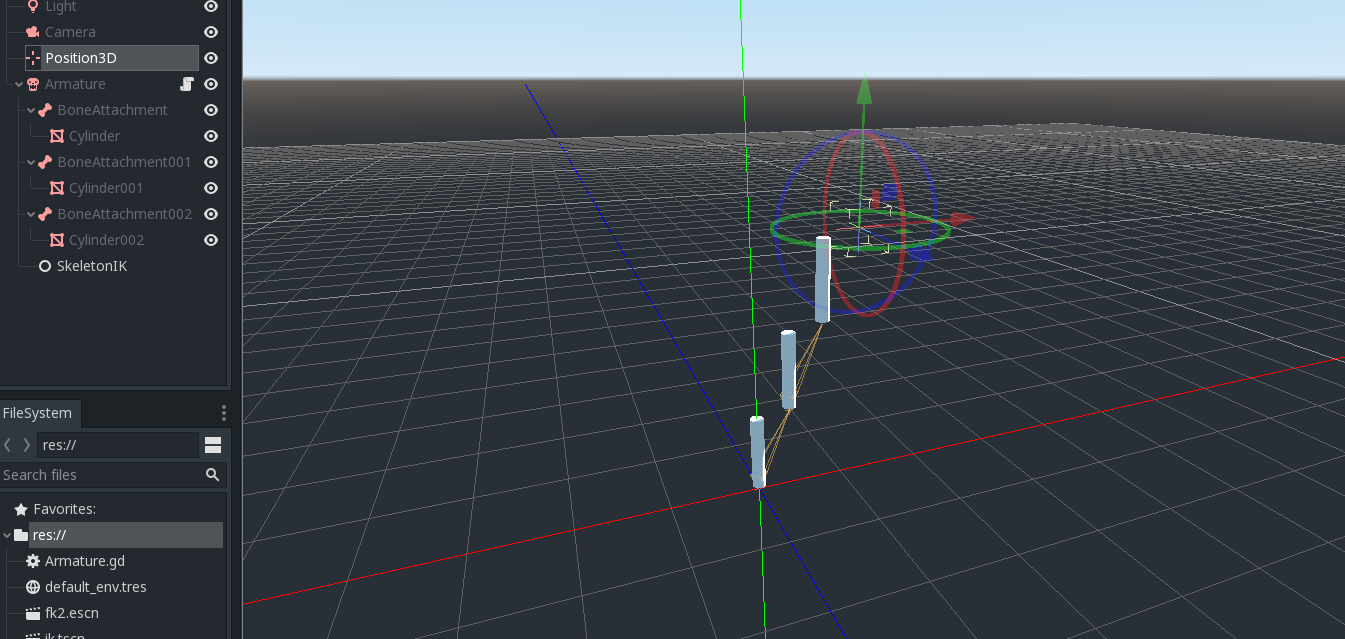
Important, the target must be outside the chain otherwise it start to follow itself.
Hope that it helps
AndreaCatania
on 10 Apr 2019
Thanks.
Although this is simple but not documented, in order to make IK work, the "Play IK" button must be enabled ...
This way, I was able to make it work by moving the "Position3D", manually in the editor.
However, I wanted to replicate this within GDScript:
extends Spatial

func _physics_process(delta):
    $Position3D.translate(Vector3(-delta, 0, 0))
But nothing happens...
What am I missing?
rogeriodec
on 10 Apr 2019
You have to start the IK by calling the start function on the IK node https://github.com/godotengine/godot/blob/master/scene/animation/skeleton_ik.cpp#L390
AndreaCatania
on 11 Apr 2019
Great!
func _ready():
    $Armature/SkeletonIK.start()

func _physics_process(delta):
    $Position3D.translate(Vector3(-delta, 0, 0))
It solves the problem.
Now, for all these tricks to be accessible to users, it would be interesting a tutorial on how to create an IK, from Blender to Godot, with a simple structure, like mine, including several code examples and tips.
rogeriodec
on 11 Apr 2019
@Calinou Where is a bug in here? I don't think this issue should be open anymore. The link in question was updated, it seems. The discussion that followed has nothing to do with docs and ended almost a year ago :)
And if this is a call for a tutorial on the inverse kinematic in Godot, this is not clear from neither title nor OP. But then it's not a bug, is it?
 pycbouh
on 13 Mar 2020
pycbouh
on 13 Mar 2020
@pycbouh Indeed, I think this issue can now be considered solved.
 Calinou
on 13 Mar 2020
Calinou
on 13 Mar 2020
Related issues
 jcmonkey
·
4Comments
jcmonkey
·
4Comments
 youreperfect
·
3Comments
youreperfect
·
3Comments
 clabe45
·
4Comments
clabe45
·
4Comments
 stsewd
·
3Comments
stsewd
·
3Comments
 tavurth
·
3Comments
tavurth
·
3Comments