Dear GNS3 Dev Team!
I'm contacting You because I would like to submit a new feature request for GNS3. I have done a quick check and find similar old unanswered questions.
Would it be possible to install/upgrade a newer QEMU version to be used?
The GNS3 default install contains only QEMU versions: 3.1.0 & 2.11.0, which are relatively an old version. For example, in my case with Juniper vSRX 15.0 and higher version, works correctly (i.e. boot takes only 5-10 min < not 1-1,5 hour) only with QEMU 4.0.0 or higher.
I've tried patch QEMU by myself following that: https://github.com/GNS3/gns3-gui/issues/2720 and https://github.com/GNS3/gns3-server/issues/1655. But without result.
VMware WS 15.5.6: GNS3 VM: v2.2.13
Kind Regards,
Bolbie
 bolbie
All 11 comments
Hi Dev team,
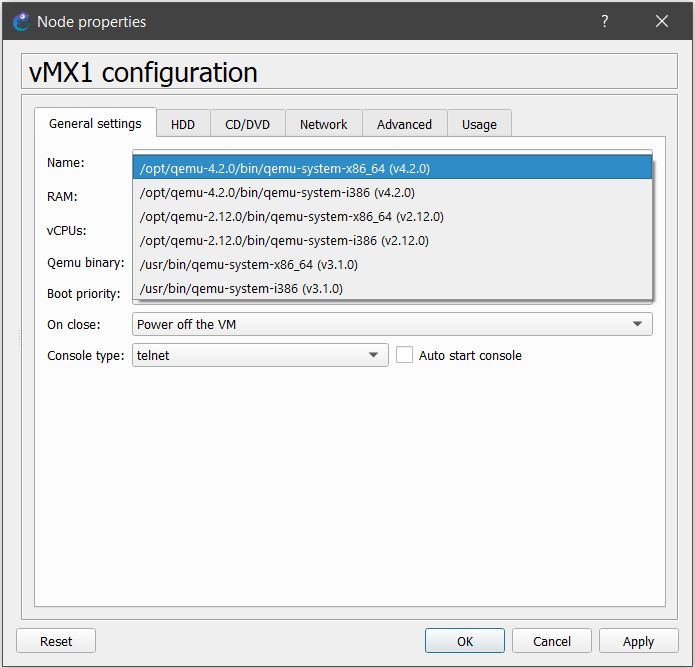
If possible, could we have these versions available in parallel, so we can choose the most appropriate for each device?
This is already supported by the GNS3 GUI following the instructions below:
https://github.com/GNS3/gns3-gui/issues/2720#issuecomment-466390317
And then updating the variable Environment with the new paths in /lib/systemd/system/gns3.service
I usually keep versions 2.x, 3.x, and 4.x in my GNS3VM, but the last step has to be repeated every time GNS3VM is updated.
 rpcsp
on 4 Oct 2020
rpcsp
on 4 Oct 2020
I usually keep versions 2.x, 3.x, and 4.x in my GNS3VM, but the last step has to be repeated every time GNS3VM is updated.
I am going to try to fix this for the next release.
 grossmj
on 8 Oct 2020
grossmj
on 8 Oct 2020
That will be great. Thanks!
rpcsp
on 17 Oct 2020
@rpcsp I would recommend to update /etc/environment to add your paths. This file shouldn't be overwritten after an upgrade.
Please let me know if this works for you.
Thanks.
grossmj
on 27 Oct 2020
Ok, I just tried that, but this caused another issue. Even though I can see the additional paths in $PATH when I connect to the server via ssh, the GNS3 GUI only finds the pre-installed qemu in /usr/bin. It seems GNS3 running as a service does not read /etc/environment by default.
But I found a possible solution. After adding the line below to /lib/systemd/system/gns3.service, GNS3 recognizes the additional qemu versions correctly:
EnvironmentFile=/etc/environment
If this line could be added permanently to gns3.service, then the issue with upgrades would be fixed.
rpcsp
on 27 Oct 2020
Good point. Do you know what is the default behavior if both the Environment and EnvironmentFile variables are configured?
grossmj
on 28 Oct 2020
I have added EnvironmentFile only.
grossmj
on 2 Nov 2020
Just saw your messages. I upgraded to 2.2.16 and all previously installed Qemu versions are available from the GUI without additional file modifications. Thanks!
rpcsp
on 8 Nov 2020
Hi :)
Did the same, and it works thanks!
I did find that after compiling the additional qemu versions the permissions and owner for /dev/kvm change to root:root and 600 instead of root:kvm and 660. it made a permission denied
I can fix it manually but it won't survive a reboot
any suggestions?
 SashaMe
on 8 Nov 2020
SashaMe
on 8 Nov 2020
Hi,
To change the permissions, you must edit /lib/udev/rules.d/60-qemu-system-common.rules
Otherwise, best is to make sure your username is part of the KVM group: sudo usermod -aG kvm <username>
grossmj
on 9 Nov 2020
I don't have that file for some reason,
I guess it was removed compiling QEMU 5.0.1, not sure why.
anyway, recreating the file with the original content resolved the issue.
thanks
SashaMe
on 9 Nov 2020
Related issues
 SayFireworks
·
6Comments
SayFireworks
·
6Comments
 adosztal
·
6Comments
adosztal
·
6Comments
 SairusCZ
·
6Comments
SairusCZ
·
6Comments
 n3oxmind
·
5Comments
n3oxmind
·
5Comments
 jingle0927
·
5Comments
jingle0927
·
5Comments
Most helpful comment
Hi Dev team,
If possible, could we have these versions available in parallel, so we can choose the most appropriate for each device?
This is already supported by the GNS3 GUI following the instructions below:
https://github.com/GNS3/gns3-gui/issues/2720#issuecomment-466390317
And then updating the variable Environment with the new paths in /lib/systemd/system/gns3.service
I usually keep versions 2.x, 3.x, and 4.x in my GNS3VM, but the last step has to be repeated every time GNS3VM is updated.