Gns3-gui: [1.5.3/2.0] SuperPutty is missing in all-in-one Windows installers
Hi,
I just wanted to report that SuperPutty is missing in all-in-one installers for Windows [1.5.3/2.0.0xx]. However, it is sill advertised in GNS3 GUI as "included".
I always have to extract it from older GNS3 packages to get SuperPutty.
Sairus
 SairusCZ
All 6 comments
Sairus,
How can I extract and get it to work version 2.0? I hate it is advertised
but not available and I rather have my devices in a tab window...easier to
on the eyes...
Thanks,
KevA
On Mon, Mar 13, 2017 at 10:15 PM, sairuscz notifications@github.com wrote:
Hi,
I just wanted to report that SuperPutty is missing in all-in-one
installers for Windows [1.5.3/2.0.0xx]. However, it is sill advertised in
GNS3 GUI as "included".I always have to extract it from older GNS3 packages to get SuperPutty.
Sairus
—
You are receiving this because you are subscribed to this thread.
Reply to this email directly, view it on GitHub
https://github.com/GNS3/gns3-gui/issues/1931, or mute the thread
https://github.com/notifications/unsubscribe-auth/AQ8qz1kkK2N-dnwvrkipxvrmgcGLPjlSks5rlfhHgaJpZM4McC5n
.
 KeVI121
on 14 Mar 2017
KeVI121
on 14 Mar 2017
Where did you see Super Putty is included? We need to fix that information.
We no longer ship Super Putty because it's not working well on Windows 10 (crash for some users) and create too much trouble.
 noplay
on 14 Mar 2017
noplay
on 14 Mar 2017
Oh, I see. I was not aware it was removed due to issues. I have been using it on Windows 10 since it was released and it never crashed or caused any issues. The only problem is that users need to install older .NET 3.5. Windows will however download it for the user. It is also included on Win10 DVD.
This is taken from GNS3 200RC1 on Windows 2016.
 .
.
Would you consider putting SupperPutty back? I have been using it for years with GNS3 as it is the best free multi-tab terminal emulator.
Here is how to make it work with Windows 10 and GNS3 RC1 (I just tested it on a fresh VM):
1)Install Windows 10
2)Install .NET Framework 3.5
a) Press “Windows Logo” + “R” keys on the keyboard.
b) Type “appwiz.cpl” in the “Run” command box and press “ENTER”.
c) In the “Programs and Features” window, click on the link “Turn Windows features on or off”.
d) Check if the “.NET Framework 3.5 (includes .NET 2.0 and 3.0)” option is available in it.
e) If yes, then enable it and then click on “OK”.
f)If you have Windows 10 DVD inserted, it will be installed from it offline. Otherwise you will be prompted to download it.
3)Download the latest SuperPutty https://github.com/jimradford/superputty/releases/download/1.4.0.8/SuperPuTTY-1.4.0.8.zip and extract it directly to C:\Program Files\GNS3 .
4)You can configure SuperPutty manually according to your needs:
a. Start SuperPutty and press F2
b. Specify putty.exe location as C:\Program Files\GNS3\putty.exe
c. Specify Settings folder as C:\Program Files\GNS3\
d. GUI tab > Tab Text: Dynamic
e. Advanced tab > Select "Only allow single instance of SuperPutty to run"
f. Advanced tab> Uncheck "automatically check for updates"
4)(Alternative) Or just copy the below config file to %USERPROFILE% folder and remove the .txt extension.
SuperPuTTY.settings.txt
5)In GNS3 2.0 go to Edit >Preferences > General >
Console Applications > Edit > Select SuperPutty from the list.
the below predefined settings will work just fine.
SuperPutty.exe -telnet "%h -P %p -wt \"%d\""
SairusCZ
on 14 Mar 2017
Thanks I fixe the list.
The problem is it too much complicated to install. And we also have have report that it's crash.
We are looking for alternative but for the moment we don't have good free solution. All solution build on top of putty are hugly hack.
Perhaps one day this will be a valid solution:
https://hyper.is/
noplay
on 14 Mar 2017
I followed the directions above and got SuperPutty working as well in GNS3
v2.0b4. The only difference is I am using Windows 7 64 bit SP1 with .NET
3.51. I did not see .NET 2.0 and 3.0 as option so I tried to install 3.5
but nothing happened when I launced the .exe file so i just continued with
rest of the set. I choose SuperPutty for my console application in GNS3 and
it works. Only issue I have with it (as well as in earlier versions of
GNS3) is when if I have several devices in my topology and click on the
console key to launch the console for all my devices, I get an error that
SuperPutty stopped working. Maybe 1 or 2 device console would open and I
then have to right click on the devices that the console window didn't open
for and select console. I don't mind having to do this at all as long as I
can get all my devices in tabs I am happy. ☺
Thank you sairuscz and GNS3 team.
On Tue, Mar 14, 2017 at 6:55 AM, sairuscz notifications@github.com wrote:
Oh, I see. I was not aware it was removed due to issues. I have been using
it on Windows 10 since it was released and it never crashed or caused any
issues. The only problem is that users need to install older .NET 3.5.
Windows will however download it for the user. It is also included on Win10
DVD.This is taken from GNS3 200RC1 on Windows 2016.
[image: superputty]
https://cloud.githubusercontent.com/assets/24818591/23892581/4f19bace-08ef-11e7-933d-cfde00b3fbe6.JPG
.Would you consider putting SupperPutty back? I have been using it for
years with GNS3 as it is the best free multi-tab terminal emulator.Here is how to make it work with Windows 10 and GNS3 RC1 (I just tested it
on a fresh VM):
1)Install Windows 102)Install .NET Framework 3.5
a) Press “Windows Logo” + “R” keys on the keyboard.
b) Type “appwiz.cpl” in the “Run” command box and press “ENTER”.
c) In the “Programs and Features” window, click on the link “Turn Windows
features on or off”.
d) Check if the “.NET Framework 3.5 (includes .NET 2.0 and 3.0)” option is
available in it.
e) If yes, then enable it and then click on “OK”.
f)If you have Windows 10 DVD inserted, it will be installed from it
offline. Otherwise you will be prompted to download it.3)Download the latest SuperPutty https://github.com/jimradford/
superputty/releases/download/1.4.0.8/SuperPuTTY-1.4.0.8.zip and extract
it directly to C:\Program Files\GNS3 .4)You can configure SuperPutty manually according to your needs:
a. Start SuperPutty and press F2
b. Specify putty.exe location as C:\Program Files\GNS3\putty.exe
c. Specify Settings folder as C:\Program Files\GNS3
d. GUI tab > Tab Text: Dynamic
e. Advanced tab > Select "Only allow single instance of SuperPutty to run"
f. Advanced tab> Uncheck "automatically check for updates"4)(Alternative) Or just copy the below config file to %USERPROFILE% folder
and remove the .txt extension.
SuperPuTTY.settings.txt
https://github.com/GNS3/gns3-gui/files/840953/SuperPuTTY.settings.txt5)In GNS3 2.0 go to Edit >Preferences > General >
Console Applications > Edit > Select SuperPutty from the list.
the below predefined settings will work just fine.
SuperPutty.exe -telnet "%h -P %p -wt \"%d\""—
You are receiving this because you commented.
Reply to this email directly, view it on GitHub
https://github.com/GNS3/gns3-gui/issues/1931#issuecomment-286387113, or mute
the thread
https://github.com/notifications/unsubscribe-auth/AQ8qzyW7A6jXXRhGARvgt5fmPo7Sv1okks5rlnIcgaJpZM4McC5n
.
KeVI121
on 15 Mar 2017
@noplay - Latest Release of GNS3 2.1.1.11 clean install of client (using VM as server) stilll lists this in console options, which IMHO is great!
@sairuscz - Thank you for getting me on track (forced me to learn a bit on the cli execution of supperputty). Also your Documentation is on point.
I was able to get the DPI scaling issue resolved w/n WIN10. For those unaware sairucscz provided a bullet proof workaround; however WIN10 and high resolution screens causes issues. The initial launch of supperputty you can watch the DPI scaling go out of control winding up with a large font, initially.
As [email protected] states in superputty forum you had to right click the tab, choose change setttings, and click apply to correct.
[email protected] in same thread tried sniffing out the issue leaving suggestion to disable the scaling for the supperputty.exe. @exjmc on thread gave their solution, which as [email protected] stated it is ugly, and it was the truth.
On another thread people were looking to change the default font color/size. This is easily resolved by tuning the default profile for putty to your preferences.
To consolodate I am reposting @sairuscz 's instructions and adding on @exjmc's suggestion accompanied w/ my change (happen to be on same tab) which gives you a fully working ver of supperputty w/n GNS3.
Caveat: this does slow the load time of superputty when executed with-in GNS3 noticably but not enough to bother me, as I dont have to correct the DPI mannually anymore (it was driving me up a wall)
********BEGIN sairucz's instructions*************
This is taken from GNS3 200RC1 on Windows 2016.
superputty .
Would you consider putting SupperPutty back? I have been using it for years with GNS3 as it is the best free multi-tab terminal emulator.
Here is how to make it work with Windows 10 and GNS3 RC1 (I just tested it on a fresh VM):
1)Install Windows 10
2)Install .NET Framework 3.5
a) Press “Windows Logo” + “R” keys on the keyboard.
b) Type “appwiz.cpl” in the “Run” command box and press “ENTER”.
c) In the “Programs and Features” window, click on the link “Turn Windows features on or off”.
d) Check if the “.NET Framework 3.5 (includes .NET 2.0 and 3.0)” option is available in it.
e) If yes, then enable it and then click on “OK”.
f)If you have Windows 10 DVD inserted, it will be installed from it offline. Otherwise you will be prompted to download it.
3)Download the latest SuperPutty https://github.com/jimradford/superputty/releases/download/1.4.0.8/SuperPuTTY-1.4.0.8.zip and extract it directly to C:\Program Files\GNS3 .
4)You can configure SuperPutty manually according to your needs:
a. Start SuperPutty and press F2
b. Specify putty.exe location as C:\Program Files\GNS3\putty.exe
c. Specify Settings folder as C:\Program Files\GNS3
d. GUI tab > Tab Text: Dynamic
e. Advanced tab > Select "Only allow single instance of SuperPutty to run"
f. Advanced tab> Uncheck "automatically check for updates"
4)(Alternative) Or just copy the below config file to %USERPROFILE% folder and remove the .txt extension.
SuperPuTTY.settings.txt
5)In GNS3 2.0 go to Edit >Preferences > General >
Console Applications > Edit > Select SuperPutty from the list.
the below predefined settings will work just fine.
SuperPutty.exe -telnet "%h -P %p -wt \"%d\""
*****Begin Fix for DPI Scaling on High Res monitors & Font/Color*******
- Make sure you explictly state which superputty.exe you are using (I say this as I have 2 places it is
installed on same PC.
- installed w/ GNS3
- had it installed (standalone) on local disk as well - Right click the supperputty.exe and goto compatability tab
- Left click "Change high DPI settings"
- configure per snippet
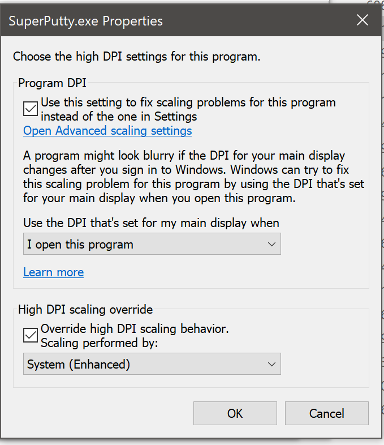
- configue putty default profile to your liking (msg me if you need help with this)
End Result is completly working/functional supperputty we have all come to love. Enjoy! and thanks to @sairuscz for documenting the begining of this journey.

 HRC4Prison
on 27 Oct 2018
HRC4Prison
on 27 Oct 2018
Related issues
 syndgr
·
8Comments
syndgr
·
8Comments
 eliassal
·
9Comments
eliassal
·
9Comments
 AJNOURI
·
8Comments
AJNOURI
·
8Comments
 Raizo62
·
8Comments
Raizo62
·
8Comments
 grossmj
·
5Comments
grossmj
·
5Comments