Gnome-shell-extension-gsconnect: Nautilus integration: duplicated context-menu entry
Hi!
Look at the screen:
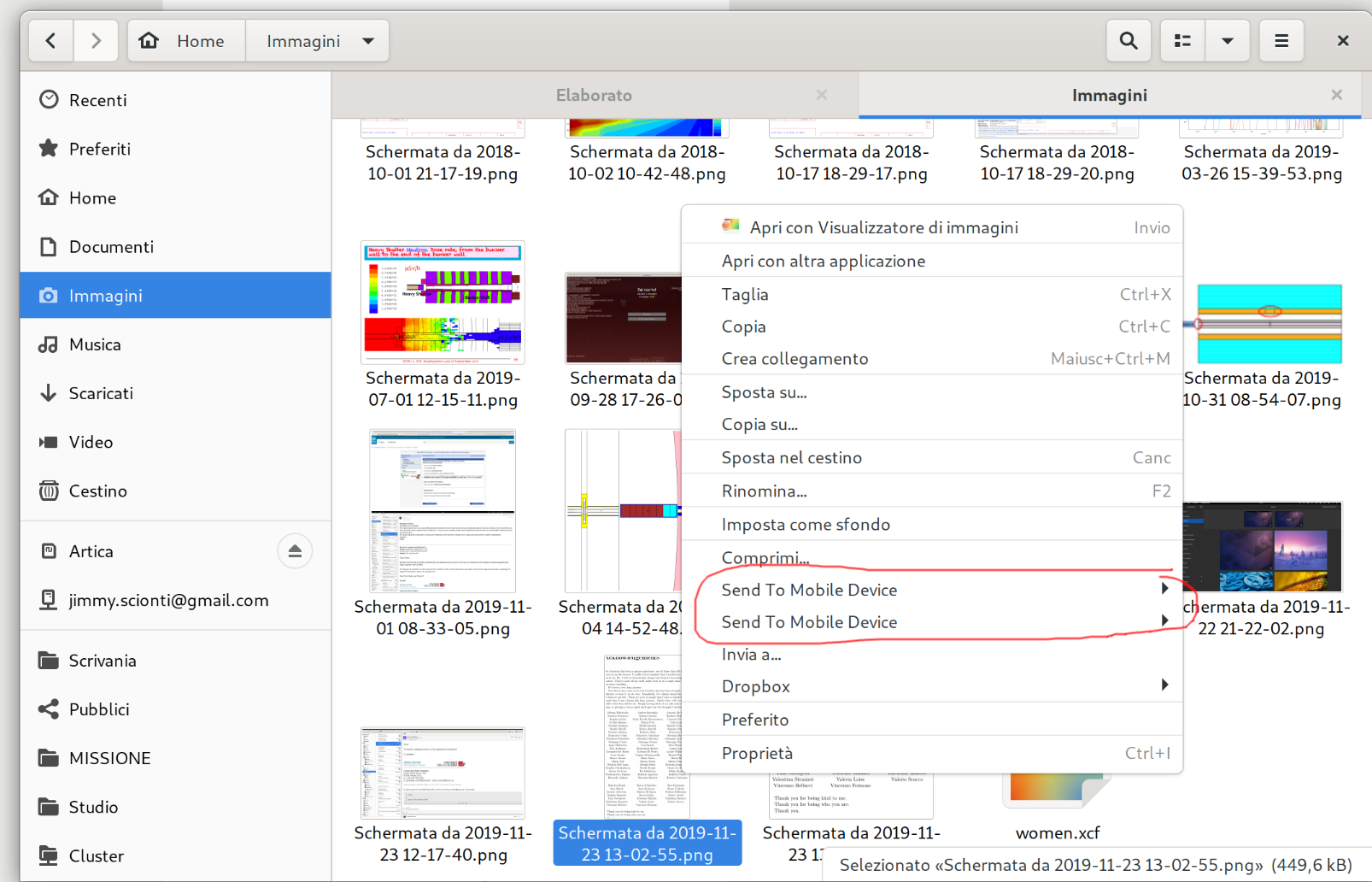
I have the same context-menu entry twice. Can I get some help to fix this?
By the way: it's not localized in my language. 🤔️
Tested on gnome-shell 3.34.1, wayland session, nautilus 3.34.1, gsconnect 28, fedora 31.
(I want the "Jimmy" tag on this issue! 😄️)
 amivaleo
All 11 comments
I have the same context-menu entry twice. Can I get some help to fix this?
Do you have more context for why this is happening? If you restart Nautilus and run it in a terminal are there any errors?
$ nautilus -q
$ nautilus
By the way: it's not localized in my language.
Has this always been the case, or only since this bug appeared?
 andyholmes
on 24 Nov 2019
andyholmes
on 24 Nov 2019
I get the error warning over and over. I believe it's not related to gsconnect:
$ nautilus
Initializing nautilus-dropbox 2019.02.14

** (org.gnome.Nautilus:3174): WARNING **: 10:22:54.583: connect() failed

** (org.gnome.Nautilus:3174): WARNING **: 10:22:54.583: connect() failed

** (org.gnome.Nautilus:3174): WARNING **: 10:22:54.583: connect() failed

** (org.gnome.Nautilus:3174): WARNING **: 10:22:54.583: connect() failed

** (org.gnome.Nautilus:3174): WARNING **: 10:22:54.583: connect() failed

** (org.gnome.Nautilus:3174): WARNING **: 10:22:54.583: connect() failed

** (org.gnome.Nautilus:3174): WARNING **: 10:22:54.583: connect() failed

** (org.gnome.Nautilus:3174): WARNING **: 10:22:54.583: connect() failed

** (org.gnome.Nautilus:3174): WARNING **: 10:22:54.584: connect() failed

** (org.gnome.Nautilus:3174): WARNING **: 10:22:54.584: connect() failed

** (org.gnome.Nautilus:3174): WARNING **: 10:22:54.584: connect() failed

** (org.gnome.Nautilus:3174): WARNING **: 10:22:54.584: connect() failed

** (org.gnome.Nautilus:3174): WARNING **: 10:22:54.584: connect() failed

** (org.gnome.Nautilus:3174): WARNING **: 10:22:54.584: connect() failed

** (org.gnome.Nautilus:3174): WARNING **: 10:22:55.537: connect() failed

** (org.gnome.Nautilus:3174): WARNING **: 10:22:56.452: connect() failed

** (org.gnome.Nautilus:3174): WARNING **: 10:22:57.453: connect() failed

** (org.gnome.Nautilus:3174): WARNING **: 10:22:58.452: connect() failed

** (org.gnome.Nautilus:3174): WARNING **: 10:22:59.453: connect() failed

** (org.gnome.Nautilus:3174): WARNING **: 10:23:00.454: connect() failed

** (org.gnome.Nautilus:3174): WARNING **: 10:23:01.453: connect() failed

** (org.gnome.Nautilus:3174): WARNING **: 10:23:02.114: connect() failed

** (org.gnome.Nautilus:3174): WARNING **: 10:23:02.114: connect() failed

** (org.gnome.Nautilus:3174): WARNING **: 10:23:02.453: connect() failed

** (org.gnome.Nautilus:3174): WARNING **: 10:23:03.452: connect() failed

** (org.gnome.Nautilus:3174): WARNING **: 10:23:04.453: connect() failed

** (org.gnome.Nautilus:3174): WARNING **: 10:23:05.453: connect() failed

** (org.gnome.Nautilus:3174): WARNING **: 10:23:06.453: connect() failed

** (org.gnome.Nautilus:3174): WARNING **: 10:23:07.453: connect() failed

** (org.gnome.Nautilus:3174): WARNING **: 10:23:08.453: connect() failed

** (org.gnome.Nautilus:3174): WARNING **: 10:23:09.453: connect() failed

** (org.gnome.Nautilus:3174): WARNING **: 10:23:10.452: connect() failed

** (org.gnome.Nautilus:3174): WARNING **: 10:23:11.453: connect() failed

** (org.gnome.Nautilus:3174): WARNING **: 10:23:12.453: connect() failed

** (org.gnome.Nautilus:3174): WARNING **: 10:23:13.453: connect() failed

** (org.gnome.Nautilus:3174): WARNING **: 10:23:14.453: connect() failed

** (org.gnome.Nautilus:3174): WARNING **: 10:23:15.453: connect() failed

** (org.gnome.Nautilus:3174): WARNING **: 10:23:16.453: connect() failed

** (org.gnome.Nautilus:3174): WARNING **: 10:23:17.452: connect() failed

** (org.gnome.Nautilus:3174): WARNING **: 10:23:17.598: connect() failed

** (org.gnome.Nautilus:3174): WARNING **: 10:23:17.598: connect() failed

** (org.gnome.Nautilus:3174): WARNING **: 10:23:18.452: connect() failed

** (org.gnome.Nautilus:3174): WARNING **: 10:23:19.453: connect() failed

** (org.gnome.Nautilus:3174): WARNING **: 10:23:20.453: connect() failed

** (org.gnome.Nautilus:3174): WARNING **: 10:23:21.452: connect() failed

** (org.gnome.Nautilus:3174): WARNING **: 10:23:22.473: connect() failed

** (org.gnome.Nautilus:3174): WARNING **: 10:23:23.318: connect() failed

** (org.gnome.Nautilus:3174): WARNING **: 10:23:23.318: connect() failed

** (org.gnome.Nautilus:3174): WARNING **: 10:23:23.339: connect() failed

** (org.gnome.Nautilus:3174): WARNING **: 10:23:23.339: connect() failed

** (org.gnome.Nautilus:3174): WARNING **: 10:23:23.453: connect() failed

** (org.gnome.Nautilus:3174): WARNING **: 10:23:24.453: connect() failed

** (org.gnome.Nautilus:3174): WARNING **: 10:23:25.453: connect() failed

** (org.gnome.Nautilus:3174): WARNING **: 10:23:26.453: connect() failed

** (org.gnome.Nautilus:3174): WARNING **: 10:23:27.454: connect() failed

** (org.gnome.Nautilus:3174): WARNING **: 10:23:28.452: connect() failed

** (org.gnome.Nautilus:3174): WARNING **: 10:23:29.454: connect() failed

** (org.gnome.Nautilus:3174): WARNING **: 10:23:30.454: connect() failed

** (org.gnome.Nautilus:3174): WARNING **: 10:23:31.452: connect() failed

** (org.gnome.Nautilus:3174): WARNING **: 10:23:32.454: connect() failed

** (org.gnome.Nautilus:3174): WARNING **: 10:23:33.453: connect() failed

** (org.gnome.Nautilus:3174): WARNING **: 10:23:34.453: connect() failed

** (org.gnome.Nautilus:3174): WARNING **: 10:23:35.453: connect() failed

** (org.gnome.Nautilus:3174): WARNING **: 10:23:36.453: connect() failed
Has this always been the case, or only since this bug appeared?
It has never been localized, ever.
amivaleo
on 24 Nov 2019
I've fixed the translations, but I'm not sure about the double menu entry since I can't reproduce that. I think you're right about the error not being related to GSConnect.
Maybe there is another copy of nautilus-gsconnect.py installed somewhere? Maybe try running locate nautilus-gsconnect.py. There should be one in the extension directory and a link to it in the Nautilus extensions directory, although locate probably won't show the symbolic link.
andyholmes
on 24 Nov 2019
I've fixed the translations
Thanks! 🎉️
Uhm...
$ locate nautilus-gsconnect.py
/home/jimmy/.local/share/gnome-shell/extensions/[email protected]/nautilus-gsconnect.py
/home/jimmy/.local/share/nautilus-python/extensions/nautilus-gsconnect.py
/usr/share/nautilus-python/extensions/nautilus-gsconnect.py
The last one is the culprit. It looks like you probably installed GSConnect as an RPM somehow.
andyholmes
on 24 Nov 2019
I brutally removed that (sudo rm...).
No double entry anymore. I definitely messed up the installation some month ago. It definitely sounds like something I'd do. :D
Thank you. Fixed.
amivaleo
on 24 Nov 2019
I brutally removed that (sudo rm...).
Too late now, I guess, but a sudo rpm -qf /usr/share/nautilus-python/extensions/nautilus-gsconnect.py would've told you what RPM owned that file, if any.
RPM is _not_ in the habit of leaving files behind on uninstall. (In the few cases it does, it renames them with an .rpmsave extension.) So if that was there, then either it was part of an RPM that's _still_ installed (and is now in a partially broken state due to the missing file), or you installed it yourself at some point with either a manual sudo cp or a sudo ninja install.
The package will be called gnome-shell-extension-gsconnect, if it's still installed it might make sense to remove the rest of it, since you're running the extension out of your user directory anyway.
Otherwise, next time the package updates it's going to recreate that file.
 ferdnyc
on 24 Nov 2019
ferdnyc
on 24 Nov 2019
I'd definitely love to have some time to spend with both of you, in the same workplace. 😍️
You're really friendly and willing to help!
I did
$ sudo dnf remove gnome-shell-extension-gsconnect
and it successfully found and removed the package as well as nautilus dependencies (nautilus-python and nautilus-gsconnect)
The trouble now is that I don't have the menu-entry at all! 😅️
I've just tried to quit (nautilus -q) and restart nautilus. I also tried to reinstall gsconnect from EGO/website.
amivaleo
on 24 Nov 2019
Oh. Oh, no, you need nautilus-python for the extension to work. Reinstall that one. :laughing:
ferdnyc
on 24 Nov 2019
(It must've been automatically installed when you installed the gsconnect package, originally. DNF is pretty aggressive about autoremoving packages it thinks are unused, if they were originally installed as dependencies. It doesn't have any way of knowing that you had a plugin in your user dir that's still using it.)
...Once you reinstall it explicitly, it'll be marked as user-installed and no longer subject to the autoremove rules.
ferdnyc
on 24 Nov 2019
Done.
Everything's ok now.
Thanks. :)
amivaleo
on 24 Nov 2019
Related issues
 sk0gen
·
4Comments
sk0gen
·
4Comments
 didierga
·
5Comments
didierga
·
5Comments
 rugk
·
4Comments
rugk
·
4Comments
 nikolowry
·
4Comments
nikolowry
·
4Comments
 Noobsai
·
4Comments
Noobsai
·
4Comments
Most helpful comment
Done.
Everything's ok now.
Thanks. :)