Gnome-shell-extension-gsconnect: Proposed re-ordering of items in the system-menu
Hi!
This is how the gsconnect-items are displayed in the system-menu:
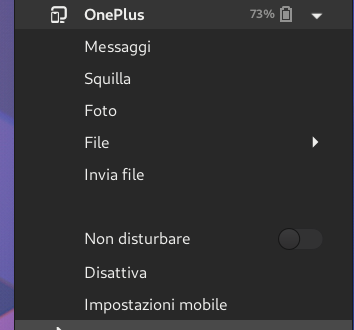
I translate them:
- Messages
- Ring
- Photos
- Files >
- Send file
To me, they could ordered in a more convenient way, according to their "meaning".
This is what I suggest:
- Ring
- Messages
- Photos
- Send file
- Files >
I pretend the "Jimmy" label for this "issue", because it is a veeeery pedantic suggestion! ☺
 amivaleo
All 21 comments
Hmm. Prioritizing "Ring" doesn't make a lot of sense to me, it's a function I suspect only a tiny percentage of users _ever_ use even once. Messaging as the first item I can understand, as it's one of the extension's more popular features. I'd probably put either Photo or Share next, and stick either Ring or Mount way at the bottom (only because Mount is another small-percentage feature, _and_ it's the one that alters the menu itself).
...The biggest issue, though, is that I suspect most users are used to the menu in the order it's currently in, and arbitrarily shuffling it around on them might cause some annoyance. Nothing worse than when some software just decides to move everything around simply because it can.
 ferdnyc
on 6 Nov 2019
ferdnyc
on 6 Nov 2019
I feel like that "Ring" and "Files/Mount" are somewhat misplaced. "Ring" in particular, also for the reason you said: it's almost never used. And all the others entries belong to the same context, in some sense.
Nothing worse than when some software just decides to move everything around simply because it can.
Yep, definetely. That's definitely a point, indeed.
🤔
I think this "issue" is maybe way too much pedantic maybe.
Gonna close this. 💪
Thank you, Frank, for being well-disposed at any time. ^_^
amivaleo
on 6 Nov 2019
FYI, you can actually re-order these by changing the dconf key for menu items:
https://github.com/andyholmes/gnome-shell-extension-gsconnect/blob/9b54aad174f97a012d8abe8fded8b377bee9aa71/data/org.gnome.Shell.Extensions.GSConnect.gschema.xml#L54-L56
This was eventually intended to be exposed in some menu editor, it's just a bit complicated because some items are dynamic.
Nothing worse than when some software just decides to move everything around simply because it can
I think we've had the same ordering since mconnect days :D
 andyholmes
on 6 Nov 2019
andyholmes
on 6 Nov 2019
Settings! I love settings.
But... Can't find that key in dconf-editor. 🤔
amivaleo
on 7 Nov 2019
Mmm, I tried creating it...
$ dconf write /org/gnome/shell/extensions/gsconnect/device/$DEVICE_ID/menu-actions \
'["sms", "share", "photo", "ring", "mount"]'
...It was not effective. (I previously tried versions containing both "commands" and "runcommand", since "commands" from the schema file didn't look right to me — and I noticed that item never showed up, though I assume it's not valid for phones... but they were all equally ineffective.)
ferdnyc
on 7 Nov 2019
Oh, it's not really setup to react to changes, so you'll have to restart gsconnect:
touch ~/.local/share/gnome-shell/extensions/[email protected]/service/daemon.js
commands is correct, because that's the name of the GAction. It's just coincidence that some GActions have the same name as their plugin, although I could see how that would be confusing.
Also, it's worth pointing out that the only actions that will work are those that take no arguments. Eg. keyboard will work but not sendNotification. commands is trickier because it's one of those dynamic items I mentioned.
clipboardPullclipboardPushkeyboardsmsmountmuteCallphotoringshareunmount
andyholmes
on 7 Nov 2019
Mmm, I tried creating it...
$ dconf write /org/gnome/shell/extensions/gsconnect/device/$DEVICE_ID/menu-actions \ '["sms", "share", "photo", "ring", "mount"]'...It was not effective. (I previously tried versions containing both
"commands"and"runcommand", since"commands"from the schema file didn't look right to me — and I noticed that item never showed up, though I assume it's not valid for phones... but they were all equally ineffective.)
When I give that command, I get
error: dconf key must not contain two consecutive slashes
Usage:
dconf write KEY VALUE
Write a new value to a key
Arguments:
KEY A key path (starting, but not ending with '/')
VALUE The value to write (in GVariant format)
🤔
amivaleo
on 7 Nov 2019
@amivaleo Did you replace $DEVICE_ID with your device ID? :wink:
Sounds like you left it unsubstituted, and since it's not a real variable (just a placeholder I made up) it would expand to the empty string, creating the two consecutive slashes.
ferdnyc
on 9 Nov 2019
Oh, it's not really setup to react to changes, so you'll have to restart gsconnect:
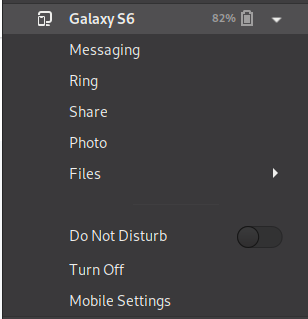
Yeah, nope, I'd tried that. At one point I think I even manually killed the gjs process and restarted it. I was going to reevaluate after a system reboot (still trying to wind everything down so I can do that), but I just tried the touch-reset again. And yet, stubbornly...
$ dconf read /org/gnome/shell/extensions/gsconnect/device/2ef99c50e6e759f8/menu-actions
['sms', 'share', 'photo', 'ring', 'mount']
ferdnyc
on 9 Nov 2019
(Maybe I created the key in the wrong place? It _looked_ like it should be a per-device setting, from the XML, but I may have gotten that wrong.)
ferdnyc
on 9 Nov 2019
Hmm, worked for me:
$ dconf write /org/gnome/shell/extensions/gsconnect/device/6ff41127f43b141f/menu-actions "['sms', 'share', 'photo', 'ring', 'mount', 'keyboard']"
$ touch ~/.local/share/gnome-shell/extensions/[email protected]/service/daemon.js
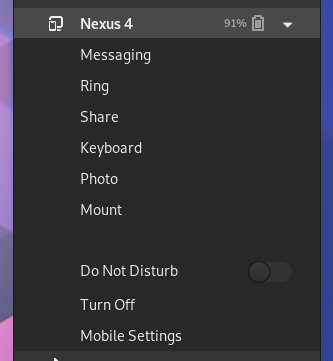
EDIT: looking closer, it looks like your menu is behaving correctly?
andyholmes
on 10 Nov 2019
So photo and mount automatically re-position themselves to the end of the list, regardless?
(Why is Ring second in both of our screenshots, though, when it's not listed second in our action lists? It seems highly resistant to any attempts at repositioning.)
ferdnyc
on 10 Nov 2019
Well, as I said it's not really set up or tested to handle this usage, it's just the basic infrastructure exists since the menu is automatically populated.
andyholmes
on 10 Nov 2019
$DEVICE_ID[...] just a placeholder I made up [...]
C'mon, dude! :( I'm a self-taught geek who doesn't like to geek but who has to geek for living. If I see a bash command, I simply copy&paste it without thinking. 🙈
I'm like an old man with some geek skill. ☺
By the way, I don't know how to find that ID. 😁
amivaleo
on 10 Nov 2019
You should be able to just use tab completion with dconf:
dconf write /org/gnome/shell/gsconnect/device/<tab><tab>...
By the way, I don't know how to find that ID.
And that was exactly why I had to use the placeholder, it's _easily_ obtainable but not very conveniently obtainable, to make it part of the sample commands. You're lucky I didn't just post commands with my own device ID and have you creating useless keys! :wink:
By inspection in dconf-editor is one way. When you're at /org/gnome/shell/extensions/gsconnect/ there's a devices key that holds a list. And if you navigate to the device (_without_ the 's') subfolder inside gsconnect, you'll see a further subfolder for each paired device ID. (Fortunately computer IDs are GUIDs, so they're much longer strings and easily discerned from mobile device IDs.)
Or you could...
$ dconf read /org/gnome/shell/extensions/gsconnect/devices
['2ef99c50e6e759f8']
Edit: Oh, hey, neat, Tab-completion does work as well! Cool.
ferdnyc
on 10 Nov 2019
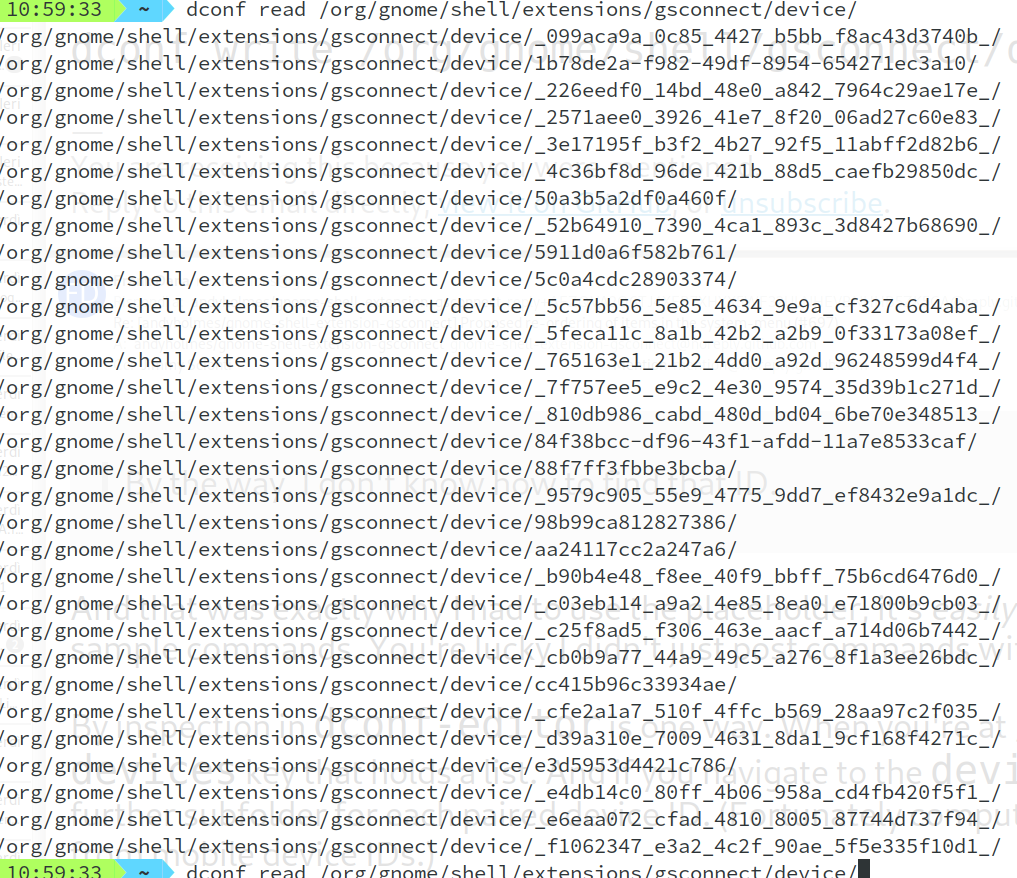
You should be able to just use tab completion with
dconf:dconf write /org/gnome/shell/gsconnect/device/<tab><tab>...
Yeah...
😁
Or you could...
$ dconf read /org/gnome/shell/extensions/gsconnect/devices
['2ef99c50e6e759f8']
That worked! ^_^
Or... At least I got only one ID. Ty guys!
amivaleo
on 10 Nov 2019
Holy _balls_!
You know, this wouldn't be the worst idea ever conceived...
$ dconf dump /org/gnome/shell/extensions/gsconnect/device/[YOUR_ONE_ACTUAL_DEVICE_ID]/ \
 > /tmp/device-settings.txt
$ dconf reset -f /org/gnome/shell/extensions/gsconnect/device/
$ dconf load /org/gnome/shell/extensions/gsconnect/device/[YOUR_ONE_ACTUAL_DEVICE_ID]/ \
 < /tmp/device-settings.txt
Clear away the _astonishing_ amount of cobwebs there.
(Insert standard disclaimers about how I'm not responsible if the world blows up in your face, etc. It _should_ be pretty safe, and realistically the worst case is you lose your device settings and pairing info and have to re-create them. Which would take... what, like 5 minutes tops? :angel: )
ferdnyc
on 10 Nov 2019
Holy balls!
?
Am I irritating? I'm a noisy guy! 😁
YOUR_ONE_ACTUAL_DEVICE_ID
Good! Now I do understand it's not a global variable! :D
Which would take... what, like 5 minutes tops?
No worries. I was used to even reinstall the entire distro because I faced some weird and completely absurd issue some year ago. Then I learned to be a bit smarter and avoid adding any f*king repo I found for ubuntu. 😅 Now I can still break fedora at anytime, but *wisely!
By the way, why should I make such backup of my settings in gsconnect? I already change the order of the entries in the system-menu:
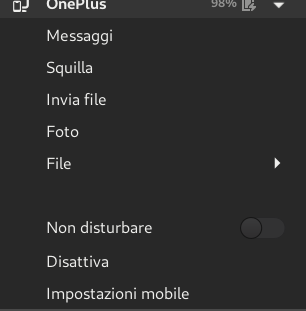
☺
amivaleo
on 10 Nov 2019
(Note: All completely OT...)
Then I learned to be a bit smarter and avoid adding any f**king repo I found for ubuntu. Now I can still break fedora at anytime, but _wisely_!
Yeah, I will give Fedora this: their COPR system of community-maintained (read: "amateur-hour") package repos — and the fact that they're managed both (a) more aggressively, and (b) completely _distinct_ from the "system" package repositories, both official and third-party — beats the _hell_ out of the polluted mess that I've come to view the PPA system as.
Adding additional _system_ repos is explicitly held up as a "risk" action, and maintainers of third-party collections mostly understand that, if they wish to enjoy any sort of "semi-official" status, they're expected to play nice with each other's packages and try very very hard not to cause any ugly conflicts or breakages.
The crazy nonsense packages slapped together by Some Random User who has no clue what they're doing, then promptly forgotten about and never maintained so that it eventually falls into complete disrepair... the ones that are almost _guaranteed_ to cause weird conflicts and unpredictable interactions with the system repo sets... those all get relegated to COPR where the fallout can at least be minimized.
ferdnyc
on 10 Nov 2019
I only had to re-install Fedora once. I installed an unreleased version, I obviously did some bad thing and had some issue with the wifi.
Not a single issue since I re-installed that (and changed the wifi&bt card...).
I like Fedora: pure gnome, without any additional ubuntu-made app that tries to replace other system apps. For example: Ubuntu has a "Update"-something app

It replaces gnome-software update feature.
My OCD couldn't accept that. 😁
That's it with this thread. We've gone way too far from the initial topic.
Thank you both, Frank and Andy, for being so patient, well-disposed and funny. :) I even tend to regret being so noisy with you. 😄
Thanks!
amivaleo
on 10 Nov 2019
Related issues
 mavit
·
6Comments
mavit
·
6Comments
 danieldeng2
·
4Comments
amivaleo
·
4Comments
danieldeng2
·
4Comments
amivaleo
·
4Comments
 didierga
·
5Comments
amivaleo
·
3Comments
didierga
·
5Comments
amivaleo
·
3Comments
Most helpful comment
And that was exactly why I had to use the placeholder, it's _easily_ obtainable but not very conveniently obtainable, to make it part of the sample commands. You're lucky I didn't just post commands with my own device ID and have you creating useless keys! :wink:
By inspection in
dconf-editoris one way. When you're at/org/gnome/shell/extensions/gsconnect/there's adeviceskey that holds a list. And if you navigate to thedevice(_without_ the 's') subfolder insidegsconnect, you'll see a further subfolder for each paired device ID. (Fortunately computer IDs are GUIDs, so they're much longer strings and easily discerned from mobile device IDs.)Or you could...
Edit: Oh, hey, neat, Tab-completion does work as well! Cool.