Gnome-shell-extension-gsconnect: GSconnect fails to connect on startup.
Describe the bug
GSconnect fails to connect on startup.
I had to click refresh every time to connect with device.
Screenshots

System Details (please complete the following information):
- GSConnect version: 27
- Installed from: GNOME Extensions Website
- GNOME/Shell version: 3.34.1
Distro/Release: Arch
- Latest KDE connect from play store.
 jkotra
All 7 comments
looks like duplicate of https://github.com/andyholmes/gnome-shell-extension-gsconnect/issues/685
closing.
jkotra
on 1 Nov 2019
problem still exists in v28.
jkotra
on 2 Nov 2019
@jkotra You may have to refresh the extension one time manually after updating, to launch the updated daemon. After that, it _should_ be fine.
At least, I just restarted my Fedora 30 system (GNOME Shell 3.32.2, granted, not 3.34) with v28 installed, and GSConnect came right up with no intervention on my part.
 ferdnyc
on 2 Nov 2019
ferdnyc
on 2 Nov 2019
I have tried the following after updating to v28:
- Uninstall and Reinstall extension.
- Enable and Disable
- Pair and Unpair.
...None worked.
I have already restarted my PC multiple times, it every time fails to auto connect.
The following is the log when i press refresh button(as shown in gif):
GSConnect Version: 28
GSConnect Install: user
GJS: 15801
XDG_SESSION_TYPE: x11
GDMSESSION: gnome
--------------------------------------------------------------------------------
-- Logs begin at Mon 2019-10-28 22:31:39 IST, end at Sat 2019-11-02 23:37:07 IST. --
Nov 02 23:37:07 dbus-daemon[775]: [session uid=1000 pid=775] Activating service name='org.gnome.Shell.Extensions.GSConnect' requested by ':1.69' (uid=1000 pid=1312 comm="gjs /home/thanos/.local/share/gnome-shell/extensio")
Nov 02 23:37:07 dbus-daemon[775]: [session uid=1000 pid=775] Successfully activated service 'org.gnome.Shell.Extensions.GSConnect'
Nov 02 23:37:07 gjs[2438]: g_variant_new_string: assertion 'string != NULL' failed
Nov 02 23:37:07 dbus-daemon[775]: [session uid=1000 pid=775] Connection :1.96 (uid=1000 pid=2438 comm="gjs /home/thanos/.local/share/gnome-shell/extensio") became a monitor.
Nov 02 23:37:07 dbus-daemon[438]: [system] Activating via systemd: service name='org.freedesktop.hostname1' unit='dbus-org.freedesktop.hostname1.service' requested by ':1.325' (uid=1000 pid=1312 comm="gjs /home/thanos/.local/share/gnome-shell/extensio")
Nov 02 23:37:07 systemd[1]: Starting Hostname Service...
Nov 02 23:37:07 dbus-daemon[438]: [system] Successfully activated service 'org.freedesktop.hostname1'
Nov 02 23:37:07 systemd[1]: Started Hostname Service.
Nov 02 23:37:07 audit[1]: SERVICE_START pid=1 uid=0 auid=4294967295 ses=4294967295 msg='unit=systemd-hostnamed comm="systemd" exe="/usr/lib/systemd/systemd" hostname=? addr=? terminal=? res=success'
Nov 02 23:37:07 kernel: audit: type=1130 audit(1572718027.621:45): pid=1 uid=0 auid=4294967295 ses=4294967295 msg='unit=systemd-hostnamed comm="systemd" exe="/usr/lib/systemd/systemd" hostname=? addr=? terminal=? res=success'
Nov 02 23:37:07 minidlnad[476]: upnphttp.c:1061: warn: HTTP Connection closed unexpectedly
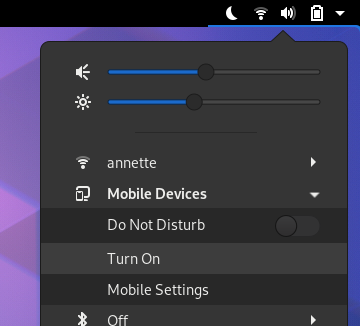
What happens when you actually use the Turn On switch? :)
 andyholmes
on 2 Nov 2019
andyholmes
on 2 Nov 2019
What happens when you actually use the _Turn On_ switch? :)
I did it, nothing happened immediately. I did a full system upgrade (pacman -Syyu) and restarted, It works now :)
jkotra
on 2 Nov 2019
That was sort of the problem with the last version. There's a setting in GSettings now that will save that preference, but v27 was constantly triggering it off.
I guess there's still a partial bug there, where if you start it some other way the setting doesn't get updated. I'll have a look at that when I get the chance :)
andyholmes
on 2 Nov 2019
Related issues
 amivaleo
·
5Comments
amivaleo
·
3Comments
amivaleo
·
5Comments
amivaleo
·
3Comments
 jeetsrs
·
4Comments
jeetsrs
·
4Comments
 jorgecodecom
·
6Comments
amivaleo
·
4Comments
jorgecodecom
·
6Comments
amivaleo
·
4Comments