Gnome-shell-extension-gsconnect: Configure position in SFTP
But to configure the SFTP position and indicate Nautilus, is there an option entry or should it be modified file?
 xzj8b3
All 10 comments
There is no way to move the position in the GUI of Nautilus, if that's what you mean.
 andyholmes
on 8 May 2019
andyholmes
on 8 May 2019
Non c'è modo di spostare la posizione nella GUI di Nautilus, se è questo che intendi.
No, it always tells me to configure poizione
Okay, but where to mount the device in nautilus from?
xzj8b3
on 8 May 2019
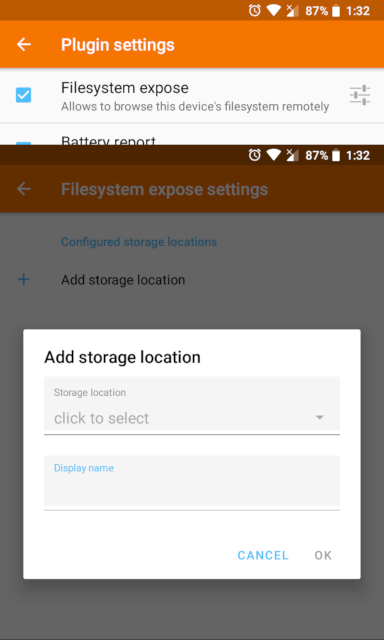
Ah, I think this is a duplicate of #525. You're getting a message along the lines of "No storage locations configured" @xzj8b3 ?
That's coming from the KDE Connect app side of things — before storage locations can be mounted on the computer, they need to be "shared" (effectively) in the Android app, so that it can request access to that storage location in the Android permissions system.
If you open up KDE Connect on the device and view the info for the paired device (the desktop system), you should see a message at the bottom regarding the "Filesystem expose" plugin. (Not sure what the translation is, sorry.) Tap on that and you can add storage locations to be mounted.
 ferdnyc
on 8 May 2019
ferdnyc
on 8 May 2019
Ah, right. Here's an image to help, I'll try and add this to the wiki later:
andyholmes
on 9 May 2019
Non c'è modo di spostare la posizione nella GUI di Nautilus, se è questo che intendi.
Solved thanks, I did not understand it had to be configured on the smartphone!
xzj8b3
on 10 May 2019
Hi, I'm completely new here, I just want to solve one problem with KDE Connect.
When I try to add storage location, as you show on the image above, KDE Connect crashes, and disconnects from my PC. I tried internal memory as well as SD card, but nothing worked. What can I do, please?
 zvolencan1
on 21 Sep 2019
zvolencan1
on 21 Sep 2019
@zvolencan1 Hmm, if that's happening on your Android device, it's entirely outside of GSConnect's hands — the place to look for support would really be the KDE Connect Android developers. However, I can offer a couple of suggestions:
- Most likely, what's crashing is the request for permissions that the app is supposed to perform at that point (which is the whole reason it's necessary to explicitly share storage locations in the first place.) So, you could try preemptively granting it:
- Go to your device's Settings > Apps > KDE Connect
- Scroll down and tap Permissions
- In the screen that comes up, make sure Storage permission is granted.
- Try to add a storage location in KDE Connect again.
- If that doesn't work, the standard app troubleshooting advice applies: try again after a Force Stop of the KDE Connect app; try restarting your phone; try clearing the app's Cache; if that doesn't work try clearing the Data (you'll have to re-pair); if all else fails try uninstalling and reinstalling it completely.
ferdnyc
on 21 Sep 2019
@zvolencan1 This is indeed an upstream bug in KDE Connect Android and it affected me as well.
I "overheard" a conversation in the development channel about this and it appears to be fixed, although I'm not sure if a new release has been pushed to the app store yet.
andyholmes
on 22 Sep 2019
@zvolencan1 @andyholmes Yep, KDE Connect 1.13.2 has hit Google Play recently, with the "What's New?" entry reading, "Fixed remote storage plugin settings crashing :(". So, an update should fix it.
ferdnyc
on 25 Sep 2019
@ferdnyc @andyholmes It really works now. :) I wrote on bugs.kde.org two days ago, maybe that has something to do with it. But anyhow, thanks, guys!
zvolencan1
on 25 Sep 2019
Related issues
 AngusLogan02
·
4Comments
AngusLogan02
·
4Comments
 amivaleo
·
3Comments
amivaleo
·
3Comments
 nikolowry
·
4Comments
nikolowry
·
4Comments
 siegfriedhuber
·
6Comments
amivaleo
·
4Comments
siegfriedhuber
·
6Comments
amivaleo
·
4Comments
Most helpful comment
@ferdnyc @andyholmes It really works now. :) I wrote on bugs.kde.org two days ago, maybe that has something to do with it. But anyhow, thanks, guys!