Gltf-blender-io: Control baked AO intensity at Export
Is your feature request related to a problem? Please describe.
In many occasion I find Blender baked AO to be too strong (opinion). Currently there is no way to control the intensity of the baked AO on the object during the baking or when exporting. Every textures except AO have a factor and can be mixed with another color https://docs.blender.org/manual/en/2.80/addons/io_scene_gltf2.html#factors
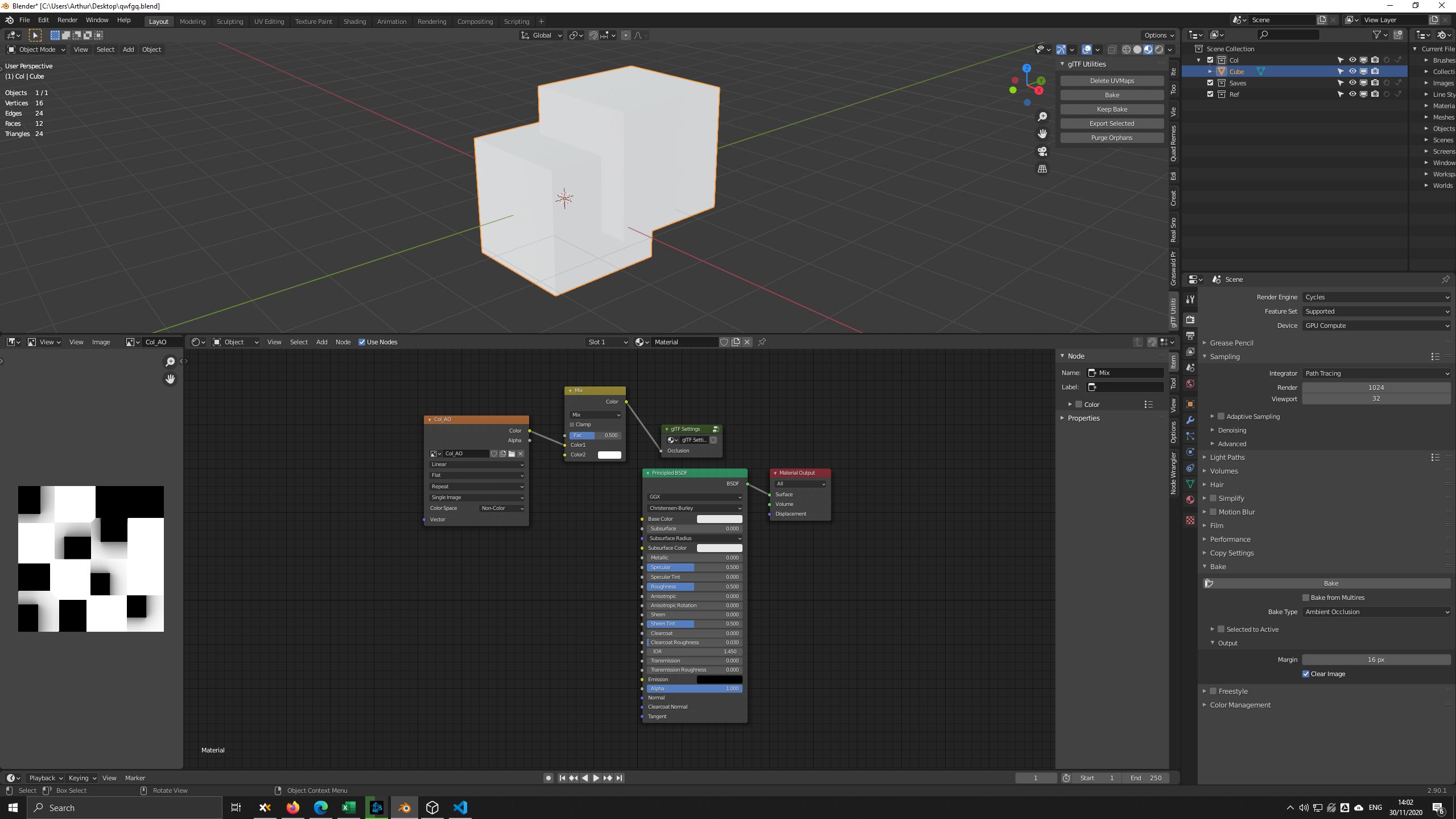
If you want a less intense AO you have to modify the AO texture in another software or if you want to keep everything inside Blender (i.e especially if you are using scripts and dealing with lots of assets) rebake a new image from the AO texture inside Blender with a weighted mix node as Emission (Emit).
Describe the solution you'd like
A 0-1 slider for AO texture intensity in the glTF export settings.
Describe alternatives you've considered
Between glTF_Settings and the Baked AO Texture nodes you could use a mix node to control AO intensity by mixing it with white. But perhaps that's not very user friendly.
Additional context
 HumanRobot3D
All 11 comments
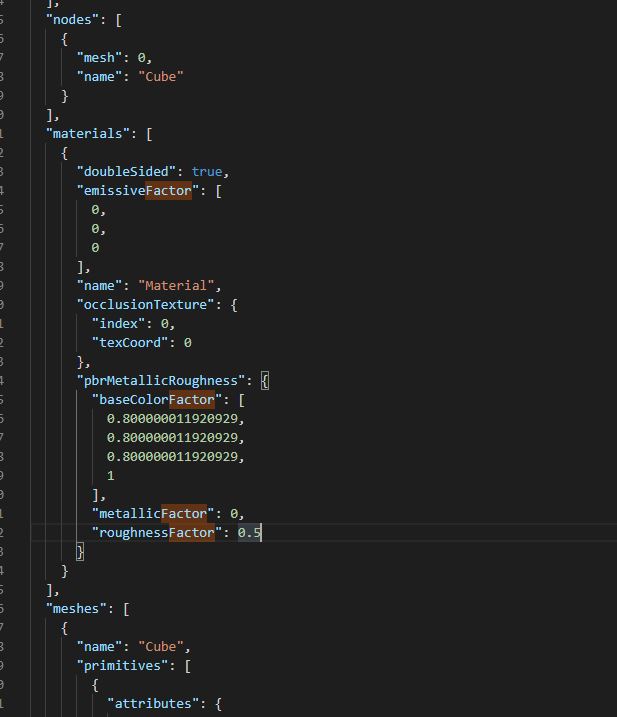
Looks like Occlusion Strength is not implemented:
Since this comes from a "glTF Settings" node, it seems a reasonable place to add an additional input. Not sure when anyone could look at this though. Contributions welcome!
 emackey
on 30 Nov 2020
emackey
on 30 Nov 2020
Since this comes from a "glTF Settings" node, it seems a reasonable place to add an additional input
````diff
diff --git a/addons/io_scene_gltf2/blender/exp/gltf2_blender_gather_texture_info.py b/addons/io_scene_gltf2/blender/exp/gltf2_blender_gather_texture_info.py
index 59cd5614..801b90ad 100644
--- a/addons/io_scene_gltf2/blender/exp/gltf2_blender_gather_texture_info.py
+++ b/addons/io_scene_gltf2/blender/exp/gltf2_blender_gather_texture_info.py
@@ -123,6 +123,11 @@ def __gather_normal_scale(primary_socket, export_settings):
# MaterialOcclusionTextureInfo only
def __gather_occlusion_strength(primary_socket, export_settings):
- if 'Occlusion Strength' in primary_socket.node.inputs:
- return gltf2_blender_get.get_const_from_socket(
- primary_socket.node.inputs['Occlusion Strength'],
- kind='VALUE',
- )
return None
````
 scurest
on 30 Nov 2020
scurest
on 30 Nov 2020
Do we think it should be an additional input, or use a multiply node as we do with the Principled BSDF?
 donmccurdy
on 30 Nov 2020
donmccurdy
on 30 Nov 2020
The strength isn't a factor like eg. baseColorFactor though. Spec says AO influences color as
occludedColor = color * (1 - s) + color * ao * s

    where ao = <sampled occlusion texture value>
          s  = <occlusion strength>
If you treat it like a factor instead (multipling s into the texture value and using strength=1) you get this instead
occludedColor = color * ao * s
Think of a pure black AO texture. A multiply node would have no effect, the occludedColor would always be black. But the strength _should_ have an effect; a strength of 0 would mean the AO texture has no influence (occludedColor == color).
scurest
on 30 Nov 2020
If an AO socket were ever added to the Principled BSDF node, we'd probably want to deal with that like other sockets, by working out some way to represent AO strength in its inputs. I see your point that it's not as straightforward as a simple Multiply node here, but something like a Map Range node would do the trick. Or maybe the Principled BSDF would get a separate Occlusion Strength socket, similar to Emission Strength.
^So given that this is a hypothetical, and it wouldn't really match existing sockets anyway, it sounds like a separate socket for Occlusion Strength is preferable for now?
donmccurdy
on 30 Nov 2020
by working out some way to represent AO strength in its inputs
The setup in the OP with the mix node is correct for that.
scurest
on 30 Nov 2020
Um, like this I think?
diff --git a/addons/io_scene_gltf2/blender/exp/gltf2_blender_gather_texture_info.py b/addons/io_scene_gltf2/blender/exp/gltf2_blender_gather_texture_info.py
index 59cd5614..13261fd1 100644
--- a/addons/io_scene_gltf2/blender/exp/gltf2_blender_gather_texture_info.py
+++ b/addons/io_scene_gltf2/blender/exp/gltf2_blender_gather_texture_info.py
@@ -123,6 +123,19 @@ def __gather_normal_scale(primary_socket, export_settings):

 # MaterialOcclusionTextureInfo only
 def __gather_occlusion_strength(primary_socket, export_settings):
+    # Look for a MixRGB node that mixes with pure white in front of
+    # primary_socket. The mix factor gives the occlusion strength.
+    node = gltf2_blender_get.previous_node(primary_socket)
+    if node and node.type == 'MIX_RGB' and node.blend_type == 'MIX':
+        val0 = gltf2_blender_get.get_const_from_socket(node.inputs[0], kind='VALUE')
+        val1 = gltf2_blender_get.get_const_from_socket(node.inputs[1], kind='RGB')
+        val2 = gltf2_blender_get.get_const_from_socket(node.inputs[2], kind='RGB')
+        if val0 is not None:
+            if val1 == [1, 1, 1] and val2 is None:
+                return val0
+            if val1 is None and val2 == [1, 1, 1]:
+                return 1.0 - val0  # reversed for reversed inputs
+
     return None
I like the mix node solution, it's easy to preview before export.
HumanRobot3D
on 30 Nov 2020
@HumanRobot3D That's a good point, I didn't think of that.
@emackey @donmccurdy Is that what you want to do?
scurest
on 30 Nov 2020
That's fine with me. One nitpick, the solution shown in the OP needs a small tweak. The texture should be connected to the second input (Color2) on the mix node. That way, when Occlusion Strength is 1.0 you get the image, and when it's 0.0 you get white.
emackey
on 30 Nov 2020
You can handle both orders, you just need to 1-x it if they're in the order in the OP. That's what the # reversed for reversed inputs is for.
I opened a PR.
scurest
on 1 Dec 2020
Related issues
donmccurdy
·
3Comments
 spiraloid
·
5Comments
spiraloid
·
5Comments
 julienduroure
·
5Comments
julienduroure
·
5Comments
 dsinni
·
3Comments
dsinni
·
3Comments
 Quinten123
·
4Comments
Quinten123
·
4Comments
Most helpful comment
````diff
diff --git a/addons/io_scene_gltf2/blender/exp/gltf2_blender_gather_texture_info.py b/addons/io_scene_gltf2/blender/exp/gltf2_blender_gather_texture_info.py
index 59cd5614..801b90ad 100644
--- a/addons/io_scene_gltf2/blender/exp/gltf2_blender_gather_texture_info.py
+++ b/addons/io_scene_gltf2/blender/exp/gltf2_blender_gather_texture_info.py
@@ -123,6 +123,11 @@ def __gather_normal_scale(primary_socket, export_settings):
# MaterialOcclusionTextureInfo only
def __gather_occlusion_strength(primary_socket, export_settings):
return None
````