Gltf-blender-io: [Export] Link-duplicated characters don't re-use armatures, copied armatures balloon file size.
Describe the bug
Animated characters that have been link duplicated in the same file export a single mesh, material and animation. But the armature, which is set to be the same on each, is exported once for each character.
This causes the file size to expand significantly as the number of these characters grows. Since the bone data is duplicated needlessly.
To Reproduce
Steps to reproduce the behavior:
- Attach an armature and animation to the default object.
Alt + Dduplicate the object multiple times.- Export everything to GLTF with animation.
- Examine the GLTF file to see re-used material, but copied armature & bones.
Expected behavior
Only one armature is exported and re-used, just like the re-used mesh and material.
Version
- OS: macos 10.15.6
- Blender Version: 2.83 and 2.90
Context
In case some additional context happens there this question is also on the Blender SE: https://blender.stackexchange.com/questions/192398/multiple-link-duplicated-characters-dont-re-use-armature-on-gltf-export
I am wondering if this is at all related to this: https://github.com/KhronosGroup/glTF-Blender-IO/issues/331
Thanks for any advice!
 BorisKourt
All 7 comments
Can you upload a .blend?
 scurest
on 26 Aug 2020
scurest
on 26 Aug 2020
This should demonstrate the question:
armatest.blend.zip
If this is opened in VS code for example, you can see that the one bone and armature are present for all models. While only one texture and mesh is used.
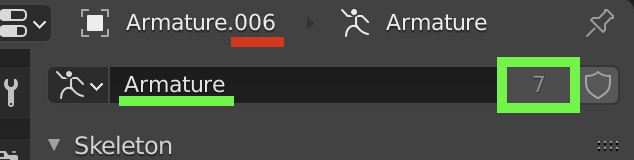
In the blender UI, the armature is re-used by each model (the instance count there) while the 'name' of the armature instance follows a standard convention.
BorisKourt
on 26 Aug 2020
Okay, thanks. Can you also say more about what you expected the glTF file to look like?
The thing is, glTF has no notion of an "armature". It also has no notion of a subtree of nodes that can be reused. So here's you file

So if we go through all the stuff that's duplicated in the glTF...
*
#### node
Since each bone has a different world transform and there is no way in glTF to reuse nodes at all, all bones become different nodes. That is unavoidable.
*
#### skin
Because each mesh is affected by a different node (bone), they must have different skin.joints arrays, so they all have different skins too. That is also unavoidable.
*
#### skin.inverseBindMatrices
The exporter currently writes all skinned meshes in world space (meaning the mesh data is stored in world space, and the inverse binds are given relative to world space), see #994 for some discussion about that. That means since all the different bones have different world transforms, they all need different skin.inverseBindMatrices.
*
#### mesh
Since meshes are given in world space, and all your meshes have different world space positions, they have different POSITIONs. So they can't be reused. (However, they should be able to share a single eg. TEXCOORD_0 accessor since that doesn't depend on the world transform. That was wrong, because how the attributes get ordered/deduplicated depends on _all_ the attributes, including the POSITIONS.)
^^^^ The above two things could theoretically be fixed if the exporter gave meshes in armature space instead of world space.
*
#### animation sampler.output
This could theoretically be shared right now but it isn't. I don't know enough about how the animation export works to speculate meaningfully on why though.
scurest
on 26 Aug 2020
Thank you for such a detailed explanation. I was hoping that the animation data (bones, skin etc) could be re-used like the geometry data appears to be, since the actual geometry is not modified and all of the data the bones influence is the same. I assume that that is not in the scope of GLTF?
Right now I've been working on a scene that contains what is essentially a large crowd of extremely low poly people all doing the same simple motion. If I export without any animation related data, geometry and material re-use make for a very small and performant file.
I guess the only solution seems to be to export one character & animation separately, then handle the instancing and positioning in the rendering front-end directly.
The reason I have been hesitant to go down this route is that these characters are positioned on top of a very varied terrain, using an applied particle system. I would likely have to distribute dummy objects via the particle system, export, and swap them out for the separately loaded character.
BorisKourt
on 26 Aug 2020
It's not too widely supported yet, but there is an instancing extension for glTF called EXT_mesh_gpu_instancing. There's no Blender import/export support for this currently. I think BabylonJS has support only in their recent alpha builds.
Here's a sample Fox model with a bunch of instances: FoxInstances.zip
Try un-zipping this, multi-select the 4 files from inside, and drag-and-drop them together on Babylon Sandbox.
Again, don't expect Blender to import more than one fox, as it doesn't currently know about the instancing extension. I'm mentioning this here just to gauge the interest level and usefulness of such an extension.
 emackey
on 7 Sep 2020
emackey
on 7 Sep 2020
That would be a very powerful addition, especially considering the performance limitations on the web. How much of a challenge would it be to implement in the Blender export tool?
@emackey Did you make this GLTF example in Babylon itself?
BorisKourt
on 9 Sep 2020
The FoxInstances model is a hand-made combination of the sample Fox paired with some accessors for transforms.bin from the teapots galore sample. I believe the latter was written out by one of OTOY's products.
It was created specifically to test a rather interesting edge case that arises when a skin is applied to an instanced mesh.
emackey
on 10 Sep 2020
Related issues
 donmccurdy
·
5Comments
donmccurdy
·
5Comments
 cstfan
·
4Comments
cstfan
·
4Comments
 viperscape
·
3Comments
viperscape
·
3Comments
 spiraloid
·
3Comments
spiraloid
·
3Comments
 julienduroure
·
3Comments
julienduroure
·
3Comments